
Pantone PT-WE001Y
User Manual for Pantone Bluetooth In-Ear Headphones
Model: PT-WE001Y
Introduction
These Pantone Bluetooth in-ear headphones are designed for high-quality audio and convenient communication. Featuring Bluetooth 5.0 technology, they offer stable connectivity and can be paired with up to two devices simultaneously. The integrated microphone and remote control allow for easy management of music playback, volume adjustments, and call handling. Enjoy up to 3 hours of battery life for your listening and communication needs.
Setup
Package Contents
Before you begin, ensure all components are present:
- Pantone Bluetooth In-Ear Headphones
- Charging Cable
Charging the Headphones
Before first use, fully charge the headphones. Connect the provided charging cable to the charging port on the headphone's control module and plug the other end into a USB power source. The indicator light will show charging status and turn off when fully charged.
A full charge provides approximately 3 hours of battery life.
Pairing with a Device
To connect your headphones to a Bluetooth-enabled device:
- Ensure the headphones are charged and turned off.
- Press and hold the multi-function button on the control module until the indicator light flashes rapidly, indicating pairing mode.
- On your device (smartphone, tablet, etc.), enable Bluetooth and search for available devices.
- Select "Pantone PT-WE001Y" from the list of found devices.
- Once connected, the indicator light on the headphones will change to a steady blue or turn off, depending on the model.
These headphones support Multipoint Technology, allowing you to connect to two devices simultaneously. After pairing with the first device, disable Bluetooth on that device, then pair with the second device. Re-enable Bluetooth on the first device, and the headphones should connect to both.

Figure 1: Pantone Bluetooth In-Ear Headphones (Model PT-WE001Y)
Operating Instructions
Control Module Functions
The in-line control module provides easy access to various functions:
- Power On/Off: Press and hold the multi-function button.
- Play/Pause: Short press the multi-function button.
- Answer/End Call: Short press the multi-function button during an incoming call or active call.
- Reject Call: Press and hold the multi-function button during an incoming call.
- Volume Up: Short press the '+' button.
- Volume Down: Short press the '-' button.
- Next Track: Press and hold the '+' button.
- Previous Track: Press and hold the '-' button.
The built-in microphone allows for hands-free calling.
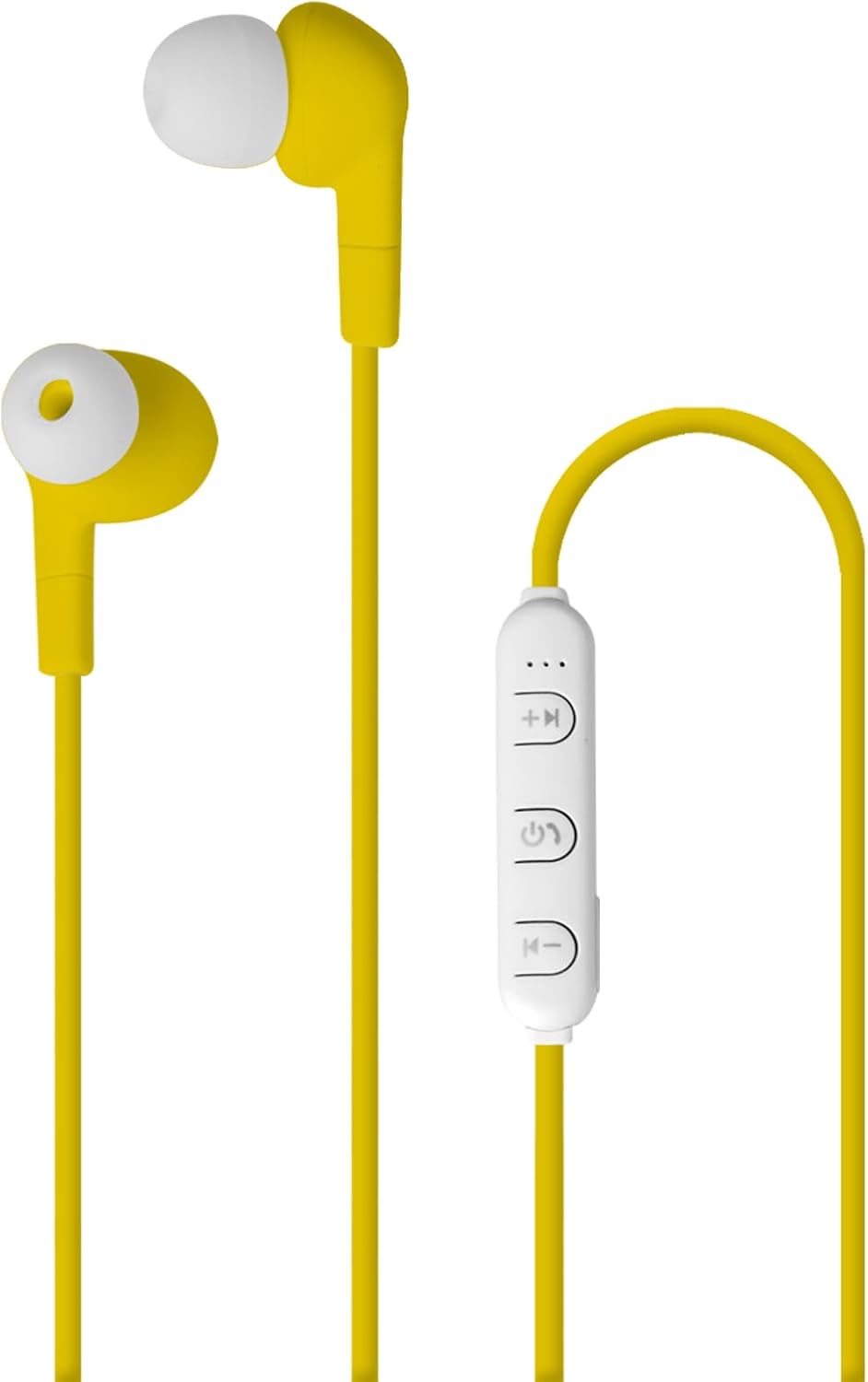
Figure 2: Headphone Control Module
Maintenance
Proper maintenance ensures the longevity and performance of your headphones:
- Keep the headphones dry. Avoid exposure to moisture or extreme temperatures.
- Clean the ear tips regularly with a soft, dry cloth to prevent wax buildup.
- Store the headphones in a clean, safe place when not in use to prevent tangling or damage.
- Do not attempt to disassemble or modify the headphones, as this will void the warranty.
Troubleshooting
If you encounter issues with your headphones, refer to the following common solutions:
| Problem | Possible Cause | Solution |
|---|---|---|
| Headphones do not turn on. | Low battery. | Charge the headphones fully. |
| Cannot pair with device. | Headphones not in pairing mode; device Bluetooth off; too far from device. | Ensure headphones are in pairing mode (flashing light). Turn device Bluetooth off and on. Move headphones closer to device (within 10 meters). |
| No sound or poor sound quality. | Volume too low; headphones not connected; ear tips blocked. | Increase volume on headphones and device. Reconnect headphones. Clean ear tips. |
| Intermittent connection. | Interference; too far from device. | Avoid strong electromagnetic interference. Move closer to the connected device. |
Specifications
| Feature | Detail |
|---|---|
| Model Name | Pantone |
| Item Model Number | PT-WE001Y |
| Brand | Pantone |
| Manufacturer | Celly |
| Connectivity Technology | Bluetooth 5.0 |
| Form Factor | In Ear |
| Color | Yellow |
| Battery Life | Up to 3 hours |
| Included Components | Charging Cable |
| Item Weight | 1.76 ounces (0.05 Kilograms) |
| Product Dimensions | 19.69 x 19.69 x 11.02 inches |
Warranty Information
This product is covered by a standard manufacturer's warranty against defects in materials and workmanship. Please refer to the product packaging or contact the manufacturer for specific warranty terms and duration. Keep your purchase receipt as proof of purchase.
Customer Support
For further assistance, technical support, or inquiries regarding your Pantone Bluetooth In-Ear Headphones, please visit the official Pantone website or contact their customer service department. Contact information can typically be found on the product packaging or the brand's official online presence.
Note: Specific contact details are not provided in this manual.
Ask a question about this manual
Ask about setup, troubleshooting, compatibility, parts, safety, or missing instructions. Manuals+ will review the question and use this page’s manual context to help answer it.