
ExpertPower EPC1220
ExpertPower 12V 20A Smart Charger Instruction Manual
Model: EPC1220
For Lithium LiFePO4 Deep Cycle Rechargeable Batteries
1. Introduction
Thank you for choosing the ExpertPower 12V 20A Smart Charger. This charger is specifically designed for 12V Lithium Iron Phosphate (LiFePO4) deep cycle rechargeable batteries. It employs an advanced 2-stage constant current/constant voltage (CC/CV) charge algorithm to ensure efficient and safe charging, maximizing battery lifespan.
This manual provides detailed instructions for the proper setup, operation, maintenance, and troubleshooting of your ExpertPower Smart Charger. Please read this manual thoroughly before use to ensure optimal performance and safety.
2. Safety Precautions
WARNING: Failure to follow these safety instructions may result in electric shock, fire, or serious injury.
- Use this charger only with 12V LiFePO4 batteries. Do not attempt to charge other battery types (e.g., lead-acid, Ni-Cd, Ni-MH) as this may cause damage to the charger or battery, or lead to fire or explosion.
- Ensure the charger is disconnected from the AC power outlet before making or breaking connections to the battery.
- Operate the charger in a well-ventilated area. Do not cover the charger during operation.
- Keep the charger away from water, moisture, and flammable materials.
- Do not operate the charger if it has been dropped, damaged, or exposed to excessive moisture.
- Do not disassemble or modify the charger. Refer all servicing to qualified personnel.
- Always connect the positive (+) charger clip (red) to the positive (+) battery terminal and the negative (-) charger clip (black) to the negative (-) battery terminal. Ensure correct polarity.
- The charger features multi-purpose protection including short circuit, over-voltage, over-current, overload, and reverse polarity protection. However, always exercise caution.

Image: The ExpertPower Smart Charger features a 30A blade fuse for multi-purpose protection against short circuit, over-voltage, over-current, overload, and reverse polarity. This fuse enhances safety and serviceability.
3. Setup and Connection
Follow these steps to properly connect your ExpertPower Smart Charger to your LiFePO4 battery:
- Prepare the Battery: Ensure the battery terminals are clean and free of corrosion.
- Connect Charger to Battery:
- Connect the red positive (+) alligator clip from the charger to the positive (+) terminal of the LiFePO4 battery.
- Connect the black negative (-) alligator clip from the charger to the negative (-) terminal of the LiFePO4 battery.
- Ensure a secure connection.
- Connect Charger to AC Power: Plug the AC power cord of the charger into a standard 120V AC wall outlet.
- Verify Connection: The charger's LED indicators will illuminate to show the charging status.
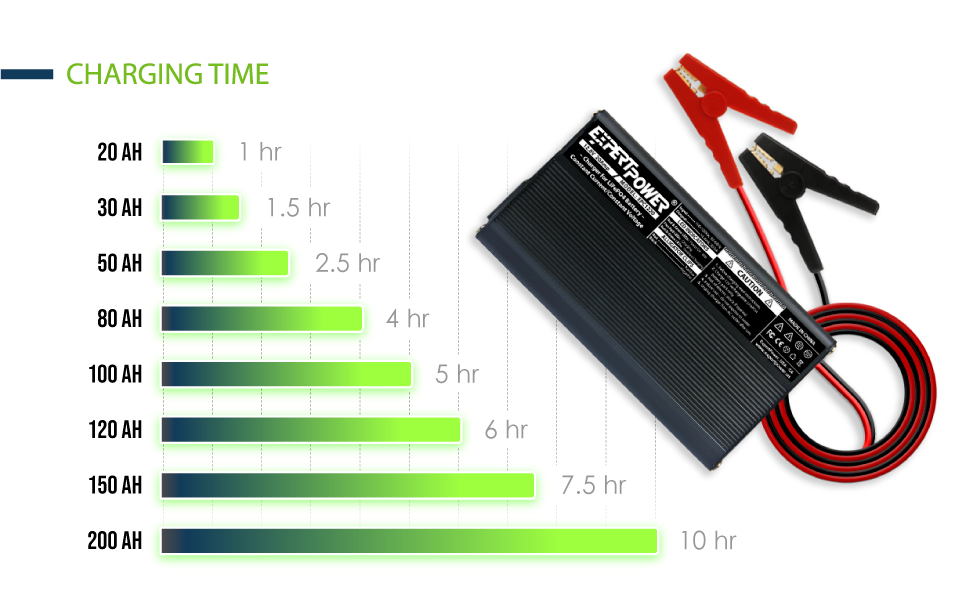
Image: Step-by-step diagram illustrating the correct connection procedure for the ExpertPower Smart Charger, including connecting alligator clips to the battery and plugging into an AC outlet.

Image: The ExpertPower 12V 20A Smart Charger, showing its main components: the charger unit, detachable AC power cord, and battery connection cables with red and black alligator clips.
4. Operating Instructions
4.1. Charging Process
The ExpertPower Smart Charger utilizes a specialized 2-stage Constant Current (CC) / Constant Voltage (CV) charge algorithm, optimized for 12V LiFePO4 batteries. This algorithm ensures efficient charging while protecting the battery's delicate structure and maximizing its lifespan.
- Constant Current (CC) Stage: The charger delivers a constant current (up to 20A for this model) to the battery until it reaches approximately 95% state of charge.
- Constant Voltage (CV) Stage: Once the battery voltage reaches 14.4V, the charger switches to constant voltage mode, where the current gradually tapers down until the battery is fully charged.
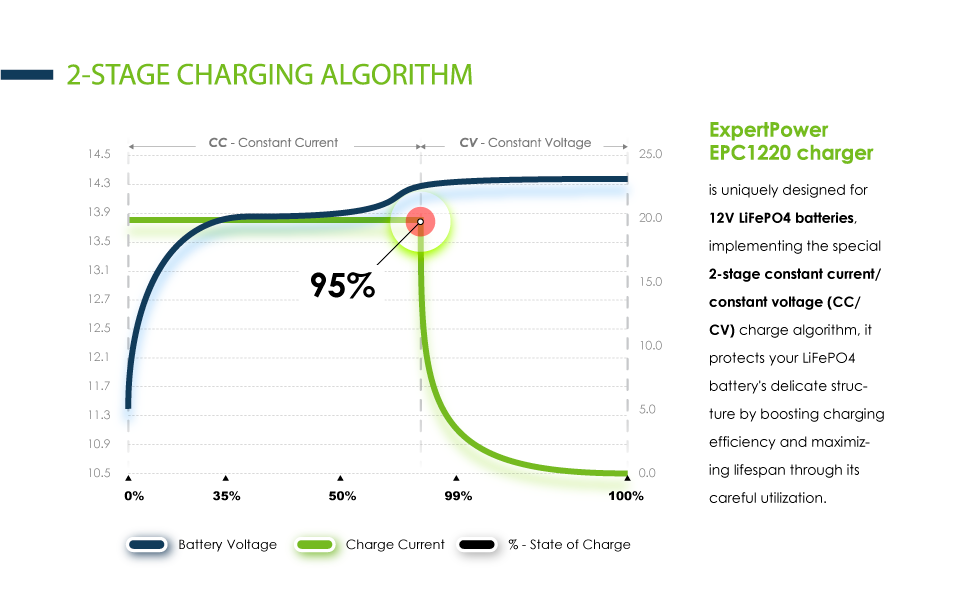
Image: A graph illustrating the 2-stage Constant Current (CC) and Constant Voltage (CV) charging algorithm used by the ExpertPower EPC1220 charger, showing how battery voltage and charge current change over time.
4.2. LED Indicators
The charger is equipped with smart LED indicators to display the charging status:
- LED 1 (Power Indicator):
- Green: Charger is plugged into AC power and idle (not connected to battery or battery is fully charged).
- LED 2 (Charging Status Indicator):
- Red: Battery is charging.
- Green: Battery is fully charged.
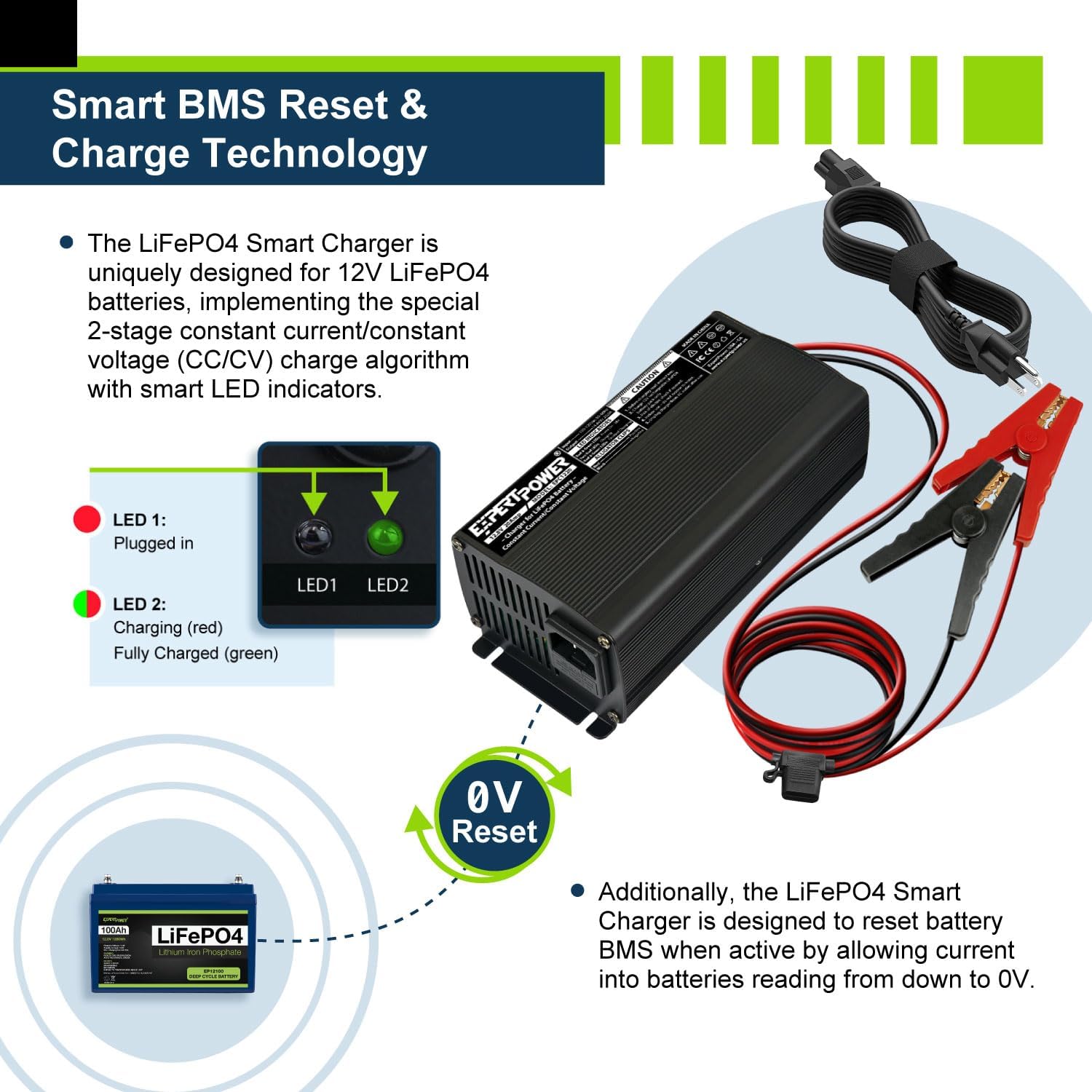
Image: Close-up view of the ExpertPower Smart Charger's LED indicators (LED 1 and LED 2) and their corresponding statuses (Plugged in, Charging, Fully Charged). It also highlights the 0V reset feature for battery management systems (BMS).
4.3. BMS Reset Function
The ExpertPower Smart Charger is designed to reset various types of Battery Management Systems (BMS) when active. It achieves this by allowing current into batteries that are reading down to 0V, which can reactivate a BMS that has triggered a low-voltage cutoff.
4.4. Estimated Charging Times
The following table provides approximate charging times for various LiFePO4 battery capacities when using the 20A ExpertPower Smart Charger:

Image: A bar chart illustrating the estimated charging duration for different LiFePO4 battery capacities (from 20Ah to 200Ah) when charged with the ExpertPower 20A Smart Charger.
| Battery Capacity (Ah) | Approximate Charging Time (hours) |
|---|---|
| 20 Ah | 1 hr |
| 30 Ah | 1.5 hrs |
| 50 Ah | 2.5 hrs |
| 80 Ah | 4 hrs |
| 100 Ah | 5 hrs |
| 120 Ah | 6 hrs |
| 150 Ah | 7.5 hrs |
| 200 Ah | 10 hrs |
Note: Charging times are approximate and may vary based on battery's initial state of charge, age, temperature, and other factors.
5. Maintenance
Proper maintenance ensures the longevity and reliable operation of your ExpertPower Smart Charger:
- Cleaning: Disconnect the charger from both AC power and the battery before cleaning. Use a dry, soft cloth to wipe the exterior. Do not use abrasive cleaners or solvents.
- Storage: Store the charger in a cool, dry place when not in use. Avoid extreme temperatures and direct sunlight.
- Cable Inspection: Regularly inspect the AC power cord and battery connection cables for any signs of damage, fraying, or exposed wires. Do not use the charger if any cables are damaged.
- Ventilation: Ensure the cooling fan and ventilation openings are free from dust and debris to prevent overheating. The unibody aluminum alloy casing also functions as a heat sink.
6. Troubleshooting
If you encounter issues with your ExpertPower Smart Charger, refer to the following common problems and solutions:
| Problem | Possible Cause | Solution |
|---|---|---|
| Charger not turning on (no LEDs) | No AC power; Faulty AC outlet; Damaged charger. | Check AC power connection and outlet. Try a different outlet. If still no power, contact support. |
| LED 1 (Power) is Green, but LED 2 (Charging) is not Red when connected to battery. | Incorrect battery connection (reverse polarity); Battery voltage too low (below 0V); Battery is already fully charged; Faulty battery. |
|
| Charger gets excessively hot. | Poor ventilation; Overload; Internal fault. |
|
| Charger does not reach "Fully Charged" (LED 2 stays Red). | Battery capacity too large for charger; Battery fault; Charger fault. |
|
For issues not listed here or if troubleshooting steps do not resolve the problem, please contact ExpertPower customer support.
7. Specifications
| Feature | Specification |
|---|---|
| Model Number | EPC1220 |
| Input Voltage | 100-120V AC, 50/60Hz |
| Output Voltage | 14.4V DC |
| Charging Current | 20A |
| Cut-off Current | 1.5-2.5A |
| Ideal for Battery Capacity | 40 Ah and above |
| Dimensions (L x W x H) | 6.3 x 4.2 x 2.4 inches (16.0 x 10.7 x 6.1 cm) |
| Weight | 2.7 pounds (1.22 kg) |
| Color | Black (with green/red indicators) |
| Protection Features | Short Circuit, Over-Voltage, Over-Current, Overload, Polarity Reverse |

Image: The ExpertPower Smart Charger highlighting its physical features, including dimensions (6.3 x 4.1 x 2.4 inches), weight (2.62 lbs), 3 ft AC cord, and 4.5 ft alligator clips.
8. Warranty Information
ExpertPower products are manufactured to high-quality standards. Specific warranty terms and conditions for your ExpertPower 12V 20A Smart Charger are typically provided with the product packaging or can be found on the official ExpertPower website. Please retain your proof of purchase for warranty claims.
For detailed warranty information, please visit the ExpertPower official website or contact customer support.
9. Customer Support
If you have any questions, require technical assistance, or need to report an issue with your ExpertPower Smart Charger, please contact ExpertPower customer support through the following channels:
- Online Store: Visit the official ExpertPower Store on Amazon for product information, FAQs, and contact options: ExpertPower Amazon Store
- Refer to your product packaging for additional contact details such as phone numbers or email addresses.
Our dedicated support team is ready to assist you.
Related documentsEPC1220

Ask a question about this manual
Ask about setup, troubleshooting, compatibility, parts, safety, or missing instructions. Manuals+ will review the question and use this page’s manual context to help answer it.