
1. Introduction
This manual provides essential information for the safe and efficient use of your ExpertPower EPC125 12.8V 5A Smart Charger. This charger is specifically designed for 12V LiFePO4 (Lithium Iron Phosphate) deep cycle rechargeable batteries. Please read this manual thoroughly before operating the charger and retain it for future reference.

Image 1.1: ExpertPower EPC125 Smart Charger with included accessories.
2. Safety Information
To ensure safe operation and prevent damage to the charger or battery, observe the following safety precautions:
- This charger is intended for 12.8V LiFePO4 battery packs with a capacity greater than 5000mAh (5Ah) only. Do not use with other battery types or voltages.
- Operate the charger in a dry location only. Avoid exposure to moisture or liquids.
- Risk of electric shock. Do not open the charger casing. There are no user-serviceable parts inside.
- Always unplug the charger from the AC outlet after use and before disconnecting from the battery.
- Ensure proper ventilation during charging.
- Keep out of reach of children.
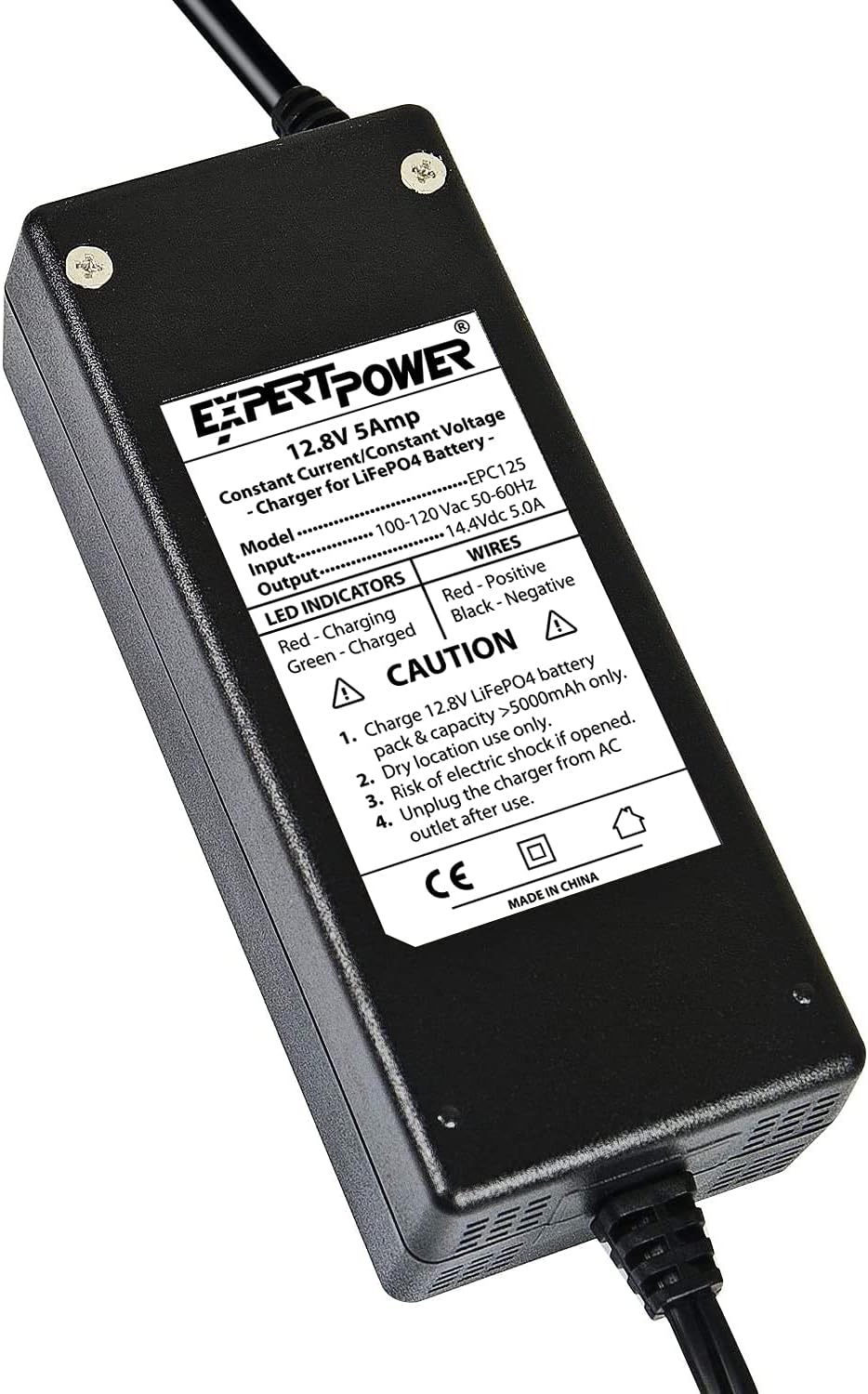
Image 2.1: Rear view of the charger with safety warnings and specifications.
3. Product Features
The ExpertPower EPC125 Smart Charger incorporates advanced technology for optimal LiFePO4 battery charging:
- Dedicated LiFePO4 Charging: Uniquely designed for 12V LiFePO4 batteries.
- 2-Stage CC/CV Algorithm: Utilizes a constant current/constant voltage (CC/CV) charge algorithm to protect the battery's structure, boost charging efficiency, and maximize lifespan.
- BMS Reset Capability: Designed to reset Battery Management Systems (BMS) by allowing current into batteries reading down to 0V.
- Smart LED Indicators: Provides clear status updates during the charging process.

Image 3.1: Key features of the ExpertPower LiFePO4 Smart Charger.
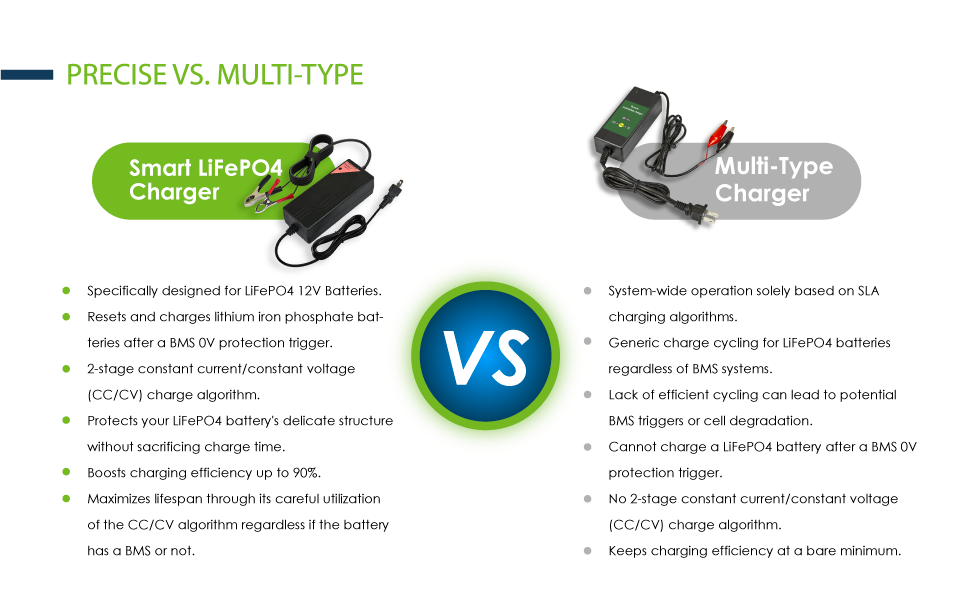
Image 3.2: Comparison highlighting the benefits of a dedicated LiFePO4 charger.
4. Setup and Connection
Follow these steps to properly connect your charger to a LiFePO4 battery:
- Connect Charger to AC Power: Plug the charger's AC cord into a standard 100-120V AC wall outlet. The charger's LED will illuminate green, indicating power on and idle status.
- Select Connection Method: Choose between the alligator clips or the blot-screw wires based on your battery's terminals. Ensure the connection is secure.
- Connect to Battery: Connect the positive (+) red terminal of the charger to the positive (+) terminal of the battery. Connect the negative (-) black terminal of the charger to the negative (-) terminal of the battery.
- Verify Connection: Ensure all connections are firm and correct polarity is observed.
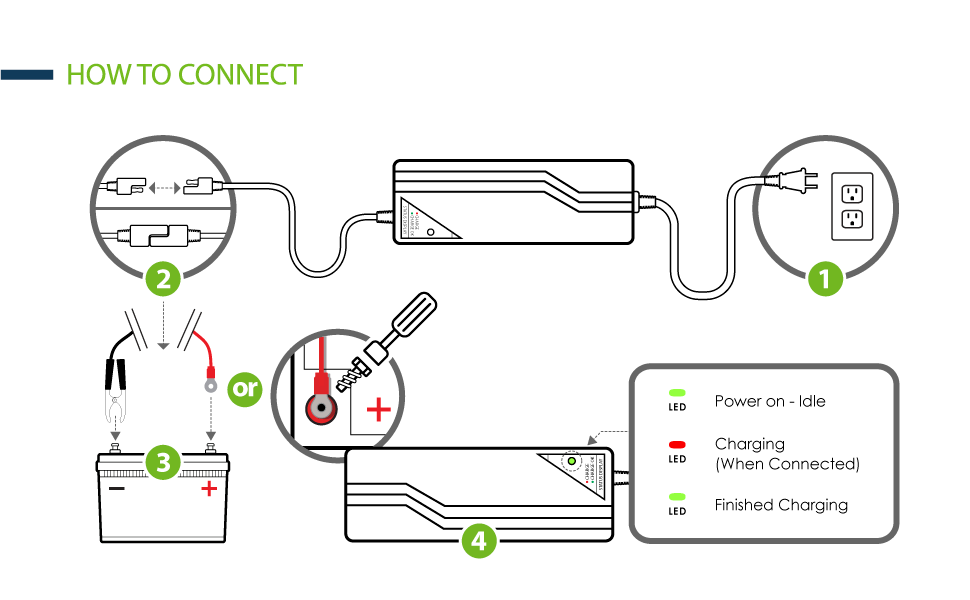
Image 4.1: Step-by-step connection guide for the charger.
5. Operation
Once connected, the charger will automatically begin the charging process.
5.1 LED Indicators
- Green LED (Solid): Indicates the charger is powered on and idle (not connected to a battery or battery is fully charged).
- Red LED (Solid): Indicates the battery is currently charging.
- Green LED (Solid, after Red): Indicates the battery is fully charged.
5.2 Charging Process
The charger employs a 2-stage Constant Current (CC) / Constant Voltage (CV) algorithm:
- Constant Current (CC) Stage: The charger delivers a steady 5A current until the battery voltage reaches approximately 14.4V. During this stage, the red LED will be illuminated.
- Constant Voltage (CV) Stage: Once 14.4V is reached, the charger maintains this voltage while the current gradually decreases. When the current drops to a low threshold (0.3-0.7A), the battery is considered fully charged, and the LED will turn green.
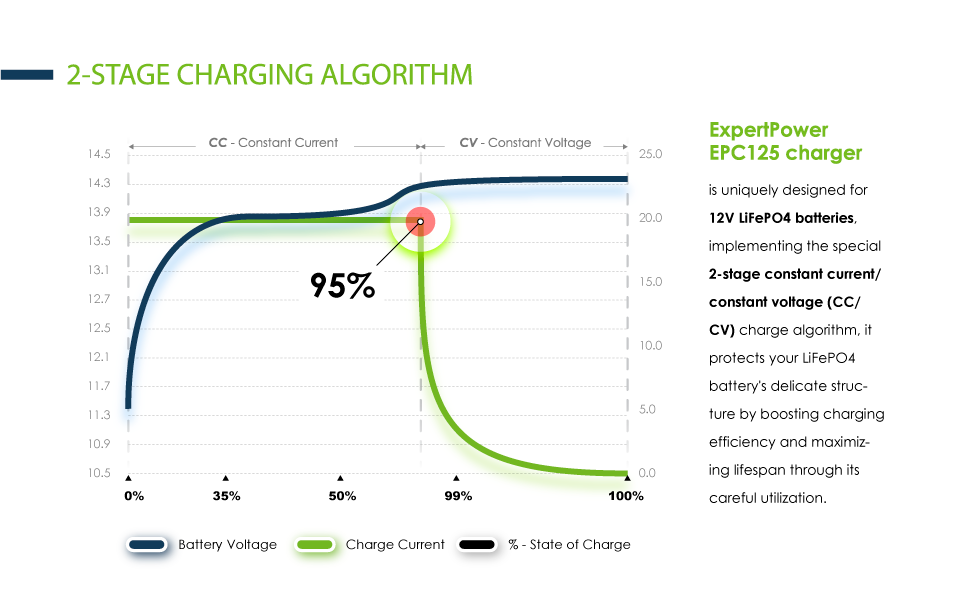
Image 5.1: Illustration of the 2-stage charging algorithm.
5.3 Estimated Charging Times
The charging time depends on the battery's capacity and its initial state of charge. Approximate charging times for various LiFePO4 battery capacities are:

Image 5.2: Estimated charging durations for common LiFePO4 battery capacities.
6. Maintenance
The ExpertPower EPC125 charger requires minimal maintenance:
- Keep the charger clean and free from dust and debris. Use a dry cloth for cleaning.
- Store the charger in a dry, cool place when not in use.
- Regularly inspect the cables and connectors for any signs of damage. Do not use if cables are frayed or connectors are damaged.
7. Troubleshooting
If you encounter issues with your charger, consider the following:
- Charger not turning on: Ensure the AC power cord is securely plugged into a live outlet. Check the outlet with another device.
- No charging (Green LED remains on after connecting to battery): Verify that the battery connections are secure and correct (positive to positive, negative to negative). Ensure the battery voltage is not extremely low (below 0V, though the charger is designed to reset BMS from 0V, extreme cases might require specific attention).
- Charging takes too long: Confirm the battery capacity is within the recommended range for a 5A charger (10Ah and above). Very large capacity batteries will naturally take longer to charge.
- Charger gets warm: It is normal for the charger to generate some heat during operation. Ensure adequate ventilation around the unit. Excessive heat may indicate an issue; discontinue use and contact support if it feels unusually hot.
For further assistance, please contact ExpertPower customer support.
8. Specifications
| Specification | Detail |
|---|---|
| Model Number | EPC125 |
| Input Voltage | 100-120 Vac, 60 Hz |
| Output Voltage | 14.4 Vdc |
| Charging Current | 5.0 A |
| Cut-off Current | 0.3-0.7 A |
| Recommended Battery Capacity | 10 Ah and above (LiFePO4) |
| LED Indicators | Red: Charging, Green: Charged |
| Product Dimensions | 1.8 x 2.5 x 1.8 inches (4.57 x 6.35 x 4.57 cm) |
| Item Weight | 1 pound (0.45 kg) |
| Manufacturer | ExpertPower |
9. Warranty and Support
ExpertPower stands behind its products with a commitment to quality and customer satisfaction.
- Money Back Guarantee: This product includes a 30-day money-back guarantee.
- Warranty: A 1-year hassle-free warranty covers manufacturing defects and issues under normal use.
For warranty claims, technical support, or any questions regarding your ExpertPower charger, please visit the official ExpertPower website or contact their customer service department directly.


