
Introduction
This manual provides instructions for the installation, setup, and operation of the GE CYNC Wireless Smart Motion Sensor. This battery-powered Bluetooth motion sensor is designed to integrate with Cync Smart Bulbs, Smart Switches, and Smart Plugs, enabling automated lighting and device control based on motion detection and ambient light levels.

Image: The GE CYNC Wireless Smart Motion Sensor, shown both in its retail packaging and as a standalone unit. The sensor is white and oval-shaped, featuring a motion detection lens and the GE logo.
Package Contents
Verify that all items are present in the package:
- One (1) GE CYNC Wireless Smart Motion Sensor
- Two (2) AAA batteries (pre-installed or included separately)
- Mounting bracket
- Mounting screw
- Drywall anchor
- Installation guide (this document)
Product Features
The GE CYNC Wireless Smart Motion Sensor offers the following functionalities:
- Automatic Control: Automatically turns Cync devices (bulbs, plugs, switches) on/off based on motion.
- Adjustable Settings: Customize motion sensitivity, light threshold, timeout period, and deactivation periods via the Cync App.
- Ambient Light Detection: Prevents lights from turning on when sufficient natural light is present.
- Wide Coverage: 105° motion detection coverage up to 20 feet.
- Wireless Connectivity: Connects via Bluetooth to the Cync App and other Cync devices.
- No Hub Required: Operates without a separate smart home hub.
- Battery Powered: Uses replaceable AAA batteries with an estimated life of over two years.
- Flexible Placement: Can be placed on a flat surface or mounted to a wall.

Image: A visual representation of the sensor's key features, including automatic on/off, adjustable settings, 105-degree motion detection up to 20 feet, Bluetooth connectivity, and no hub requirement.
Setup Instructions
Follow these steps to set up your GE CYNC Wireless Smart Motion Sensor:
- Download the Cync App:
Download the latest version of the Cync App, powered by Savant, from the Apple App Store or Google Play Store. Search for "Cync App".

Image: A smartphone displaying the Cync app interface and options to download from the App Store or Google Play, along with a QR code for direct access. The QR code links to https://l.ead.me/bc4KOh.
- Initiate Setup:
Press the Wake Button located on the side of the Smart Sensor. The LED indicator light will flash blue, indicating it is ready for setup.
- Add Sensor to Cync App:
Open the Cync App and follow the in-app instructions to add your Smart Sensor via Bluetooth. Ensure Bluetooth is enabled on your smartphone.
- Group Devices:
Group your Smart Sensor within the same Room/Space in the Cync App as the Smart Lights, Plugs, and Switches you intend to control with motion sensing.
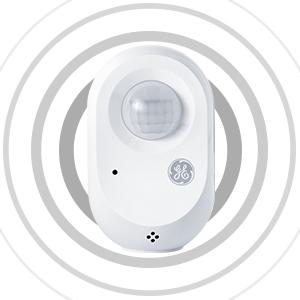
Image: An illustration demonstrating how the Cync Smart Motion Sensor connects wirelessly to Cync Smart Bulbs, Smart Plugs, and Smart Switches, enabling motion sensing for these paired devices.
Tip: Before setting up scenes or automations in the Cync App for your Smart Sensor, you may need to "Wake Up" the device by pressing the Wake Button on the side of the sensor.
Operating Instructions
Once set up, the GE CYNC Wireless Smart Motion Sensor operates automatically based on your configured settings in the Cync App.
Customizing Settings in the Cync App
The Cync App allows for detailed customization of your motion sensor's behavior:
- Motion Sensitivity: Adjust how easily the sensor detects movement.
- Light Threshold: Define the ambient light level at which the sensor should activate connected lights.
- Timeout Period: Set the duration lights remain on after motion is no longer detected.
- Deactivation Period: Schedule specific times when the sensor should be inactive.
- Schedules: Create custom schedules for different times of day (e.g., dim lights at night, full brightness during the day).

Image: A smartphone screen displaying the Cync app's device schedule settings, illustrating options to set motion schedules, control sensitivity, and adjust light brightness for automated lighting.
Example Use Cases
- Bathroom Lighting: Turn off bathroom lights automatically when the room is unoccupied. (Requires Cync Smart Switch, sold separately).
- Entryway Lighting: Turn on entryway lights automatically upon arrival. (Requires Cync Smart Light, sold separately).
- Device Control: Automatically turn on/off devices like fans or curling irons when entering/leaving a room. (Requires Cync Smart Plug, sold separately).

Image: A smartphone screen showing the Cync app's daily schedule interface, demonstrating how to set different motion-activated lighting behaviors for morning, daytime, evening, and sleep periods to save energy.
Mounting Options
The GE CYNC Wireless Smart Motion Sensor offers flexible placement options:
- Tabletop Placement: Place the sensor on a shelf, table, or any flat surface within the desired detection area.
- Wall Mounting: Use the included mounting bracket, screw, and drywall anchor to secure the sensor to a wall. Ensure the sensor is positioned to cover the intended area without obstruction.

Image: A woman entering a room, demonstrating how the motion sensor can automatically turn on lights upon entry, providing convenience and energy savings.
Image: The Cync motion sensor placed on a shelf next to a plant, illustrating a common tabletop placement option.
Battery Replacement
The GE CYNC Wireless Smart Motion Sensor is powered by two AAA alkaline batteries. The battery life is estimated to be over two years under typical usage conditions.
To Replace Batteries:
- Gently open the sensor casing to access the battery compartment.
- Remove the old AAA batteries.
- Insert two new AAA alkaline batteries, ensuring correct polarity (+/-).
- Close the sensor casing securely.
- The sensor may blink blue, indicating it is ready to reconnect or needs to be "Woken Up" by pressing the side button.
Troubleshooting
If you encounter issues with your GE CYNC Wireless Smart Motion Sensor, refer to the following common problems and solutions:
| Problem | Possible Cause | Solution |
|---|---|---|
| Sensor not detecting motion or lights not turning on. |
|
|
| Lights turn on when there's sufficient natural light. | Ambient light detection setting is too low or disabled. | Adjust the light threshold setting in the Cync App to a higher value. |
| Sensor disconnects from Cync App or paired devices. |
|
|
| Cannot pair sensor with Cync App. |
|
|
Specifications
| Model Number | CWLMSONNWW1/ST1P |
| Brand | Cync (formerly GE) |
| Power Source | Battery Powered (2 x AAA Alkaline batteries, included) |
| Battery Life | Approximately 2 years (1.752E+4 Hours) |
| Connectivity | Bluetooth |
| Motion Detection Range | Up to 20 feet |
| Motion Detection Angle | 105 degrees |
| Mounting Type | Tabletop or Wall Mount |
| Color | White |
| Material | Plastic |
| Product Dimensions (D x W x H) | 3.11" x 4.92" x 8.23" (Note: These dimensions seem large for a sensor, likely package dimensions. Actual sensor dimensions are smaller, implied by images.) |
| Item Weight | 3.2 ounces (0.2 pounds) |
| Recommended Use | Indoor |
| UPC | 043168503341 |
Warranty and Support
Warranty Information
The GE CYNC Wireless Smart Motion Sensor comes with a 2 Year Limited Warranty. For detailed warranty terms and conditions, please refer to the official Cync website or contact customer support.
Customer Support
For further assistance, technical support, or to report issues, please visit the official Cync support website or contact their customer service.
- Cync Support Website: gelighting.com/cync
- Cync App: Access support resources directly through the Cync App.


