
Introduction
The ChiliTec Pilota Casa Wireless Magnetic Contact Switch with 230V Receiver provides a convenient solution for wirelessly controlling electrical devices based on the open or closed status of a door or window. This system is designed for universal use, allowing you to automate lighting, ventilation, or other appliances up to 2000 Watts. The magnetic contact switch is battery-operated, while the receiver connects to your 230V power supply.
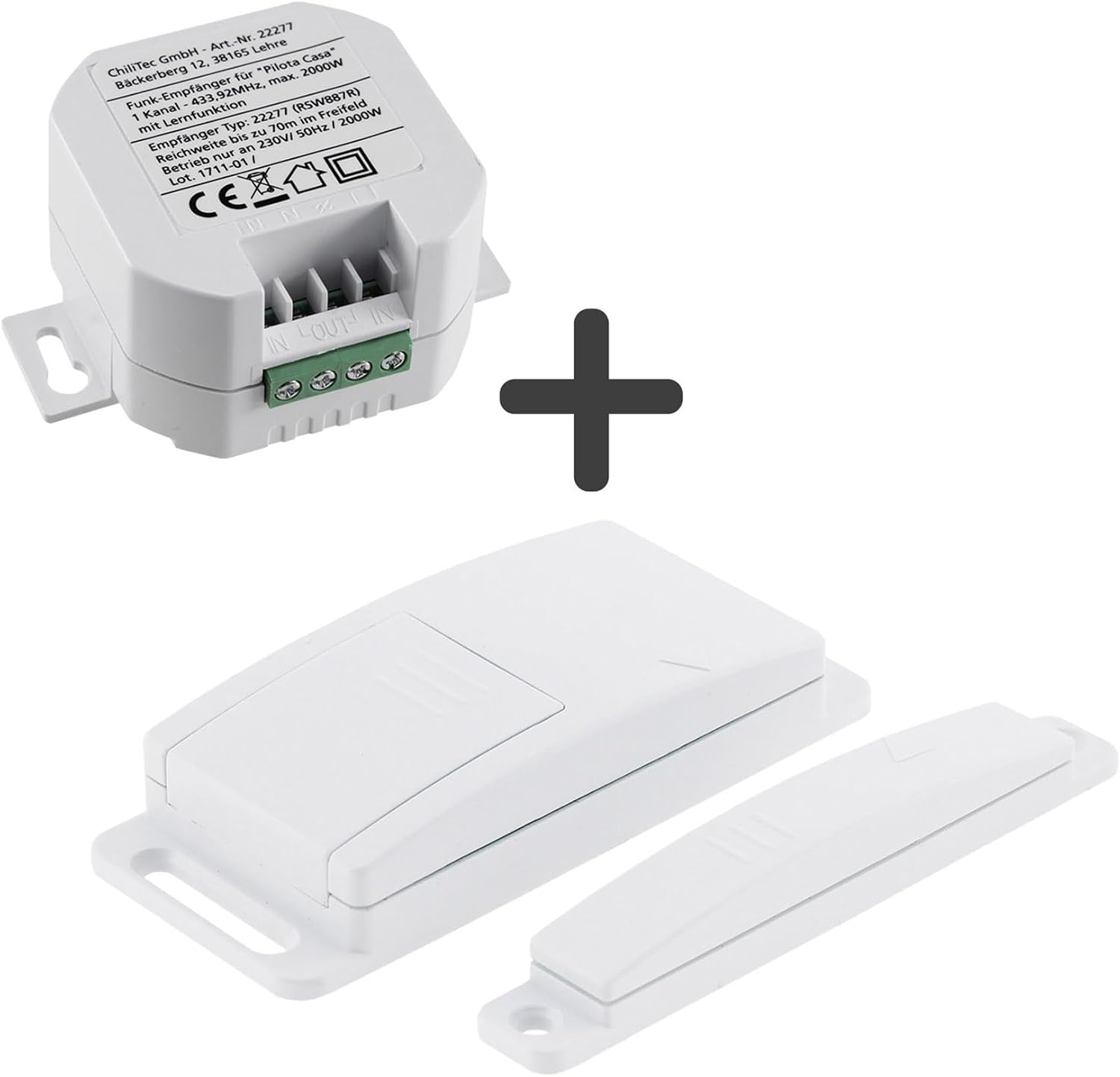
Figure 1: ChiliTec Pilota Casa Wireless Magnetic Contact Switch and Receiver components. This image shows the main components of the ChiliTec Pilota Casa system: the wireless receiver module and the two-part magnetic contact switch.
Safety Information
Please read all safety instructions carefully before installation and operation. Incorrect installation can lead to electric shock or fire. This device operates on 230V AC. Installation should only be performed by a qualified electrician or a person with appropriate electrical knowledge. Ensure the power supply is disconnected before any installation or maintenance work.
- Do not expose the device to moisture or extreme temperatures.
- Do not open or modify the device.
- Keep out of reach of children.
- Ensure proper ventilation for the receiver module if installed in an enclosed space.
Package Contents
Verify that all components are present in the package:
- 1x Wireless Receiver Module (230V)
- 1x Magnetic Contact Switch (two parts)
- 1x CR2032 Battery (pre-installed or included)
- Instruction Manual
Setup and Installation
1. Magnetic Contact Switch Battery Installation
The magnetic contact switch is powered by a CR2032 battery. If not pre-installed, open the battery compartment on the magnetic contact switch and insert the CR2032 battery with the correct polarity. Close the compartment securely.
2. Receiver Module Wiring (230V)
The receiver module requires a 230V AC power supply. It is designed to be integrated into existing electrical circuits, such as behind a light switch or in a junction box. WARNING: Disconnect the main power supply before performing any wiring.
- Identify the live (Phase) and neutral (Null) wires for your intended load (e.g., lamp, fan).
- Connect the 230V input (IN) terminals of the receiver module to the main power supply (Phase and Null).
- Connect the output (OUT) terminals of the receiver module to your electrical appliance (Phase and Null). The receiver acts as a switch for the Phase line.

Figure 2: Receiver Wiring Diagram. This diagram explains how the wireless receiver connects to power and a load, and how it can be controlled by multiple wireless switches or remote controls.
3. Mounting the Magnetic Contact Switch
The magnetic contact switch consists of two parts: the main switch unit and a smaller magnet unit. They should be mounted on a door or window frame so that they are close together when the door/window is closed (maximum 1-2 cm gap) and separate when it opens.
- Method 1 (Adhesive): Use the provided adhesive pads to attach both parts to a clean, dry surface.
- Method 2 (Screws): For a more secure installation, use screws through the designated holes on both units.

Figure 3: Mounting Examples. This image illustrates practical applications, such as automatically turning on a wardrobe light when the door opens, or controlling a fan based on window status.
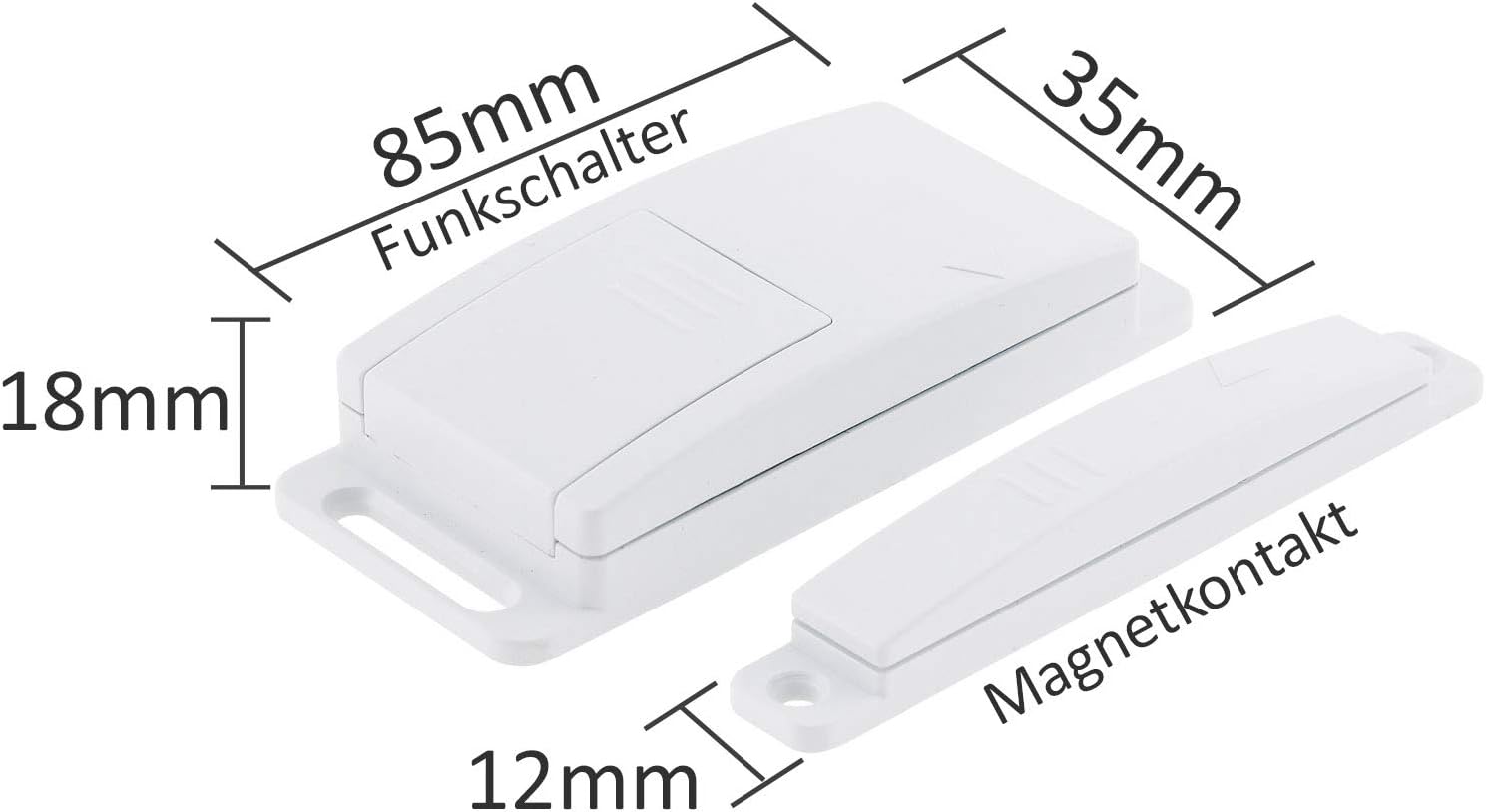
Figure 4: Magnetic Contact Switch Dimensions. This image provides the physical dimensions of the magnetic contact switch, showing its length, width, and height.
4. Pairing the Magnetic Contact Switch with the Receiver
After wiring the receiver and installing the battery in the magnetic contact switch, you need to pair them.

Figure 5: Receiver Module. A detailed view of the wireless receiver module, highlighting the indicator light and the ON/OFF Learning Code button for pairing.
- Restore power to the receiver module.
- Press and hold the "ON/OFF Learning Code" button on the receiver module for approximately 3 seconds until the indicator light starts flashing. This puts the receiver into learning mode.
- Within 10 seconds, activate the magnetic contact switch by separating and then bringing the two parts together (e.g., open and close the door/window).
- The receiver's indicator light should stop flashing and remain solid for a moment, indicating successful pairing.
- Test the connection by opening and closing the door/window. The connected appliance should switch on/off accordingly.
The receiver can be paired with multiple Pilota Casa wireless switches or remote controls.
Operating Instructions
Once successfully installed and paired, the ChiliTec Pilota Casa system operates automatically:
- Automatic Switching: When the magnetic contact switch detects a change in status (e.g., door opens), it sends a signal to the receiver. The receiver then activates or deactivates the connected appliance.
- Open/Close Functionality: The system can be configured to turn devices ON when a door/window opens and OFF when it closes, or vice-versa, depending on the initial pairing sequence and desired application.
- Typical Applications:
- Automatically turn on a light in a wardrobe or pantry when the door opens.
- Control an extractor fan or air conditioning unit based on window status (e.g., fan turns off when window opens).
- Activate alarm systems or notification lights.
- Range: The wireless range is up to 30 meters in an open field. Obstacles like walls and metal structures can reduce this range.
Maintenance
Battery Replacement (Magnetic Contact Switch)
The magnetic contact switch is powered by a CR2032 lithium battery. The battery life is rated for over 2500 switching cycles. If the switch stops responding or its range decreases significantly, the battery may need replacement.
- Carefully open the battery compartment on the magnetic contact switch.
- Remove the old CR2032 battery.
- Insert a new CR2032 battery, ensuring correct polarity (+ side up).
- Close the battery compartment securely.
- Dispose of old batteries according to local regulations.
Cleaning
Clean the devices with a soft, dry cloth. Do not use abrasive cleaners or solvents. Ensure no moisture enters the devices.
Troubleshooting
| Problem | Possible Cause | Solution |
|---|---|---|
| Device does not switch ON/OFF. |
|
|
| Reduced wireless range. |
|
|
| Receiver loses state after power outage. | Receiver requires continuous power to register status changes from the magnetic contact. If power is interrupted, it may not correctly reflect the window/door status until the switch is activated again. | Ensure the receiver is permanently powered. Do not wire it in a way that its power supply is interrupted by the controlled appliance's switch. If controlling a fan, the receiver should power the fan's control circuit, not directly interrupt the fan's main power if that power is also used by the receiver itself. |
Technical Specifications
| Feature | Specification |
|---|---|
| Model Number | AK3-AT1-GL-M-X (Reference: 23149) |
| Brand | ChiliTec |
| Power Supply (Receiver) | 230V AC |
| Max. Switching Capacity | 2000 Watts |
| Max. Current | 8.7 A |
| Wireless Frequency | 433.92 MHz |
| Wireless Range | Up to 30m (free field) |
| Magnetic Contact Switch Battery | 1x CR2032 Lithium (included) |
| Battery Life (Magnetic Contact) | > 2500 switching cycles |
| Installation Method | Adhesive / Screws |
| Usage Environment | Indoor |
| Dimensions (Magnetic Switch) | 85mm (length) x 35mm (width) x 18mm (height) for main unit; 12mm (height) for magnet. |
| Manufacturer | ChiliTec GmbH |
Warranty Information
This product is covered by the standard manufacturer's warranty. For specific warranty terms and conditions, please refer to the documentation provided with your purchase or contact ChiliTec GmbH directly. Keep your proof of purchase for warranty claims.
Customer Support
If you encounter any issues or have questions regarding the installation or operation of your ChiliTec Pilota Casa Wireless Magnetic Contact Switch, please contact your retailer or the manufacturer for assistance.
Manufacturer: ChiliTec GmbH
For further support, please visit the official ChiliTec website or consult your local dealer.


