1. Introduction
This manual provides detailed instructions for the YuanLey YS082G-P 10-Port PoE Switch. This unmanaged network switch is designed for various applications, offering 8 Power over Ethernet (PoE+) ports and 2 Gigabit uplink ports for efficient network connectivity and power delivery.

Image 1.1: Front view of the YuanLey YS082G-P 10-Port PoE Switch.
2. Key Features
- Port Configuration: Features 8 PoE ports (10/100Mbps) and 2 Gigabit uplink Ethernet ports (1000Mbps) for high-bandwidth connections.
- Power over Ethernet (PoE+): Supports IEEE 802.3af/at standards with a maximum total power budget of 120W, delivering up to 30W per port.
- Plug and Play: Unmanaged switch design allows for automatic device detection and requires no configuration for easy setup.
- Extend Function: Enables single PoE ports to support transmission distances up to 250m at 10Mbps when activated.
- VLAN Support: Ports 1-8 support VLAN isolation to reduce network congestion and enhance security.
- Durable Design: Constructed with a metal case for bilateral heat dissipation, fanless operation for quiet performance, and 4KV lightning protection.
- Wide Operating Temperature: Designed to operate reliably in environments ranging from -10°C to +55°C.
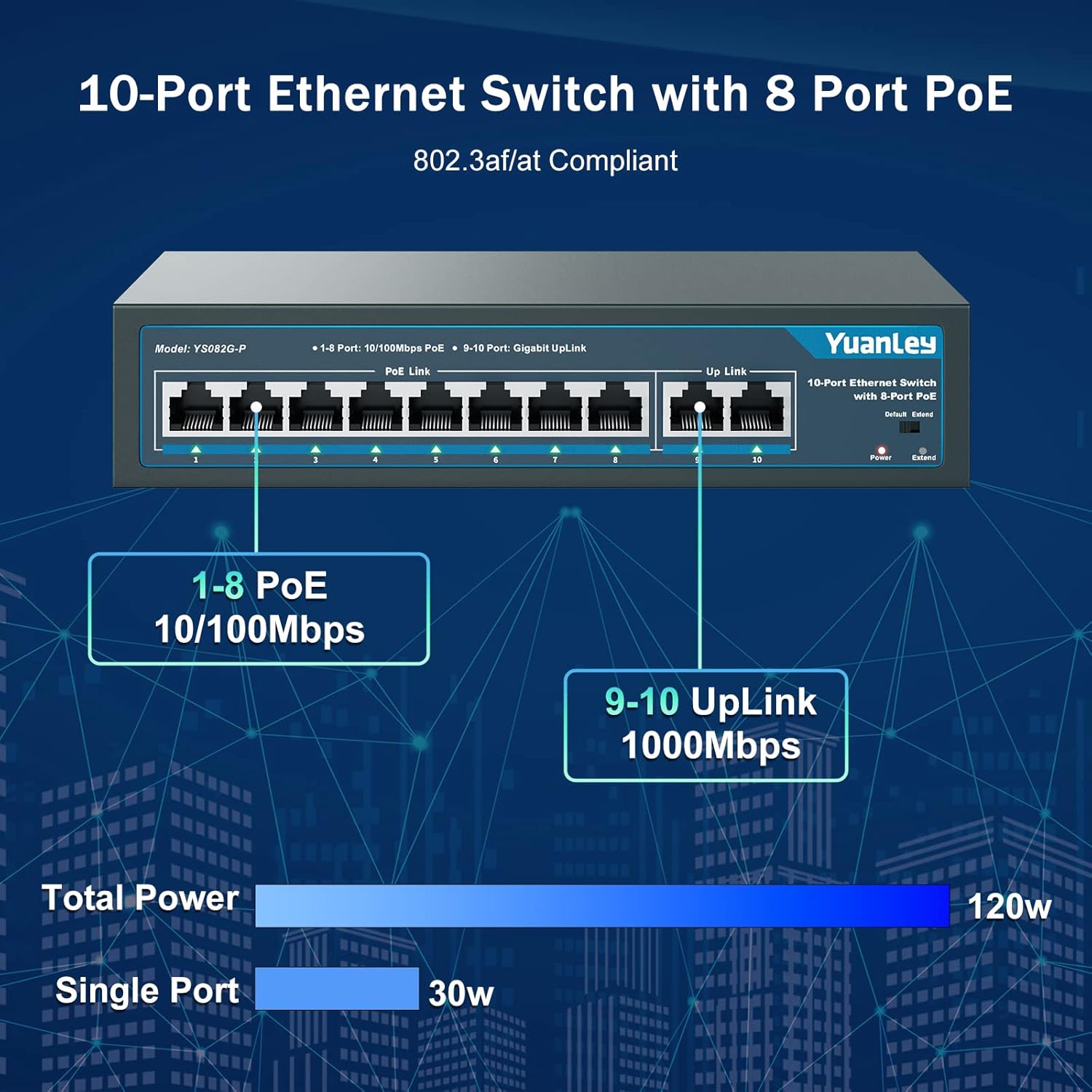
Image 2.1: Port configuration showing 8 PoE ports (10/100Mbps) and 2 Gigabit uplink ports (1000Mbps).

Image 2.2: Diagram illustrating the One Key VLAN function, isolating ports 1-8 while allowing communication with uplink ports.

Image 2.3: Comparison of Extend Mode (250m, 10Mbps) and Default Mode (100m, 100Mbps) for PoE transmission.
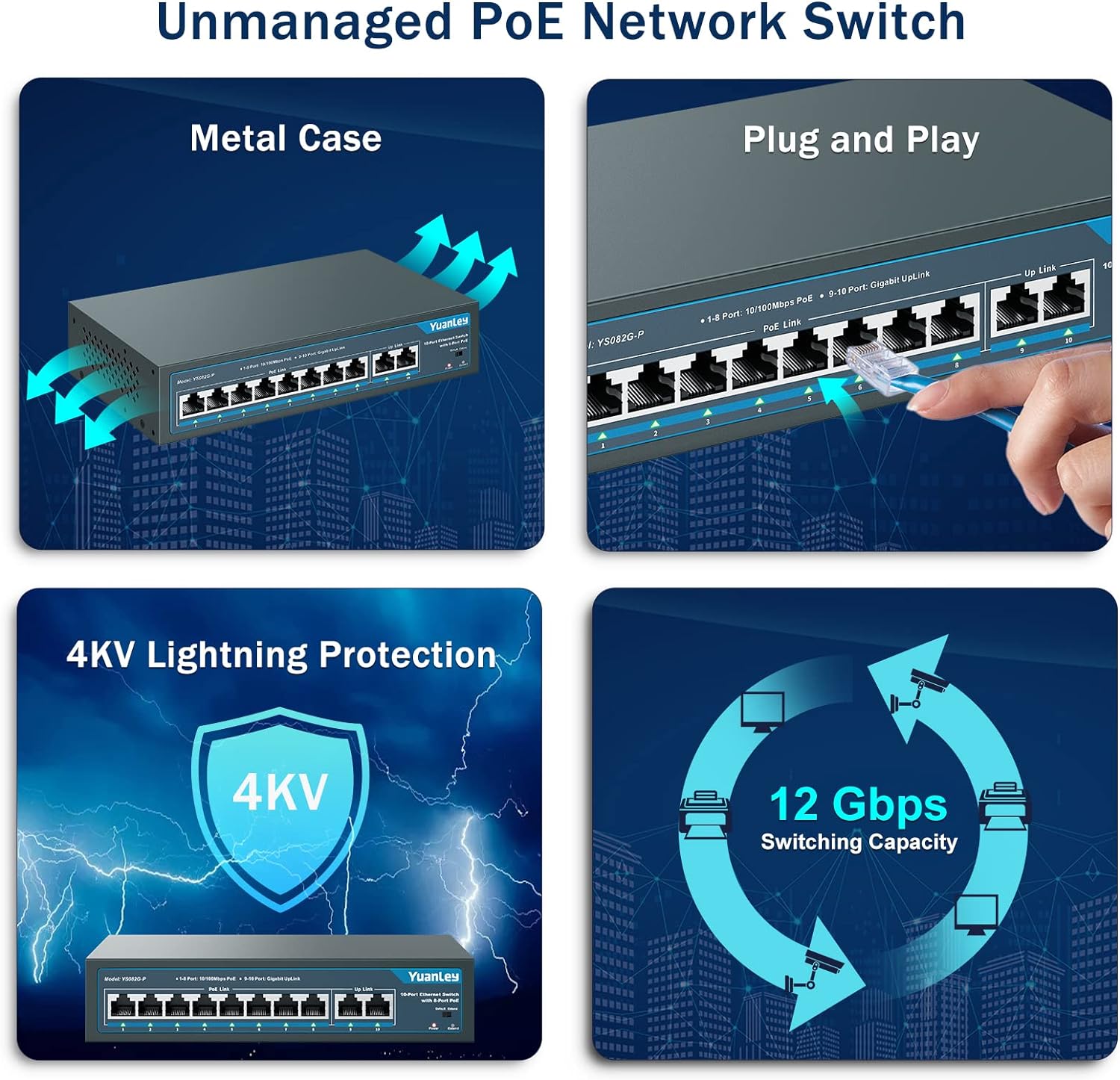
Image 2.4: Overview of the switch's unmanaged features including metal case, plug and play, 4KV lightning protection, and 12 Gbps switching capacity.

Image 2.5: Illustration of the switch's fanless design and wide operating temperature range (-10°C to +55°C).
3. Package Contents
Verify that all items are present in the package:
- YuanLey YS082G-P 10-Port PoE Switch
- Power Cord
- Mounting Brackets (for rackmount or wall mount)
- Screws for mounting
- Quick Start Guide
4. Setup Instructions
The YuanLey YS082G-P is a plug-and-play unmanaged switch, requiring minimal setup.
- Connect Power: Plug the provided power cord into the AC IN port on the back of the switch and then into a standard electrical outlet. The Power LED on the front panel should illuminate.
- Connect Uplink: Connect your router or main network device to one of the two Gigabit uplink ports (ports 9 or 10) using a standard Ethernet cable.
- Connect PoE Devices: Connect your PoE-compatible devices (e.g., IP cameras, wireless access points, IP phones) to any of the 8 PoE ports (ports 1-8) using Ethernet cables. The switch will automatically detect and power these devices.
- Mounting (Optional): Use the included mounting brackets and screws to install the switch in a 19-inch rack or mount it on a wall.
Video 4.1: A brief overview of the YuanLey 10 Port PoE Switch, demonstrating its physical appearance and basic connectivity.

Image 4.2: Visual guide for the simple plug-and-play setup process: Connect to Power, Connect Devices, and Enjoy.
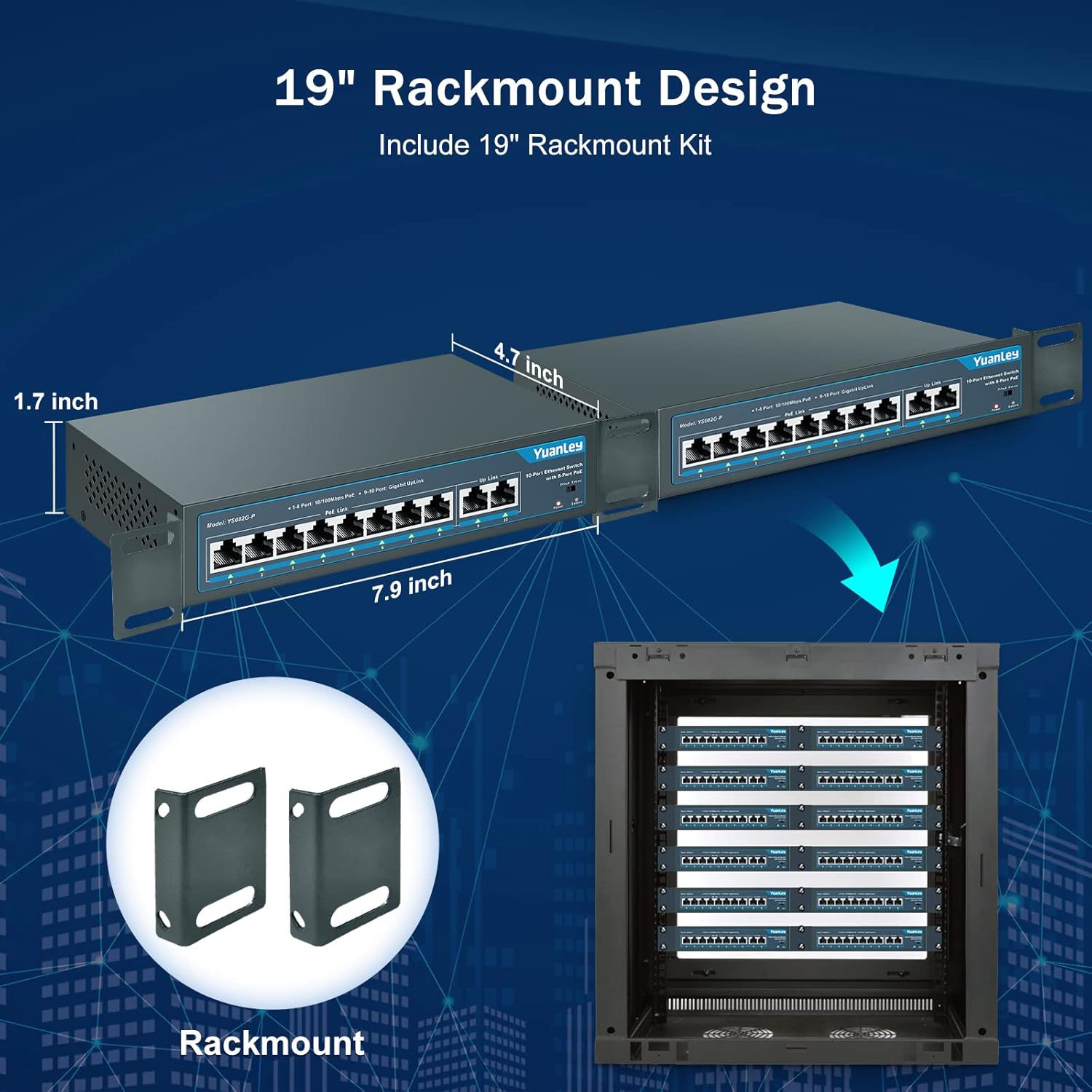
Image 4.3: Illustration of the rackmount design and included brackets for installation.
5. Operating Modes
The switch features a mode switch on the front panel to select between Default and Extend modes.
- Default Mode: In this mode, all ports operate at their standard speeds (10/100Mbps for PoE ports, 1000Mbps for uplink ports) with a maximum transmission distance of 100 meters.
- Extend Mode: When the switch is set to Extend mode, PoE ports 1-8 can transmit data and power up to 250 meters, but the speed for these ports will be reduced to 10Mbps. This mode is ideal for long-distance deployments of devices like IP cameras where higher bandwidth is not critical.
- VLAN Functionality: The switch supports VLAN isolation on ports 1-8. When enabled, these ports are isolated from each other but can still communicate with the uplink ports (9-10). This helps in segmenting the network, reducing broadcast storms, and improving overall network security and performance.
Image 5.1: The physical switch for selecting between Default and Extend modes.

Image 5.2: Diagram illustrating the functionality of One Key VLAN and the Extend mode for longer PoE distances.
6. Maintenance
To ensure optimal performance and longevity of your YuanLey PoE Switch:
- Keep the device in a well-ventilated area to prevent overheating. The fanless design relies on natural convection.
- Regularly inspect cables for damage and ensure secure connections.
- Clean the exterior of the switch with a soft, dry cloth. Avoid using liquid cleaners or aerosols.
- Ensure the power source is stable and within the specified voltage range (AC 100-240V).
7. Troubleshooting
| Problem | Possible Cause | Solution |
|---|---|---|
| No Power LED indication. | No power supply or faulty power cord. | Check power cord connection and power outlet. Ensure the power source is active. |
| PoE device not receiving power or data. | Incorrect cable, non-PoE device, or device exceeding power budget. | Verify the device is PoE-compatible (IEEE 802.3af/at). Check Ethernet cable for damage. Ensure total power consumption does not exceed 120W and individual port consumption does not exceed 30W. |
| Slow network speed on PoE ports. | Extend mode is enabled. | If high speed is required for short distances (under 100m), switch the mode to Default. Extend mode reduces speed to 10Mbps for longer distances. |
| Network congestion or security concerns. | No network segmentation. | Enable VLAN isolation for ports 1-8 to segment traffic and improve security. |
8. Specifications
| Feature | Detail |
|---|---|
| Model | YS082G-P |
| Ports | 8 x 10/100Mbps PoE+ Ports, 2 x 1000Mbps Gigabit Uplink Ports |
| PoE Standard | IEEE 802.3af/at |
| Total PoE Power Budget | 120W |
| Max Power Per Port | 30W |
| Data Transfer Rate | 1000 Megabits Per Second (Uplink), 100 Megabits Per Second (PoE Ports) |
| Switching Capacity | 12 Gbps |
| Extend Function | Up to 250m transmission distance at 10Mbps on PoE ports 1-8 |
| VLAN Support | Ports 1-8 isolation, communication with uplink ports |
| Interface Type | RJ45 |
| Power Input | AC 100-240V, 50/60Hz (Built-in Power Supply) |
| Case Material | Metal |
| Cooling | Fanless |
| Operating Temperature | -10°C to +55°C |
| Product Dimensions | 7.9"L x 4.7"W x 1.7"H |
| Item Weight | 0.96 Kilograms (2.11 pounds) |
| Lightning Protection | 4KV |
9. Warranty and Support
For any questions, technical assistance, or warranty inquiries, please contact YuanLey official support. Refer to the product packaging or the official YuanLey website for the most current contact information.


