
1. Introduction
Thank you for choosing the Cofun 3-piece pasta attachment for your KitchenAid stand mixer. This kit is designed to simplify the process of making fresh, homemade pasta, allowing you to create delicious spaghetti, fettuccine, and pasta sheets with ease. Please read this manual thoroughly before first use to ensure proper operation, maintenance, and safety.
2. Product Overview
The Cofun pasta attachment set includes three essential components, all crafted from durable stainless steel, designed to seamlessly integrate with your KitchenAid stand mixer's power hub.
- Pasta Roller: For rolling dough into sheets of desired thickness. Features 8 adjustable settings.
- Fettuccine Cutter: For cutting pasta sheets into classic fettuccine noodles.
- Spaghetti Cutter: For cutting pasta sheets into traditional spaghetti noodles.
- Cleaning Brush: Included for easy maintenance of the attachments.
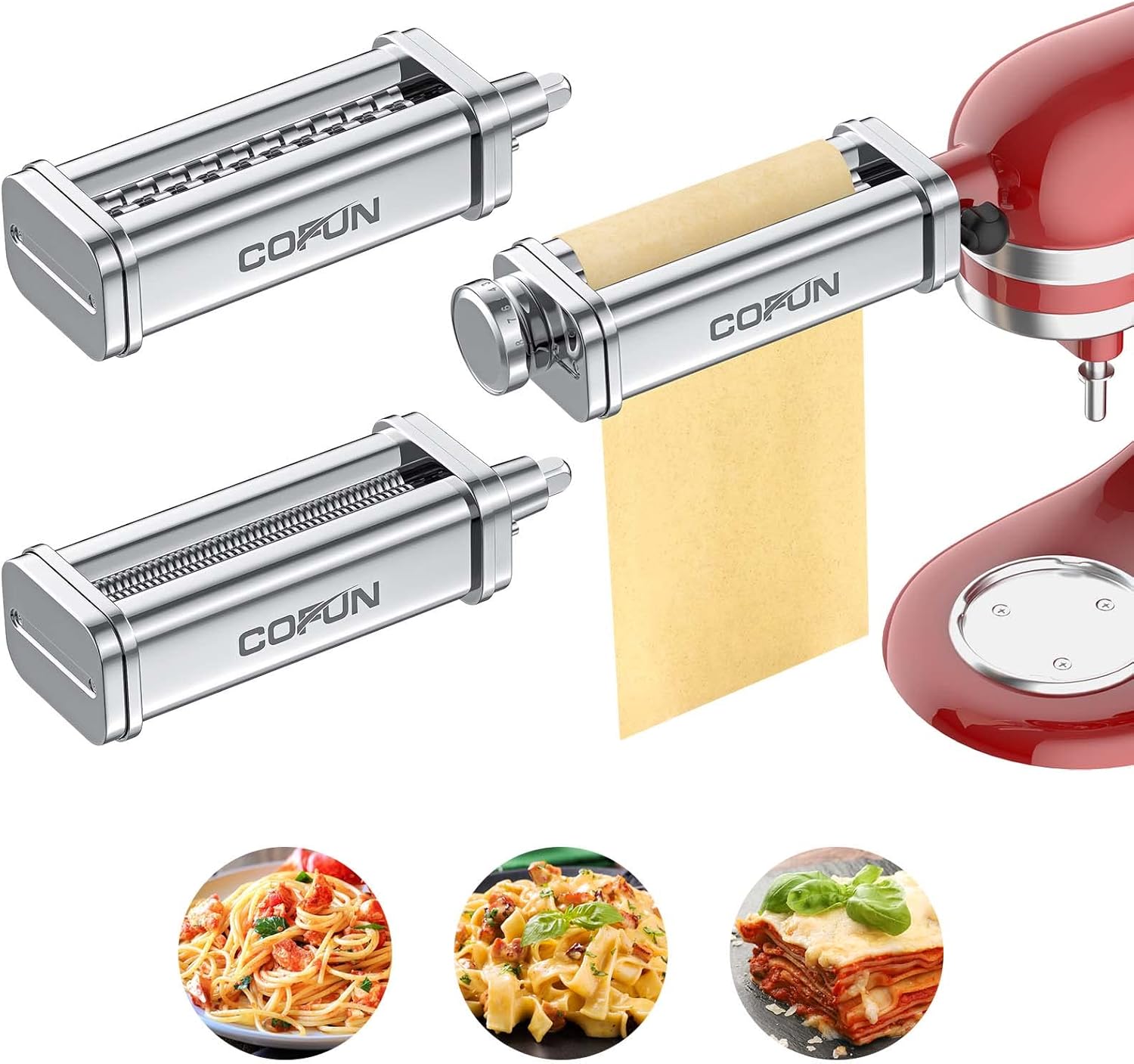
Figure 2.1: The complete Cofun 3-piece pasta attachment set.

Figure 2.2: The pasta roller in action, demonstrating dough being flattened.
3. Safety Instructions
- Always ensure the stand mixer is turned off and unplugged before attaching or removing any accessories.
- Keep fingers and loose clothing away from the rollers and cutters during operation.
- Do not immerse the attachments in water. They are not dishwasher safe.
- Clean the attachments immediately after use to prevent dough from drying and hardening.
- Use only with compatible KitchenAid stand mixers.
4. Setup
To attach the pasta maker to your KitchenAid stand mixer:
- Ensure your KitchenAid stand mixer is unplugged.
- Locate the power hub on the front of your stand mixer.
- Unscrew the attachment knob on the power hub and remove the hub cover.
- Insert the shaft of the desired pasta attachment (pasta roller, fettuccine cutter, or spaghetti cutter) into the power hub, ensuring the attachment fits securely.
- Tighten the attachment knob until the attachment is firmly in place. Do not overtighten.
- Plug in your stand mixer.

Figure 4.1: Pasta attachments prepared for installation on a KitchenAid mixer.
5. Operating Instructions
Before operating, prepare your pasta dough according to your preferred recipe. Ensure the dough is firm enough to handle but still pliable.
5.1. Using the Pasta Roller
The pasta roller is used to flatten dough into sheets of varying thickness. It features 8 adjustable thickness settings.
- Attach the pasta roller to the mixer's power hub as described in Section 4.
- Set the thickness knob to the widest setting (typically '1' for the thickest sheet).
- Turn the mixer to a low speed (e.g., Speed 2).
- Feed a small, flattened piece of dough through the rollers. Fold the dough in half and repeat this process several times until the dough is smooth and elastic.
- Gradually decrease the thickness setting, one number at a time, feeding the dough through each setting until you reach your desired pasta sheet thickness. For best results, dust the dough lightly with flour if it becomes sticky.

Figure 5.1: The pasta roller with its adjustable thickness settings.
5.2. Using the Fettuccine Cutter
Once you have rolled your pasta dough to the desired thickness using the pasta roller, you can use the fettuccine cutter.
- Remove the pasta roller and attach the fettuccine cutter to the mixer's power hub.
- Turn the mixer to a low speed (e.g., Speed 3-5 for cutters).
- Feed the pasta sheet through the fettuccine cutter. The machine will cut the sheet into uniform fettuccine noodles.
- Catch the noodles as they emerge and place them on a lightly floured surface or pasta drying rack to prevent sticking.

Figure 5.2: The fettuccine cutter creating noodles.
5.3. Using the Spaghetti Cutter
For spaghetti noodles, follow the same procedure as with the fettuccine cutter, but use the spaghetti cutter attachment.
- Remove the fettuccine cutter and attach the spaghetti cutter to the mixer's power hub.
- Turn the mixer to a low speed (e.g., Speed 3-5).
- Feed the pasta sheet through the spaghetti cutter.
- Collect the spaghetti noodles and place them on a lightly floured surface or drying rack.

Figure 5.3: The spaghetti cutter creating noodles.
6. Maintenance and Cleaning
Proper cleaning and maintenance will extend the life of your pasta attachments.
- Hand Wash Only: The attachments are not dishwasher safe. Immersion in water is not recommended.
- Immediate Cleaning: Clean the attachments immediately after use, while any remaining dough is still soft.
- Use Cleaning Brush: Use the included cleaning brush to remove any dough particles from the rollers and cutters. A wooden skewer or toothpick can also be used for hard-to-reach areas.
- Drying: Ensure all parts are thoroughly dry before storing to prevent rust or corrosion.
- Storage: Store the attachments in a dry place.
7. Troubleshooting
| Problem | Possible Cause | Solution |
|---|---|---|
| Dough sticks to rollers/cutters. | Dough is too wet or not floured enough. | Add more flour to the dough or dust the dough surface lightly with flour before feeding. |
| Pasta sheets are uneven. | Dough not properly kneaded or folded. | Ensure dough is well-kneaded and folded several times through the widest roller setting before gradually decreasing thickness. |
| Attachment not securely fastened. | Attachment knob is loose. | Tighten the attachment knob on the power hub until the attachment is firm. |
8. Specifications
- Brand: Cofun
- Model Number: C1903
- Material: Food-grade 304 Stainless Steel
- Color: Silver
- Product Dimensions: 9.2"L x 3.7"W x 2"H
- Item Weight: 4.18 pounds
- Number of Thickness Settings (Pasta Roller): 8 (0.4mm to 2mm)
- Operation Mode: Automatic (powered by stand mixer)
- Dishwasher Safe: No
9. Warranty and Support
Cofun stands behind the quality of its products. For any questions, concerns, or support needs regarding your pasta attachment, please contact our customer service team. Refer to your purchase documentation for specific warranty details.
We are committed to ensuring your satisfaction and assisting you with any issues you may encounter.