
ForeverPRO 312180200240
ForeverPRO 312180200240 Main PCB (MCWC50DST) for E-Wave Refrigerator - Installation and Information Manual
Introduction
This manual provides essential information for the installation, operation, and maintenance of the ForeverPRO 312180200240 Main PCB (Printed Circuit Board) for E-Wave Refrigerators. This component is a critical part of your appliance's control system. Please read these instructions carefully before proceeding with installation or any service.
The ForeverPRO 312180200240 Main PCB is designed as a compatible replacement for E-Wave Refrigerator part number 312180200057. It is important to verify compatibility with your specific refrigerator model before installation.
Product Overview
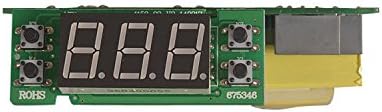
The Main PCB (MCWC50DST) serves as the central control unit for your E-Wave refrigerator, managing various functions such as temperature regulation, defrost cycles, and compressor operation. Proper functioning of this board is crucial for the refrigerator's overall performance.
Safety Information
WARNING: Before attempting any installation or repair, ensure the refrigerator is completely disconnected from its power source. Failure to do so can result in electric shock, serious injury, or death.
- Always wear appropriate personal protective equipment (PPE), such as gloves and safety glasses.
- Only qualified technicians or individuals with experience in appliance repair should attempt to replace this component.
- Handle the PCB by its edges to avoid damaging sensitive electronic components or introducing static discharge.
- Keep the PCB away from moisture and extreme temperatures.
Setup and Installation
Replacing a main PCB requires careful attention to detail and electrical safety. If you are not confident in your ability to perform this repair, it is highly recommended to seek assistance from a certified appliance technician.
Required Tools (Typical)
- Screwdrivers (Phillips and Flathead)
- Nut drivers or socket set
- Needle-nose pliers
- Multimeter (for testing, if necessary)
- Anti-static wrist strap (recommended)
Installation Steps (General Guidance)
- Disconnect Power: Unplug the refrigerator from the wall outlet.
- Access the PCB: Locate and remove the access panel that covers the main PCB. This location varies by refrigerator model (often at the back or top of the appliance).
- Document Connections: Before disconnecting any wires, take clear photos or make detailed diagrams of all wire connections to the existing PCB. This is crucial for correct reassembly.
- Disconnect Wires: Carefully disconnect all wire harnesses and connectors from the old PCB.
- Remove Old PCB: Unscrew or unclip the old PCB from its mounting brackets.
- Install New PCB: Mount the ForeverPRO 312180200240 Main PCB in the same location, ensuring it is securely fastened.
- Reconnect Wires: Using your photos or diagrams, carefully reconnect all wire harnesses and connectors to the new PCB. Ensure all connections are firm and correctly seated.
- Secure Access Panel: Replace the access panel and secure it with screws.
- Restore Power: Plug the refrigerator back into the wall outlet.
- Test Operation: Verify that the refrigerator powers on and functions correctly. Monitor for any unusual behavior.
Operating Principles
The Main PCB operates automatically once installed and powered. It interprets signals from various sensors (e.g., temperature sensors, door switches) and sends commands to components like the compressor, fans, and defrost heater to maintain optimal refrigerator conditions. There are no direct user operating controls on the PCB itself; all user interactions occur via the refrigerator's external control panel, which communicates with this main board.
Maintenance
The ForeverPRO 312180200240 Main PCB is designed for long-term reliability and typically requires no routine maintenance. However, to ensure its longevity and proper function:
- Ensure the area around the PCB is kept clean and free of dust and debris.
- Avoid exposing the refrigerator to excessive humidity or moisture, which can damage electronic components.
- Periodically check for loose connections if the refrigerator experiences intermittent issues (after disconnecting power).
Troubleshooting
If your E-Wave refrigerator experiences issues after PCB replacement, consider the following troubleshooting steps:
- No Power: Ensure the refrigerator is securely plugged into a working outlet and that the circuit breaker has not tripped. Double-check all power connections to the PCB.
- Incorrect Functionality: If the refrigerator is not cooling, defrosting, or operating as expected, re-verify all wire connections to the PCB using your diagrams or photos. A single misplaced wire can cause multiple issues.
- Error Codes: If your refrigerator's display shows an error code, consult your refrigerator's specific user manual for the meaning of the code and recommended actions. The PCB processes these codes.
- Intermittent Issues: Loose connections can cause intermittent problems. With power disconnected, gently press on all connectors to ensure they are fully seated.
- Still Not Working: If troubleshooting does not resolve the issue, it is advisable to contact a professional appliance repair technician for further diagnosis.
Specifications
| Attribute | Detail |
|---|---|
| Brand Name | ForeverPRO |
| Model Number | 312180200240 |
| Part Number | 312180200240 |
| Replaces Part Number | 312180200057 |
| Compatible Appliance | E-Wave Refrigerator |
| Included Components | Main Pcb (Mcwc50Dst) Sh031 / |
Warranty and Support
ForeverPRO stands by the quality of its products. This Main PCB comes with a No Questions Asked Money Back Guarantee. For any questions regarding installation, compatibility, or product performance, please contact ForeverPRO customer support. As a USA-based company, ForeverPRO is committed to providing reliable support for its products.
Please refer to your purchase documentation or the ForeverPRO website for the most current warranty terms and contact information.
Ask a question about this manual
Ask about setup, troubleshooting, compatibility, parts, safety, or missing instructions. Manuals+ will review the question and use this page’s manual context to help answer it.