
1. Product Overview
This manual provides instructions for the installation, operation, and maintenance of the ForeverPRO 71001844 Thermostat. This thermostat is a replacement part designed for various Whirlpool range models and is also compatible with ranges from Maytag, KitchenAid, Jenn-Air, Amana, Magic Chef, Admiral, Norge, and Roper.
The ForeverPRO 71001844 thermostat replaces original equipment manufacturer (OEM) part numbers 5-70072, 570072, 695174, 7-12079, 712079, AH2077404, EA2077404, JA99701687, PS2077404, and Y712079.
2. Important Safety Information
Read all instructions carefully before installing or servicing this product. Failure to follow these instructions could result in property damage, personal injury, or death.
- Always disconnect power to the appliance before attempting any installation, repair, or maintenance.
- Wear appropriate personal protective equipment, such as gloves and eye protection.
- If you are unsure about any part of the installation process, consult a qualified appliance technician.
- Ensure all connections are secure and properly insulated after installation.
3. Package Contents
The ForeverPRO 71001844 Thermostat package includes:
- 1x ForeverPRO 71001844 Thermostat
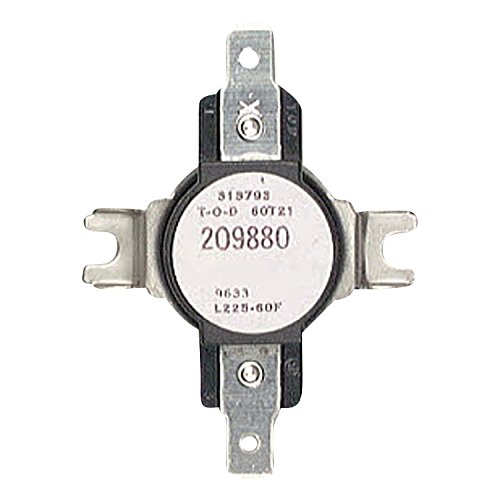
Image: ForeverPRO 71001844 Thermostat. This image displays the thermostat component as it appears in the package.
4. Installation Instructions
This section outlines the general steps for replacing a range thermostat. Specific procedures may vary depending on your appliance model. Refer to your appliance's service manual for detailed instructions.
Step 1: Disconnect Power
Before beginning any work, ensure the range is completely disconnected from its power source. Turn off the circuit breaker or unplug the appliance from the wall outlet.
Step 2: Access the Thermostat
Depending on your range model, you may need to remove the back panel, top panel, or oven cavity components to access the existing thermostat. Use appropriate tools to carefully remove screws or fasteners.
Step 3: Disconnect Old Thermostat
Carefully note the wiring connections to the old thermostat. It is recommended to take a photograph before disconnecting. Disconnect all wires and remove the old thermostat from its mounting bracket.
Step 4: Install New Thermostat
Mount the new ForeverPRO 71001844 Thermostat into the same location as the old one. Connect the wires to the new thermostat, ensuring they match the original configuration. Double-check all connections for security.
Step 5: Reassemble and Test
Reassemble any panels or components that were removed. Restore power to the range and test the oven's heating function to ensure the new thermostat is operating correctly.
5. Operation
The thermostat is an internal component that regulates the temperature within your range's oven. Once installed, its operation is automatic, maintaining the set temperature for cooking. Users interact with the thermostat indirectly through the range's control panel to set desired oven temperatures.
6. Maintenance
The ForeverPRO 71001844 Thermostat is a sealed unit and does not require routine maintenance. If the oven temperature becomes inconsistent or fails to heat, the thermostat may need to be inspected or replaced.
- Keep the oven cavity clean to prevent debris from affecting temperature sensor performance (if applicable to your range model).
- Avoid harsh cleaning chemicals near thermostat components.
7. Troubleshooting
If your range is experiencing heating issues after thermostat replacement, consider the following:
- Oven Not Heating: Check if power is fully restored to the range. Verify all wiring connections to the thermostat are secure.
- Inconsistent Temperature: Ensure the thermostat is correctly mounted and its sensor (if external) is not obstructed.
- Error Codes: Consult your range's user manual for specific error code interpretations.
If problems persist, it is recommended to contact a qualified appliance technician.
8. Product Specifications
| Brand | ForeverPRO |
|---|---|
| Model Number | 71001844 |
| Included Components | Thermostat |
| UPC | 194878055818 |
| Replaces Part Numbers | 5-70072, 570072, 695174, 7-12079, 712079, AH2077404, EA2077404, JA99701687, PS2077404, Y712079 |
| Compatible Brands | Whirlpool, Maytag, KitchenAid, Jenn-Air, Amana, Magic Chef, Admiral, Norge, Roper |
9. Warranty and Support
For warranty information or technical support regarding your ForeverPRO 71001844 Thermostat, please refer to the documentation provided with your purchase or contact ForeverPRO directly.
Visit the ForeverPRO Brand Store on Amazon for more information.