
1. Important Safety Information
Always read and understand the complete instruction manual before installing or using your Chicco KidFit Zip Plus booster seat. Failure to follow these instructions could result in serious injury or death.
Weight and Height Requirements:
- High-Back Booster Mode: For children at least 4 years of age, weighing 40-100 lbs (18-45.3 kg), and whose height is 38-57 inches (97-145 cm).
- Backless Booster Mode: For children weighing 40-110 lbs (18-49.9 kg), and whose height is 38-57 inches (97-145 cm).
- Child's ears must be below the top of the booster seat headrest.
- The shoulder belt guide must be at or above the child's shoulders.
This booster seat must only be used with a vehicle's lap and shoulder belt system. Never use with only a lap belt.
2. Product Overview
The Chicco KidFit Zip Plus is a versatile 2-in-1 belt-positioning booster car seat designed for growing children. It offers enhanced safety features and comfort for extended use.
Key Features:
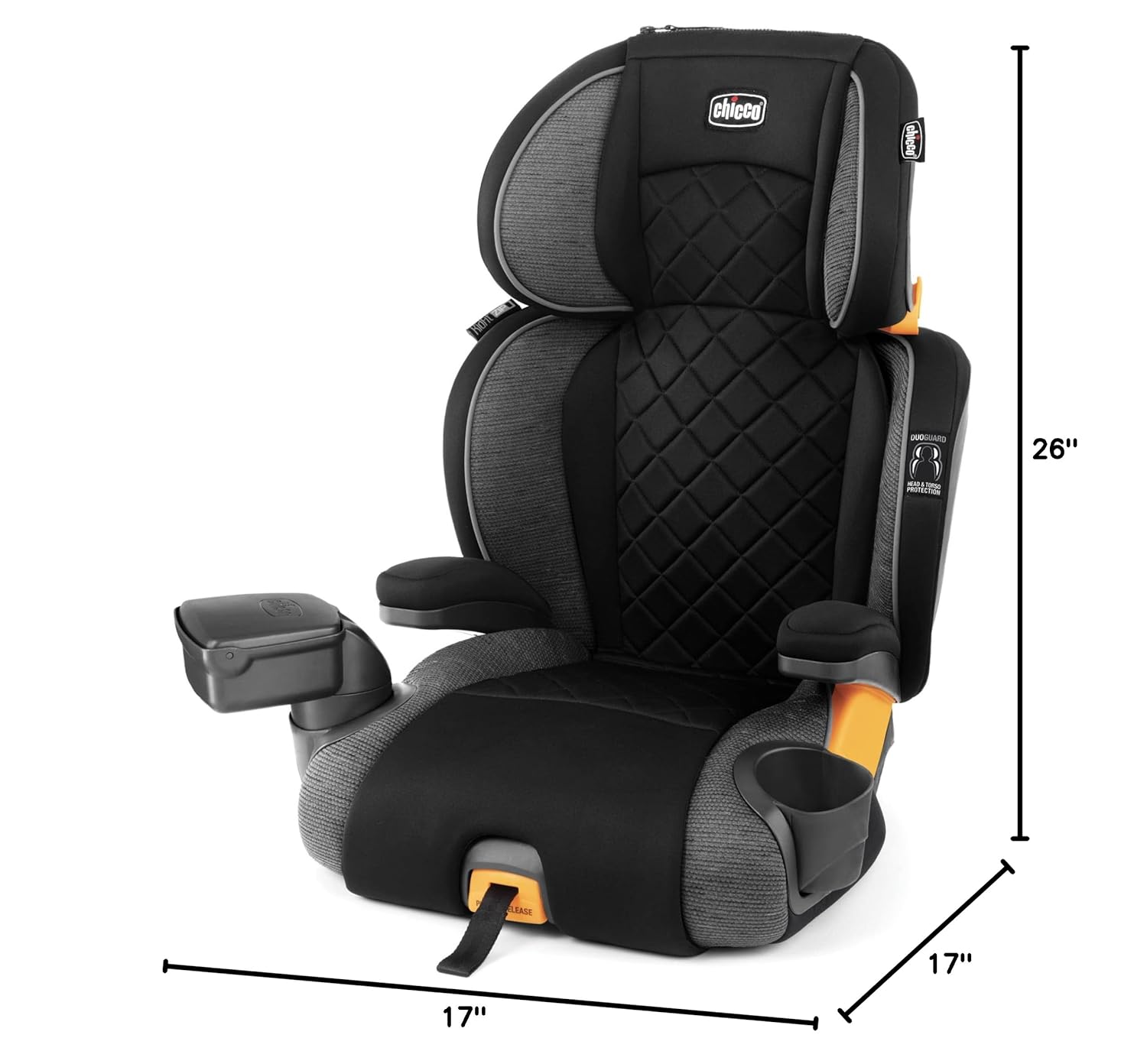
- DuoGuard Head and Torso Protection: Two layers of rigid shell and EPS energy-absorbing foam for superior impact protection.
- 10-Position Headrest: Easily adjustable from the waist for comfortable head and body support.
- Premium LATCH Connectors with SuperCinch Tightener: Stabilizes the seat for easy in/out and secure attachment.
- Quick-Release LATCH: Allows for convenient one-hand removal for easy transfer between vehicles.
- ErgoBoost Plus Seat: Contoured design with triple-foam padding for comfort and support.
- 2-Position Backrest: Adjusts to mimic the vehicle seat position and is removable for backless booster mode.
- Zip-Off Cushions: Stylish, quilted seat and backrest cushions easily zip off for machine washing.
- Dishwasher-Safe CupFolders: Two removable cup holders that fold away when not in use.
- Bonus Storage Console: Fits into either CupFolder for small item storage.
3. Setup and Installation
Proper installation is crucial for your child's safety. Follow these steps carefully.
3.1 Assembling the Booster Seat
The KidFit Zip Plus typically comes in two main parts: the booster base and the high-back section. Align the high-back section with the slots on the booster base and push down firmly until it clicks into place. Ensure it is securely attached.
3.2 Installing in High-Back Booster Mode
- Place the booster seat on the vehicle seat.
- Locate the LATCH connectors on the booster seat. These are typically found at the rear of the booster base.
- Attach the LATCH connectors to your vehicle's lower anchor bars. Push firmly until you hear a click, indicating a secure connection.
- Use the SuperCinch one-pull tightener (a strap at the front of the base) to tighten the LATCH system, pulling until the booster seat is snug against the vehicle seat back.
- Adjust the headrest height so that the shoulder belt guide is at or slightly above your child's shoulders. The 10-position headrest can be adjusted by squeezing the lever at the top of the headrest and sliding it up or down.


3.3 Installing in Backless Booster Mode
- To convert to backless mode, locate the release levers or buttons on the back of the high-back section where it connects to the booster base.
- Press the release mechanisms and lift the high-back section off the booster base.
- Place the backless booster base on the vehicle seat.
- Attach the LATCH connectors to your vehicle's lower anchor bars and tighten using the SuperCinch strap.

4. Operating Instructions
4.1 Securing Your Child
- Ensure your child is seated comfortably and correctly in the booster seat.
- Guide the vehicle's lap belt across your child's upper thighs, ensuring it rests low on the hips.
- Thread the shoulder belt through the red shoulder belt guide on the booster seat (in high-back mode) or the vehicle's shoulder belt guide (in backless mode), ensuring it lies flat across your child's chest and shoulder, not on the neck.
- Buckle the vehicle's seat belt and pull any slack to ensure a snug fit.

4.2 Using Cup Holders and Storage Console
- The two CupFolders are removable and dishwasher-safe. They can be folded away when not in use to create a narrower seat profile.
- A bonus storage console is included and can be placed into either CupFolder to hold small items.


5. Maintenance and Cleaning
Regular cleaning helps maintain the hygiene and longevity of your booster seat.
5.1 Fabric Care
- The seat and backrest cushions, including armrest covers, are designed to easily zip off for removal.
- All fabrics are machine washable on a delicate cycle with mild detergent. Do not use bleach.
- Hang to dry; do not machine dry.

5.2 Hard Goods Care
- Plastic parts can be wiped clean with a damp cloth and mild soap.
- The CupFolders are dishwasher-safe for thorough cleaning.
- Do not use abrasive cleaners or solvents.
6. Troubleshooting
If you encounter any issues with your Chicco KidFit Zip Plus, refer to the following common solutions:
- Seat feels loose after installation: Ensure LATCH connectors are fully engaged and the SuperCinch strap is pulled tightly. Rock the seat side-to-side and front-to-back; it should not move more than 1 inch (2.5 cm) at the belt path.
- Vehicle seat belt does not fit child correctly: Verify the headrest is adjusted so the shoulder belt guide is at or slightly above the child's shoulders. The lap belt should be low on the hips, touching the thighs.
- Difficulty adjusting headrest: Ensure the adjustment lever is fully squeezed before attempting to slide the headrest. Check for any obstructions.
- Cushions are difficult to remove/attach: Ensure zippers are fully aligned and not snagged.
For further assistance, please contact Chicco customer support.
7. Specifications
| Brand | Chicco |
| Model | KidFit Zip Plus |
| Minimum Weight (High-Back) | 40 lbs (18 kg) |
| Maximum Weight (High-Back) | 100 lbs (45.3 kg) |
| Maximum Weight (Backless) | 110 lbs (49.9 kg) |
| Minimum Height | 38 inches (97 cm) |
| Maximum Height | 57 inches (145 cm) |
| Dimensions (D x W x H) | 17"D x 17"W x 26"H |
| Item Weight | 10 lbs (4.5 kg) |
| Material Type | Metal, Plastic, Polyester |
| Installation Type | LATCH |
| Harness Type | 3-Point (vehicle belt) |
| Number of Height Positions | 10 |
8. Warranty and Support
8.1 Manufacturer's Warranty
The Chicco KidFit Zip Plus 2-in-1 Belt-Positioning Booster Car Seat comes with a 1-year limited warranty from the manufacturer, Artsana USA, Inc. This warranty covers defects in materials and workmanship under normal use.
Please retain your proof of purchase for warranty claims.
8.2 Customer Support
For any questions, concerns, or warranty claims, please contact Chicco customer service. You can find their contact information on the official Chicco USA website or through the retailer where you purchased the product.
Always refer to the official Chicco website for the most up-to-date product information and support resources.

