
iLiving V8
iLiving V8 Foldable Electric Mobility Scooter User Manual
Model: V8 | Brand: iLiving
Introduction
This manual provides essential instructions for the safe and efficient operation, maintenance, and care of your iLiving V8 Foldable Electric Mobility Scooter. Please read this manual thoroughly before using the scooter to ensure proper understanding and to prevent injury or damage.
Safety Information
Your safety is paramount. Always adhere to the following guidelines:
- Always wear appropriate safety gear, such as a helmet, if local regulations require or if you deem it necessary for your safety.
- Ensure the scooter is fully unfolded and locked into place before use.
- Do not exceed the maximum weight capacity of 275 lbs.
- Operate the scooter on stable, level surfaces. Avoid steep inclines, rough terrain, or slippery conditions.
- Be aware of your surroundings and other pedestrians or vehicles.
- Do not operate the scooter under the influence of alcohol or medication that may impair your judgment.
- Regularly check brakes, tires, and battery charge before each use.
- The Electronic Stability Control system automatically reduces speed during turns to prevent tip-overs. Always turn gradually.
Setup
Unfolding the Scooter
The iLiving V8 features a patented quick-and-easy two-step fold/unfold system.
- Place the folded scooter on a flat, stable surface.
- Locate the red lever near the rear wheel assembly. Pull the lever to release the locking mechanism.
- Gently unfold the scooter until it clicks into its fully extended position.
- Adjust the seat and tiller to your preferred height and lock them securely.

Image: The iLiving V8 scooter in a partially folded state, highlighting the compact design and folding mechanism.
Battery Installation and Charging
The V8 scooter comes with two rechargeable Lithium-Ion batteries. Ensure they are properly installed and charged before first use.
- The battery compartment is secure and requires the scooter key for access.
- Connect the charger to the charging port on the scooter and then to a standard electrical outlet.
- A full charge can provide up to 15 miles of travel.

Image: A detailed view of the charging port and the integrated USB port on the iLiving V8 scooter.
Operating Instructions
Controls Overview
The control panel is located on the tiller. It includes:
- On/Off Switch: Powers the scooter on or off.
- Speed Dial: Adjusts the maximum speed (often depicted with tortoise and rabbit icons).
- Battery Indicator: Displays the current battery charge level.
- Horn Button: Activates the horn.
- Throttle Levers: Used to move forward or backward.
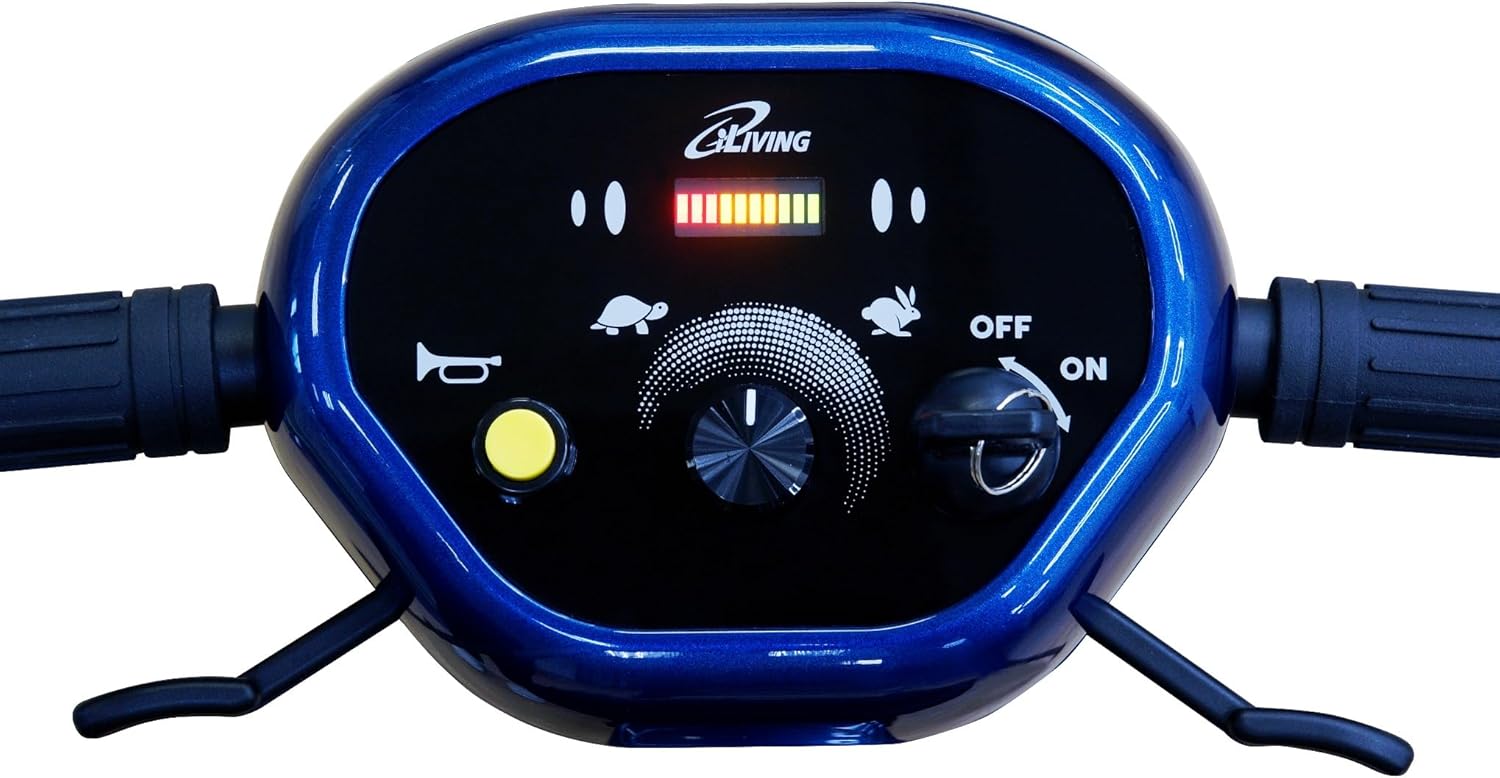
Image: The control panel of the iLiving V8 scooter, showing the speed adjustment dial, battery level indicator, and horn button.
Driving the Scooter
- Ensure the scooter is fully unfolded and the seat and tiller are locked.
- Turn the key to the ON position.
- Adjust the speed dial to your desired setting.
- Gently press the throttle lever to move forward or backward. Release the lever to stop.
- Steer by turning the tiller. The Electronic Stability Control will assist in safe turning.
Folding the Scooter for Transport
To fold the scooter for transport or storage:
- Ensure the scooter is powered off.
- Lower the seat and tiller if they were extended.
- Locate and pull the red lever near the rear wheel assembly to release the lock.
- Gently fold the scooter until it is compact. It will lock into the folded position.

Image: The iLiving V8 scooter shown in its compact, folded configuration, ready for transport or storage.
USB Charging Port
The scooter is equipped with a USB port to charge your mobile devices. Simply plug your device's USB cable into the port located near the main charging port.
Maintenance
- Cleaning: Wipe down the scooter with a damp cloth. Avoid using harsh chemicals or excessive water.
- Battery Care: Charge batteries regularly, even if the scooter is not in frequent use, to prolong their lifespan. Store the scooter in a cool, dry place.
- Tires: The scooter features solid tires, eliminating the need for inflation. Periodically check for wear and tear.
- General Inspection: Regularly check all nuts, bolts, and moving parts for tightness and proper function.
Troubleshooting
| Problem | Possible Cause | Solution |
|---|---|---|
| Scooter does not power on. | Battery not charged, key not in ON position, loose battery connection. | Charge the battery, ensure key is ON, check battery connections. |
| Scooter moves slowly or loses power quickly. | Low battery charge, old battery, operating on an incline. | Fully charge the battery. Consider battery replacement if issues persist. Avoid prolonged use on steep inclines. |
| Unusual noises during operation. | Loose components, foreign object caught in wheels. | Inspect the scooter for loose parts or obstructions. Tighten any loose fasteners. |
| Steering column feels loose. | Locking mechanism not fully engaged or worn part. | Ensure the tiller locking mechanism is fully engaged. Contact customer support if a part is worn. |
| Electronic Stability Control engages frequently. | Aggressive turning, operating on uneven surfaces. | Practice smoother turns. Avoid very uneven terrain. |
| Scooter does not fold/unfold easily. | Locking mechanism obstructed or stiff. | Ensure no obstructions. Apply a small amount of lubricant to hinges if stiff. |
Specifications
- Model: V8
- Brand: iLiving
- Product Dimensions (Unfolded): 40.4"D x 20.5"W x 33.2"H
- Product Dimensions (Folded): 20 x 19 x 32 inches (approximate)
- Item Weight: 40 Pounds (including batteries)
- Weight Capacity: 275 lbs
- Batteries: 2 Lithium Ion batteries (included)
- Range: Up to 15 miles on a single charge
- Motor: 140W
- Special Features: Electronic Stability Control, USB Charging Port, Airline Friendly (UN38.3 certified batteries)

Image: Dimensional diagram of the iLiving V8 mobility scooter, illustrating its size when unfolded and compactly folded.
Official Product Videos
iLiving V8 Foldable Electric Mobility Scooter Overview
Video: This official product video from Dr. Heater USA (iLiving's parent company) provides a comprehensive overview of the iLiving V8 Foldable Electric Mobility Scooter, demonstrating its features, portability, and ease of use in various settings.
Warranty and Support
For warranty information, customer support, or to purchase replacement parts, please contact iLiving USA directly. Refer to the product packaging or the official iLiving website for the most current contact details.
The product is sold by iLIVING USA, which also provides customer support.
Related documentsV8


Ask a question about this manual
Ask about setup, troubleshooting, compatibility, parts, safety, or missing instructions. Manuals+ will review the question and use this page’s manual context to help answer it.