
1. Introduction
This manual provides detailed instructions for the safe and effective use of your IREENUO HL-3050 Aquarium LED Light. Please read this manual thoroughly before installation and operation, and retain it for future reference. This product is designed to provide optimal lighting conditions for aquatic plants, reef corals, and fish in freshwater and saltwater aquariums.
Safety Information
- WARNING: This aquarium light is NOT waterproof. Do not immerse it in water or allow it to come into contact with water.
- Ensure the power supply is disconnected before performing any maintenance or installation.
- Keep the light and its components away from children and pets.
- Use only the provided power adapter.
- Do not attempt to disassemble or modify the light fixture.
- Ensure proper ventilation around the light to prevent overheating.
2. Package Contents
Verify that all items are present in the package:
- IREENUO HL-3050 Aquarium LED Light Fixture (16W, 20.4 inch)
- Adjustable Mounting Bracket
- Wireless IR Remote Control (1 CR2032 battery included)
- Power Adapter
- User Manual (this document)
3. Product Features
- Full Spectrum Lighting: Provides a balanced light spectrum suitable for aquatic plants, reef corals, and enhancing fish coloration.
- 24-Hour Automatic Sunlight Cycle Mode: Simulates natural sunrise, daylight, and sunset.
- 4 Weather Effect Modes: Includes Cloudy, Thunder, Sunny, and Moon modes for varied ambiance.
- Custom Color Mode: Allows manual adjustment of Red, Green, and Blue (RGB) light intensity.
- Adjustable Clip-on Design: Fits aquarium walls up to 0.9 inches (2.3 cm) thick.
- Flexible Light Neck: Allows for bending and positioning the light at different angles.
- Energy Efficient: Low power consumption LED design.
4. Setup Instructions
Follow these steps to install your aquarium LED light:
- Unpack Components: Carefully remove all items from the packaging.
- Attach Mounting Bracket: Secure the adjustable mounting bracket to the light fixture.
- Mount to Aquarium: Position the clip-on bracket onto the edge of your aquarium. Tighten the screw until the light is securely fastened. Ensure the aquarium wall thickness does not exceed 0.9 inches (2.3 cm).
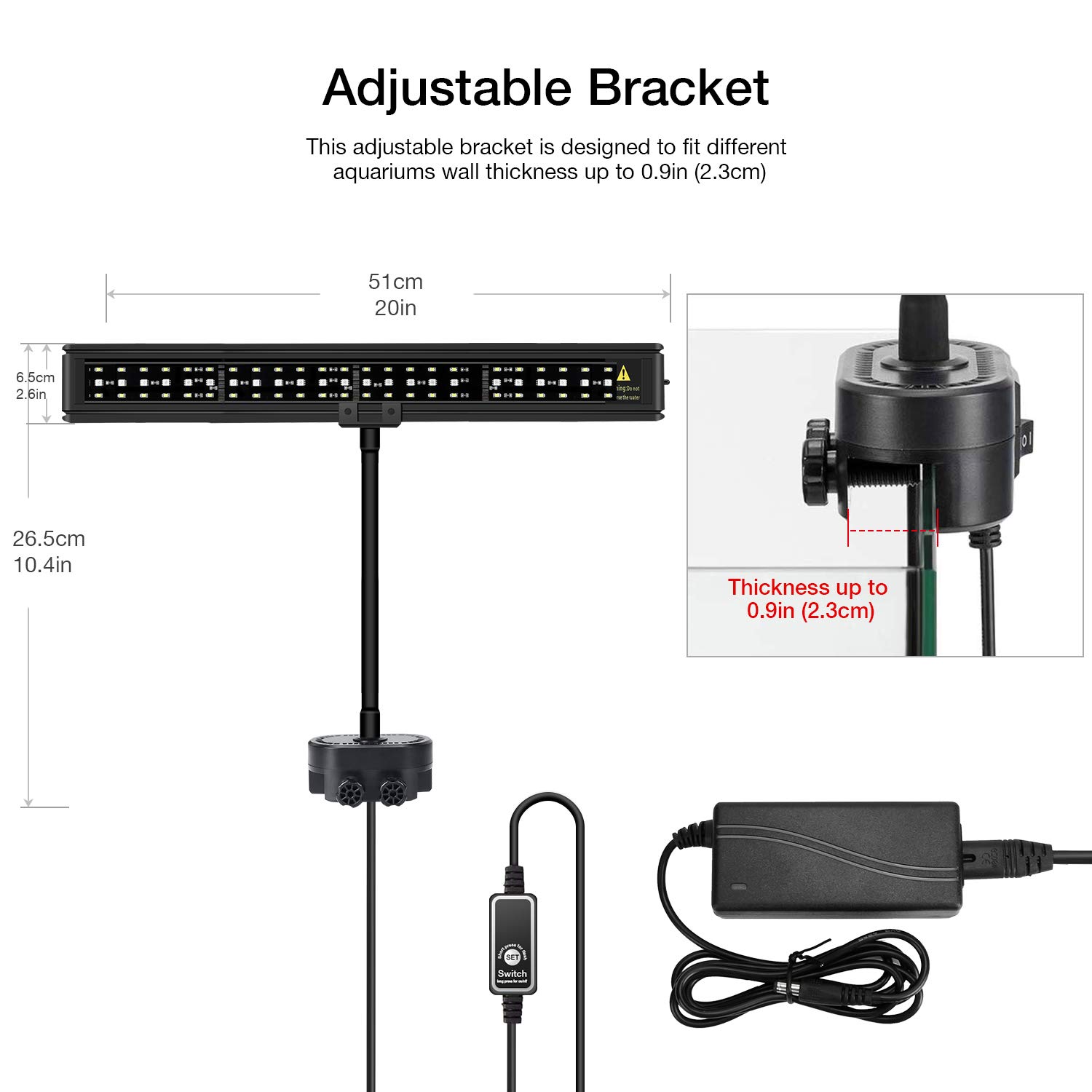
Image 4.1: Adjustable bracket installation. The bracket can accommodate aquarium glass up to 0.9 inches (2.3 cm) thick.
- Adjust Light Position: Utilize the flexible light neck to bend and position the light fixture over your aquarium at the desired angle and height.

Image 4.2: Flexible light neck allows for various positioning options.
- Connect Power: Plug the power adapter into the light fixture's control unit, then plug the adapter into a suitable power outlet.
5. Operating Instructions
The IREENUO HL-3050 Aquarium LED Light is controlled using the included wireless IR remote.

Image 5.1: Wireless IR Remote Control Layout.
Remote Control Functions:
- Power Button: Turns the light ON or OFF.
- MAX Button: Sets all LEDs to their brightest setting.
- 24/7 Button: Activates the 24-hour automatic sunlight cycle mode. This mode simulates natural light changes throughout the day.
- DEMO Button: Demonstrates the 24-hour cycle of natural light changes at an accelerated pace.
- Weather Effect Modes (Cloudy, Thunder, Sunny, Moon): Select one of these buttons to activate the corresponding weather lighting effect.
- Manual Color Adjustment (R, G, B buttons with Up/Down arrows): Use these buttons to increase or decrease the intensity of Red, Green, or Blue light, allowing for custom color settings.
- Memory Keys (M1, M2, M3, M4): Store and recall your custom color settings.
Understanding the 24/7 Automatic Sunlight Cycle
The 24/7 mode simulates a natural day-night cycle, gradually changing light intensity and color temperature to mimic sunrise, daylight, and sunset. This promotes a healthier environment for your aquarium inhabitants.

Image 5.2: Visual representation of the 24/7 automatic light cycle throughout a day.
Weather Effect Modes
Choose from four distinct weather effects to create different moods and environments in your aquarium:
- Cloudy: Simulates an overcast day.
- Thunder: Creates a dynamic lightning effect.
- Sunny: Bright, full-spectrum light.
- Moon: Gentle blue light for nighttime viewing.

Image 5.3: Examples of the Cloudy, Thunder, Sunny, and Moon weather effects.
6. Maintenance
Regular maintenance ensures the longevity and optimal performance of your IREENUO Aquarium LED Light.
- Cleaning: Disconnect the power before cleaning. Use a soft, dry cloth to wipe the light fixture. Do not use abrasive cleaners or immerse the light in water.
- Inspection: Periodically check the power cord and adapter for any signs of damage. If damage is found, discontinue use and contact support.
- Remote Battery: The remote control uses one CR2032 battery. Replace it when the remote's range or responsiveness decreases.
Important Note: This aquarium light is not waterproof. Ensure it remains dry at all times to prevent damage and electrical hazards.
7. Troubleshooting
If you encounter issues with your IREENUO Aquarium LED Light, refer to the following common problems and solutions:
| Problem | Possible Cause | Solution |
|---|---|---|
| Light does not turn on. | No power supply; faulty connection; remote battery depleted. | Check power adapter connection. Ensure outlet is functional. Replace remote battery. |
| Remote control is unresponsive. | Remote battery depleted; obstruction between remote and light sensor. | Replace remote battery. Ensure direct line of sight to the light's IR receiver. |
| Light flickers or dims unexpectedly. | Unstable power supply; loose connection. | Ensure power adapter is securely connected. Try a different power outlet. |
| Specific color mode not working. | Incorrect remote input; temporary software glitch. | Re-select the desired mode. Power cycle the light (unplug and replug). |
If the problem persists after attempting these solutions, please contact IREENUO customer support for further assistance.
8. Specifications
| Model Number | HL-3050 |
| Power (Wattage) | 16 Watts |
| Voltage | 12 Volts |
| Light Output | 1280 Lumens (Maximum) |
| Dimensions (L x W x H) | 50.8 cm x 6.5 cm x 1 cm (20.4 inch x 2.6 inch x 0.4 inch) |
| Item Weight | 454 g |
| Material | Plastic |
| Light Source Type | LED |
| Power Source | Corded Electric |
| Remote Battery | 1 x CR2032 (included) |
| Max Aquarium Wall Thickness | 0.9 inches (2.3 cm) |
| UPC | 745302295128 |
9. Warranty Information
IREENUO products are manufactured to high-quality standards. This product comes with a limited warranty against defects in materials and workmanship. The specific terms and duration of the warranty may vary by region. Please retain your proof of purchase for warranty claims. For detailed warranty information, refer to the warranty card included with your product or visit the official IREENUO website.
10. Customer Support
If you have any questions, require technical assistance, or need to report an issue with your IREENUO HL-3050 Aquarium LED Light, please contact our customer support team. Contact information can typically be found on the product packaging, our official website, or your purchase receipt.
We are committed to providing excellent service and support for our products.