
1. Introduction
This manual provides detailed instructions for the setup, operation, and maintenance of your Benro A2573F Aluminum Single Tube Tripod with S4Pro Fluid Video Head. This versatile system is designed to support camera loads up to 8.8 lb (4 kg) and offers a compact, lightweight solution for stable video capture.
The S4Pro fluid head features a 60mm flat base with a 3/8"-16 threaded hole, allowing it to be used independently on sliders, jibs, or other support equipment. Its advanced features include a 1-2 step counterbalance system, fixed pan and tilt drag, and independent pan and tilt locks, providing smooth and precise camera movements.
2. Safety Information
- Always ensure all locks and adjustments are securely tightened before mounting equipment or leaving the tripod unattended.
- Do not exceed the maximum payload capacity of 8.8 lb (4 kg) to prevent damage to the tripod or attached equipment.
- Be cautious when extending or collapsing the tripod legs to avoid pinching fingers.
- Avoid exposing the tripod to extreme temperatures, direct sunlight for prolonged periods, or corrosive substances.
- Clean the tripod regularly as described in the Maintenance section to ensure optimal performance and longevity.
- When carrying the tripod, ensure the legs are fully collapsed and secured, and use the provided carry case for protection.
3. What's in the Box
Upon unpacking your Benro A2573F Tripod System, please verify that all the following components are present:
- Benro A2573F Aluminum Single Tube Tripod Legs
- Benro S4Pro Fluid Video Head (pre-attached to tripod legs)
- Quick Release Plate
- Pan Handle
- Carry Case
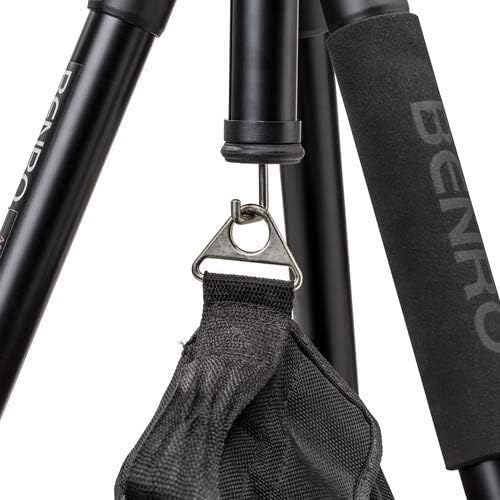
Figure 3.1: The included carry case for convenient transport and protection.
4. Setup
Follow these steps to set up your Benro A2573F Tripod System:
- Unpack the Tripod: Remove the tripod from its carry case. The legs will be folded upwards for compact storage.
- Extend the Legs: Release the leg locks on each section and extend the legs to your desired height. Securely fasten the leg locks. The tripod features two stages for height adjustment.
- Adjust Leg Angles: Each leg has an independent angle adjustment mechanism. Press the angle lock release button near the top of each leg to select one of the three available leg positions (standard, wide, or low-angle). Ensure all legs are set to the same angle for stability.
- Level the Tripod: Use the integrated leveling adapter to ensure the fluid head is perfectly level, even on uneven terrain. Adjust the adapter until the bubble level (if present on your model) indicates a level position.
- Attach the Pan Handle: Screw the pan handle into the designated port on the S4Pro fluid head. Tighten it securely.
- Mount Your Camera: Attach your camera to the quick release plate. Slide the quick release plate with your camera into the receiver on the S4Pro fluid head until it clicks into place. Ensure the safety lock is engaged.

Figure 4.1: Benro A2573F Tripod with legs fully extended.
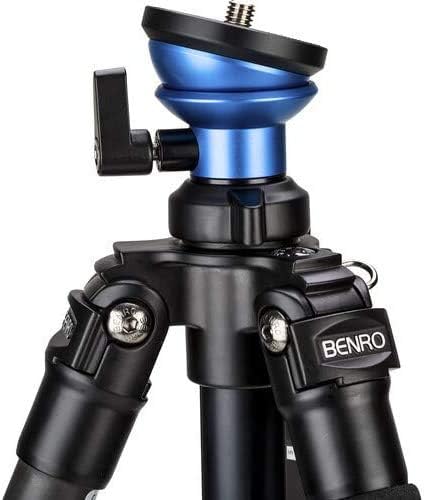
Figure 4.2: Close-up of the leg angle adjustment mechanism.

Figure 4.3: The S4Pro fluid head with the pan handle attached.
5. Operating
Understanding the features of your S4Pro fluid head is key to smooth operation:
- Counterbalance System: The S4Pro head offers 1-2 steps of counterbalance. Natively, it is set at 1 step. To add an additional step (total 2 steps), press the blue 'Engage' button. To return to 1 step, press the red 'Release' switch. Note that there is no zero setting.
- Pan and Tilt Locks: The head features independent locks for both pan and tilt movements. Tighten these knobs to secure the camera in a fixed position. Loosen them for smooth, fluid motion. The pan range is a full 360°, and the tilt range is +90° to -75°.
- Fixed Pan and Tilt Drag: The S4Pro head has fixed drag settings for both pan and tilt, providing consistent resistance for smooth camera movements.
- Height Adjustment: Adjust the height of the tripod by extending or retracting the leg sections and securing the leg locks. The tripod can be adjusted from a low-angle of 16.3 inches to a maximum height of 70 inches (177 cm).
- Weight Hook: A retractable hook is located at the bottom of the center column. You can hang a weight (e.g., a camera bag) from this hook to increase the tripod's stability, especially in windy conditions or when using heavy lenses.

Figure 5.1: Close-up of the counterbalance 'Engage' (blue) and 'Release' (red) buttons.

Figure 5.2: The weight hook located at the base of the center column.
6. Maintenance
Proper maintenance will extend the life and performance of your Benro tripod:
- Cleaning: After each use, especially in dusty or sandy environments, wipe down the tripod legs and head with a soft, dry cloth. For stubborn dirt, use a slightly damp cloth and then dry thoroughly.
- Lubrication: The fluid head is factory-lubricated and generally does not require additional lubrication. Do not attempt to disassemble the fluid head for lubrication.
- Storage: Store the tripod in its carry case in a cool, dry place, away from direct sunlight and extreme temperatures. Ensure all leg sections are fully retracted and locks are loose to prevent pressure on internal components.
- Inspection: Periodically inspect all screws, bolts, and moving parts for tightness. Do not overtighten.
7. Troubleshooting
If you encounter issues with your Benro A2573F Tripod, refer to the following common problems and solutions:
| Problem | Possible Cause | Solution |
|---|---|---|
| Tripod is unstable or wobbly. | Leg locks not fully tightened; legs not extended evenly; uneven ground; weight not centered. | Ensure all leg locks are secure. Extend legs evenly. Use the leveling adapter. Distribute camera weight centrally. Consider using the weight hook. |
| Pan or tilt movement is not smooth. | Pan/tilt locks are engaged; dirt or debris in the head mechanism. | Ensure pan and tilt locks are fully disengaged. Clean the head exterior. Do not attempt to lubricate internal mechanisms. |
| Quick release plate is stuck or difficult to remove/insert. | Safety lock engaged; plate not aligned correctly; debris in the receiver. | Ensure the safety lock is disengaged. Align the plate correctly with the receiver. Clean any debris from the receiver slot. |
| Counterbalance not functioning as expected. | Incorrect button press; camera weight outside optimal range. | Ensure you are pressing the correct 'Engage' or 'Release' button. Verify your camera setup is within the 8.8 lb (4 kg) payload limit. |
8. Specifications
Key technical specifications for the Benro A2573F Aluminum Single Tube Tripod with S4Pro Fluid Video Head:
| Feature | Specification |
|---|---|
| Model Name | Benro A2573FS4PRO Video Tripod |
| Material | Aluminum |
| Maximum Height | 70 inches (177 cm) |
| Minimum Height | 16.3 inches |
| Folded Length | 33.6 inches |
| Item Weight | 6.71 pounds (3.05 kg) |
| Weight Limit (Payload) | 8.8 lb (4 kg) |
| Tripod Head Type | S4Pro Fluid Video Head |
| Head Base | 60mm Flat Base with 3/8"-16 Thread |
| Counterbalance | 1-2 Steps |
| Pan Range | 360° |
| Tilt Range | +90° / -75° |
| Leg Sections | 2 Stages |
| Compatible Devices | Camera |
9. Warranty and Support
For warranty information and technical support, please refer to the official Benro website or contact Benro customer service directly. Keep your purchase receipt as proof of purchase for any warranty claims.
You can visit the Benro store on Amazon for more product information: Benro Store