1. Introduction
Thank you for choosing the HOOBRO Computer Desk BF60DN01. This manual provides detailed instructions for the assembly, operation, maintenance, and troubleshooting of your new 55.1-inch writing desk. Please read this manual thoroughly before assembly and retain it for future reference to ensure proper use and longevity of your product.
2. Safety Information
Adhering to these safety guidelines is crucial for preventing injury and damage to the product.
- Always assemble the desk strictly according to the provided instructions.
- Ensure the desk is placed on a level surface to prevent instability.
- Properly anchor the desk if necessary, especially when placing heavy equipment like monitors or multiple devices, to prevent tipping.
- Do not place excessively heavy objects on the edges of the desk or shelves to maintain stability and prevent structural damage.
- Keep small parts and packaging materials away from children to avoid choking hazards.
3. Package Contents
Before beginning assembly, verify that all components listed below are present and undamaged. If any parts are missing or damaged, please contact customer support.
- Desktop Panel (1)
- Main Frame Components (Metal Legs and Support Bars)
- Adjustable Shelf Panels (2)
- Shelf Support Frame Components
- Assembly Hardware (Screws, Allen Wrench, etc.)
- Instruction Manual (This document)
4. Setup and Assembly Instructions
Follow these steps carefully for a smooth assembly process. It is recommended to have a second person assist with certain steps.
- Unpack and Identify Parts: Lay out all components on a clean, soft surface to prevent scratches. Identify each part using the labels and the parts list in your included assembly guide.
- Assemble the Main Frame: Connect the metal legs and support bars as indicated in the step-by-step diagrams. Ensure all screws are finger-tightened initially.
- Attach the Desktop: Carefully place the desktop panel onto the assembled frame. Align the pre-drilled holes and secure the desktop using the provided screws. Fully tighten all screws on the main frame and desktop.
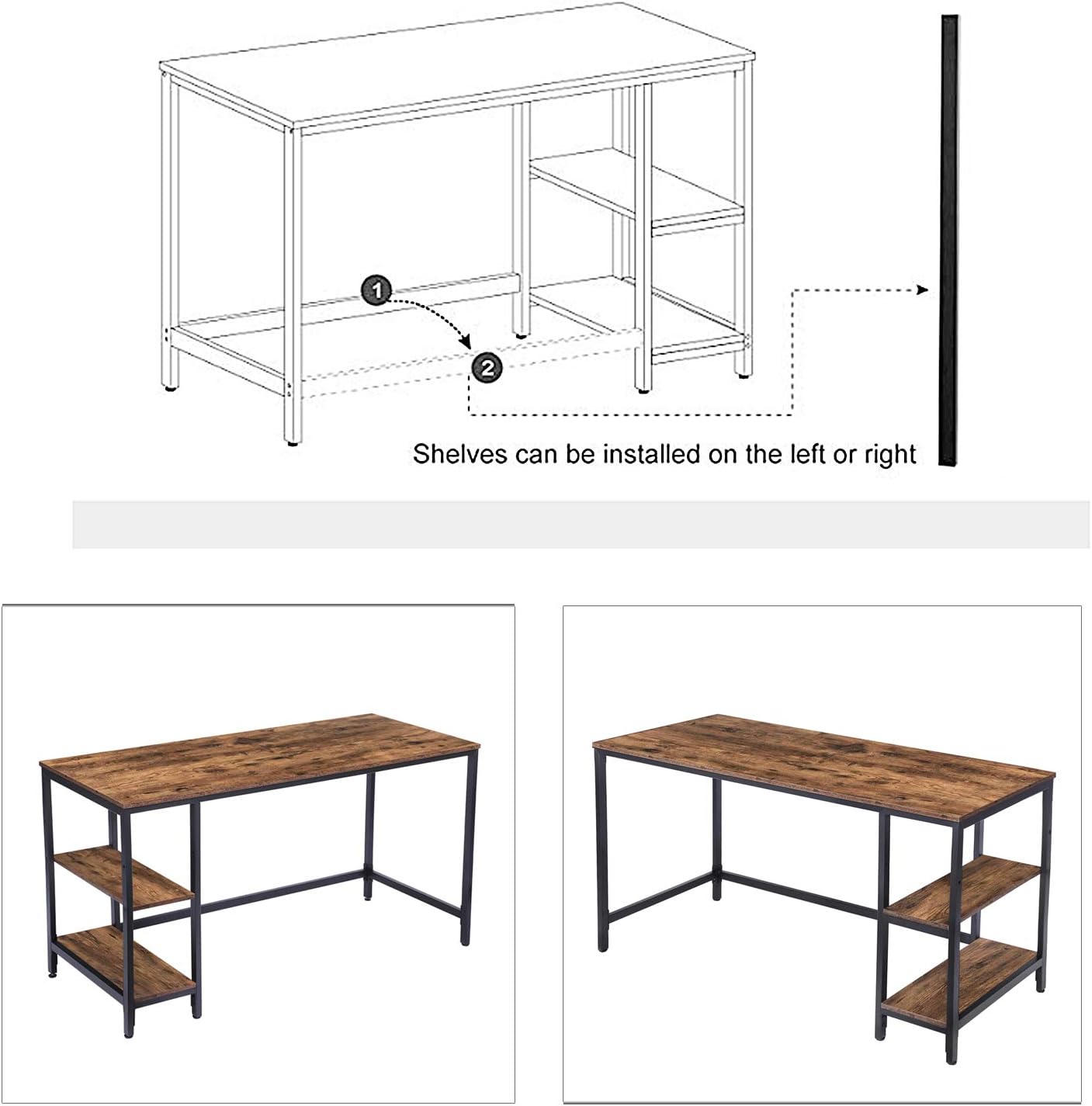
- Assemble the Adjustable Shelf Unit: The shelf unit can be installed on either the left or right side of the desk. Assemble the shelf support frame according to your preferred orientation.
- Install Shelf Panels: Insert the adjustable shelf panels into the designated slots on the shelf support frame. The shelf height can be adjusted to two different positions to accommodate various items, such as a computer tower or books.


5. Operating Instructions
The HOOBRO Computer Desk BF60DN01 is designed for versatile use in home and office environments.
- Placement: Position the desk on a flat, stable surface. Avoid placing it in direct sunlight or near heat sources to prevent material degradation.
- Weight Distribution: Distribute weight evenly across the desktop. Avoid concentrating heavy items in one area, especially near the edges. The adjustable shelves are suitable for books, computer towers, and other office essentials.
- Cable Management: Utilize the open design to manage cables effectively, keeping your workspace tidy and safe.


6. Maintenance
Regular maintenance will help preserve the appearance and structural integrity of your desk.
- Cleaning: Wipe surfaces with a soft, damp cloth. Avoid harsh chemicals or abrasive cleaners that could damage the finish. For stubborn marks, a mild soap solution can be used, followed by drying with a clean cloth.
- Hardware Check: Periodically check all screws and fasteners to ensure they remain tight. Re-tighten if necessary to maintain stability.
- Spills: Clean up spills immediately to prevent moisture damage to the desktop material.
7. Troubleshooting
If you encounter issues with your HOOBRO Computer Desk, refer to the following common solutions.
- Desk Wobbles:
- Ensure all screws are fully tightened.
- Verify the desk is on a level surface. Adjust floor glides if present, or use shims if needed.
- Difficulty Assembling:
- Review the assembly instructions carefully, paying close attention to part orientation.
- Do not overtighten screws until all parts are loosely fitted, then tighten gradually.
- If holes do not align, gently adjust the frame components. Avoid forcing parts together.
- Missing or Damaged Parts: If you discover any missing or damaged components upon unpacking, do not proceed with assembly. Contact HOOBRO customer support immediately for assistance.
8. Specifications
| Feature | Detail |
|---|---|
| Model Number | BF60DN01 |
| Dimensions (D x W x H) | 23.6"D x 55.1"W x 30.1"H |
| Material | Engineered Wood (Desktop), Metal (Frame) |
| Color | Rustic Brown (Desktop), Black (Frame) |
| Special Feature | Adjustable Shelf (Left or Right Installation, 2 Height Options) |
| Number of Shelves | 3 (2 adjustable shelves, 1 fixed bottom shelf) |
| Assembly Required | Yes |
9. Warranty Information
The HOOBRO Computer Desk BF60DN01 comes with a limited warranty. For specific details regarding warranty coverage, terms, and conditions, please refer to the warranty card included with your product or contact HOOBRO customer support directly. This warranty typically covers manufacturing defects under normal use.
10. Customer Support
For any questions, concerns, or assistance with your HOOBRO Computer Desk BF60DN01, please contact our customer support team. When contacting support, please have your model number (BF60DN01) and purchase information readily available.
Contact Information:
- Refer to the contact details provided in your product packaging or on the official HOOBRO website.


