
1. Introduction and Overview
This manual provides essential information for the safe and efficient use of your Indesit IFVR 800 H AV Electric Ventilated Oven. Please read these instructions carefully before installation, first use, and maintenance. Keep this manual for future reference.
The Indesit IFVR 800 H AV is a built-in electric ventilated oven with a capacity of 65 liters, designed for domestic use. It features an energy efficiency class A rating.
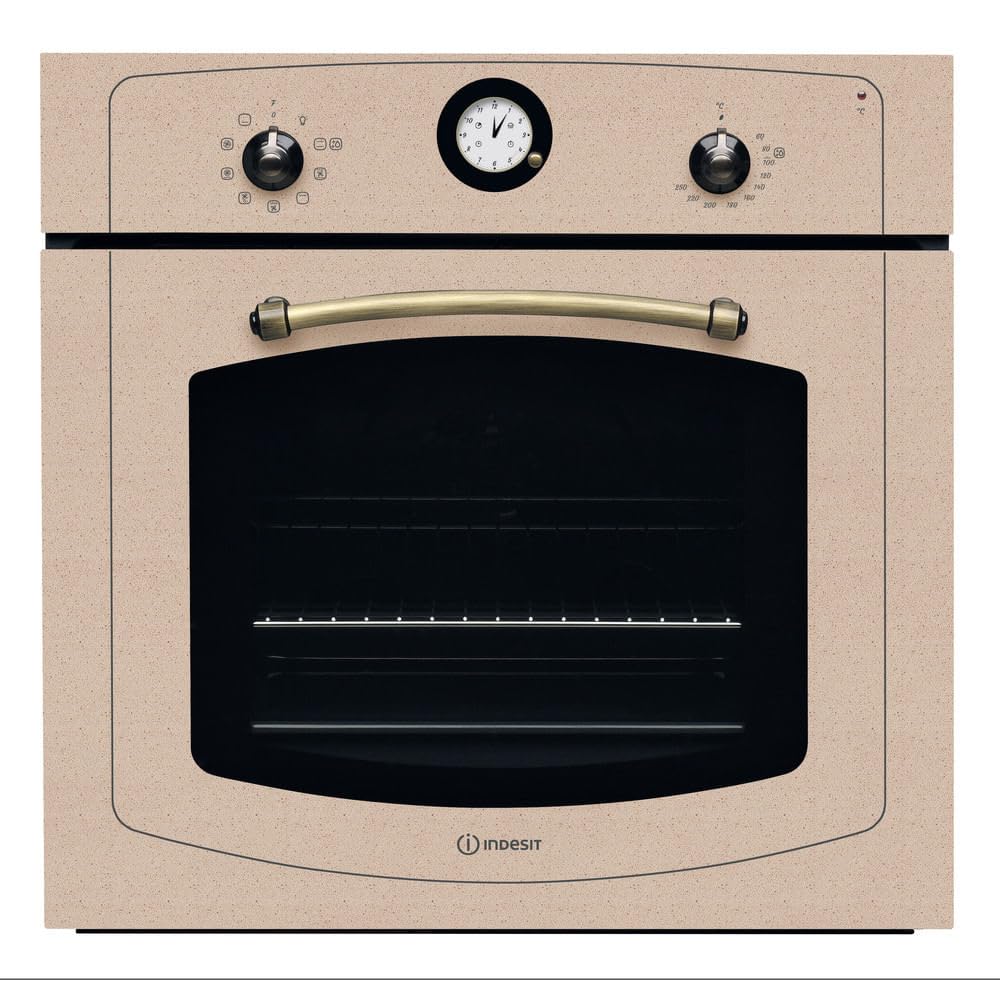
Image: The Indesit IFVR 800 H AV oven, showcasing its beige finish and integrated design within a kitchen environment.
2. Safety Information
- Electrical Safety: Ensure the oven is correctly installed by a qualified electrician in accordance with local regulations. Do not use adapters, multiple sockets, or extension leads.
- Hot Surfaces: The oven and its accessible parts become hot during use. Exercise caution to avoid touching heating elements. Keep children away.
- Child Safety Lock: This oven is equipped with an electronic child lock system. Refer to the operating instructions for activation and deactivation.
- Ventilation: Ensure adequate ventilation around the appliance as specified in the installation instructions.
- Cleaning: Always disconnect the appliance from the power supply before performing any cleaning or maintenance.
- Intended Use: This appliance is intended for domestic use only for cooking food. Do not use it for other purposes, such as heating rooms.
3. Installation
The Indesit IFVR 800 H AV oven is designed for built-in installation. Proper installation is crucial for safe and efficient operation. It is strongly recommended that installation be performed by a qualified technician.
3.1. Electrical Connection
Before connecting the appliance, ensure that the mains voltage corresponds to the value indicated on the rating plate located on the oven. The electrical system must be earthed in conformity with current regulations. For specific electrical requirements, consult the product label and a qualified electrician.
3.2. Dimensions and Cabinet Requirements
Refer to the installation diagram for precise dimensions and clearances required for cabinet integration. Ensure sufficient space for ventilation and access for maintenance.

Image: Detailed technical drawing showing the dimensions and required cabinet cut-outs for installing the Indesit IFVR 800 H AV oven.
4. Setup
4.1. Initial Cleaning
Before first use, clean the oven interior and accessories with warm water and a mild detergent. Rinse thoroughly and dry. Do not use abrasive cleaners.
4.2. First Heating Cycle
To eliminate any manufacturing odors, heat the empty oven for approximately 30 minutes at maximum temperature. Ensure the kitchen is well-ventilated during this process.
5. Operating Instructions
The Indesit IFVR 800 H AV oven features a user-friendly control panel for selecting cooking functions and temperature.

Image: A detailed view of the oven's control panel, showing the function selector knob, analog clock, and temperature control knob.
5.1. Control Panel Overview
- Function Selector Knob: Located on the left, this knob allows you to choose from the available cooking programs.
- Analog Clock: Central display for time. Note that a timer function for cooking duration is not available on this model.
- Temperature Control Knob: Located on the right, this knob sets the desired cooking temperature in degrees Celsius.
5.2. Basic Operation
- Turn On: Rotate the function selector knob to the desired cooking program.
- Set Temperature: Rotate the temperature control knob to the required temperature.
- Preheating: Allow the oven to preheat to the set temperature before placing food inside for optimal results.
- Turn Off: Once cooking is complete, turn both knobs back to the 'off' position.
5.3. Cooking Programs
This oven offers 5 cooking programs, including a ventilated (convection) heating method. The specific symbols for each program are indicated around the function selector knob. Consult the symbols on the control panel for detailed program selection.
6. Cleaning and Maintenance
Regular cleaning and maintenance ensure the longevity and optimal performance of your oven. Always ensure the oven is cool and disconnected from the power supply before cleaning.
6.1. Exterior Cleaning
Clean the exterior surfaces, including the stainless steel components, with a soft cloth dampened with warm water and a mild detergent. Avoid abrasive cleaners or scouring pads that can scratch the finish.
6.2. Interior Cleaning
For the oven interior, use specialized oven cleaners or a solution of warm water and mild detergent. Follow the product instructions for oven cleaners. Remove racks and accessories for separate cleaning.
6.3. Door Maintenance
The oven door is reversible. For cleaning the inner glass, consult a qualified technician if disassembly is required.
7. Troubleshooting
If you encounter issues with your oven, refer to the following common troubleshooting steps before contacting customer support.
- Oven not heating: Check if the oven is properly plugged in and if the circuit breaker has tripped. Ensure both the function and temperature knobs are set correctly.
- Uneven cooking: Ensure food is placed centrally in the oven. Avoid overcrowding the oven, which can obstruct airflow.
- Smoke or odors during first use: This is normal during the initial heating cycle as manufacturing residues burn off. Ensure good ventilation.
If the problem persists after attempting these solutions, contact Indesit customer support or a qualified service technician.
8. Specifications
| Feature | Specification |
|---|---|
| Brand | Indesit |
| Model | IFVR 800 H AV |
| Type | Electric Ventilated Oven |
| Installation Type | Built-in |
| Capacity | 65 Liters |
| Energy Class | A |
| Heating Method | Convection |
| Number of Programs | 5 |
| Timer Function | Not available |
| Child Lock | Electronic system |
| Color | Beige (Avena) |
| Material | Stainless Steel |
| Weight | 24 Kilograms |

Image: Energy efficiency label indicating Class A rating for the oven.
9. Warranty and Support
9.1. Product Warranty
This Indesit oven comes with a 2-year product warranty. Please retain your proof of purchase for warranty claims.
9.2. Customer Support
For technical assistance, spare parts, or warranty service, please contact Indesit customer support. You can find contact information on the official Indesit website or through your retailer.
For more information about Indesit products, visit the Indesit Store.


