
1. Introduction
The Caline CP-81 10 Band EQ Guitar Effect Pedal V3.0 is a versatile equalizer designed to fine-tune the tone of your guitar or other instruments. It features ten adjustable frequency bands and an additional volume control, allowing for precise sound shaping. This pedal incorporates a true bypass design to ensure your signal remains unaffected when the pedal is disengaged.
2. Safety Information
- Power Supply: This pedal requires a 9V DC power supply with a center-negative polarity and a minimum current rating of 500mA. Using an incorrect power supply can damage the unit and void the warranty. The power supply is not included with the pedal.
- Environment: Do not expose the pedal to extreme temperatures, humidity, water, or direct sunlight.
- Handling: Handle the pedal with care. Avoid dropping or subjecting it to strong impacts.
- Modifications: Do not attempt to open or modify the pedal. Unauthorized modifications can lead to malfunction and void the warranty.
3. Package Contents
The Caline CP-81 10 Band EQ Guitar Effect Pedal V3.0 package typically includes:
- Caline CP-81 10 Band EQ Guitar Effect Pedal V3.0
- Instruction Manual (this document)
Note: A 9V DC center-negative, 500mA power supply is required and sold separately.
4. Setup
Follow these steps to set up your Caline CP-81 pedal:
- Power Connection: Connect a 9V DC center-negative power supply (minimum 500mA) to the 'DC 9V' input jack on the pedal. Ensure the power supply meets the specified requirements.
- Input Connection: Connect your instrument (e.g., guitar) to the 'IN' jack on the right side of the pedal using a standard 1/4-inch instrument cable.
- Output Connection: Connect the 'OUT1' or 'OUT2' jack to your amplifier or the next pedal in your signal chain using a standard 1/4-inch instrument cable. The pedal offers two output jacks for versatile routing options.

Figure 1: Top view of the Caline CP-81 pedal showing input, output, and power connections.

Figure 2: Bottom view of the Caline CP-81 pedal, indicating power requirements (9V DC, center negative).
5. Operating Instructions
The Caline CP-81 features ten frequency band sliders and a dedicated volume slider for precise tonal control.
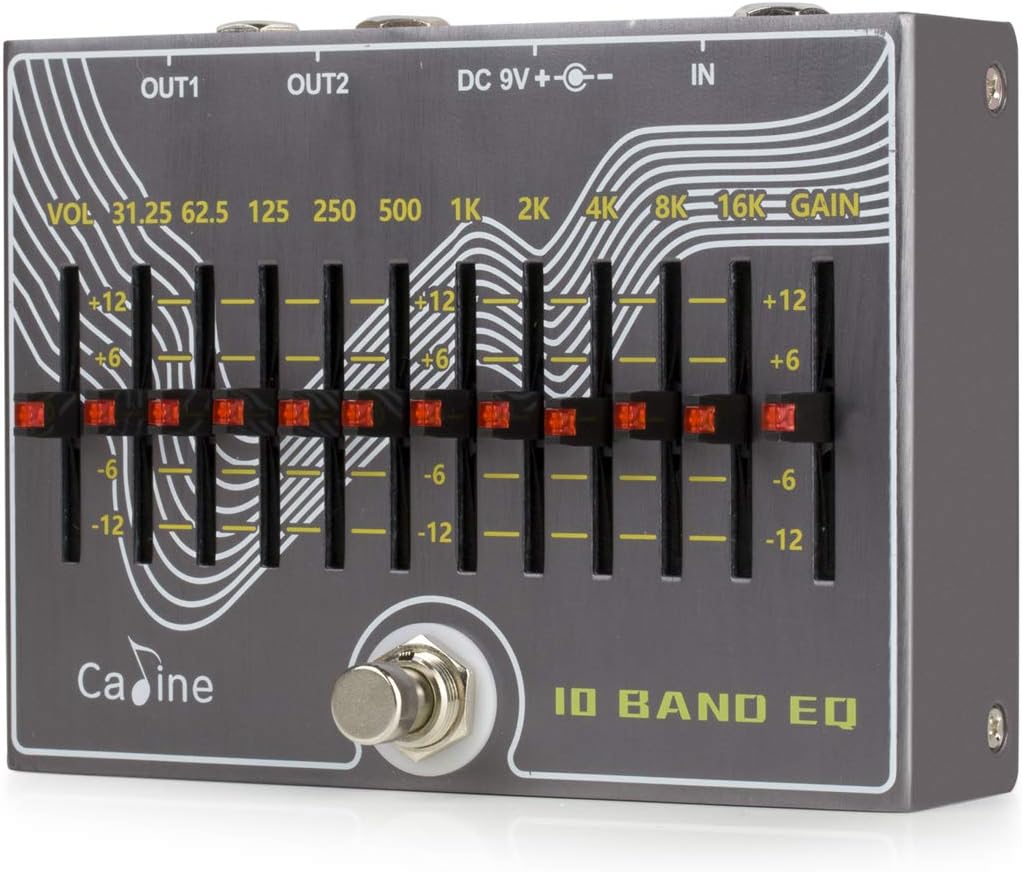
Figure 3: Close-up of the EQ sliders and their corresponding frequency labels.
- Footswitch: Press the footswitch to engage or bypass the effect. When engaged, the pedal's EQ and volume settings are active. When bypassed, the signal passes through unaffected (true bypass).
- Frequency Sliders: The ten sliders control specific frequency bands: 31.25Hz, 62.5Hz, 125Hz, 250Hz, 500Hz, 1kHz, 2kHz, 4kHz, 8kHz, and 16kHz. Moving a slider up boosts that frequency band, while moving it down cuts it. Each slider offers a range of +/-12dB.
- Volume Slider (VOL): This slider controls the overall output volume of the pedal. Adjust it to match the desired level with your bypassed signal or to provide a volume boost/cut when the effect is active.
Experiment with different slider positions to achieve your desired tone. For example, boosting lower frequencies (31.25Hz - 250Hz) can add warmth and body, while boosting higher frequencies (8kHz - 16kHz) can add clarity and presence.
6. Maintenance
- Cleaning: Use a soft, dry cloth to clean the pedal's exterior. Do not use abrasive cleaners or solvents.
- Storage: When not in use for extended periods, store the pedal in a dry, cool place away from direct sunlight.
- Connections: Periodically check all cable connections for wear and tear. Ensure jacks are free of dust and debris.
7. Troubleshooting
| Problem | Possible Cause | Solution |
|---|---|---|
| Pedal does not power on / lights blink | Incorrect or insufficient power supply. | Ensure you are using a 9V DC, center-negative power supply with a minimum of 500mA. Verify the power adapter is functioning correctly. |
| No sound when pedal is engaged | Incorrect cable connections; faulty cables; volume slider set to minimum. | Check all instrument cable connections. Test cables with another device. Ensure the 'VOL' slider is not at its lowest setting. |
| Excessive noise or hiss | Power supply issues; ground loop; pedal version sensitivity. | Verify power supply stability and current. Try a different power outlet or isolated power supply. Some earlier versions (V2.1) may be sensitive to exact 9V DC; ensure power is stable. Contact Caline support if issues persist with V3.0. |
| Sound is distorted or unclear | Input signal too hot; extreme EQ settings. | Reduce the output level of the preceding instrument or pedal. Adjust EQ sliders to less extreme positions. |
8. Specifications
- Model: CP-81
- Power Requirement: 9V DC center negative, 500mA (Power supply not included)
- Frequency Bands: 31.25Hz, 62.5Hz, 125Hz, 250Hz, 500Hz, 1kHz, 2kHz, 4kHz, 8kHz, 16kHz
- EQ Boost/Cut Range: +/-12dB per band
- Bypass: True Bypass
- Material: Aluminium Alloy
- Item Weight: Approximately 12.3 ounces (0.35 kg)
- Product Dimensions: Approximately 5.2 x 3.75 x 1.78 inches (13.2 x 9.5 x 4.5 cm)
- Connector Type: 1/4 inch (6.35mm) audio jack
9. Warranty & Support
Caline products are designed for reliability and performance. For specific warranty information and terms, please refer to the documentation provided with your purchase or contact Caline customer support directly. Caline is committed to addressing any questions or issues you may have with your product.
For technical assistance or warranty claims, please visit the official Caline website or contact their customer service department through the retailer where the product was purchased.