
1. Introduction
The Norwii S358 Bluetooth Voice Amplifier is a portable and versatile audio amplification device designed to make your voice louder and clearer in various settings. Ideal for teachers, tour guides, fitness instructors, and anyone needing to project their voice effectively without strain. This manual provides detailed instructions for setup, operation, and maintenance to ensure optimal performance.
2. Package Contents
Please check the box for the following items:
- Voice Amplifier Unit (S358)
- Wired Headset Microphone
- Adjustable Waistband
- 3.5 mm Audio Cable (AUX Cable)
- USB-C Charging Cable
- User Manual
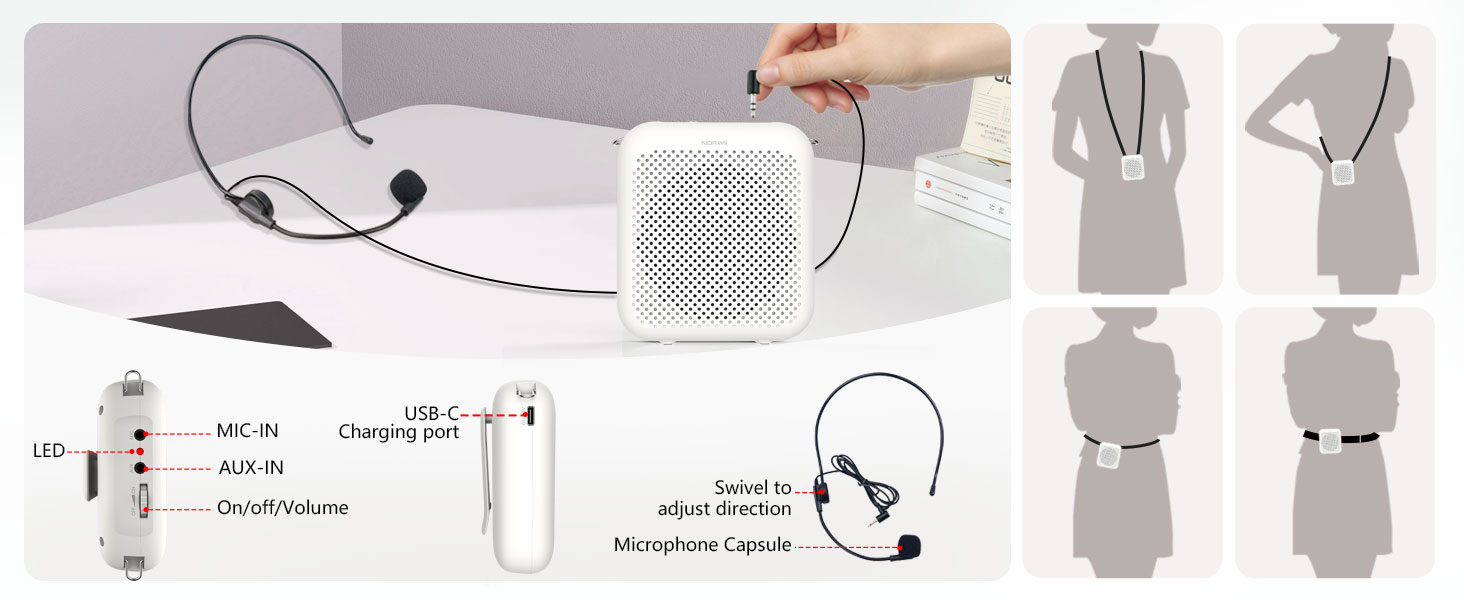
Image: Norwii S358 Voice Amplifier package contents. Shows the amplifier unit, wired microphone, USB-C charging cable, 3.5mm audio cable, adjustable waist strap, and user manual.
3. Setup Guide
- Charge the Amplifier: Before first use, fully charge the amplifier using the provided USB-C cable. The indicator light will show charging status.
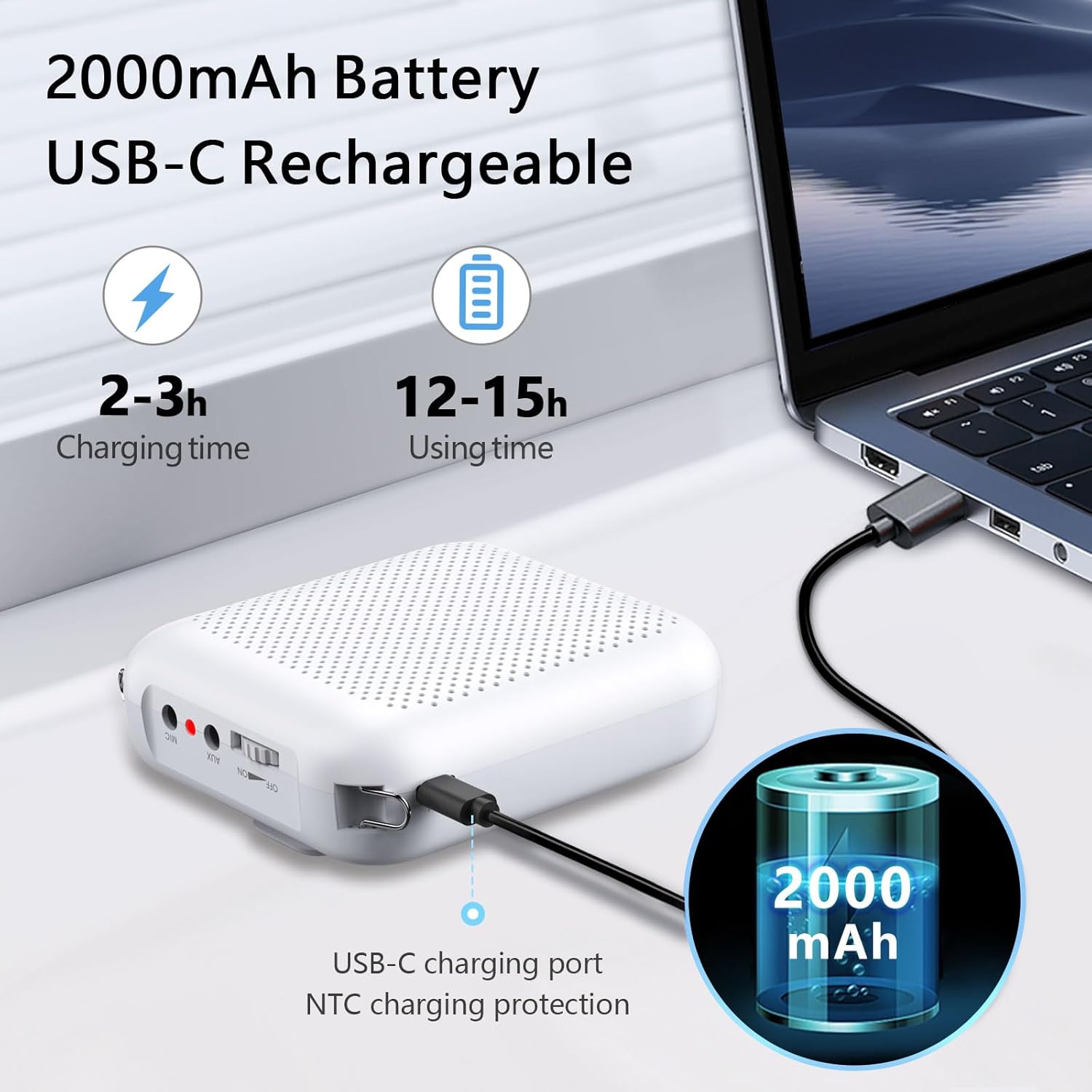
Image: Norwii S358 Voice Amplifier charging via USB-C cable. The image highlights the USB-C charging port and indicates charging times (2-3 hours for 2000mAh, 4-6 hours for 4000mAh).
- Connect the Microphone: Plug the wired headset microphone into the "MIC-IN" port on the amplifier. Ensure it clicks into place.
Video: "S358_How to use" by NORWII. This video demonstrates how to connect the wired microphone to the amplifier and adjust the volume. It also shows how to wear the microphone and amplifier.
- Position the Microphone: Adjust the headset so the microphone is positioned 0.5-1 cm in front of your mouth. Keep the microphone at least 20 cm (8 inches) away from the amplifier to prevent feedback.
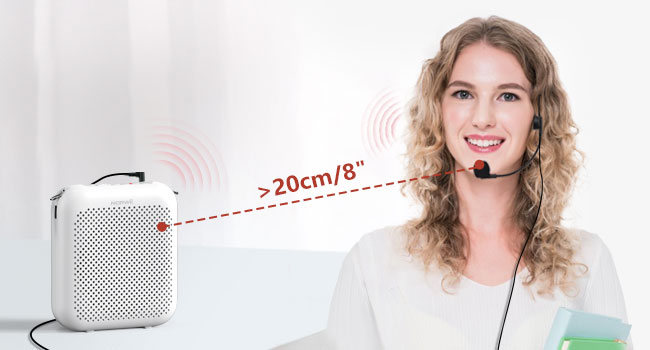
Image: Diagram illustrating the recommended distance of at least 20 cm (8 inches) between the microphone and the amplifier to prevent audio feedback.
- Wear the Amplifier:
- Use the adjustable waistband to wear the amplifier around your waist.
- Alternatively, use the back clip to attach it to your belt or pocket.
- The lanyard can be used to hang the amplifier around your neck.

Image: A woman demonstrating wearing the Norwii S358 Voice Amplifier clipped to her waist with the wired headset microphone in use.
4. Operating Instructions
- Power On/Off and Volume Control: Rotate the dial switch/volume knob to turn the amplifier ON. Continue rotating to adjust the volume. Rotate it fully counter-clockwise to turn OFF.

Image: Close-up of the amplifier's top panel, showing the dial switch for power and volume, AUX-IN, and MIC-IN ports.
- Using as an External Speaker (AUX-IN): Connect your computer, mobile phone, PAD, or MP3 player to the amplifier using the 3.5 mm audio cable (AUX cable) through the "AUX-IN" port. The amplifier will function as an external speaker.

Image: The Norwii S358 Voice Amplifier connected to a laptop via the AUX cable, demonstrating its use as an external speaker for playing music.
- Bluetooth Connectivity: The amplifier supports Bluetooth. You can pair it with Bluetooth-enabled devices to play audio wirelessly. (Note: A Bluetooth headset is not included with the wired version of this product.)
5. Maintenance and Care
- Charging: Use only the provided USB-C cable or a standard 5V charger. Do not use quick charge or chargers with voltages higher than 5V, as this may damage the device.
Video: "S358_How to use" by NORWII. This video demonstrates how to connect the wired microphone to the amplifier and adjust the volume. It also shows how to wear the microphone and amplifier, and includes charging instructions.
- Battery Life: The 2000mAh battery provides 12-15 hours of continuous use. For extended use, a 4000mAh version is available, offering 25-30 hours.

Image: The Norwii S358 Voice Amplifier's battery specifications, showing 2000mAh for 12-15 hours and 4000mAh for 25-30 hours of continuous use.
- Storage: If not in use for a long period, fully charge the amplifier to ensure the battery's lifespan.
- Microphone Care: Do not remove the sponge cover on the microphone, as it helps reduce noise and ensures clear sound.
6. Troubleshooting
- Feedback/Howling Sound:
- Ensure the microphone is at least 20 cm (8 inches) away from the amplifier.
- Keep the front of the amplifier at a distance of 50 cm or more from any walls or hard surfaces to avoid sound reflection and howling.
- No Sound:
- Check if the amplifier is turned ON and the volume is adjusted.
- Ensure the microphone is securely plugged into the "MIC-IN" port.
- Verify the microphone is correctly positioned in front of your mouth.
- Check battery level; charge if low.
- Distorted Sound:
- Lower the volume using the dial switch.
- Ensure the microphone is not too close to your mouth or the amplifier.
- Interference: Keep the amplifier away from charging devices or other electronic devices to avoid interference.
7. Specifications
| Feature | Detail |
|---|---|
| Model Number | S358 |
| Output Power | 10 Watts |
| Speaker Size | 3-inch |
| Battery Capacity | 2000mAh (standard), 4000mAh (optional) |
| Continuous Use Time (2000mAh) | 12-15 hours |
| Continuous Use Time (4000mAh) | 25-30 hours |
| Charging Port | USB-C |
| Audio Input | AUX, MIC, Bluetooth |
| Mounting Type | Portable (clip-on, waistband, lanyard) |
| Item Weight | 5.6 ounces |
| Product Dimensions | 4 x 3.59 x 1.49 inches |
| Material | Acrylonitrile Butadiene Styrene (ABS), PC |
8. Warranty and Support
For warranty information, technical support, or any inquiries regarding your Norwii S358 Voice Amplifier, please visit the official Norwii website or contact their customer service. The product includes a user manual with detailed contact information.
You can visit the Norwii Store for more information: Norwii Store


