
Introduction
Thank you for choosing the 1MORE Triple Driver Bluetooth Neckband Earphones. These earphones are engineered to deliver a superior audio experience with a combination of a dynamic driver and two balanced armatures, supporting Hi-Res LDAC wireless sound quality. Designed for comfort and convenience, they feature fast charging capabilities and environmental noise cancellation for clear calls. Please read this manual carefully to ensure proper use and optimal performance of your new earphones.
What's in the Box
Your 1MORE Triple Driver Bluetooth Neckband Earphones package includes the following items:
- 1MORE Triple Driver Bluetooth Neckband Earphones
- Silicone Ear Tips (5 pairs of various sizes)
- Foam Ear Tips (3 pairs of various sizes)
- Type-C to USB Charging Cable
- Carrying Pouch
- User Guide
- Stickers
- APP QR Code Card

Image: All components included in the product packaging, neatly arranged. This includes the neckband earphones, various ear tip sizes, a USB-C charging cable, a carrying pouch, and user documentation.
Product Overview
The 1MORE Triple Driver Bluetooth Neckband Earphones feature a sleek design with intuitive controls and high-quality materials.

Image: The 1MORE Triple Driver Bluetooth Neckband Earphones, showcasing the flexible neckband and the earbuds with their metallic finish.
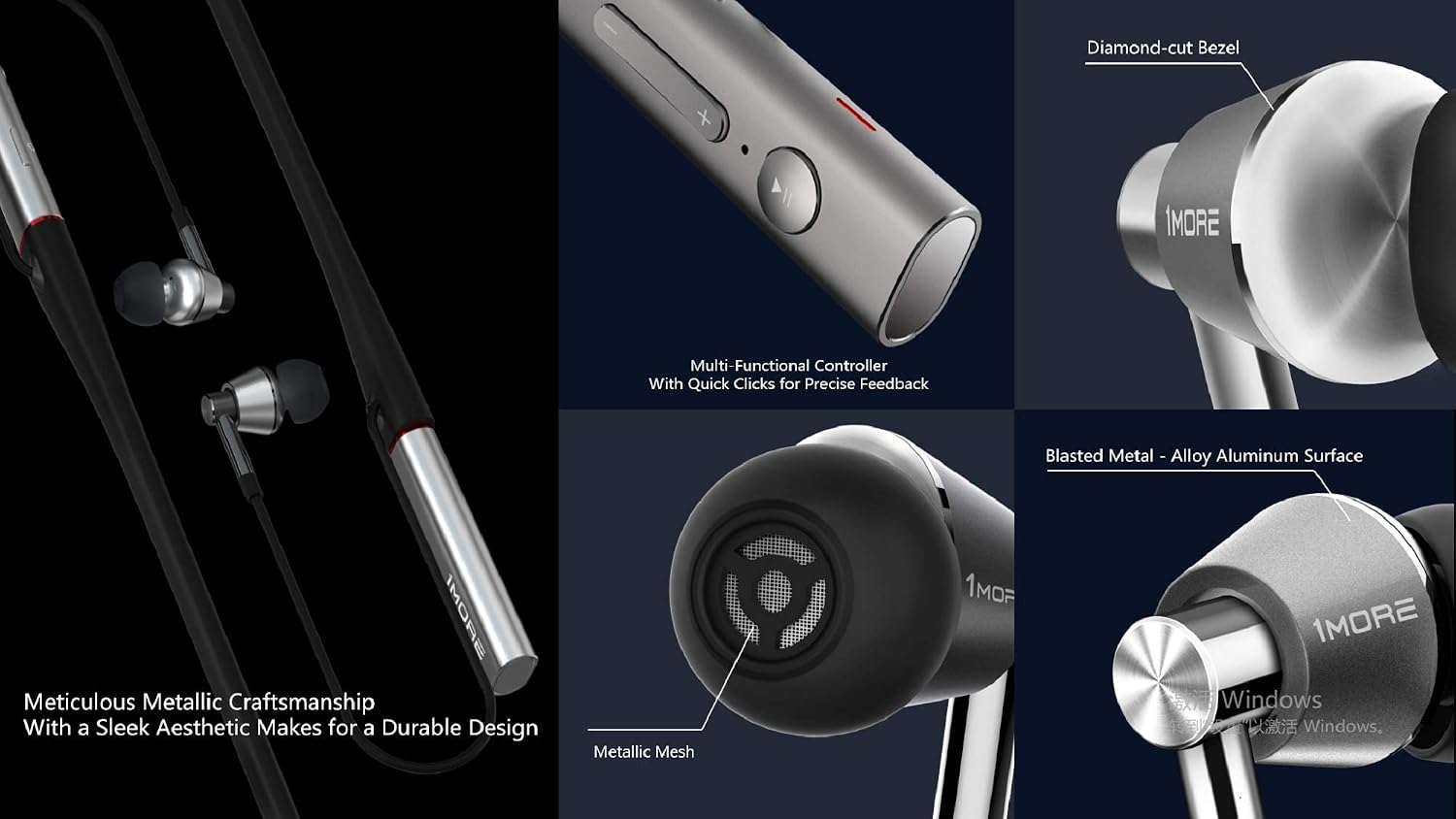
Image: Close-up details of the earphones, illustrating the multi-functional controller for precise feedback, the diamond-cut bezel on the earbuds, the blasted metal-alloy aluminum surface, and the metallic mesh covering the speaker.
Controls and Indicators:
- Power Button: Located on the neckband, used to turn the earphones on/off.
- Multi-Functional Controller: Includes play/pause, answer/end calls, and voice assistant activation.
- Volume Buttons (+/-): Adjusts audio volume.
- Microphone: Integrated for hands-free calls and environmental noise cancellation.
- LED Indicator: Displays power status, pairing mode, and charging status.
Setup
1. Initial Charging:
Before first use, fully charge your earphones. Connect the provided Type-C USB cable to the charging port on the neckband and a power source. The LED indicator will show charging status. A 10-minute charge provides approximately 3 hours of use.
2. Power On/Off:
To power on, press and hold the power button until the LED indicator lights up. To power off, press and hold the power button until the LED indicator turns off.
3. Bluetooth Pairing:
When powered on for the first time, the earphones will automatically enter pairing mode (LED will flash). On your device (smartphone, tablet, etc.), enable Bluetooth and search for '1MORE Headset' or '1MORE Music' in the list of available devices. Select it to connect. Once connected, the LED indicator will stop flashing.
Video: An official 1MORE video demonstrating the features and connectivity of the Triple Driver Bluetooth Neckband Earphones, including Bluetooth pairing and environmental noise cancellation.
Operating Instructions
Music Playback:
- Play/Pause: Press the multi-functional button once.
- Next Track: Press and hold the '+' volume button.
- Previous Track: Press and hold the '-' volume button.
- Volume Up: Short press the '+' volume button.
- Volume Down: Short press the '-' volume button.
Phone Calls:
- Answer/End Call: Press the multi-functional button once.
- Reject Call: Press and hold the multi-functional button.
- Activate Voice Assistant: Double-press the multi-functional button.
Environmental Noise Cancellation (ENC):
The earphones feature Environmental Noise Cancellation for clearer call quality. The integrated microphone actively reduces ambient noise during phone conversations.
Ear Tip Selection and Fit
Proper ear tip selection is crucial for optimal sound quality and comfort. The package includes multiple sizes of silicone and foam ear tips. Experiment with different sizes to find the best fit for your ears. A snug fit ensures better bass response and passive noise isolation.

Image: A close-up of one earbud, showing the soft ear tip and the metallic body, emphasizing the importance of a good seal for sound quality.
Charging
The earphones are equipped with a USB-C charging port for efficient power delivery. Connect the provided USB-C cable to the port on the neckband and a standard USB power adapter or computer USB port. The LED indicator will illuminate during charging and change color or turn off when fully charged. A full charge provides up to 7 hours of playback, and a quick 10-minute charge can provide 3 hours of use.
Maintenance
- Keep the earphones dry. Do not expose them to extreme temperatures.
- Clean the ear tips regularly with a soft, dry cloth to prevent wax buildup.
- Store the earphones in the provided carrying pouch when not in use to protect them from dust and damage.
- Avoid using abrasive cleaners or solvents.
Troubleshooting
Cannot Power On:
Ensure the earphones are fully charged. If the battery is depleted, connect them to a power source and allow them to charge for at least 10 minutes before attempting to power on again.
Cannot Pair with Device:
- Make sure the earphones are in pairing mode (LED indicator flashing).
- Ensure Bluetooth is enabled on your device and it is within range (10 meters).
- Try forgetting the device from your phone's Bluetooth settings and re-pairing.
- Restart both the earphones and your device.
Poor Sound Quality:
- Check the fit of the ear tips. A proper seal is essential for optimal sound.
- Ensure there are no obstructions between the earphones and your device.
- Verify that your device supports LDAC for the highest quality audio.
- Clean the ear tips and speaker mesh to remove any debris.
Specifications
| Model Number | E1001BT |
| Connectivity Technology | Bluetooth 4.2, Wireless |
| Wireless Communication Technology | Bluetooth |
| Audio Driver Type | Dynamic Driver |
| Audio Driver Size | 10 Millimeters |
| Frequency Response | 20000 Hz |
| Sensitivity | 99 dB |
| Impedance | 32 Ohms |
| Noise Control | Sound Isolation |
| Special Features | Microphone Included, Noise Cancellation, Noise Isolation, Wireless |
| Battery Life | 7 Hours |
| Charging Time | 10 minutes (for 3 hours use) |
| Water Resistance Level | Waterproof |
| Item Weight | 1.41 ounces (0.04 Kilograms) |
| Product Dimensions | 2 x 8.7 x 7 inches |
Warranty and Support
1MORE products are designed and manufactured to the highest quality standards. For warranty information and customer support, please refer to the warranty card included in your product packaging or visit the official 1MORE website. Keep your proof of purchase for any warranty claims.