
Introduction
Thank you for choosing the Avella VH501 Video Tripod System. This professional-grade tripod is designed for stability and smooth operation, supporting cameras up to 13.2 pounds (6 kg). Its aluminum construction ensures durability, while the detachable fluid drag pan tilt head provides precise control for video and photography. This manual provides essential information for the safe and effective use of your tripod.
Safety Information
- Always ensure all locks and levers are securely tightened before mounting equipment or moving the tripod.
- Do not exceed the maximum load capacity of 13.2 lbs (6 kg) to prevent damage to the tripod or your equipment.
- Be cautious when extending or collapsing the legs to avoid pinching fingers.
- Avoid exposing the tripod to extreme temperatures or corrosive substances.
- Keep the tripod away from children to prevent accidents.
- Do not leave the tripod unattended with a camera mounted, especially in windy conditions.
Package Contents
Verify that all items are present in your package:
- 1 x VH501 Tripod Leg
- 1 x Fluid Head
- 1 x Carrying Bag
- 1 x 2.36in/60mm Half Ball Adapter
- 1 x Universal QR Plate
- 1 x Pan Handle
- 3 x Hex Keys
- 1 x Instructions Manual (this document)

Image: Contents of the Avella VH501 Video Tripod System package, including the tripod, fluid head, carrying bag, and accessories.
Product Overview
The Avella VH501 features a robust fluid head and sturdy aluminum legs designed for professional use.
Fluid Head Components
- 1/4" Screw & 3/8" Screw: For attaching cameras and accessories.
- Safety Pin: Prevents accidental camera release.
- Non-slip Mat: Provides secure grip for the camera.
- QR Plate Locking Lever: Secures the quick release plate.
- QR Plate Safety Button: Releases the quick release plate.
- Tilt Locking Knob: Adjusts and locks the vertical tilt.
- Pan Bar Locking: Secures the pan bar position.
- Spirit Level: Helps achieve a level setup.
- Pan Locking Lever: Locks the horizontal panning motion.

Image: Detailed view of the fluid head with labels for its various components, including screws, safety features, and locking mechanisms.
Tripod Leg Features
- Quick Flip Leg Locks: For fast and secure leg extension and retraction.
- Middle Spreader: Enhances stability by connecting the tripod legs.
- 60mm Diameter Bowl Base: Allows for quick leveling of the fluid head.
- Aluminum Alloy Pipe: Provides sturdy construction.

Image: Diagram showing the tripod leg construction, highlighting the 60mm bowl base, quick flick locks, and middle spreader.
Setup
- Unpack the Tripod: Carefully remove all components from the carrying bag.
- Extend the Legs: Release the quick flip leg locks on each leg. Extend the legs to the desired height and spread them to form a stable base. Securely close all leg locks.
- Attach the Fluid Head: The fluid head is typically pre-attached. If not, ensure the 60mm half ball adapter is correctly seated in the tripod's bowl base and the fluid head is securely tightened onto it.
- Level the Tripod: Use the spirit level on the fluid head to ensure the base is level. Adjust the legs or the half ball adapter until the bubble is centered. Tighten the half ball adapter's locking knob.
- Mount the Camera:
- Press the QR Plate Safety Button and slide the QR Plate Locking Lever to release the quick release plate.
- Attach your camera to the quick release plate using either the 1/4" or 3/8" screw, ensuring it is tightened securely.
- Slide the camera with the attached quick release plate back into the fluid head until it clicks into place. Ensure the QR Plate Locking Lever is engaged and the safety pin is up.
- Attach the Pan Handle: Screw the pan handle into the designated port on the fluid head and tighten it.
Operating
Adjusting Pan and Tilt
- Panning: Loosen the Pan Locking Lever to allow horizontal rotation. Tighten to lock the position. The fluid head supports 360° panoramic rotation.
- Tilting: Loosen the Tilt Locking Knob to adjust the vertical angle. Tighten to lock the position. The head allows for a tilt range of +90° to -50°.

Image: Demonstrates the 360° panoramic rotation and the +90° to -50° tilt range of the fluid head.
Multi-Angle Shooting
The tripod and fluid head allow for versatile camera positioning, including vertical, level, and downward angles, to suit various shooting requirements.
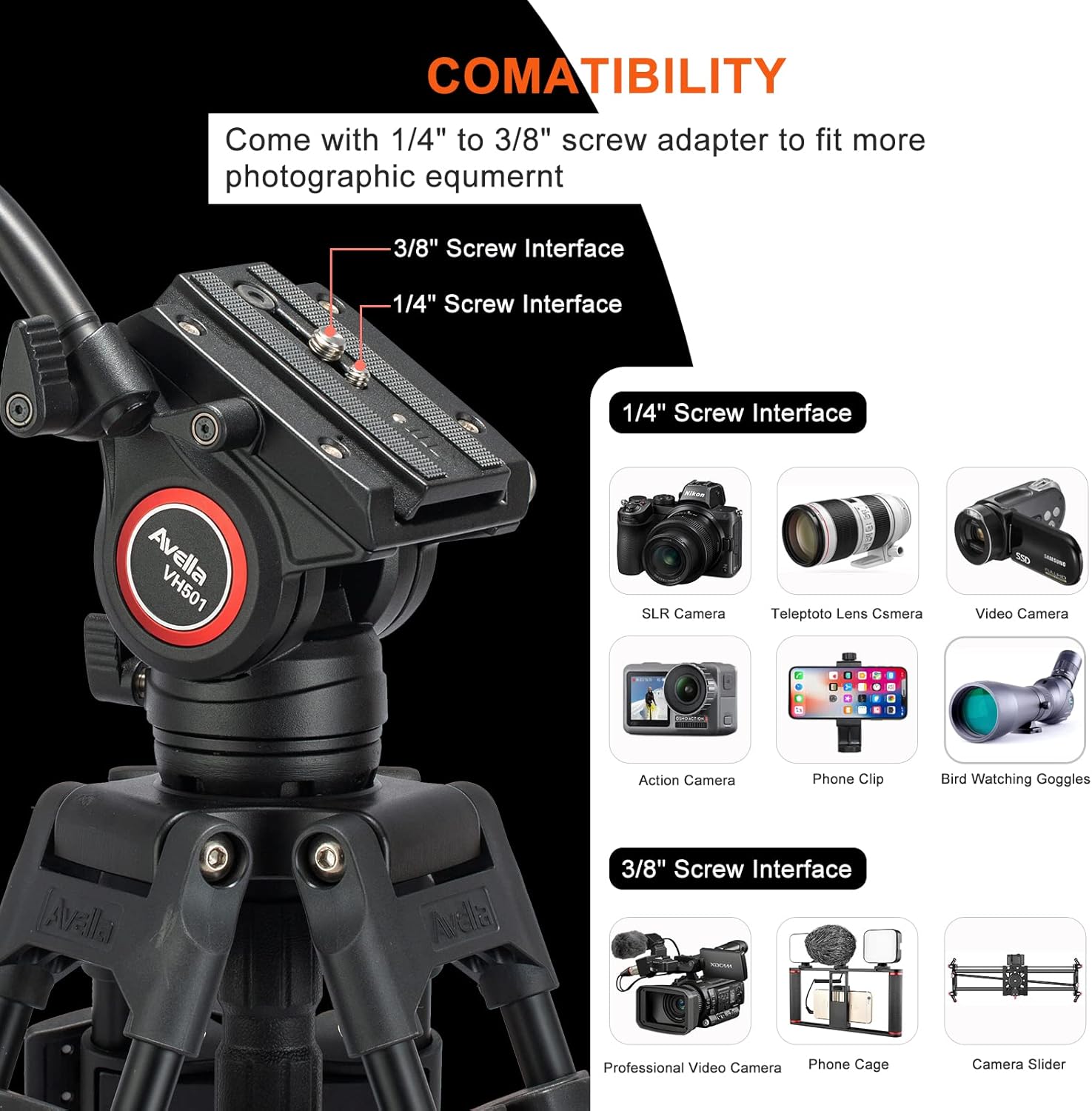
Image: Examples of multi-angle shooting setups, including vertical, level, and downward camera positions using the tripod.
Device Compatibility
The fluid head is equipped with both 1/4" and 3/8" screw interfaces, making it compatible with a wide range of photographic equipment.
- 1/4" Screw Interface: Suitable for DSLR cameras, telephoto lens cameras, video cameras, action cameras, phone clips, and bird watching goggles.
- 3/8" Screw Interface: Suitable for professional video cameras, phone cages, and camera sliders.
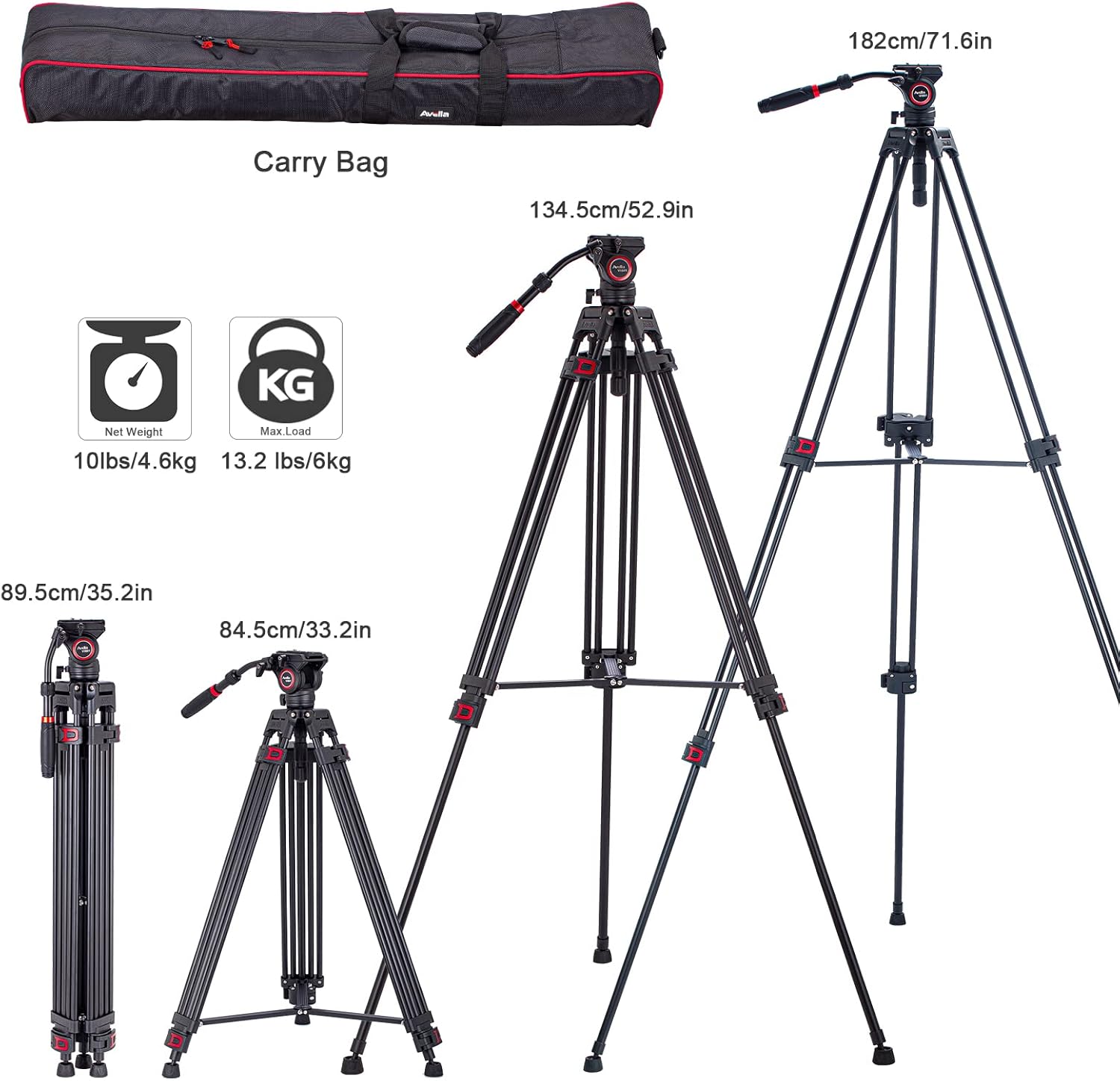
Image: Visual representation of various devices compatible with the 1/4" and 3/8" screw interfaces on the fluid head.
Official Product Video
Video: An official product video from Avella Photo demonstrating the features and usage of the Avella VH501 72-inch Professional Video Tripod.
Maintenance
- Cleaning: Wipe the tripod and fluid head with a soft, dry cloth after each use. For stubborn dirt, use a slightly damp cloth and mild soap, then dry thoroughly. Avoid harsh chemicals.
- Lubrication: The fluid head is factory-lubricated. Do not attempt to lubricate internal components unless specifically instructed by Avella support.
- Storage: Store the tripod in its carrying bag in a cool, dry place, away from direct sunlight and excessive moisture.
- Inspection: Periodically check all screws, levers, and leg locks for tightness. Use the provided hex keys to tighten any loose fasteners.
Troubleshooting
- Problem: Tripod feels unstable or wobbly.
Solution: Ensure all leg locks are fully engaged and tightened. Verify the middle spreader is properly extended. Check that the fluid head is securely attached to the bowl base. - Problem: Camera not securely mounted on the fluid head.
Solution: Ensure the quick release plate is correctly attached to the camera and fully inserted into the fluid head until the QR Plate Locking Lever clicks into place. Check that the safety pin is engaged. - Problem: Pan or tilt motion is not smooth.
Solution: Ensure the Pan Locking Lever and Tilt Locking Knob are sufficiently loosened. If the issue persists, check for any obstructions or debris. - Problem: Legs are difficult to extend or retract.
Solution: Check for any dirt or debris in the leg lock mechanisms. Clean as necessary. Ensure the quick flip leg locks are fully released. - Problem: Tripod is not level despite adjustments.
Solution: Re-check the spirit level. Ensure the half ball adapter's locking knob is loosened before leveling and then securely tightened afterward.
Specifications
| Feature | Specification |
|---|---|
| Brand | AVELLA |
| Model Number | VH501 |
| Material | Aluminum |
| Maximum Height | 182 Centimeters (72 Inches) |
| Minimum Height (Folded) | 89.5 cm (35.2 inches) |
| Weight Limit | 13.2 Pounds (6 kg) |
| Item Weight | 5.05 Kilograms (11.13 lbs) |
| Tripod Head Type | Fluid Head (also compatible with Ball Heads, Video Heads) |
| Leg Sections | 3 |
| Compatible Devices | Camera, GoPro, iPhone X (via adapter), DSLR, Video Camera, etc. |

Image: Visual representation of the tripod's dimensions, net weight, and maximum load capacity.

Image: Detailed dimensions of the tripod in both extended and folded states.
Warranty Information
Avella products are manufactured to high-quality standards. For specific warranty terms and conditions, please refer to the warranty card included with your product or visit the official Avella website. Keep your purchase receipt as proof of purchase for any warranty claims.
Support
For technical assistance, troubleshooting, or general inquiries regarding your Avella VH501 Video Tripod System, please contact Avella customer support through the following channels:
- Website: Visit the official Avella website for FAQs and support resources.
- Email: Refer to your product packaging or the official website for customer service email addresses.
- Phone: Contact numbers may be available on the official Avella website.
When contacting support, please have your product model number (VH501) and purchase information ready.