1. Introduction
This manual provides essential information for the safe and effective use of the Garosa LJC30A3-H-Z/BY DC PNP Capacitive Proximity Sensor. This sensor is designed for non-contact detection in various industrial applications.
Key features include:
- Ideal Proximity Sensor: A high-quality non-contact proximity switch, serving as an ideal electronic on-off sensor.
- Non-Contact Detection: Characterized by non-contact detection, offering strong anti-interference capabilities to minimize impact on the measured object's operating conditions.
- Long Lifespan & Wide Application: Designed for durability with no mechanical wear or fatigue, ensuring a long service life. It is widely used in machine tools, metallurgy, chemistry, textile, and printing industries.
- Sealed Structure & Robust Properties: Features a sealed structure that provides shockproof and corrosion-resistant properties, good moisture and dust resistance, and high working reliability.
- Stable & Reliable Performance: Delivers exceptional detection performance, reliable action, stable operation, and a fast frequency response.
2. Safety Information
Please read and understand all safety instructions before installing, operating, or maintaining this product. Failure to follow these instructions may result in injury or damage to the product.
- Ensure power is disconnected before any installation or wiring.
- Only qualified personnel should perform installation and wiring.
- Verify correct voltage and current ratings before connecting the sensor.
- Do not expose the sensor to environments exceeding its specified temperature or humidity limits.
- Avoid strong impacts or excessive force on the sensor.
3. Product Overview
The Garosa LJC30A3-H-Z/BY is a cylindrical capacitive proximity sensor designed for detecting various materials, including metals, non-metals, liquids, and powders, without physical contact. It features a threaded body for easy mounting and an orange sensing face.

Figure 3.1: Side view of the Garosa LJC30A3-H-Z/BY Capacitive Proximity Sensor, showing its threaded body and orange sensing cap.
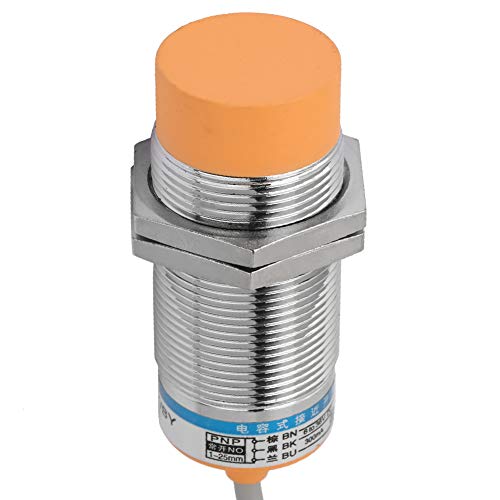
Figure 3.2: Front view of the sensor, illustrating the orange sensing face responsible for detection.
4. Specifications
| Parameter | Value |
|---|---|
| Model | LJC30A3-H-Z/BY |
| Brand | Garosa |
| Switch Type | Capacitive Proximity Switch |
| Output Type | DC PNP, Normally Open (NO) |
| Detection Distance | 25 mm |
| Operating Voltage | 6-36V DC |
| Operating Current | 13 mA |
| Output Current | 300 mA |
| Wiring | 3-wire |
| Material | Brass Nickel Plating + ABS |
| Dimensions (L x W x H) | 8 x 4.5 x 4.5 cm (3.15 x 1.77 x 1.77 inches) |
| Weight | 100 grams |
| Max Operating Temperature | 60°C |
| Cable Color | Grey |
| Country of Origin | China |
| UPC | 738586321812 |
5. Setup
5.1 Mounting
The sensor features a threaded cylindrical body for secure mounting. Use the provided nuts to fasten the sensor into a panel or bracket. Ensure the sensing face is clear of obstructions and positioned correctly relative to the target object.

Figure 5.1: Sensor showing its threaded body and mounting nuts for installation.
5.2 Wiring
The LJC30A3-H-Z/BY is a 3-wire DC PNP Normally Open (NO) sensor. Connect the wires as follows:
- Brown Wire (BN): Connect to the positive (+) terminal of the DC power supply (6-36V DC).
- Blue Wire (BU): Connect to the negative (-) terminal of the DC power supply.
- Black Wire (BK): This is the signal output. Connect it to the input of your control device (e.g., PLC, relay).
Since it is a PNP Normally Open sensor, the black output wire will switch to a high state (close to the positive supply voltage) when an object is detected within the sensing range. When no object is detected, the output remains low (open circuit).

Figure 5.2: Sensor label with wiring diagram and electrical specifications.
6. Operating Instructions
Once properly installed and wired, the sensor operates automatically. When a target object enters the 25mm detection range of the sensor's orange face, the sensor's internal switch activates, and the black output wire changes state (from low to high for PNP NO). When the object leaves the detection range, the output returns to its original state.
The sensor is designed to detect a wide range of materials. The actual sensing distance may vary slightly depending on the material, size, and shape of the target object, as well as environmental conditions.
7. Maintenance
To ensure optimal performance and longevity of your capacitive proximity sensor, follow these maintenance guidelines:
- Cleaning: Regularly clean the sensing face of the sensor to prevent accumulation of dust, dirt, or debris, which can affect detection accuracy. Use a soft, dry cloth. Do not use abrasive cleaners or solvents.
- Inspection: Periodically inspect the sensor and its wiring for any signs of physical damage, wear, or loose connections. Ensure the mounting is secure.
- Environmental Conditions: Verify that the operating environment remains within the specified temperature and humidity ranges. Protect the sensor from excessive moisture or corrosive substances.
8. Troubleshooting
If you encounter issues with your Garosa LJC30A3-H-Z/BY sensor, refer to the following troubleshooting steps:
- Sensor Not Detecting Objects:
- Check if the sensor is powered correctly (Brown to +, Blue to -).
- Ensure the target object is within the 25mm detection range.
- Verify that the sensing face is clean and free from obstructions.
- Confirm the target material is detectable by a capacitive sensor.
- Check the wiring connections for continuity and proper polarity.
- False Detections or Erratic Behavior:
- Ensure there are no other objects or environmental factors (e.g., excessive moisture, strong electromagnetic fields) interfering with the sensor.
- Check for loose wiring or damaged insulation.
- Verify the sensor is securely mounted and not vibrating excessively.
- No Output Signal:
- Confirm the sensor is receiving power.
- Check the black output wire connection to your control device.
- Ensure the control device's input is configured correctly for a PNP signal.
If the problem persists after following these steps, contact customer support.
9. Warranty Information
Garosa products are manufactured to high-quality standards. This product is covered by a standard manufacturer's warranty against defects in materials and workmanship. Please refer to your purchase documentation or contact your retailer for specific warranty terms and conditions.
10. Support
For further assistance, technical support, or inquiries regarding the Garosa LJC30A3-H-Z/BY Capacitive Proximity Sensor, please contact your supplier or visit the official Garosa website. When contacting support, please have your product model number (LJC30A3-H-Z/BY) and purchase details available.


