
ANENG ST209
ANENG ST209 Digital Multimeter Clamp Meter User Manual
Model: ST209
1. Introduction
This user manual provides detailed instructions for the safe and effective operation of the ANENG ST209 Digital Multimeter Clamp Meter. This versatile instrument is designed for measuring DC/AC voltage, DC/AC current, resistance, capacitance, frequency, temperature, and features non-contact voltage (NCV) detection and a flashlight. It is a true RMS meter with an auto-ranging function, making it suitable for various electrical testing applications.
2. Safety Information
Always adhere to the following safety precautions to prevent personal injury or damage to the meter or equipment under test:
- Do not exceed the maximum input values for any function.
- Do not use the meter if it or the test leads appear damaged.
- Exercise extreme caution when working with voltages above 30V AC RMS, 42V peak, or 60V DC. These voltages pose a shock hazard.
- Always disconnect power to the circuit and discharge all high-voltage capacitors before testing resistance, continuity, diodes, or capacitance.
- Ensure the correct function and range are selected before making measurements.
- Do not operate the meter in explosive gas, vapor, or dust environments.
- Replace the battery immediately when the low battery indicator appears.
- Use only the specified type of battery (AAA 1.5V x 2).
3. Product Overview
The ANENG ST209 Digital Multimeter Clamp Meter features a compact design with intuitive controls. Key components include:
- Clamp Jaw: For non-contact AC/DC current measurement. Jaw size: 32mm.
- Function Rotary Switch: Selects measurement functions.
- LCD Display: Shows measurement readings, units, and indicators. Maximum display: 5999 counts.
- Input Jacks: COM (common), VΩHz (voltage, resistance, frequency), mA (milliamperes), A (amperes).
- Buttons: SELECT, RANGEL, HOLD/LIGHT, NCV.
- Flashlight: Integrated light for illuminating dark work areas.

Figure 3.1: Front view of the ANENG ST209 Digital Multimeter Clamp Meter, showing the clamp jaw, rotary switch, LCD display, and input jacks.

Figure 3.2: Dimensions of the ANENG ST209 Digital Multimeter Clamp Meter. The device measures approximately 180mm (7in) in length, 63.6mm (2.5in) in width, and 31mm (1.22in) in thickness.
4. Setup
4.1 Battery Installation
The ANENG ST209 requires two AAA 1.5V batteries (not included). To install or replace batteries:
- Ensure the meter is turned OFF.
- Locate the battery compartment cover on the back of the meter.
- Use a screwdriver to loosen the screw(s) on the battery cover.
- Remove the cover.
- Insert two AAA 1.5V batteries, observing the correct polarity (+ and -).
- Replace the battery cover and secure it with the screw(s).
4.2 Connecting Test Leads
For most measurements (voltage, resistance, continuity, capacitance, frequency, temperature), connect the black test lead to the COM input jack and the red test lead to the VΩHz input jack.
5. Operating Instructions
Turn the rotary switch to the desired function. The meter features auto-ranging for most functions, simplifying operation.
5.1 DC Voltage Measurement (DCV)
To measure DC voltage:
- Connect the black test lead to COM and the red test lead to VΩHz.
- Turn the rotary switch to the V (DCV) position.
- Connect the test leads in parallel to the circuit or component under test.
- Read the voltage value on the LCD display.

Figure 5.1: Measuring DC voltage, such as an automotive battery, using the ANENG ST209 Digital Multimeter. The test leads are connected to the battery terminals.
5.2 AC Voltage Measurement (ACV)
To measure AC voltage:
- Connect the black test lead to COM and the red test lead to VΩHz.
- Turn the rotary switch to the V~ (ACV) position.
- Connect the test leads in parallel to the AC circuit.
- Read the voltage value on the LCD display.

Figure 5.2: Measuring Alternating Current (AC) using the ANENG ST209. The clamp jaw is placed around a single conductor to measure current without breaking the circuit.
5.3 DC/AC Current Measurement (Clamp)
The clamp jaw allows for non-contact measurement of AC and DC current.
- Turn the rotary switch to the 600A position.
- Press the clamp trigger to open the jaw.
- Enclose only one conductor within the clamp jaw. Do not clamp around multiple conductors as this will result in an inaccurate reading.
- Read the current value on the LCD display.

Figure 5.3: The clamp head of the ANENG ST209 can directly measure both Alternating Current (AC) and Direct Current (DC) by clamping around a single conductor.
5.4 Resistance, Diode, Continuity, Capacitance, Frequency Measurement
Turn the rotary switch to the corresponding symbol (Ω for resistance, ⟷ for diode, for continuity, F for capacitance, Hz for frequency). Use the SELECT button to cycle through functions if multiple are on one switch position.
5.5 Temperature Measurement
To measure temperature:
- Connect the temperature probe (if included) to the input jacks, observing polarity.
- Turn the rotary switch to the TEMP position.
- Place the probe tip on the object or in the environment to be measured.
- Read the temperature on the LCD display.
5.6 Non-Contact Voltage (NCV) Detection
The NCV function allows for quick detection of AC voltage without direct contact.
- Turn the rotary switch to the NCV position.
- Move the top end of the meter close to the conductor or outlet.
- The meter will beep and the NCV indicator will light up if AC voltage is detected.
5.7 Flashlight Function
The integrated flashlight helps illuminate dark work areas.
- Press and hold the HOLD/LIGHT button to turn the flashlight ON/OFF.

Figure 5.4: The ANENG ST209 features a built-in flashlight, useful for illuminating measurement points in dark environments, as shown here while testing an electrical outlet.
5.8 Data Hold Function
To freeze the current reading on the display:
- Press the HOLD/LIGHT button briefly. The "HOLD" indicator will appear on the display.
- Press the button again to release the hold function.
6. Maintenance
6.1 Cleaning
Wipe the case with a damp cloth and mild detergent. Do not use abrasives or solvents. Keep the input terminals free of dirt or moisture.
6.2 Battery Replacement
Refer to Section 4.1 for battery installation/replacement instructions. Replace batteries when the low battery indicator appears on the display to ensure accurate measurements.
6.3 Storage
If the meter is not used for an extended period, remove the batteries to prevent leakage and damage to the meter. Store the meter in a dry, cool environment, away from direct sunlight and extreme temperatures.
7. Troubleshooting
| Problem | Possible Cause | Solution |
|---|---|---|
| Meter does not turn ON | Dead or incorrectly installed batteries. | Check battery polarity; replace batteries. |
| "OL" displayed | Over-range condition; input value exceeds selected range. | For manual range, select a higher range. For auto-range, the value is too high for the meter. |
| Inaccurate readings | Low battery; incorrect function/range selected; poor test lead connection. | Replace batteries; verify function/range; ensure secure connections. |
| No current reading with clamp | Clamping around multiple conductors (e.g., live and neutral wires); very low current. | Ensure only a single conductor is within the clamp jaw. |
8. Specifications
Detailed technical specifications for the ANENG ST209 Digital Multimeter Clamp Meter:
| Parameter | Specification |
|---|---|
| Display | Liquid Crystal Display (LCD), 5999 counts (3 5/6 digits) |
| Measurement Method | Double integral A/D conversion |
| Sampling Rate | Approximately 3 times per second |
| Overrange Display | "OL" symbol |
| Low Voltage Display | Low voltage symbol appears |
| Working Environment | 0°C to 40°C (32°F to 104°F), relative humidity ≤ 80% |
| Power Supply | 2 x AAA 1.5V batteries |
| DC Voltage (DCV) Range | 6V, 60V, 600V, 1000V |
| AC Voltage (ACV) Range | 6V, 60V, 600V, 750V |
| DC Current (DCA) Range | 60A, 600A |
| AC Current (ACA) Range | 60A, 600A |
| Resistance (Ω) Range | 600Ω, 6kΩ, 60kΩ, 600kΩ, 6MΩ, 60MΩ |
| Capacitance (F) Range | 10nF, 100nF, 1µF, 10µF, 100µF, 1mF, 10mF, 100mF |
| Frequency (Hz) Range | 10Hz to 10MHz |
| Temperature Measurement | Yes (C/F) |
| True RMS | Yes |
| NCV (Non-Contact Voltage) | Yes |
| Flashlight | Yes |
| Auto Power Off | Yes |
| Jaw Size | 32mm |
| Weight | 172g |
| Material | ABS |
| Color | Red |
| Dimensions (L x W x H) | 180mm x 63.6mm x 31mm (7in x 2.5in x 1.22in) |

Figure 8.1: Summary of ANENG ST209 product parameters, including brand, type, weight, color, material, battery type, size, and included accessories.
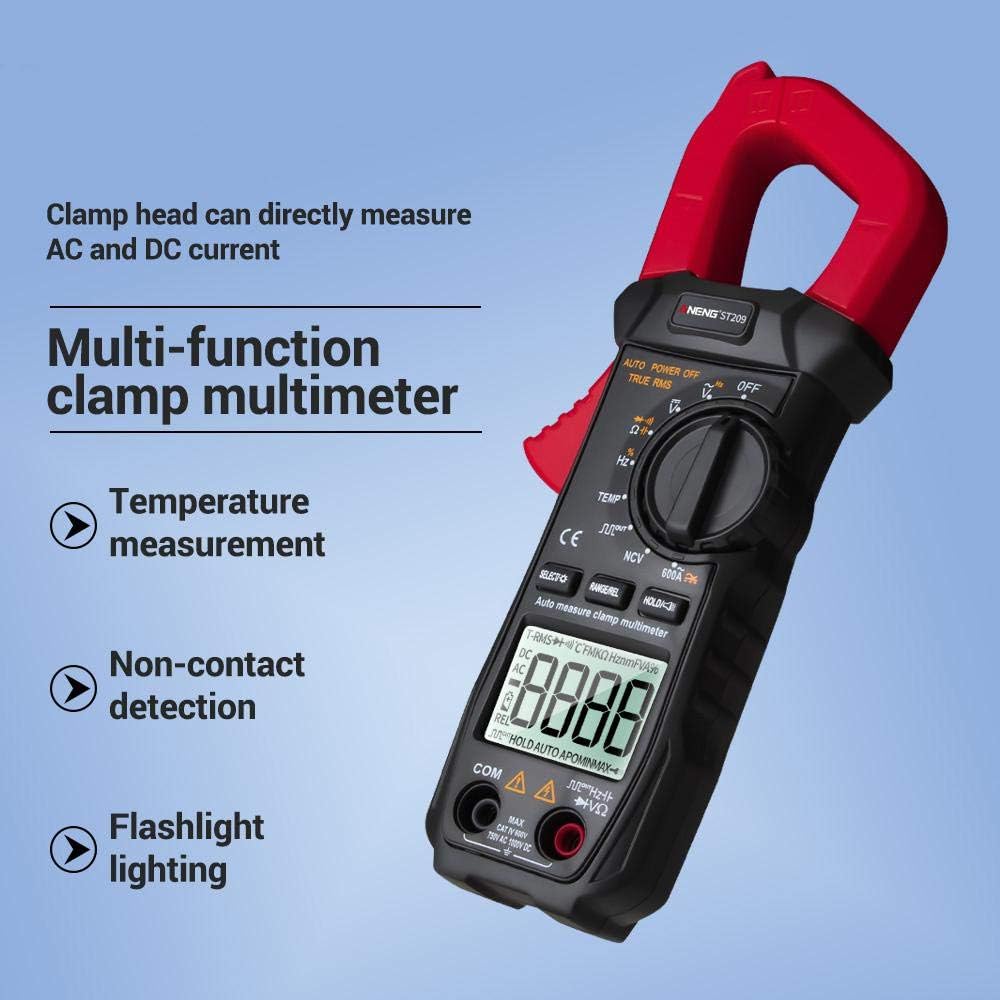
Figure 8.2: Overview of the multi-functional capabilities of the ANENG ST209, highlighting clamp head AC/DC current measurement, temperature measurement, non-contact detection, and flashlight lighting.
9. Warranty and Support
Specific warranty information for the ANENG ST209 Digital Multimeter Clamp Meter is not provided in this manual. For warranty claims, technical support, or service inquiries, please contact your point of purchase or the manufacturer directly. Keep your purchase receipt as proof of purchase.
Related documentsST209


Ask a question about this manual
Ask about setup, troubleshooting, compatibility, parts, safety, or missing instructions. Manuals+ will review the question and use this page’s manual context to help answer it.