
1. Product Overview
The MENGQI-CONTROL 4 Doors RFID/Password Door Lock System provides a robust and flexible solution for managing access to multiple entry points. This system integrates various access methods, including RFID cards, PIN codes, and a combination of both, along with remote access capabilities via a smartphone application. It is designed for comprehensive security and efficient user management, suitable for commercial and residential applications.
Key Features:
- Control for up to 4 doors simultaneously.
- Multiple access methods: RFID card, PIN code, or Card + PIN.
- Remote door opening via smartphone application (iOS & Android).
- Capacity for up to 20,000 users and 100,000 event logs.
- Network communication via TCP/IP for centralized management.
- Software compatibility with Windows 7/8/10/11 (32 & 64-bit).
- Automatic open/close scheduling.
- 600LBS holding force magnetic locks for enhanced security.
2. Package Contents
Upon unboxing, please verify that all components listed below are present and in good condition:
- 4 x RFID Keypad/PIN Pad Readers (Support swipe, PIN, or Card+PIN)
- 4 x Electric Magnetic Locks (600LBS holding force)
- 4 x Metal Push to Exit buttons with install base
- 1 x 4-door Network Access Control Panel/Controller
- 1 x Power Supply Box (110-240V input, 5A output, to power the whole system)
- 1 x USB Enroll Desktop Reader
- 50 x RFID Key Fobs
- 50 x RFID Cards
- 1 x User manual (this document) with detailed instructions and wire diagrams

Image: Overview of the complete MENGQI-CONTROL 4-Door Access Control System kit, showing all included components.
3. Setup and Installation
Proper installation is crucial for the optimal performance and security of your access control system. It is recommended to review the provided wire diagrams and video guides thoroughly before beginning installation.
3.1 System Components

Image: The black metal enclosure of the Access Controller Power Supply Box, with power cables.
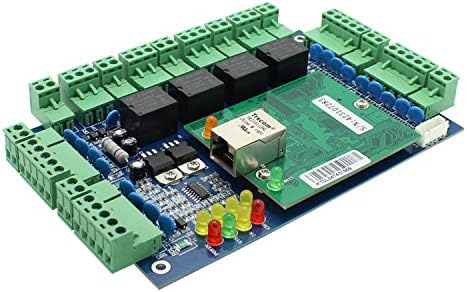
Image: The main circuit board of the 4-Door Network Access Control Panel, showing various connection terminals and network port.

Image: A close-up of the black RFID Keypad/PIN Pad Reader with illuminated numeric keys and a blue LED indicator for card sensing.
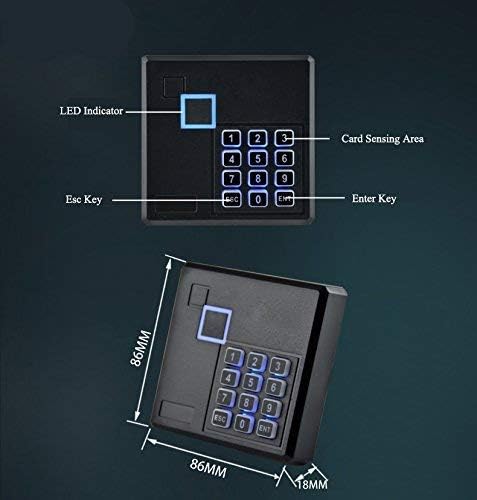
Image: The components of an Electric Magnetic Lock, including the main lock body, armature plate, and various screws and mounting accessories.

Image: The USB Enroll Desktop Reader, a compact black device with a USB cable, used for registering RFID cards and key fobs with the system software.

Image: A silver-colored Metal Push to Exit Button with a central push button and an icon indicating a hand pressing it.
3.2 Wiring and Connections
The system utilizes TCP/IP for network communication. Ensure all components are wired according to the provided detailed wire diagram. The power supply box provides 110-240V input and 5A output to power the entire system. Each keypad, magnetic lock, and exit button requires specific wiring to the 4-door access control panel.
3.3 Software and App Installation
The management software supports Windows 7, 8, 10, and 11 (both 32-bit and 64-bit systems). Install the software on a compatible PC to configure users, manage access rights, and retrieve logs. A smartphone application (available for iOS and Android) allows for remote door opening and basic system control. Use the included USB Enroll Desktop Reader to easily register RFID cards and key fobs into the software.
4. Operating Instructions
This section details the daily operation of your MENGQI-CONTROL access control system.
4.1 Gaining Entry
Users can gain entry through one of the following methods:
- RFID Card/Key Fob: Swipe your registered RFID card or key fob over the keypad reader's sensing area. The lock will disengage for a preset duration.
- PIN Code: Enter your assigned PIN code on the keypad. The lock will disengage upon correct entry.
- Card + PIN: For enhanced security, some configurations may require both a valid RFID card swipe followed by the correct PIN code entry.
- Smartphone App: Use the dedicated smartphone application to remotely open the lock, provided you have the necessary permissions and network connectivity.
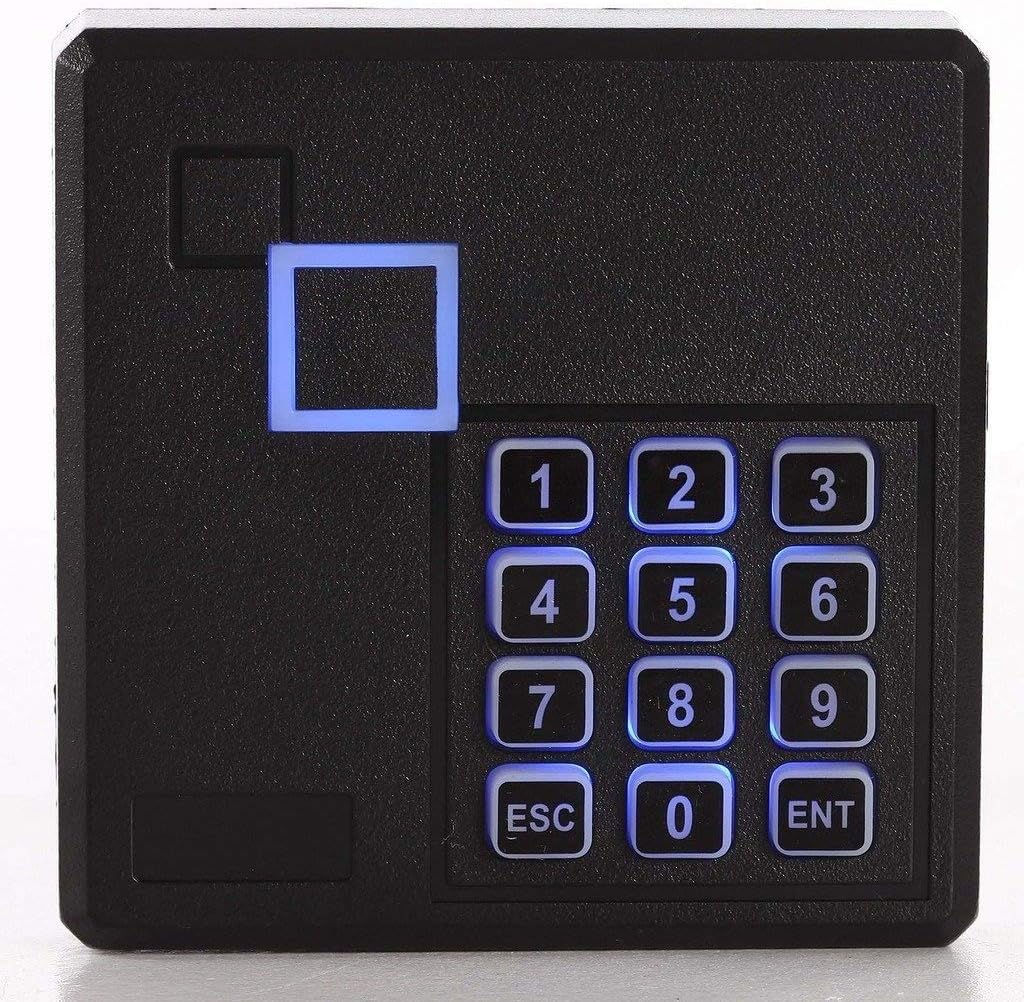
Image: Detailed view of the RFID Keypad, highlighting the LED indicator, card sensing area, ESC key, and ENT key, along with its dimensions (86mm x 86mm x 18mm).
4.2 Exiting a Controlled Area
To exit a controlled area, simply press the Metal Push to Exit button located near the door. This will temporarily disengage the magnetic lock, allowing egress.
Image: The Metal Push to Exit Button, showing its compact design and dimensions (30mm x 80mm x 23mm).
4.3 User and Access Management
The system's software allows for comprehensive management of users and access privileges:
- User Registration: Add new users by registering their RFID cards/key fobs and assigning PIN codes using the desktop software and USB reader.
- Access Control: Define who can access which door at specific times or days.
- Event Logging: The system automatically stores up to 100,000 entry and exit logs, which can be downloaded and reviewed for auditing purposes.
- Time-Based Access: Configure automatic lock/unlock schedules for doors based on predefined times and days.
5. Maintenance
Regular maintenance ensures the longevity and reliable operation of your access control system.
- Cleaning: Periodically clean the keypads and magnetic locks with a soft, dry cloth. Avoid abrasive cleaners or solvents.
- Connection Checks: Annually inspect all wiring connections to ensure they are secure and free from corrosion.
- Software Updates: Keep the system software updated to the latest version to benefit from new features and security enhancements.
- Magnetic Lock Inspection: Ensure the magnetic lock and armature plate are free from debris and properly aligned for maximum holding force.

Image: Detailed view of the Electric Magnetic Lock, showing its main body and armature plate, along with key dimensions (250mm length, 48mm width, 25mm height for the main body; 180mm length, 38mm width, 12mm height for the armature plate).
6. Troubleshooting
This section provides solutions to common issues you might encounter.
- Door Not Unlocking:
- Verify power supply to the system and individual components.
- Check wiring connections for the specific lock and keypad.
- Ensure the RFID card/key fob is registered and valid.
- Confirm the PIN code is correct and entered properly.
- Check for any schedule conflicts or access restrictions in the software.
- Keypad Not Responding:
- Check the power connection to the keypad.
- Inspect the data communication lines between the keypad and the control panel.
- Software Connectivity Issues:
- Ensure the network cable is securely connected to the control panel and the network.
- Verify network settings (IP address, subnet mask) on both the control panel and the PC.
- Temporarily disable firewalls on the PC to check for interference.
- Power Outage/Emergency: The system can be integrated with external overrides, such as fire alarm systems, to ensure doors unlock automatically during emergencies. Consult the detailed wiring diagram for connecting these safety features.
If issues persist, refer to the detailed video guides and wire diagrams provided, or contact customer support for assistance. The manufacturer is known for providing prompt and helpful technical support.
7. Specifications
| Brand | MENGQI-CONTROL |
| Model Number | MENGQI-CONTROL-4D-RFIDPW |
| Style | 4Door RFID/PIN Magnetic Lock |
| Colour | Black |
| Power Source | Electric |
| Voltage | 110 Volts |
| Installation Method | Screw-In |
| Connectivity Technology | TCP/IP |
| Control Method | App, Keypad |
| Compatible Devices | Smartphone |
| Item Weight | 11.5 kg |
| Manufacturer | SecureControl |
8. Warranty and Support
MENGQI-CONTROL is committed to providing quality products and continuous support. While specific warranty terms are not detailed in this manual, the manufacturer offers extensive customer support to assist with installation, programming, and troubleshooting.
For technical assistance, detailed wire diagrams, or video guides, please refer to the resources provided with your purchase or contact MENGQI-CONTROL customer service. Their support team is highly responsive and dedicated to ensuring customer satisfaction.