
Introduction
Thank you for purchasing the Bonnlo 63" LED TV Stand. This modern entertainment center is designed to enhance your living space with its high-gloss finish and integrated LED lighting. This manual provides essential information for safe assembly, operation, and maintenance of your new TV stand. Please read these instructions carefully before beginning assembly and retain them for future reference.
Safety Information
WARNING: Always assemble this product with two people to avoid injury. Do not exceed the weight limit of 79 pounds. Be cautious of pinch points and sharp edges during assembly and use. Ensure all connections are secure before placing items on the stand. Keep small parts away from children during assembly.
Package Contents
Before assembly, please verify that all components listed below are present and undamaged. If any parts are missing or damaged, please contact customer support.
- TV Stand Panels (various sizes)
- Assembly Hardware (screws, dowels, cam locks, etc.)
- LED Light Strip with Power Adapter and Controller
- User Manual
Figure 1: All components of the TV stand laid out for inspection.
Setup and Assembly
The Bonnlo 63" LED TV Stand is designed for straightforward assembly. It is highly recommended that two people perform the assembly to ensure safety and ease of construction. Follow the detailed, step-by-step instructions provided in the included user manual, which features clearly labeled parts and diagrams.
- Prepare the Area: Clear a spacious, clean, and flat area for assembly. Lay down a blanket or cardboard to protect the furniture pieces and your floor.
- Identify Parts: Unpack all components and identify them using the parts list and diagrams in the separate assembly guide. Ensure all hardware is present.
- Assemble the Frame: Begin by connecting the main side panels to the base and top panels using the provided hardware. Ensure all connections are snug but do not overtighten.
- Install Shelves and Dividers: Insert the internal shelves and dividers as indicated in the assembly guide.
- Attach Drawers: Assemble the drawers according to the instructions and install them into the designated compartments.
- Install LED Lighting: Carefully attach the LED light strip to the designated areas. Connect the power adapter and controller.
- Final Checks: Once assembled, gently lift and move the stand to its desired location. Ensure it is stable and level.

Figure 2: Partial assembly of the TV stand.
Operating Instructions (LED Lights)
The Bonnlo LED TV Stand features integrated LED lighting with various customization options. To operate the LED lights:
- Power On/Off: Use the ON/OFF switch on the LED light controller to turn the lights on or off.
- Change Colors: The controller allows you to select from 20 different light colors to match your mood or decor.
- Dynamic Modes: Choose from 22 dynamic modes for various lighting effects.
- Adjust Brightness and Speed: Adjust the brightness of the lights and the speed of dynamic modes using the controller.

Figure 3: RGB LED Lighting features and controls.
For a visual demonstration of the LED lighting effects, please refer to the video below:
Video: Demonstration of the LED lighting effects on the Bonnlo TV cabinet, showcasing various colors and modes.
Maintenance
To maintain the appearance and longevity of your Bonnlo LED TV Stand, follow these simple care instructions:
- Cleaning: Wipe the surfaces with a damp cloth. Avoid using harsh chemicals or abrasive cleaners, which can damage the high-gloss finish.
- Spills: Immediately wipe up any spills to prevent staining or damage to the material.
- Protection: Use coasters or protective pads under items that may scratch or mark the surface.
- LED Lights: Ensure the LED strip and connections remain dry. If the lights become dusty, gently wipe them with a dry, soft cloth.

Figure 4: High-gloss finish detail, emphasizing ease of cleaning.
Troubleshooting
If you encounter any issues with your Bonnlo LED TV Stand, please refer to the following common troubleshooting tips:
- LED Lights Not Working:
- Check if the power adapter is securely plugged into both the wall outlet and the LED strip controller.
- Ensure the ON/OFF switch on the controller is in the 'ON' position.
- Verify that the LED strip connections are firm.
- Stand Instability:
- Ensure all screws and fasteners are tightened. Do not overtighten to avoid damaging the material.
- Check that the stand is placed on a flat, level surface.
- Drawers Not Sliding Smoothly:
- Verify that the drawer slides are correctly installed and aligned.
- Ensure no obstructions are in the drawer tracks.
If these steps do not resolve the issue, please contact Bonnlo customer support for further assistance.
Specifications
| Feature | Detail |
|---|---|
| Brand | Bonnlo |
| Model Number | 791a36d7-76dc-4dd0-a370-89620bd270e4 |
| Color | White |
| Material | Engineered Wood |
| Product Dimensions (D x W x H) | 14"D x 63"W x 18"H (160 x 35 x 45 cm) |
| Item Weight | 33 Kilograms (72.75 lbs) |
| Maximum Weight Capacity | 79 Pounds |
| Number of Drawers | 2 |
| Number of Shelves | 2 (open compartments) |
| Assembly Required | Yes |
| Product Care Instructions | Wipe with Damp Cloth |
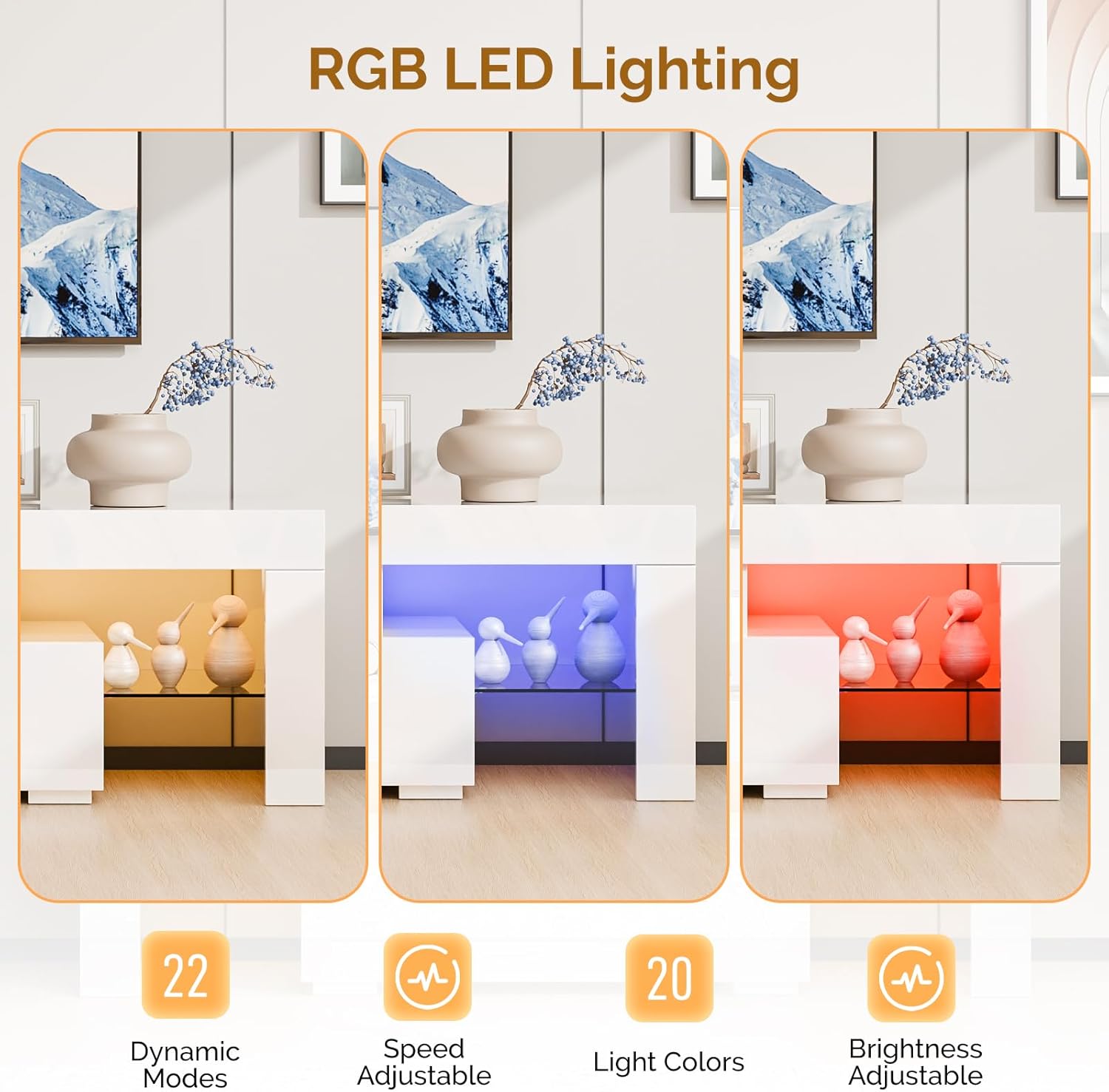
Figure 5: Product dimensions.
Warranty Information
Bonnlo products are manufactured with quality and durability in mind. This product comes with a standard manufacturer's warranty covering defects in materials and workmanship under normal use. For specific warranty terms and conditions, please refer to the documentation included with your purchase or contact Bonnlo customer support.
Customer Support
If you have any questions, require assistance with assembly, or need to report missing/damaged parts, please do not hesitate to contact Bonnlo customer support. Our team is available to provide professional assistance and ensure your satisfaction.
Please visit the official Bonnlo website or refer to your purchase documentation for contact details.