
Introduction
The BOSS Waza Air is a revolutionary wireless personal guitar amplification system designed to provide a natural 'amp-in-room' sound experience through circumaural headphones. It integrates advanced BOSS spatial technology and a gyroscopic sensor to deliver 3D ambience and dynamic sound localization. This system offers premium amplifier tones, a wide range of effects, Bluetooth audio streaming, and smartphone-based sound editing via the BOSS Tone Studio app. Its integrated wireless technology ensures exceptional sound quality with ultra-low latency, making it ideal for practice and silent playing.

Image: BOSS Waza Air headphones showcasing integrated gyroscopic sensor, built-in amplifiers and effects, and the included WL-T transmitter, emphasizing a cable-free experience.
Package Contents
Verify that all the following items are included in your package:
- BOSS Waza Air Headphones
- Owner's Manual
- Leaflet "USING THE UNIT SAFELY"
- Transmitter (WL-T)
- Micro USB cable for charging (*Note: Use a standard USB AC adaptor (5 V, 0.5 A or more) for charging.)

Image: Visual representation of the BOSS Waza Air package contents and the physical dimensions of the headphones.
Setup
1. Charging the Waza Air and Transmitter
Before initial use, fully charge both the Waza Air headphones and the WL-T transmitter. Connect the supplied Micro USB cable to the charging port on each device and to a standard USB AC adaptor (5 V, 0.5 A or more). The charging indicator will illuminate during charging and turn off when complete.
2. Connecting the Transmitter to Your Guitar
Plug the WL-T transmitter into the output jack of your guitar. Ensure it is securely inserted. The transmitter will automatically power on when connected to an instrument and detect movement.
3. Pairing the Waza Air with Your Device (Bluetooth)
To stream audio from your smartphone or tablet, enable Bluetooth on your device and select "WAZA-AIR" from the list of available devices. For sound editing and advanced features, you will also need to connect via the BOSS Tone Studio app.
4. Installing and Using the BOSS Tone Studio App
Download and install the dedicated BOSS Tone Studio app for Waza Air from your device's app store. Launch the app and follow the on-screen instructions to connect to your Waza Air unit. This app allows access to amplifier models, effects, and spatial sound settings.

Image: Side view of the Waza Air headphones, highlighting the charging port and control buttons.
Operation
1. Basic Controls
- Power Button: Press and hold to turn the headphones on or off.
- Volume Knob: Adjusts the overall output volume of the headphones.
- Bluetooth Button: Initiates Bluetooth pairing mode for audio streaming.
2. Understanding 3D Spatial Technology
The Waza Air features advanced spatial technology with three distinct environment modes:
- Surround: Places the amplifier in a virtual room, providing an immersive experience similar to playing in a recording studio.
- Static: Provides spatial localization where the combined sound of the amplifier and room changes continuously depending on head movement.
- Stage: Places the user in the center of a virtual stage, with the amplifier sound coming from a virtual background. Ideal for playing along with backing tracks.

Image: Illustration of the Surround, Static, and Stage 3D spatial sound modes.
3. Using Amplifier Models and Effects
The Waza Air provides access to a variety of amplifier types and over 50 customizable effects. These can be selected and adjusted using the BOSS Tone Studio app. Amplifier types include Brown, Lead, Crunch, Clean, and Flat/Bass/Acoustic, catering to various musical styles and instruments.
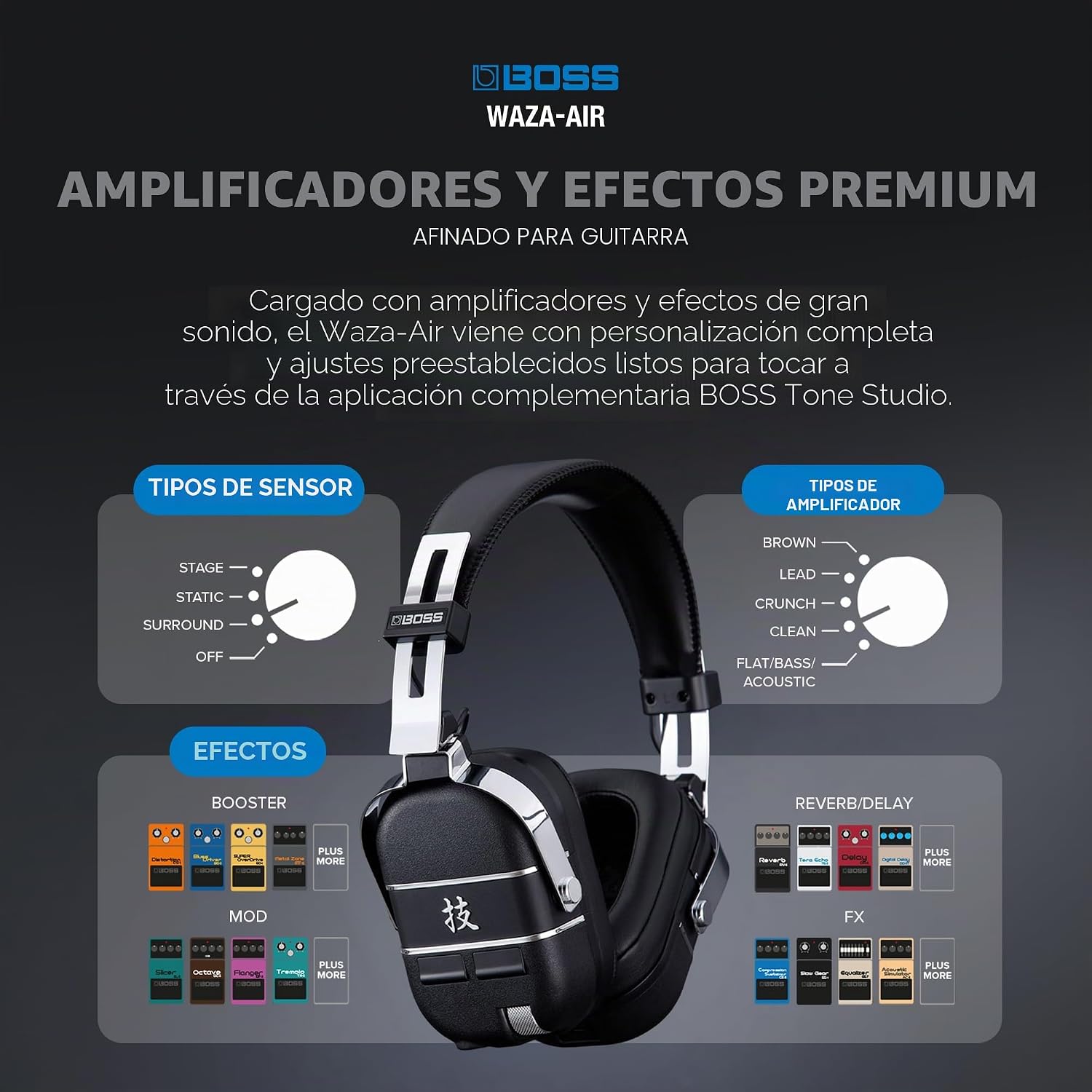
Image: Overview of amplifier types and effects available through the BOSS Tone Studio app.
4. Playing Along with Music
Once your Waza Air is paired via Bluetooth to your smartphone or tablet, you can stream music directly to the headphones. This allows you to play along with your favorite tracks, backing tracks, or online lessons, all within the immersive Waza Air sound environment.
Maintenance
Cleaning
Wipe the headphones and transmitter with a soft, dry cloth. Do not use abrasive cleaners, waxes, or solvents. Avoid getting moisture into any openings.
Battery Care
To prolong battery life, avoid fully discharging the batteries frequently. Charge the devices regularly, even if not in use for extended periods. Store in a cool, dry place.
Storage
When not in use, store the Waza Air headphones in a protective case (sold separately) to prevent damage. Avoid exposing the devices to extreme temperatures or direct sunlight.

Image: Waza Air headphones in a folded position, suitable for compact storage.
Troubleshooting
- No Sound:
- Ensure both the Waza Air headphones and WL-T transmitter are powered on and charged.
- Check the volume levels on both the headphones and your connected audio device.
- Verify that the WL-T transmitter is securely plugged into your guitar's output jack.
- Confirm that the Waza Air is correctly paired via Bluetooth for audio streaming and within the BOSS Tone Studio app.
- Bluetooth Connection Issues:
- Ensure the Waza Air is in pairing mode (refer to the manual for specific button presses).
- Turn off and on Bluetooth on your device, then try reconnecting.
- Move closer to the Waza Air to ensure you are within Bluetooth range.
- If issues persist, try unpairing and re-pairing the device.
- App Not Connecting:
- Ensure the BOSS Tone Studio app is updated to the latest version.
- Restart both the Waza Air headphones and your smart device.
- Check your device's app permissions to ensure Bluetooth access is granted to the BOSS Tone Studio app.
Specifications
| Model Name | WAZA-AIR |
| Manufacturer | Roland |
| Product Dimensions | 22.1 x 6.7 x 27 cm (8.7 x 2.6 x 10.6 inches) |
| Item Weight | 320 g (11.3 ounces) |
| Color | Black |
| Material | Metal |
| Batteries | 2 AA batteries required (included) |
| Connector Type | 3.5 mm Jack (for transmitter) |
| Country of Origin | Thailand |
| UPC | 761294514672 |

Image: Detailed dimensions of the Waza Air headphones.
Warranty and Support
Warranty Information
The BOSS Waza Air comes with a 1-year limited warranty from the date of purchase. This warranty covers defects in materials and workmanship under normal use. Please retain your proof of purchase for warranty claims. For full warranty terms and conditions, refer to the "USING THE UNIT SAFELY" leaflet included in your package or visit the official BOSS website.
Customer Support
For technical assistance, product inquiries, or service requests, please visit the official BOSS website or contact your local BOSS distributor. Online resources, including FAQs and software updates, are also available on the official support pages.
Official BOSS Website: https://www.boss.info/global/


