
1. Introduction
The XTUGA X-CM01 is a professional UHF wireless lavalier microphone system designed for high-quality audio recording. It is suitable for various applications including photography, video recording, news interviews, and classroom lectures. This system provides stable signal transmission with 16 selectable channels to minimize interference, offering a wireless range of up to 50 meters (164 feet). It is compatible with DSLR cameras, camcorders, smartphones, laptops, and PCs.
2. Package Contents
Please check the package contents to ensure all items are present:
- 1 x XTUGA X-CM01 UHF Receiver
- 1 x XTUGA X-CM01 UHF Transmitter
- 1 x Lavalier Microphone
- 1 x 3.5mm TRS to TRS Cable (for cameras/camcorders)
- 1 x 3.5mm TRS to TRRS Cable (for smartphones/laptops)
- 1 x Camera Shoe Mount
- 1 x Belt Clip (pre-attached to units)
- User Manual (this document)
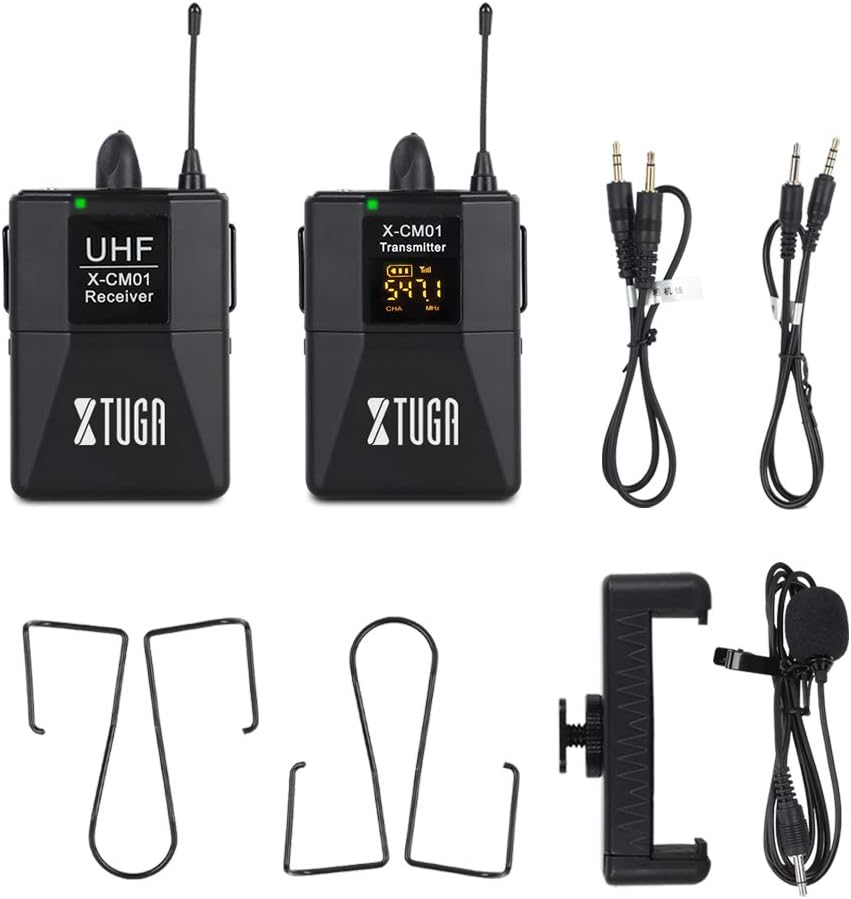
Figure 2.1: All components included in the XTUGA X-CM01 package. This includes the receiver, transmitter, lavalier microphone, two 3.5mm cables, and a camera shoe mount.
3. Setup
3.1. Battery Installation
Both the receiver and transmitter require two AA, 1.5V batteries each. Batteries are not included in the package.
- Locate the battery compartment cover on the back of both the receiver and transmitter units.
- Slide the cover open.
- Insert two AA batteries, ensuring correct polarity (+/-).
- Close the battery compartment cover securely.

Figure 3.1: Open battery compartment showing insertion of AA batteries. The system requires two AA batteries for each unit (transmitter and receiver).
3.2. Connecting the Lavalier Microphone
Connect the lavalier microphone to the transmitter unit.
- Locate the 3.5mm microphone input jack on the top of the transmitter.
- Insert the 3.5mm plug of the lavalier microphone firmly into this jack.
- Attach the lavalier microphone to your clothing, approximately 6-8 inches from your mouth, using the lapel clip.
3.3. Connecting the Receiver to a Recording Device
The receiver can be connected to various recording devices using the appropriate 3.5mm cable.
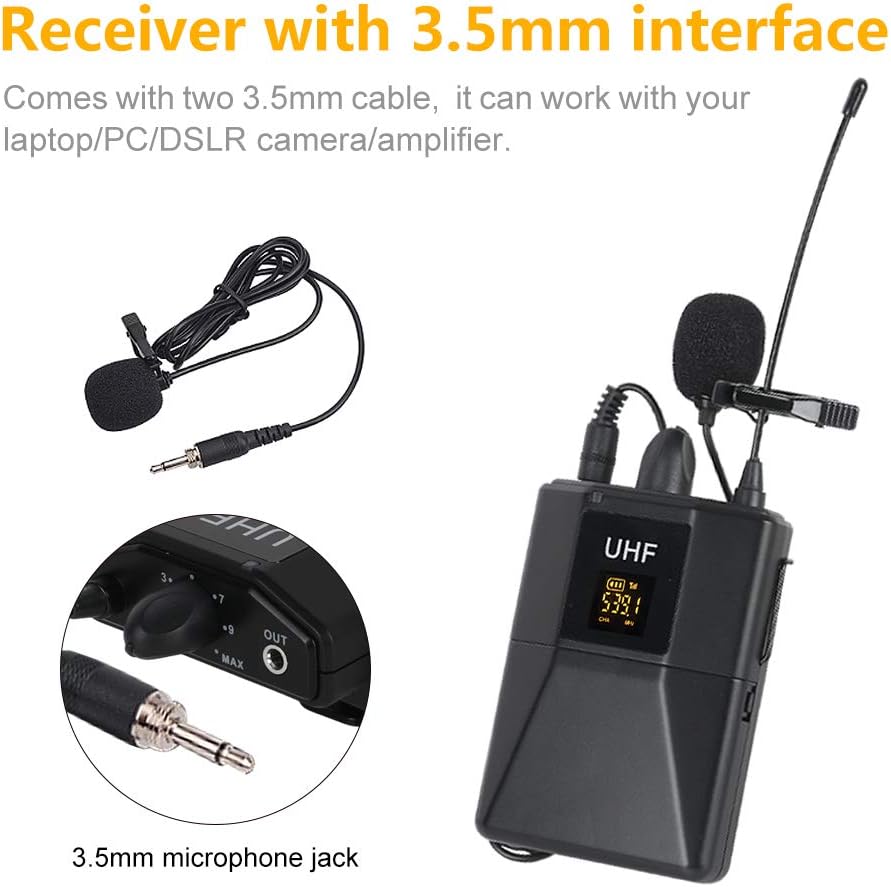
Figure 3.2: The receiver unit showing its 3.5mm output jack and the two types of 3.5mm cables provided for connecting to different devices.
- For DSLR Cameras/Camcorders/Audio Recorders:
Use the 3.5mm TRS to TRS cable (two black rings on the plug). Connect one end to the "OUT" jack on the receiver and the other end to the microphone input jack on your camera or recording device.

Figure 3.3: Receiver connected to a DSLR camera via the camera shoe mount and 3.5mm TRS cable.
- For Smartphones/Laptops/PCs:
Use the 3.5mm TRS to TRRS cable (three black rings on the plug). Connect one end to the "OUT" jack on the receiver and the other end to the headphone/microphone combo jack on your smartphone or laptop. For PCs with separate microphone and headphone jacks, you may need an additional adapter (not included).

Figure 3.4: Receiver connected to a smartphone using the appropriate 3.5mm TRRS cable.
3.4. Mounting the Receiver
The receiver unit can be mounted on a camera using the included shoe mount or attached to clothing using the belt clip.
- Camera Shoe Mount: Slide the camera shoe mount onto the receiver's belt clip, then slide the entire assembly onto your camera's hot shoe or cold shoe mount.
- Belt Clip: Use the integrated belt clip to attach the receiver to your belt, pocket, or other clothing.
4. Operating Instructions
4.1. Powering On/Off
Press and hold the power button on both the receiver and transmitter units for a few seconds to turn them on or off. The LCD display will illuminate when powered on.
4.2. Channel Selection
The X-CM01 system offers 16 selectable UHF channels to help avoid interference. Both the transmitter and receiver must be set to the same channel for proper operation.
- With the transmitter and receiver powered on, observe the channel number displayed on their LCD screens.
- On the transmitter, press the "FM keys" button (or channel selection button) to cycle through the available channels.
- Ensure the receiver automatically syncs to the same channel as the transmitter. If not, manually adjust the receiver's channel to match the transmitter's.
- Select a channel that provides clear audio without interference.

Figure 4.1: Transmitter unit displaying the channel selection button ("FM keys") and the LCD screen showing the current channel and frequency.
4.3. Volume Control
Both the transmitter and receiver units have individual volume controls. Adjust these to achieve optimal audio levels without distortion.
- Transmitter Volume: Adjust the input gain on the transmitter to prevent clipping (distortion) from the lavalier microphone.
- Receiver Volume: Adjust the output level on the receiver to match the input sensitivity of your recording device (camera, smartphone, etc.). Start with a moderate level and adjust as needed.
Tip: It is often best to set the transmitter volume to a level where the audio is strong but not peaking, and then fine-tune the overall recording level using the receiver's volume control and your recording device's input settings.
4.4. Operating Range
The system has a wireless range of up to 50 meters (164 feet) in an open environment. Obstacles such as walls, metal structures, and other wireless devices can reduce this range. Maintain a clear line of sight between the transmitter and receiver for best performance.

Figure 4.2: Visual representation of the 50-meter (164 feet) transmission distance in an open environment.
5. Maintenance
- Cleaning: Use a soft, dry cloth to clean the units. Do not use liquid cleaners or solvents.
- Storage: When not in use for extended periods, remove the batteries from both units to prevent leakage. Store the system in a cool, dry place.
- Battery Replacement: Replace batteries when the low battery indicator appears on the LCD display. Always use fresh AA 1.5V batteries.
6. Troubleshooting
| Problem | Possible Cause | Solution |
|---|---|---|
| No sound or low sound level. |
|
|
| Interference or static. |
|
|
| Audio cuts out intermittently. |
|
|
| Distorted audio. |
|
|
7. Specifications
| Brand | XTUGA |
| Model Name | X-CM01 |
| Wireless Type | UHF |
| Frequency Range | 519-551MHz (16 selectable channels) |
| Wireless Range | Up to 50 meters (164 feet) in open environment |
| Connector Type | 3.5 mm Jack |
| Compatible Devices | Camcorder, Camera, Smartphone, Laptop, PC, Audio Recorder |
| Audio Sensitivity | 98 Decibels |
| Signal-to-Noise Ratio | 98 dB |
| Power Source | Battery Powered (2 x AA 1.5V batteries per unit) |
| Estimated Battery Life | 4-5 hours (with fresh AA batteries) |
| Item Weight | 350 Grams (total package weight) |
8. Warranty and Support
For warranty information or technical support, please refer to the retailer's return policy or contact XTUGA customer service through their official website or the platform where the product was purchased. Please have your model number (X-CM01) and purchase details ready when contacting support.
