1. Introduction
This manual provides essential instructions for the safe and efficient use of your Panasonic NN-CD86JBFDG 34L Convection Microwave Oven. Please read this manual thoroughly before operating the appliance and retain it for future reference.
The Panasonic NN-CD86JBFDG is a versatile 34-liter convection microwave oven designed for various cooking needs. Key features include Zero Oil Cooking, 365 Auto Cook Menus, Magic Grill for dual-sided cooking, Fermentation function for dough and yogurt, and convenient Defrost and Reheat options.
Included Components:
- 1 Microwave Unit
- 1 User Manual
- Ceramic Tray
- Baking Tawa
- Rotating Ring
- Vertical Rotisserie
- High & Low Rack
- Multi Level Glass Shelf

Figure 1: Front view of the Panasonic NN-CD86JBFDG Convection Microwave Oven.
2. Setup Instructions
2.1 Unpacking
- Carefully remove the microwave oven and all packing materials from the carton.
- Check the oven for any damage, such as dents or a broken door. Do not operate the oven if it is damaged. Contact customer service.
- Remove any protective film from the surface of the oven.
2.2 Placement
- Place the oven on a flat, stable surface that can support its weight (28 kg).
- Ensure adequate ventilation. Leave a minimum of 10 cm (4 inches) of space at the rear, 20 cm (8 inches) at the top, and 5 cm (2 inches) on each side for proper airflow.
- Do not block any ventilation openings on the oven.
- Keep the oven away from heat sources, strong magnetic fields, and areas with high humidity.

Figure 2: Side view of the microwave oven with dimensions (52.6D x 40.8W x 50.1H Centimeters) for proper placement.

Figure 3: Rear view of the microwave oven, highlighting the power cord and ventilation areas.
2.3 Power Connection
- Ensure the power supply matches the oven's requirements: 230 Volts, 50 Hz.
- Plug the power cord into a properly grounded electrical outlet. Do not use extension cords or adapters.
3. Operating Instructions
Familiarize yourself with the control panel before operating the oven.
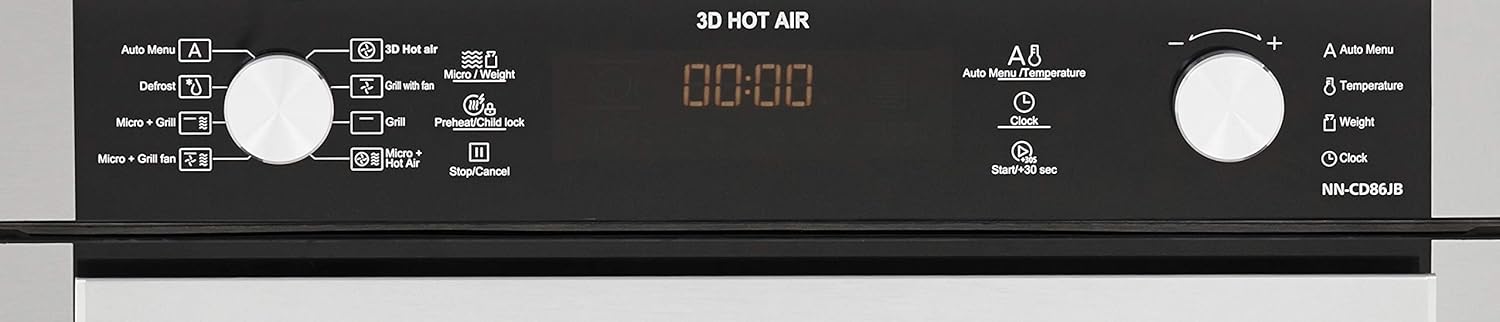
Figure 4: Detailed view of the control panel, showing various function buttons and dials.

Figure 5: Interior view of the microwave oven, showing the ceramic tray and rotating ring.
3.1 Basic Microwave Operation
- Place food in a microwave-safe container on the ceramic tray.
- Close the oven door securely.
- Select the 'Micro' function.
- Use the dial to set the desired cooking time and power level.
- Press 'Start/+30 sec' to begin cooking.
3.2 Convection Cooking
The convection mode uses a fan to circulate hot air, similar to a traditional oven, for baking and roasting.
- Place food on the appropriate rack (high or low) or baking tawa.
- Select the '3D Hot Air' or 'Convection' function.
- Set the desired temperature and cooking time using the dials.
- Press 'Start/+30 sec'. The oven may preheat before cooking begins.
3.3 Grill Function (Magic Grill)
The Magic Grill feature utilizes dual grills for even browning and crisping.
- Place food on the high rack for grilling.
- Select the 'Grill' function.
- Set the desired grilling time.
- Press 'Start/+30 sec'.
3.4 Combination Cooking
Combine microwave, grill, or convection for faster and more versatile cooking results.
- Micro + Grill: Ideal for cooking and browning simultaneously.
- Micro + Convection (Micro + Grill Fan): Combines microwave speed with convection browning.
- Select the desired combination mode.
- Set the power levels and cooking times as required.
- Press 'Start/+30 sec'.
3.5 Special Features
- 365 Auto Cook Menus: Use the 'Auto Menu' function and dial to select from a wide range of pre-programmed recipes. Follow on-screen prompts for weight and quantity.
- Zero Oil Cooking: Specific auto cook menus are designed for cooking with minimal or no oil. Refer to the recipe guide for details.
- Fermentation: This feature allows for preparing yogurt, proofing dough, and making paneer. Select the 'Fermentation' option and follow the instructions for specific items.
- Defrost: The 'Defrost' function allows for hassle-free thawing of meat, fish, bread, soups, fruits, and vegetables. Select 'Defrost', input the weight, and press 'Start'.
- Reheat: Use the 'Reheat' option to warm up leftovers. Select 'Reheat' and the oven will automatically determine the optimal reheating time.

Figure 6: Interior view of the microwave oven with a cooking pot, demonstrating cooking capacity.
4. Maintenance and Cleaning
Regular cleaning and maintenance will ensure the longevity and optimal performance of your microwave oven.
4.1 General Cleaning
- Always unplug the oven before cleaning.
- Interior: Wipe the interior cavity with a damp cloth after each use. For stubborn stains, use a mild detergent solution. Do not use abrasive cleaners or harsh chemicals.
- Exterior: Clean the exterior surfaces with a soft, damp cloth. Avoid getting water into the ventilation openings.
- Door Seal: Keep the door seal clean to ensure a proper seal during operation.
- Ceramic Tray and Rotating Ring: These components can be removed and washed with warm, soapy water. Ensure they are dry before placing them back in the oven.
4.2 Vapor Clean Function
The oven may feature a 'Vapor Clean' function to assist in loosening food residue. Refer to the specific instructions in the full user manual for how to use this feature.
5. Troubleshooting
Before contacting customer service, please refer to the following common issues and solutions:
| Problem | Possible Cause | Solution |
|---|---|---|
| Oven does not start | Power cord not plugged in; Door not closed properly; Fuse blown or circuit breaker tripped. | Ensure power cord is securely plugged in; Close the door firmly; Check household fuse/circuit breaker. |
| Food not heating | Incorrect cooking time/power level; Door not closed properly; Using non-microwave safe cookware. | Adjust cooking time/power; Ensure door is closed; Use microwave-safe dishes. |
| Light not working | Bulb needs replacement. | Contact qualified service personnel for bulb replacement. |
| Sparking inside oven | Metal in oven; Food residue; Damaged waveguide cover. | Remove any metal objects; Clean oven interior; Contact service if waveguide cover is damaged. |
If the problem persists after attempting these solutions, please contact Panasonic customer support.
6. Specifications
| Feature | Specification |
|---|---|
| Brand | Panasonic |
| Model | NN-CD86JBFDG |
| Capacity | 34 litres |
| Installation Type | Countertop |
| Oven Cooking Mode | Convection |
| Colour | Black |
| Voltage | 230 Volts |
| Wattage | 1500 Watts |
| Fuel Type | Electric |
| Defrost System | Defrost |
| Door Orientation | Left |
| Material | Steel |
| Inner Material Type | Ceramic, Glass |
| Item Weight | 28 kg |
| Item Dimensions (LxWxH) | 50.1 x 52.6 x 40.8 Centimeters |
7. Warranty Information
Your Panasonic NN-CD86JBFDG Convection Microwave Oven comes with the following warranty:
- 1 year on the product from the date of purchase.
- 5 years on the magnetron from the date of purchase.
Please retain your purchase receipt as proof of purchase for warranty claims. For detailed terms and conditions, refer to the warranty card included with your product or visit the official Panasonic website.
8. Customer Support
For further assistance, technical support, or service requests, please contact Panasonic customer service or visit the official Panasonic website.
You can find more information and support resources on the official Panasonic website: Panasonic Store on Amazon.in


