
Introduction
Thank you for purchasing the iLuv Bubble Gum True Wireless Air Earbuds. This manual provides detailed instructions on how to set up, operate, maintain, and troubleshoot your new earbuds. Please read this manual thoroughly before use to ensure proper operation and to maximize the lifespan of your device.
Safety Information
To ensure safe and proper use of your iLuv Bubble Gum True Wireless Air Earbuds, please observe the following precautions:
- Do not expose the earbuds or charging case to extreme temperatures, humidity, or liquids.
- Avoid dropping, impacting, or disassembling the device.
- Do not use abrasive cleaners or harsh chemicals.
- Listen at moderate volume levels to prevent hearing damage.
- Keep out of reach of children and pets.
Package Contents
Verify that all items are present in your package:
- iLuv Bubble Gum True Wireless Air Earbuds (Left and Right)
- Wireless Charging Case
- USB Charging Cable (Type-C)
- User Manual (this document)
Product Overview

Figure 1: iLuv Bubble Gum True Wireless Air Earbuds in their open charging case. The image shows both earbuds, one in its charging slot and the other slightly elevated, with the charging case open. The iLuv logo is visible on the earbuds, and blue indicator lights are present on both the earbuds and the front of the charging case.
The iLuv Bubble Gum True Wireless Air Earbuds consist of two independent earbuds and a portable charging case. Each earbud features a touch-sensitive surface for controls and an LED indicator. The charging case has LED indicators on the front to show battery status.
Setup
1. Charging the Earbuds and Case
Before first use, fully charge the earbuds and the charging case.
- Place both earbuds into the charging case. Ensure they are properly seated in their respective slots (L for left, R for right).
- Connect the USB charging cable to the charging port on the case and the other end to a USB power adapter (not included) or a computer's USB port.
- The LED indicators on the charging case will illuminate to show charging status. Once fully charged, the indicators may turn solid or turn off, depending on the model.
- The earbuds' LED indicators will show charging status while inside the case. They will typically turn off when fully charged.
Note: A full charge provides up to 20 hours of total listening power with the charging case.
2. Pairing with Your Device
The iLuv Bubble Gum True Wireless Air Earbuds feature 1-step pairing for convenience.
- Ensure Bluetooth is enabled on your smartphone, tablet, or other audio device.
- Open the charging case. The earbuds will automatically enter pairing mode. The LED indicator on one of the earbuds will flash, indicating it's ready to pair.
- On your device, search for Bluetooth devices and select "iLuv Bubble Gum Air" (or similar name) from the list.
- Once connected, a voice prompt will confirm successful pairing, and the earbud LED indicators will stop flashing.
Tip: If the earbuds do not connect automatically, try turning off and on your device's Bluetooth, or place the earbuds back in the case, close it, and then reopen it.
Operating Instructions
Wearing the Earbuds
Gently insert each earbud into your ear canal. Adjust them for a comfortable and secure fit. The "L" and "R" markings on the earbuds indicate left and right.
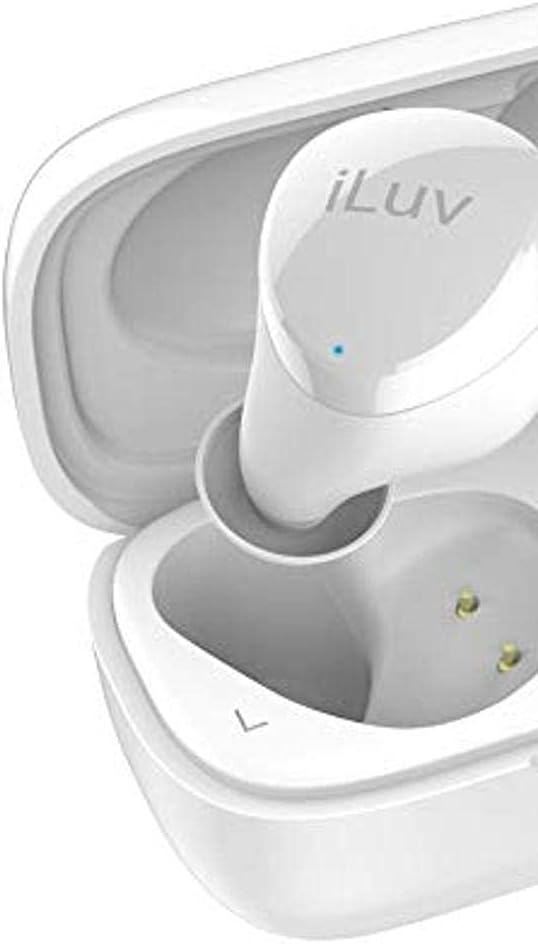
Figure 2: Close-up view of the left iLuv Bubble Gum True Wireless Air earbud, showing the "L" marking and the iLuv logo on its surface. A small blue LED indicator is visible near the logo.

Figure 3: Close-up view of the right iLuv Bubble Gum True Wireless Air earbud, showing the "R" marking and the iLuv logo on its surface. A small blue LED indicator is visible near the logo.
Touch Controls
The earbuds feature simple touch controls on their outer surface:
- Play/Pause: Single tap on either earbud.
- Next Track: Double tap on the right earbud.
- Previous Track: Double tap on the left earbud.
- Answer/End Call: Single tap on either earbud during an incoming call.
- Reject Call: Press and hold on either earbud for 2 seconds during an incoming call.
- Activate Voice Assistant: Triple tap on either earbud.
Note: Volume control is typically managed via your connected device.
Maintenance
Cleaning
Regular cleaning helps maintain optimal performance and hygiene:
- Use a soft, dry, lint-free cloth to wipe the earbuds and charging case.
- For stubborn dirt, slightly dampen the cloth with water or a mild, non-abrasive cleaner.
- Do not allow any liquid to enter the openings.
- Gently clean the ear tips and speaker mesh with a cotton swab or a small, soft brush to remove earwax or debris.
Storage
When not in use, store the earbuds in their charging case to protect them and keep them charged. Store the case in a cool, dry place away from direct sunlight and extreme temperatures.
Battery Care
To prolong battery life:
- Avoid fully discharging the battery frequently.
- Charge the device regularly, even if not used for extended periods.
- Do not expose the device to temperatures below 0°C (32°F) or above 45°C (113°F).
Troubleshooting
If you encounter issues with your earbuds, refer to the following common problems and solutions:
| Problem | Possible Cause | Solution |
|---|---|---|
| Earbuds not pairing or connecting. | Bluetooth is off on device; earbuds not in pairing mode; interference. | Ensure Bluetooth is on. Place earbuds in case, close, then reopen. Forget device on your phone and re-pair. Move closer to your device. |
| No sound or sound cutting in/out. | Low battery; out of range; interference; earbud not properly seated. | Charge earbuds and case. Stay within 10 meters of your device. Avoid strong Wi-Fi signals. Ensure earbuds are clean and properly inserted. |
| One earbud has no sound. | Earbud not connected; low battery; earbud issue. | Place both earbuds back in the case, close, then reopen. Ensure both are charged. Try re-pairing. |
| Earbuds not charging. | Charging cable issue; dirty charging contacts; case battery empty. | Check cable connection. Clean charging contacts on earbuds and case with a dry cotton swab. Charge the case. |
If the problem persists, please contact iLuv customer support.
Specifications
| Feature | Detail |
|---|---|
| Model Name | ILVBBGTWSAIROR |
| Wireless Communication Technology | Bluetooth 5.0 |
| Form Factor | In Ear |
| Control Method | Touch |
| Included Components | Wireless Charging Case |
| Battery Cell Composition | Lithium Ion |
| Total Listening Power (with case) | Up to 20 hours |
| Material | Plastic |
| Color | Orange (Note: Product title indicates White, but specifications list Orange. User manual will reflect the provided specification data.) |
| Item Weight | 100 g (Parcel Dimensions) |
Note: Specifications are subject to change without notice.
Warranty and Support
iLuv products are designed and manufactured to the highest quality standards. For detailed warranty information and customer support, please visit the official iLuv website or contact their customer service department. Keep your proof of purchase for warranty claims.
For further assistance, please visit: www.iluv.com/support

