
COLZER TR160D
COLZER TR160D Commercial Dehumidifier User Manual
Model: TR160D | Brand: COLZER
Introduction
Thank you for choosing the COLZER TR160D Commercial Dehumidifier. This powerful and portable industrial dehumidifier is designed for efficient water damage restoration, flood clean-up, and general moisture removal in large spaces up to 6000 square feet. Its robust construction and advanced features ensure reliable performance in demanding environments. Please read this manual thoroughly before operation to ensure proper use, maintenance, and safety.
Important Safety Information
- Always ensure the unit is placed on a stable, level surface.
- Do not operate the dehumidifier with a damaged power cord or plug.
- Keep the air inlet and outlet clear of obstructions to ensure proper airflow.
- Do not immerse the unit in water or use it in standing water.
- Unplug the unit before cleaning or performing any maintenance.
- This appliance is cETL Listed, indicating compliance with North American safety standards.
- Allow the unit to sit upright for at least 24 hours before initial operation if it has been transported horizontally.
Product Features & Components
The COLZER TR160D is engineered for high-performance dehumidification with user-friendly features:
- High Capacity: Removes up to 190 PPD (Pints Per Day) at saturation and 93 PPD (AHAM) with 386 CFM airflow, suitable for areas up to 6000 sq ft.
- Built-in Heavy-duty Pump: Features an internal pump with a 17 ft long drain hose, allowing for vertical drainage up to 15 ft, providing flexible drainage options.
- Durable Construction: Equipped with a rough roto-molded housing that is bumps-resistant, anti-scratch, dents-resistant, wear-resistant, and anti-corrosion, ensuring longevity in tough environments.
- Portability: Designed with a collapsible handle and 12-inch semi-pneumatic wheels for easy transport and storage. Includes a power cord winder and drain pipe strap for convenience.
- Advanced Control Panel: Digital display shows inlet/outlet temperature and humidity, job hours, and timer settings. Features indicators for water full and defrost.
- Worry-free Operation: Includes HGV Defrost for efficient operation in low temperatures (33-100°F) and an auto-restart function after power outages.
Visual Overview

Figure 1: Front view of the COLZER TR160D Commercial Dehumidifier, showcasing its blue and grey robust casing and large wheels.
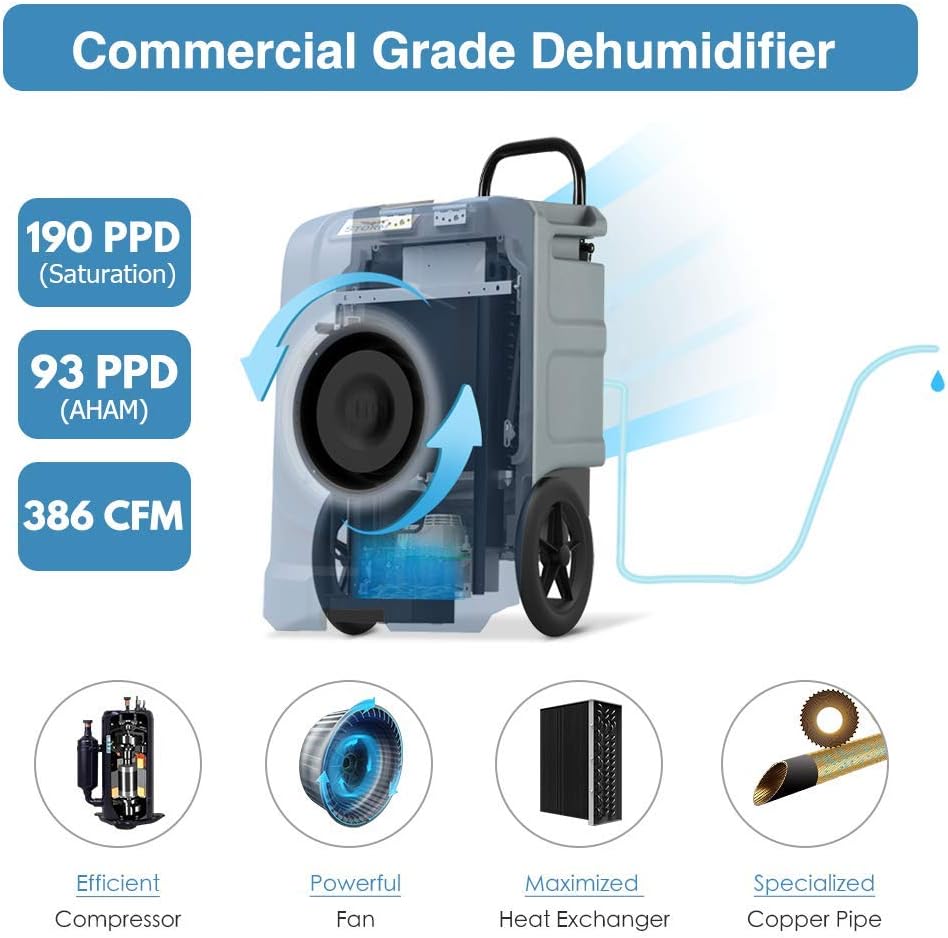
Figure 2: Diagram highlighting the dehumidifier's capacity (190 PPD saturation, 93 PPD AHAM) and airflow (386 CFM), along with internal components like the efficient compressor and powerful fan.
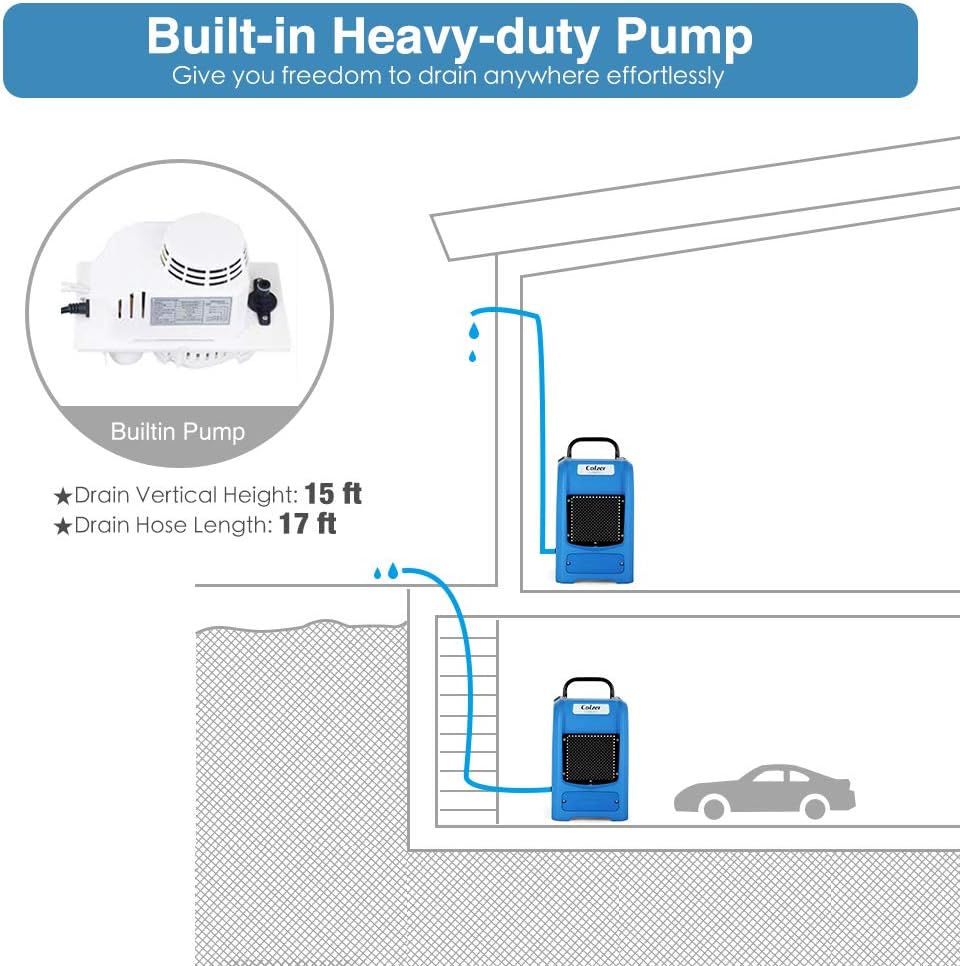
Figure 3: Illustration of the built-in heavy-duty pump, demonstrating its ability to drain water up to 15 feet vertically and through a 17-foot hose, allowing for flexible placement.

Figure 4: Details of the rough roto-molded housing, emphasizing its resistance to bumps, scratches, dents, wear, and corrosion, ensuring durability.

Figure 5: View of the rear of the unit, highlighting the collapsible handle, drain pipe strap, power cord winder, and 12-inch semi-pneumatic wheels for easy movement and storage.
Setup Guide
- Unpacking: Carefully remove the dehumidifier from its packaging. Inspect for any shipping damage.
- Initial Placement: If the unit was transported horizontally, allow it to stand upright for at least 24 hours before plugging it in. This allows the refrigerant to settle.
- Positioning: Place the dehumidifier in the desired location, ensuring adequate space around the air inlet and outlet for optimal airflow. The unit is designed for rough conditions, making it suitable for basements, construction sites, and other challenging environments.
- Drain Hose Connection:
- Locate the drain outlet on the unit.
- Connect the provided 17 ft long drain hose to the easy-fitting connector.
- Route the drain hose to a suitable drainage point (e.g., floor drain, sink, or outside). The built-in pump can lift water up to 15 feet vertically. Ensure the hose is not kinked or obstructed.
- Power Connection: Unwind the 25 ft power cord from its winder. Plug the power cord into a grounded electrical outlet.
- Handle Adjustment: Adjust the collapsible handle to your preferred height for easy maneuvering. Ensure it is securely locked in place during transport.
Operating Instructions
The COLZER TR160D features an intuitive control panel for easy operation.
Control Panel Overview

Figure 6: Detailed view of the control panel, showing the digital display and various function buttons.
- Digital Display: Shows Job Hours Meter, Timer Display, Inlet Temperature & Humidity Reading (IN), and Outlet Temperature & Humidity Reading (OUT).
- FULL Indicator (Red): Illuminates when the internal reservoir is full (if not using continuous drainage) or if there's a pump issue.
- PURGE Button: Press to manually empty the internal pump reservoir.
- POWER Button: Press to turn the unit ON or OFF.
- TIMER Button: Press and hold for 3-4 seconds to activate the timer function. Use to set desired operating duration.
- DEFROST Indicator (Blue): Illuminates when the unit is in defrost mode, which automatically clears ice buildup on the coils.
Starting Operation
- Ensure the unit is properly set up and the drain hose is connected.
- Press the POWER button to turn on the dehumidifier. The display will light up, showing current readings.
- The unit will begin operating in continuous mode by default, actively removing moisture from the air.
Timer Function
- To set a timer for operation, press and hold the TIMER button for 3-4 seconds.
- Use the arrow buttons (if available, or repeated presses of TIMER) to adjust the desired operating hours. The unit will run for the set duration and then automatically shut off.
Automatic Features
- HGV Defrost: The unit automatically enters defrost mode when coil temperatures are too low, preventing ice buildup and ensuring efficient operation in temperatures between 33°F and 100°F.
- Auto-Restart: In case of a power outage, the dehumidifier will automatically restart with its previous settings once power is restored.
Official Product Video
Video: An official overview of the Colzer Commercial Dehumidifier, demonstrating its features, setup, and operation. This video provides a visual guide to connecting the drain hose, plugging in the unit, and using the control panel.
Maintenance
Regular maintenance ensures the longevity and efficient operation of your COLZER TR160D dehumidifier.
- Filter Cleaning:
- The unit features quick access to the high-airflow filter. Regularly check and clean the air filter to maintain optimal performance.
- To access, locate the finger slot at the bottom of the air-inlet grill and push the filter up for removal.
- Clean the filter with warm, soapy water or a vacuum cleaner. Ensure it is completely dry before reinserting.
- Exterior Cleaning: Wipe the exterior of the unit with a soft, damp cloth. Do not use harsh chemicals or abrasive cleaners.
- Drain Hose Inspection: Periodically check the drain hose for any blockages, kinks, or signs of wear. Ensure it is securely connected.
- Storage: If storing the unit for an extended period, ensure it is clean and dry. Drain any remaining water from the pump using the PURGE function. Store in a cool, dry place.
Troubleshooting
Before contacting customer support, please refer to the following common issues and solutions:
| Problem | Possible Cause | Solution |
|---|---|---|
| Dehumidifier does not turn on. | No power, power cord not fully plugged in, circuit breaker tripped. | Check power connection, ensure outlet is functional, reset circuit breaker. |
| Unit is running but not collecting water. | Air filter clogged, room temperature too low, humidity too low, unit in defrost mode. | Clean air filter. Ensure room temperature is within operating range (33-100°F). Allow unit to complete defrost cycle. |
| "FULL" indicator is on, but drain hose is connected. | Drain hose kinked or blocked, pump malfunction. | Check drain hose for obstructions. Press the PURGE button to manually activate the pump. If issue persists, contact support. |
| Unit is noisy. | Unit not level, fan obstruction, loose parts. | Ensure unit is on a level surface. Check for any foreign objects near the fan. |
Product Specifications
| Specification | Detail |
|---|---|
| Brand | COLZER |
| Model Name | TR160D |
| Capacity (Saturation) | 190 PPD (Pints Per Day) |
| Capacity (AHAM) | 93 PPD (Pints Per Day) |
| Floor Area Coverage | Up to 6000 Square Feet |
| Airflow (CFM) | 386 CFM |
| Wattage | 735 watts |
| Operation Mode | Automatic |
| Operating Temperature Range | 33°F - 100°F |
| Product Dimensions (L x W x H) | 21.5 x 19.3 x 32 inches |
| Item Weight | 104.8 pounds |
| Drain Hose Length | 17 feet |
| Max Vertical Drain Height | 15 feet |
| Power Cord Length | 25 feet |
| Certifications | cETL Listed |
Warranty & Support
For detailed warranty information, please refer to the official user manual PDF available via the link below. For technical support, troubleshooting assistance, or parts inquiries, please contact COLZER customer service.
- Official User Manual (PDF): Download Here
- Website: colzersmart.com
- Email Support: service@colzer.com
Related documentsTR160D


Ask a question about this manual
Ask about setup, troubleshooting, compatibility, parts, safety, or missing instructions. Manuals+ will review the question and use this page’s manual context to help answer it.