
ECOTOUCH ETH24B
ECOTOUCH Induction Cooktop User Manual
Model: ETH24B
Brand: ECOTOUCH
Introduction
This manual provides comprehensive instructions for the safe and efficient operation, installation, and maintenance of your ECOTOUCH 24-inch 4-burner electric built-in induction cooktop. Please read this manual thoroughly before using the appliance and retain it for future reference.

Image: The ECOTOUCH induction cooktop, showcasing its sleek black glass ceramic surface, four induction zones, and intuitive touch controls. The display shows '99' and '9' indicating power levels or timer settings.
Safety Information
Always adhere to basic safety precautions when using electrical appliances to reduce the risk of fire, electric shock, burns, or injury. This cooktop is designed for domestic use only.
- Ensure proper installation by a qualified technician.
- Do not touch hot surfaces. Use handles or knobs.
- Never leave the cooktop unattended during operation.
- Keep flammable materials away from the cooktop.
- Use only induction-compatible cookware.
- Do not store items that could be attractive to children above the cooktop.
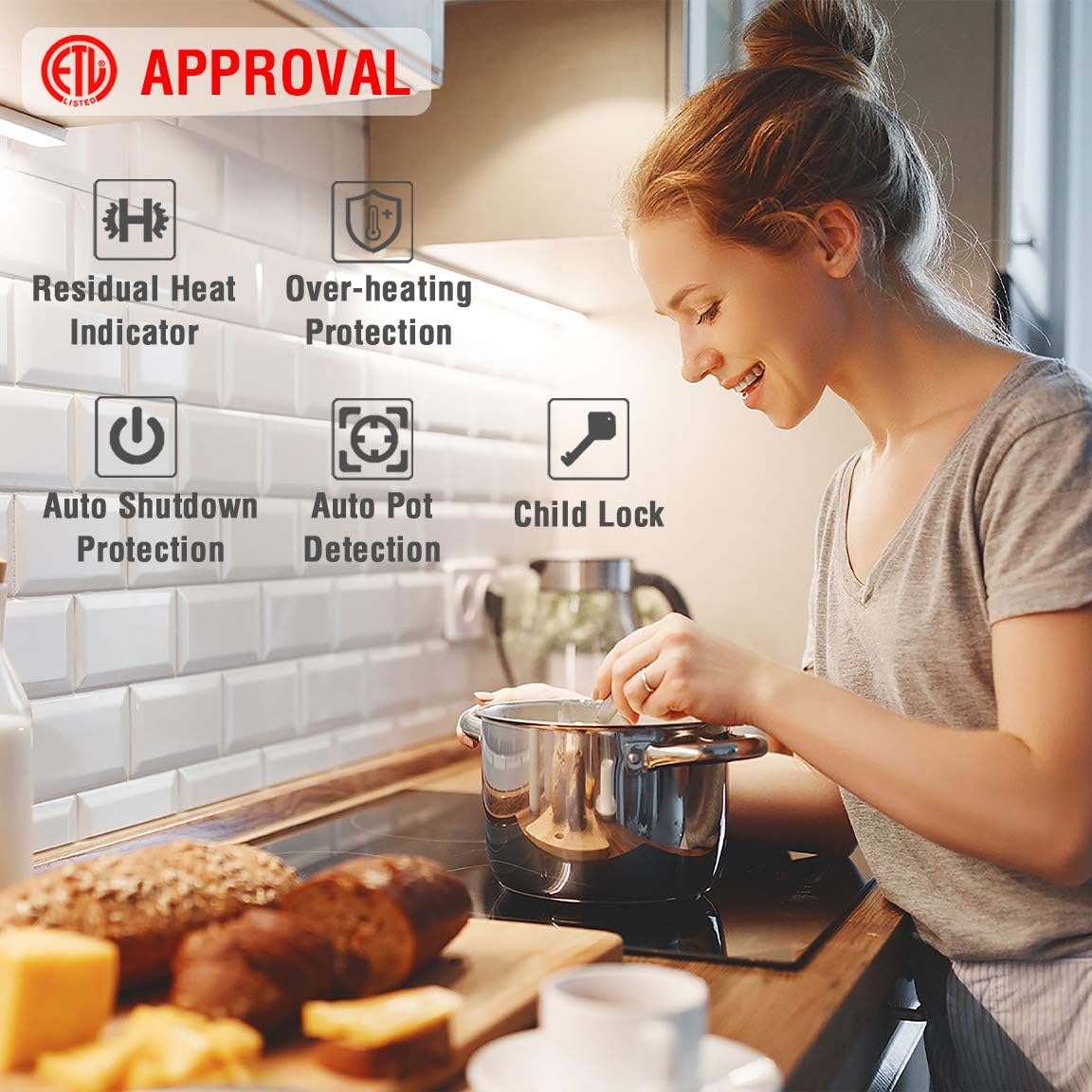
Image: An illustration highlighting key safety features of the ECOTOUCH cooktop, including Residual Heat Indicator, Over-heating Protection, Auto Shutdown Protection, Auto Pot Detection, and Child Lock, ensuring safe operation.

Image: A family scene in a kitchen, demonstrating the Child Lock feature. A father and daughter are cooking, emphasizing the safety aspect for households with children.
Setup and Installation
Proper installation is crucial for the safe and efficient operation of your induction cooktop. It is recommended that installation be performed by a qualified electrician or technician.
Dimensions and Cutout
Ensure your countertop cutout meets the specified dimensions for a proper fit and adequate ventilation.
- Product Dimensions: 23.23 inches (W) x 20.47 inches (D) x 2.36 inches (H)
- Cutout Dimensions: Approximately 22.05 inches (W) x 19.29 inches (D)
- Minimum clearance below cooktop for ventilation: 1.97 inches (5cm)
Electrical Connection
The cooktop requires a dedicated 240V, 30AMP electrical circuit. Refer to the wiring diagram for correct connections. The unit comes with pre-connected wires for ease of installation.
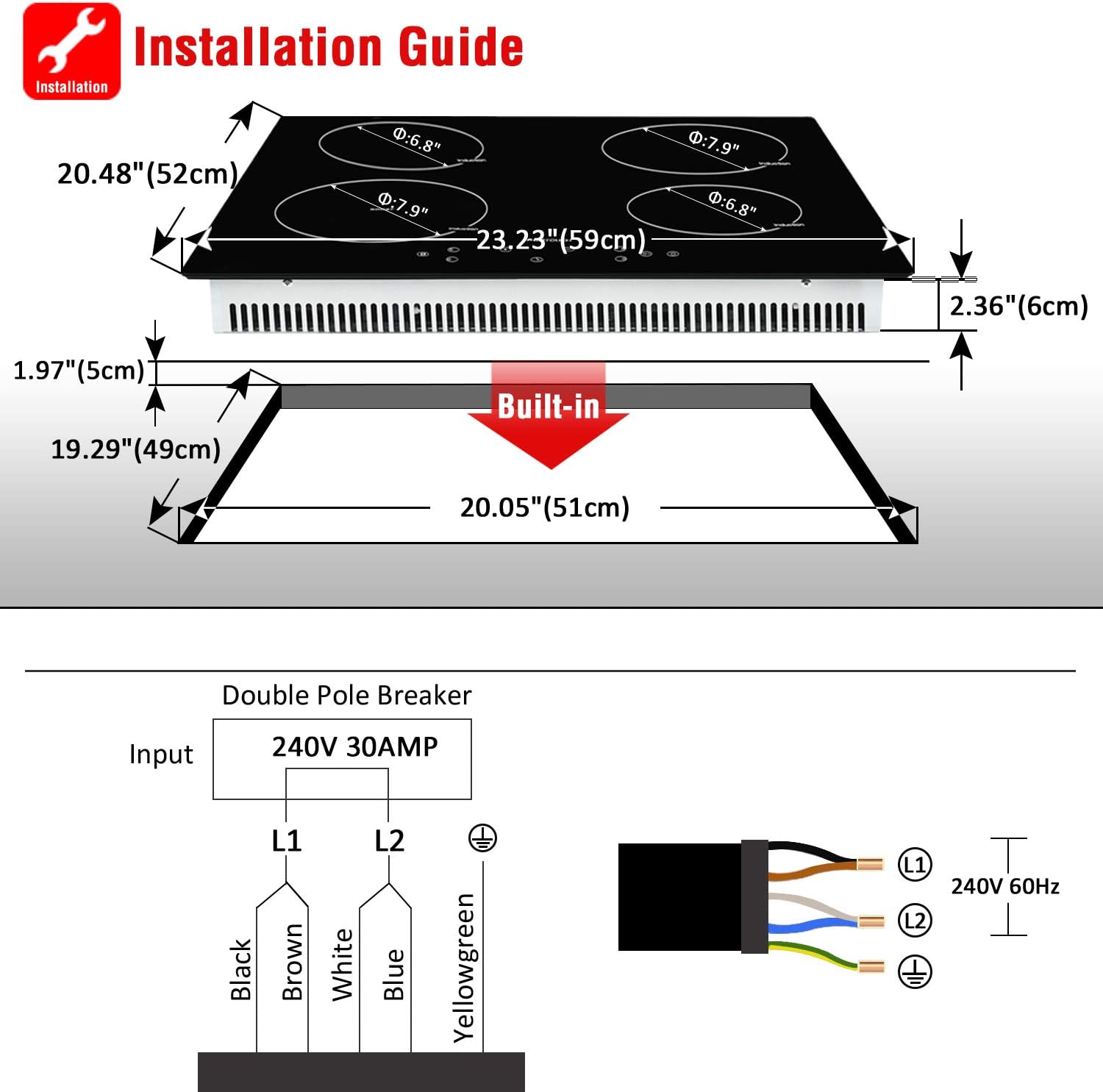
Image: A detailed installation guide illustrating the physical dimensions of the cooktop and the required countertop cutout. It also includes a clear electrical wiring diagram for connecting the cooktop to a 240V 30AMP double pole breaker, showing Black, Brown, White, Blue, and Yellowgreen wires.
Note: Ensure adequate air circulation around the cooktop for optimal performance and to prevent overheating. Do not obstruct ventilation openings.
Operating Instructions
Your ECOTOUCH induction cooktop features intuitive touch controls for precise cooking.
Powering On/Off
- Touch the Power button to turn the cooktop on.
- Select the desired cooking zone.
- Adjust the power level using the '+' and '-' buttons.
- To turn off, touch the Power button again or turn off individual zones.
Power Levels
The cooktop offers 9 power levels for versatile cooking, from gentle simmering to rapid boiling.

Image: A user preparing food on the cooktop, illustrating the concept of a high-power burner with 9 adjustable power levels to meet various cooking demands.
Booster Function
The Booster function provides an extra burst of power for rapid heating, ideal for boiling water quickly. Activate it by selecting the designated booster zone and pressing the boost button.

Image: The ECOTOUCH induction cooktop installed in a kitchen, visually representing the power output of each induction zone. It highlights the 1500W, 2000W, and a maximum 2200W (Booster) zones, demonstrating precise and fast heating capabilities.
Timer Function
Set a cooking timer for individual zones, ranging from 1 to 99 minutes. The cooktop will automatically turn off the zone once the set time expires.
- Select the cooking zone.
- Touch the Timer button.
- Use '+' and '-' to set the desired time.

Image: A user interacting with the cooktop, emphasizing the Timer Function feature which allows setting cooking times from 1 to 99 minutes for precise control.
Maintenance and Cleaning
Regular cleaning ensures the longevity and aesthetic appeal of your ECOTOUCH induction cooktop. Always ensure the cooktop is cool before cleaning.
- For light spills, wipe with a damp cloth and mild detergent.
- For stubborn stains, use a ceramic cooktop cleaner and a non-abrasive pad.
- Avoid abrasive cleaners, scouring pads, or harsh chemicals.
- Do not use steam cleaners.

Image: A demonstration of the easy cleaning process for the ECOTOUCH cooktop's smooth glass ceramic surface, showing hands in yellow gloves wiping the surface with a sponge and spray cleaner.
Troubleshooting
This section addresses common issues you might encounter with your induction cooktop. For problems not listed here, contact customer support.
| Problem | Possible Cause | Solution |
|---|---|---|
| Cooktop does not turn on. | No power supply; circuit breaker tripped. | Check power connection and reset circuit breaker. |
| "E" or "E8" error code displayed. | Internal fault; power cycle needed. | Turn off the cooktop at the circuit breaker for a few minutes, then turn it back on. If the error persists, contact support. |
| Burner not heating. | Non-induction compatible cookware; cookware too small/large; no pot detected. | Use induction-compatible cookware with a flat, magnetic base of appropriate size for the zone. Ensure the pot is centered. |
| Cooktop makes humming/buzzing noise. | Normal operation for induction; fan noise. | This is normal. The fan cools internal components. Some cookware may also produce slight noise. |
Specifications
| Brand | ECOTOUCH |
| Model Number | ETH24B |
| Installation Type | Built In |
| Heating Elements | 4 Induction Burners |
| Material Type | Glass Ceramic |
| Color | Black |
| Voltage | 240 Volts |
| Wattage | 7000 watts |
| Product Dimensions (D x W x H) | 20.47 x 23.23 x 2.36 inches |
| Item Weight | 22 pounds |
| Special Features | Booster Burner, Child Lock, Timer Function, Auto Pot Detection, Over-heating Protection, Auto Shutdown Protection, Residual Heat Indicator |
Warranty and Support
ECOTOUCH provides a manufacturer's warranty for this product. Please refer to your purchase documentation or contact ECOTOUCH customer service for specific warranty terms and conditions.
For technical assistance, troubleshooting, or warranty claims, please visit the official ECOTOUCH website or contact their customer support team. Keep your proof of purchase handy when contacting support.
You can find more information and contact details on the ECOTOUCH Store on Amazon.
Related Documents - ETH24B
 |
Fulgor Milano ENOVA 48" Induction Cooktop F7EIK48MB1 - Product Overview Detailed information on the Fulgor Milano ENOVA 48-inch matte black induction cooktop (F7EIK48MB1), featuring Quantum induction, 5 cooking zones, bridge function, digital controls, and premium design. |
 |
Duxtop Built-In Double Induction Cooktop User Manual (Models BT-K35, 8620BI) Comprehensive user manual for the Duxtop Built-In Double Induction Cooktop, models BT-K35 and 8620BI. Covers safety precautions, installation, operation, maintenance, troubleshooting, specifications, and warranty. |
 |
ECOTOUCH Electric Ceramic Cooktop CRAH302B: Installation and Use Manual Comprehensive guide for installing, using, and maintaining the ECOTOUCH Electric Ceramic Cooktop model CRAH302B. Includes safety instructions, operating procedures, troubleshooting, and technical specifications. |
 |
Duxtop BT-C35-D / P961LS Induction Cooktop Countertop Burner User Manual Comprehensive user manual for the Duxtop BT-C35-D and P961LS countertop induction burner, covering safety, operation, cookware selection, troubleshooting, specifications, and warranty. Learn how to use your Duxtop induction cooktop efficiently and safely. |
 |
LG Ceramic-Glass Induction Cooktop Owner's Manual Explore the LG Ceramic-Glass Induction Cooktop Owner's Manual for CBIH3013BE and CBIH3613BE models. Find installation, operation, maintenance, and safety instructions for your LG appliance. |
 |
Café™ 30" Built-In Touch Control Induction Cooktop CHP90301TBB | Product Specifications Detailed specifications and features for the Café™ 30" Built-In Touch Control Induction Cooktop (CHP90301TBB). Learn about its induction technology, guided cooking, WiFi connectivity, and installation requirements. |
Ask a question about this manual
Ask about setup, troubleshooting, compatibility, parts, safety, or missing instructions. Manuals+ will review the question and use this page’s manual context to help answer it.