
1. Introduction
The ANENG AN881B+ is a True RMS Digital Multimeter designed for high precision electrical measurements. This versatile instrument is capable of measuring AC/DC Voltage, AC/DC Current, Resistance, Capacitance, and Temperature. It also features Non-Contact Voltage (NCV) detection, continuity testing, diode testing, and transistor (hFE) measurement. Its compact design and clear digital display make it an essential tool for electricians, hobbyists, and professionals.
2. Safety Information
Always observe basic safety precautions when using this multimeter to avoid personal injury or damage to the meter or equipment under test. Read the following safety information carefully before use.
- Do not exceed the maximum input value specified for any range.
- Use extreme caution when working with voltages above 30V AC RMS, 42V peak, or 60V DC. Such voltages pose a shock hazard.
- Always disconnect the test leads from the circuit before changing functions or ranges.
- Ensure the meter is in the correct function and range for the measurement being performed.
- Inspect test leads for damaged insulation or exposed metal before use. Replace if damaged.
- Do not operate the meter if it appears damaged or if the case is open.
- Remove the test leads from the meter before opening the battery cover or fuse cover.
- Do not use the meter in explosive gas, vapor, or dust environments.
3. Product Components and Identification
Familiarize yourself with the components of your ANENG AN881B+ Digital Multimeter.

Figure 3.1: Front view of the ANENG AN881B+ Digital Multimeter. This image displays the large LCD screen, the central rotary function switch, and the input terminals for test leads. Key features visible include the 'HOLD' button, 'NCV' indicator, and 'AUTO POWER OFF' label.

Figure 3.2: Included components with the ANENG AN881B+ Digital Multimeter. This image shows the multimeter unit, a pair of red and black test leads, a printed instruction manual, and two spring clips (red and black) for specialized connections.
Key Components:
- LCD Display: Shows measurement readings, units, and function indicators.
- Function Rotary Switch: Used to select the desired measurement function (e.g., Voltage, Current, Resistance, Capacitance, Temperature).
- Input Jacks:
- COM Jack: Common terminal for all measurements (negative lead).
- VΩmA Jack: Input for voltage, resistance, capacitance, frequency, temperature, and small current measurements.
- 10A Jack: Input for large current measurements (up to 20A).
- HOLD Button: Freezes the current reading on the display.
- NCV Indicator: Lights up when non-contact voltage is detected.
4. Setup
4.1 Battery Installation
The ANENG AN881B+ requires a 9V (6F22) battery for operation. The battery is not included with the multimeter.
- Ensure the multimeter is turned OFF and disconnect all test leads from the input jacks.
- Locate the battery compartment cover on the back of the multimeter.
- Use a screwdriver to loosen the screw securing the battery cover.
- Remove the battery cover.
- Connect a new 9V battery to the battery connector, observing correct polarity.
- Place the battery into the compartment.
- Replace the battery cover and secure it with the screw.
4.2 Connecting Test Leads
Proper connection of test leads is crucial for accurate and safe measurements.
- Always insert the black test lead into the COM (Common) jack.
- For most measurements (Voltage, Resistance, Capacitance, Temperature, Diode, Continuity, and small currents up to 200mA), insert the red test lead into the VΩmA jack.
- For large current measurements (up to 20A), insert the red test lead into the 10A jack.
5. Operating Instructions
This section provides instructions for common measurement functions.
5.1 DC Voltage Measurement
- Set the rotary switch to the desired DC Voltage range (e.g., 200m, 2, 20, 200, 1000V). If the voltage is unknown, start with the highest range and decrease as needed.
- Connect the black test lead to the COM jack and the red test lead to the VΩmA jack.
- Connect the test leads in parallel to the circuit or component under test.
- Read the voltage value on the LCD display.
5.2 AC Voltage Measurement
- Set the rotary switch to the desired AC Voltage range (e.g., 200m, 2, 20, 200, 750V).
- Connect the black test lead to the COM jack and the red test lead to the VΩmA jack.
- Connect the test leads in parallel to the AC circuit or component under test.
- Read the voltage value on the LCD display.
5.3 Resistance Measurement
- Ensure the circuit is de-energized before measuring resistance.
- Set the rotary switch to the desired Resistance range (e.g., 200Ω, 2KΩ, 20KΩ, 200KΩ, 2MΩ, 20MΩ, 200MΩ, 2000MΩ).
- Connect the black test lead to the COM jack and the red test lead to the VΩmA jack.
- Connect the test leads across the component whose resistance you want to measure.
- Read the resistance value on the LCD display.
5.4 DC/AC Current Measurement
Caution: Never connect the multimeter in parallel to a voltage source when measuring current, as this can damage the meter and pose a safety hazard. Always connect in series with the load.
- De-energize the circuit and open the circuit where the current is to be measured.
- Set the rotary switch to the appropriate DC or AC Current range (e.g., 2mA, 20mA, 200mA, 20A).
- For currents up to 200mA, connect the red test lead to the VΩmA jack. For currents up to 20A, connect the red test lead to the 10A jack. The black test lead always goes to COM.
- Connect the multimeter in series with the circuit.
- Re-energize the circuit and read the current value on the LCD display.
5.5 Capacitance Measurement
- Ensure the capacitor is fully discharged before testing.
- Set the rotary switch to the Capacitance range (e.g., 2nF, 20nF, 200nF, 2uF, 20uF, 200uF).
- Connect the black test lead to the COM jack and the red test lead to the VΩmA jack.
- Connect the test leads across the capacitor terminals.
- Read the capacitance value on the LCD display.
5.6 Temperature Measurement
The multimeter can measure temperature using a K-type thermocouple (not included, but implied by the function).

Figure 5.1: Temperature measurement function in use. The image shows the multimeter connected to a temperature probe, which is immersed in a glass of liquid, demonstrating its capability to measure liquid temperature.
- Set the rotary switch to the Temperature (℃ or ℉) range.
- Connect the temperature probe to the VΩmA and COM jacks, observing polarity if applicable.
- Place the tip of the temperature probe on or in the object/medium whose temperature you wish to measure.
- Read the temperature value on the LCD display.
5.7 Non-Contact Voltage (NCV) Detection
The NCV function allows for detection of AC voltage without direct contact with wires.
- Set the rotary switch to the NCV position.
- Move the top front part of the multimeter close to the wire or outlet you suspect has AC voltage.
- The NCV indicator light will illuminate and the buzzer will sound if AC voltage (90V-1000V) is detected.
5.8 Continuity Test
- Set the rotary switch to the Continuity (Buzzer) position.
- Connect the black test lead to the COM jack and the red test lead to the VΩmA jack.
- Touch the test leads across the circuit or component.
- If the resistance is below a certain threshold (typically <50Ω), the buzzer will sound, indicating continuity.
5.9 Diode Test
- Set the rotary switch to the Diode position.
- Connect the black test lead to the COM jack and the red test lead to the VΩmA jack.
- Connect the red test lead to the anode and the black test lead to the cathode of the diode. The display will show the forward voltage drop.
- Reverse the leads. The display should show "OL" (Open Line) for a good diode.
5.10 Transistor (hFE) Measurement
The multimeter includes a socket for measuring the hFE (DC current gain) of NPN and PNP transistors.
- Set the rotary switch to the hFE position.
- Identify the Emitter (E), Base (B), and Collector (C) leads of the transistor.
- Insert the transistor leads into the corresponding holes in the hFE socket, ensuring correct NPN or PNP type.
- Read the hFE value on the LCD display.
5.11 Auto Power Off
The ANENG AN881B+ features an auto power-off function to conserve battery life. If the multimeter is idle for approximately 15 minutes, it will automatically shut down. To reactivate, simply turn the rotary switch to OFF and then back to the desired function, or press any button.
6. Maintenance
6.1 Cleaning
Wipe the case with a damp cloth and mild detergent. Do not use abrasives or solvents. Keep the input terminals free of dirt or debris.
6.2 Battery Replacement
When the battery symbol appears on the display, the battery needs to be replaced. Refer to Section 4.1 for battery installation instructions.
6.3 Fuse Replacement
If the multimeter fails to measure current, the fuse may be blown. Fuses protect the meter from overload. Always replace a blown fuse with one of the specified type and rating.
- Ensure the multimeter is turned OFF and disconnect all test leads.
- Open the battery compartment cover (refer to Section 4.1).
- Locate the fuse(s). The AN881B+ typically uses two fuses: one for the mA range and one for the 10A range.
- Carefully remove the old fuse by gently prying it from its clips.
- Install a new fuse of the correct type and rating. Refer to the specifications section for fuse ratings.
- Replace the battery cover and secure it with the screw.
Note: Fuse ratings are typically found inside the battery/fuse compartment or in the full product manual. Common ratings for multimeters are F200mA/250V for mA range and F10A/250V for 10A range.
7. Troubleshooting
If your multimeter is not functioning correctly, refer to the following common issues and solutions:
| Problem | Possible Cause | Solution |
|---|---|---|
| No display or dim display | Low battery or no battery installed. Auto power-off activated. | Replace battery. Turn rotary switch OFF then ON again. |
| "OL" (Overload) displayed | Input value exceeds selected range. Open circuit in resistance/continuity test. | Select a higher range. Check test leads and circuit connection. |
| Incorrect current reading or no current reading | Blown fuse. Incorrect input jack used (e.g., VΩmA for 10A). Meter not in series. | Check and replace fuse. Ensure red lead is in correct current jack (10A or VΩmA). Connect meter in series. |
| No continuity beep | Open circuit. High resistance. | Check circuit for breaks. Ensure resistance is below threshold for beep. |
8. Specifications
Detailed technical specifications for the ANENG AN881B+ Digital Multimeter.
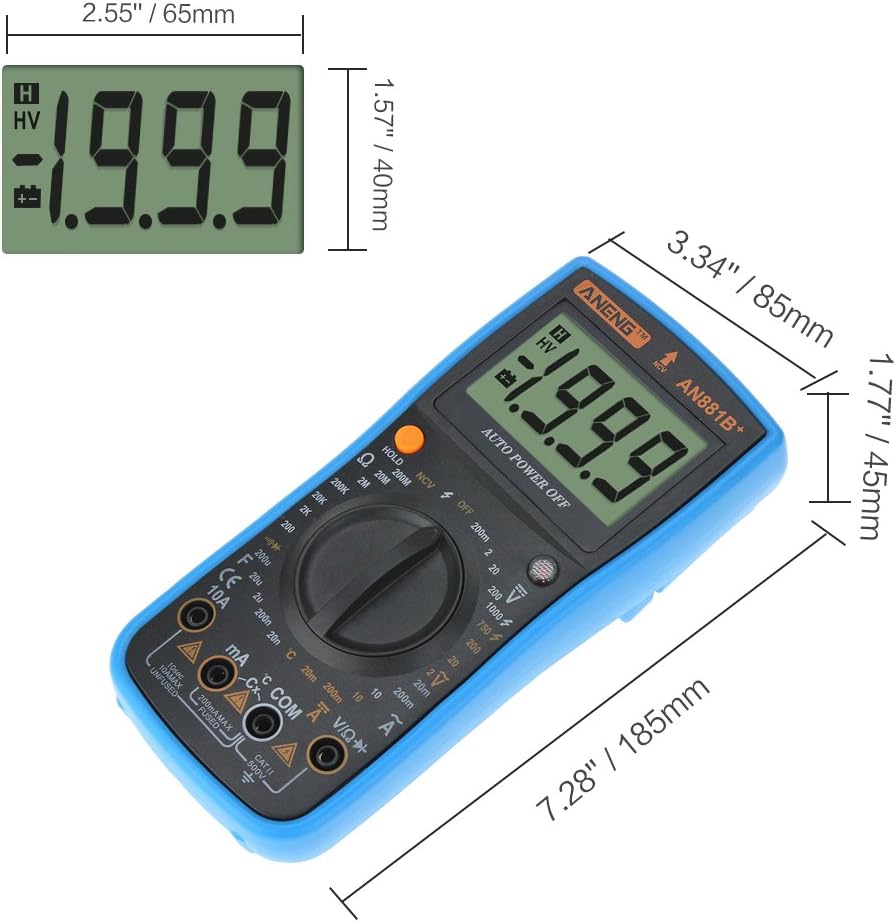
Figure 8.1: Physical dimensions of the ANENG AN881B+ Digital Multimeter. The image indicates a length of 7.28 inches (185mm), width of 3.34 inches (85mm), and height of 1.77 inches (45mm).
| Parameter | Value |
|---|---|
| Model | ANENG AN881B+ |
| Display Type | Digital Display |
| Operating Mode | Handed |
| DC Voltage Range | 200mV / 2V / 20V / 200V / 1000V |
| AC Voltage Range | 200mV / 2V / 20V / 200V / 750V |
| DC Current Range | 2mA / 20mA / 200mA / 20A |
| AC Current Range | 2mA / 20mA / 200mA / 20A |
| Resistance Range | 200Ω / 2KΩ / 20KΩ / 200KΩ / 2MΩ / 20MΩ / 200MΩ / 2000MΩ |
| Capacitance Range | 2nF / 20nF / 200nF / 2uF / 20uF / 200uF |
| Temperature Range | -20℃ to 1000℃ (-4℉ to 1832℉) |
| Non-Contact Voltage (NCV) Test | AC 90V-1000V |
| Continuity Test | Yes (with Buzzer) |
| Diode Test | Yes |
| Transistor (hFE) Measurement | Yes |
| Finding FireWire | Yes |
| Auto Power Off | Yes |
| Power Source | 1 x 9V (6F22) Battery (not included) |
| Dimensions | 185mm x 85mm x 45mm (7.28" x 3.34" x 1.77") |
| Operating Temperature | 0℃ to 40℃ (32℉ to 104℉) |
| Manufacturer | China |
| UPC | 630282713673 |
9. Warranty and Support
For information regarding product warranty, please refer to the warranty card included with your purchase or contact the seller directly. Specific warranty terms and conditions may vary by region and retailer.
For technical support or further assistance, please reach out to the retailer or manufacturer's customer service channels. Keep your purchase receipt and product model number (ANENG AN881B+) handy when contacting support.


