
Scosche BTFMPD3SR-SP
Contents
Scosche BTFMPD3SR FM Bluetooth Radio Transmitter User Manual
Model: BTFMPD3SR-SP | Brand: Scosche
Introduction
The Scosche BTFMPD3SR is a versatile FM Bluetooth Radio Transmitter designed to bring modern connectivity to any vehicle. This device allows you to stream music, make hands-free calls, and charge your mobile devices simultaneously through your car's 12-volt cigarette lighter outlet. It features dual charging ports (12W USB-A and 20W USB-C) and supports voice commands for a safer and more convenient driving experience.
Key Features
- Car FM Transmitter: Enjoy crystal-clear sound and wireless streaming by transmitting audio from your phone to your car's FM radio.
- Hands-Free Car Kit: Easily make and receive calls with a built-in microphone and aux port for added convenience.
- Dual Charging Ports: Features one 12W USB-A and one 20W USB-C port for rapid charging of multiple devices.
- Voice Command Support: Compatible with Siri and Google Voice commands for enhanced safety and convenience.
- Universal Compatibility: Connects to any iPhone, Galaxy, or Android cell phone via Bluetooth, and other mobile devices via the 3.5mm aux port.
Setup Guide
Follow these steps to set up your Scosche BTFMPD3SR FM Bluetooth Radio Transmitter:
- Plug In the Transmitter: Insert the BTFMPD3SR into your vehicle's 12-volt cigarette lighter outlet. The device will power on and display the current FM frequency.
- Tune Your Car Radio: Tune your car's FM radio to an unused frequency. An unused frequency will typically have static or no sound.
- Match Transmitter Frequency: Adjust the frequency on the BTFMPD3SR to match the unused frequency on your car radio. Use the frequency button on the side of the device to enter frequency adjustment mode, then rotate the multi-function button to change the frequency.
- Pair via Bluetooth: On your mobile device, enable Bluetooth and search for available devices. Select "Scosche BTFMPD3SR" from the list to pair. Once paired, a confirmation tone will sound, and the Bluetooth icon on the transmitter's display will illuminate.
- Begin Streaming: You can now stream audio from your mobile device through your car's speakers.

The Scosche BTFMPD3SR plugged into a car's 12V outlet, ready for use. It displays the FM frequency and has a phone connected for charging and audio streaming.
Official Scosche video demonstrating the setup and basic functions of the Universal Hands-free Bluetooth Car Kit.
Operating Instructions
Audio Streaming
Once paired, your device's audio will automatically stream through the selected FM frequency. Use your phone's media controls to play, pause, skip tracks, or adjust volume. The multi-function button on the transmitter can also be used for play/pause.
Hands-Free Calling
The BTFMPD3SR allows for hands-free communication:
- Answer/End Call: Press the multi-function button once to answer an incoming call or end an active call.
- Reject Call: Press and hold the multi-function button to reject an incoming call.
- Redial: Double-press the multi-function button to redial the last number.
Voice Commands (Siri/Google Assistant)
To activate your mobile device's voice assistant (Siri or Google Assistant), press and hold the multi-function button until the voice assistant is activated. You can then issue commands through the transmitter's built-in microphone.
Charging Devices
Utilize the dual USB ports to charge your devices:
- Plug your USB-A compatible charging cable into the 12W USB-A port.
- Plug your USB-C compatible charging cable into the 20W USB-C port.

Diagram showing the key components and controls of the Scosche BTFMPD3SR FM Bluetooth Radio Transmitter.
Maintenance
To ensure the longevity and optimal performance of your Scosche BTFMPD3SR, follow these simple maintenance guidelines:
- Cleaning: Use a soft, dry cloth to wipe down the device. Avoid using harsh chemicals, cleaning solvents, or strong detergents, as these may damage the finish or internal components.
- Storage: When not in use for extended periods, store the transmitter in a cool, dry place away from direct sunlight and extreme temperatures.
- Handling: Handle the device with care. Avoid dropping it or subjecting it to strong impacts, which could damage the internal circuitry or external casing.
Troubleshooting
If you encounter issues with your Scosche BTFMPD3SR, try the following solutions:
| Problem | Possible Solution |
|---|---|
| No power/display | Ensure the transmitter is fully inserted into the 12V outlet. Check the vehicle's fuse for the 12V outlet. |
| Static or poor audio quality | Find a clearer, unused FM frequency on your car radio and match it on the transmitter. Avoid frequencies close to strong local radio stations. Ensure your phone's volume is at a high level. |
| Bluetooth not connecting | Ensure Bluetooth is enabled on your mobile device. Forget the device from your phone's Bluetooth settings and try pairing again. Restart both the transmitter (by unplugging and replugging) and your mobile device. |
| Low audio volume | Increase the volume on both your mobile device and your car stereo. Ensure the FM frequency is clear of interference. |
| Charging not working | Ensure the charging cable is securely connected to both the transmitter and your device. Try a different charging cable or device to rule out cable issues. |
Specifications
| Feature | Detail |
|---|---|
| Product Dimensions | 1.87 x 3.76 x 7 inches |
| Item Weight | 3.52 ounces |
| Model Number | BTFMPD3SR-SP |
| Connectivity Technology | Bluetooth, 3.5mm Aux |
| Special Features | Hands-Free Calls, Fast Charging, Built-In Microphone |
| Charging Ports | 12W USB-A, 20W USB-C |
| Color | Black/Silver |
| Material | Plastic |
| Country of Origin | Vietnam |
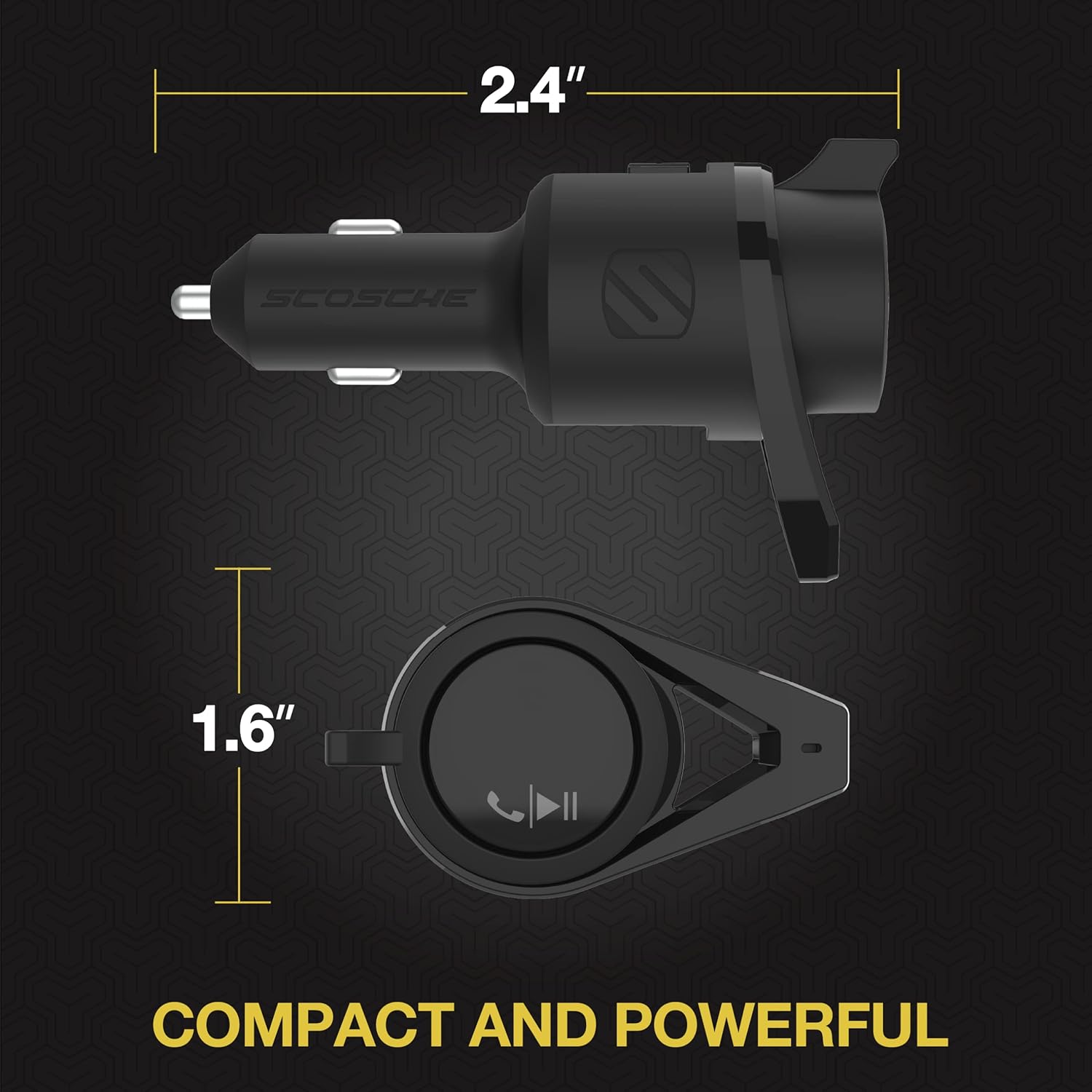
Visual representation of the compact dimensions of the Scosche BTFMPD3SR.
Important Safety Information
To prevent possible hearing damage, avoid prolonged exposure to high volume levels.
Warranty and Support
The Scosche BTFMPD3SR is backed by Scosche's Lifetime Tech Support and a 3-year limited warranty. For technical assistance or warranty claims, please refer to the contact information provided with your product packaging or visit the official Scosche website.
For additional resources, you may refer to the official User Manual PDF: Scosche BTFMPD3SR User Manual (PDF)
Ask a question about this manual
Ask about setup, troubleshooting, compatibility, parts, safety, or missing instructions. Manuals+ will review the question and use this page’s manual context to help answer it.