
ForeverPRO 12200031
ForeverPRO 12200031 Knob Kit (2) User Manual
Model: 12200031
Product Overview
The ForeverPRO 12200031 Knob Kit provides replacement control knobs for Jenn-Air Wall Ovens. This kit includes two knobs designed to replace original parts with numbers such as 403262, 7-3058, 7-3501, 703058, 703501, AH2005741, EA2005741, PS2005741, and Y703501.
These PRO Grade Premium knobs are manufactured to meet or exceed OEM specifications, ensuring quality and compatibility with various Jenn-Air Wall Oven models, including S105, S105-C, S120, S120-C, S121, W104, W105, W105-C, W204, W205, W211, W230, W231, W241, W241-C, and W242.
Product Components
The kit includes two distinct control knobs, each designed for specific functions on your Jenn-Air Wall Oven. One knob typically controls temperature settings and the "Clean" function, while the other manages "Bake," "Time Bake," "Broil," and "Clean" settings.
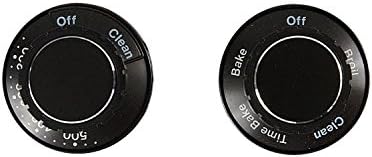
Image: The ForeverPRO 12200031 Knob Kit includes two black control knobs for Jenn-Air Wall Ovens. The left knob displays temperature settings and a 'Clean' option, while the right knob features 'Bake', 'Time Bake', 'Broil', and 'Clean' functions.
Installation and Setup
Before beginning installation, ensure the oven is turned off and disconnected from its power source to prevent electrical hazards. This knob kit is designed for direct replacement.
- Preparation: Carefully pull the old knob directly off the control shaft. Do not twist or force it, as this may damage the shaft.
- Alignment: Observe the shape of the control shaft. The new knob has a corresponding shape on its back to ensure proper alignment.
- Installation: Align the new ForeverPRO knob with the control shaft and gently push it firmly into place until it is seated securely. Ensure the knob is fully engaged and does not wobble.
- Verification: Once installed, gently turn the knob to confirm it rotates smoothly and engages with the oven's control mechanism.
If you encounter resistance or difficulty, re-check the alignment. Do not force the knob, as this could damage the oven's control panel or the knob itself. For complex installations or if unsure, consult a qualified appliance technician.
Operating Instructions
The ForeverPRO replacement knobs function identically to the original Jenn-Air Wall Oven knobs. Refer to your specific Jenn-Air Wall Oven's user manual for detailed operating instructions regarding temperature settings, cooking modes (Bake, Broil, Time Bake), and the self-clean cycle.
- Temperature Control: Turn the temperature knob to select the desired oven temperature.
- Cooking Modes: Use the mode knob to select functions such as Bake, Broil, or Time Bake.
- Clean Cycle: Both knobs may have a 'Clean' setting. Consult your oven's manual for the correct procedure to initiate a self-cleaning cycle.
Always ensure the knob is fully engaged in the desired position to prevent inaccurate readings or improper oven operation.
Maintenance
Proper maintenance of your ForeverPRO knobs will ensure their longevity and maintain the aesthetic of your oven.
- Cleaning: To clean the knobs, gently pull them off the control shaft. Wash them with warm, soapy water and a soft cloth. Avoid abrasive cleaners or scouring pads, as these can scratch the surface or remove the markings.
- Drying: Ensure the knobs are completely dry before reattaching them to the oven.
- Reinstallation: Realign the dry knob with the control shaft and push it firmly back into place.
Regular cleaning prevents grease and food residue buildup, which can make the knobs difficult to turn or obscure markings.
Troubleshooting
If you encounter issues with your ForeverPRO replacement knobs, consider the following common solutions:
- Knob Does Not Fit:
Ensure the knob's internal shape matches the oven's control shaft. While this kit is compatible with many Jenn-Air models, verify your specific oven model against the compatibility list provided in the product description. Double-check the part numbers.
- Knob is Loose or Wobbly:
Ensure the knob is pushed firmly all the way onto the control shaft. If it remains loose, inspect the shaft for damage or wear. If the shaft is damaged, it may require professional repair.
- Markings Wearing Off:
Avoid using harsh chemical cleaners or abrasive materials when cleaning the knobs, as this can degrade the printed markings over time. Use only mild soap and water.
If problems persist after troubleshooting, contact the manufacturer or a qualified appliance repair technician.
Specifications
| Manufacturer | ForeverPRO |
| Part Number | 12200031 (FP-12200031) |
| Replaces Part Numbers | 403262, 7-3058, 7-3501, 703058, 703501, AH2005741, EA2005741, PS2005741, Y703501 |
| Compatibility | Compatible with various Jenn-Air Wall Oven models including S105, S105-C, S120, S120-C, S121, W104, W105, W105-C, W204, W205, W211, W230, W231, W241, W241-C, W242. Also compatible with Whirlpool, Maytag, KitchenAid, Amana, Magic Chef, Admiral, Norge, Roper, and others (verify specific model). |
| Item Model Number | 12200031 |
Warranty and Support
ForeverPRO offers a "No Questions Asked Money Back Guarantee" for this product, reflecting their commitment to quality and customer satisfaction. This ensures that if you are not satisfied with your purchase, you can return it.
For further support, technical assistance, or to inquire about the warranty process, please refer to the contact information provided with your purchase or visit the official ForeverPRO website. When contacting support, please have your product model number (12200031) and purchase details ready.
Ask a question about this manual
Ask about setup, troubleshooting, compatibility, parts, safety, or missing instructions. Manuals+ will review the question and use this page’s manual context to help answer it.