
1. Introduction
This manual provides essential information for the safe and effective use of your YUSTDA 6-foot AC Power Cord. This replacement power cord is designed for compatibility with various Panasonic audio systems, including models SA-AK450, SA-AK630, SA-AK633, SA-AK640, and SA-AK750. Please read these instructions carefully before connecting the power cord to ensure proper function and safety.
The YUSTDA power cord features a 2-prong polarized connector and is manufactured with high-quality materials to ensure durability and reliable power delivery to your electronic devices.
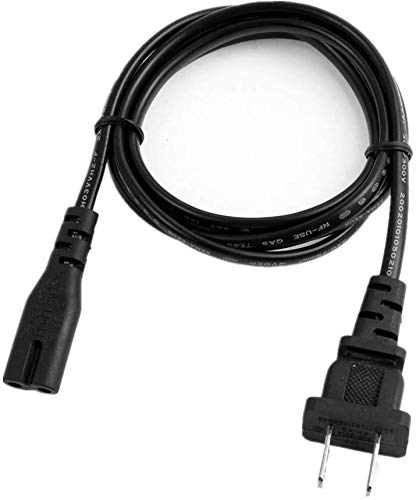
Image 1.1: The YUSTDA 6-foot AC Power Cord, featuring a 2-prong polarized plug.
2. Product Features
The YUSTDA AC Power Cord is engineered with several features to ensure performance and safety:
- Advanced Design: Ensures high portability and reliable power connection.
- Polarized Connector: A 2-prong polarized plug for correct electrical orientation.
- Optimal Length: 6 feet (approximately 1.8 meters) cable length for flexible placement.
- Broad Compatibility: Suitable for LED HDTVs, printers, laptop adapters, VCRs, DVD players, cable boxes, and various audio/video equipment.
- Safety Protections: Includes over current, total power, over voltage, and short circuit protection.
- Quality Materials: Constructed with high-quality copper wire and PVC insulation for durability.
- Certifications: FCC, CE, and RoHS certified for safety and environmental standards.

Image 2.1: Illustration of the power cable's internal structure, highlighting high-quality copper wire and PVC insulation jacket.

Image 2.2: Visual representation of the safety features, including protection against over-temperature, over-voltage, over-current, and short circuits.

Image 2.3: Depiction of the power cord's durable construction and compact design, suitable for various environments.
3. Setup
Follow these steps to properly connect your YUSTDA AC Power Cord:
- Verify Compatibility: Ensure your device requires a 2-prong polarized AC power cord and is compatible with the specified Panasonic models (SA-AK450, SA-AK630, SA-AK633, SA-AK640, SA-AK750) or similar electronic equipment.
- Power Off Device: Before connecting, ensure the electronic device is turned off and unplugged from any existing power source.
- Connect to Device: Insert the female end of the YUSTDA power cord firmly into the power input port of your electronic device. Ensure a snug fit.
- Connect to Power Outlet: Insert the 2-prong polarized male plug into a standard, grounded AC wall outlet. Ensure the plug is fully inserted.
- Power On Device: Once connected, you may turn on your electronic device.
Important: Do not force the plug into an outlet if it does not fit. Ensure the outlet type matches the plug type.
4. Operating
The YUSTDA AC Power Cord operates by providing electrical power from a wall outlet to your compatible electronic device. Once properly connected as described in the Setup section, the power cord functions automatically.
- Ensure the power cord is not kinked, twisted, or placed under heavy objects, which could damage the cable.
- Avoid placing the cord in high-traffic areas where it could be tripped over or damaged.
- The cord is designed for indoor use only. Do not expose it to moisture or extreme temperatures.
5. Maintenance
Proper maintenance ensures the longevity and safe operation of your power cord:
- Cleaning: Disconnect the power cord from both the device and the wall outlet before cleaning. Wipe the cord with a dry, soft cloth. Do not use liquid cleaners or abrasive materials.
- Inspection: Periodically inspect the power cord for any signs of damage, such as cuts, fraying, exposed wires, or bent prongs. If damage is found, discontinue use immediately and replace the cord.
- Storage: When not in use, store the power cord in a cool, dry place, away from direct sunlight and extreme temperatures. Avoid tightly wrapping the cord, which can cause internal damage.
6. Troubleshooting
If you encounter issues with your YUSTDA AC Power Cord, consider the following:
- No Power to Device:
- Ensure both ends of the power cord are securely plugged into the device and the wall outlet.
- Check if the wall outlet is functional by plugging in another device.
- Verify that the device's power switch is in the 'ON' position.
- Inspect the power cord for visible damage. If damaged, replace it.
- Loose Connection:
- If the cord feels loose, gently push it in further. If it remains loose or falls out easily, the cord or the device's port may be damaged.
If troubleshooting steps do not resolve the issue, please contact customer support.
7. Specifications
| Feature | Specification |
|---|---|
| Brand | YUSTDA |
| Model (Cable Type) | AC Power Cord |
| Compatible Devices | Panasonic SA-AK450, SA-AK630, SA-AK633, SA-AK640, SA-AK750, and other compatible electronics |
| Connector Type | 2-Prong Polarized (Male-to-Female) |
| Plug Format | Type A |
| Cable Length | 6 Feet (1.8 meters) |
| Color | Black |
| Safety Features | Over current protection, Total power protection, Over voltage protection, Short Circuit Protection |
| Certifications | FCC, CE, RoHS |
| ASIN | B08212B3FF |
8. Warranty Information
YUSTDA products are manufactured with high-quality materials and undergo strict quality control. For specific warranty terms and conditions, please refer to the product packaging or the official YUSTDA website. Typically, a standard limited warranty applies to cover manufacturing defects.
9. Support
If you have any questions, require assistance, or encounter problems not covered in this manual, please do not hesitate to contact YUSTDA customer support.
Email: epcustomerservice@yahoo.com
Please provide your product details and a clear description of the issue when contacting support to facilitate a quicker resolution.


