
1. Product Overview
The TANITA TT-585 BL is a compact digital thermohygrometer designed to display temperature, humidity, and time. It features a clear, easy-to-read display and offers flexible placement options, including a stable desktop stand and a magnetic back for attachment to metal surfaces. This device helps you monitor indoor environmental conditions for comfort and health.
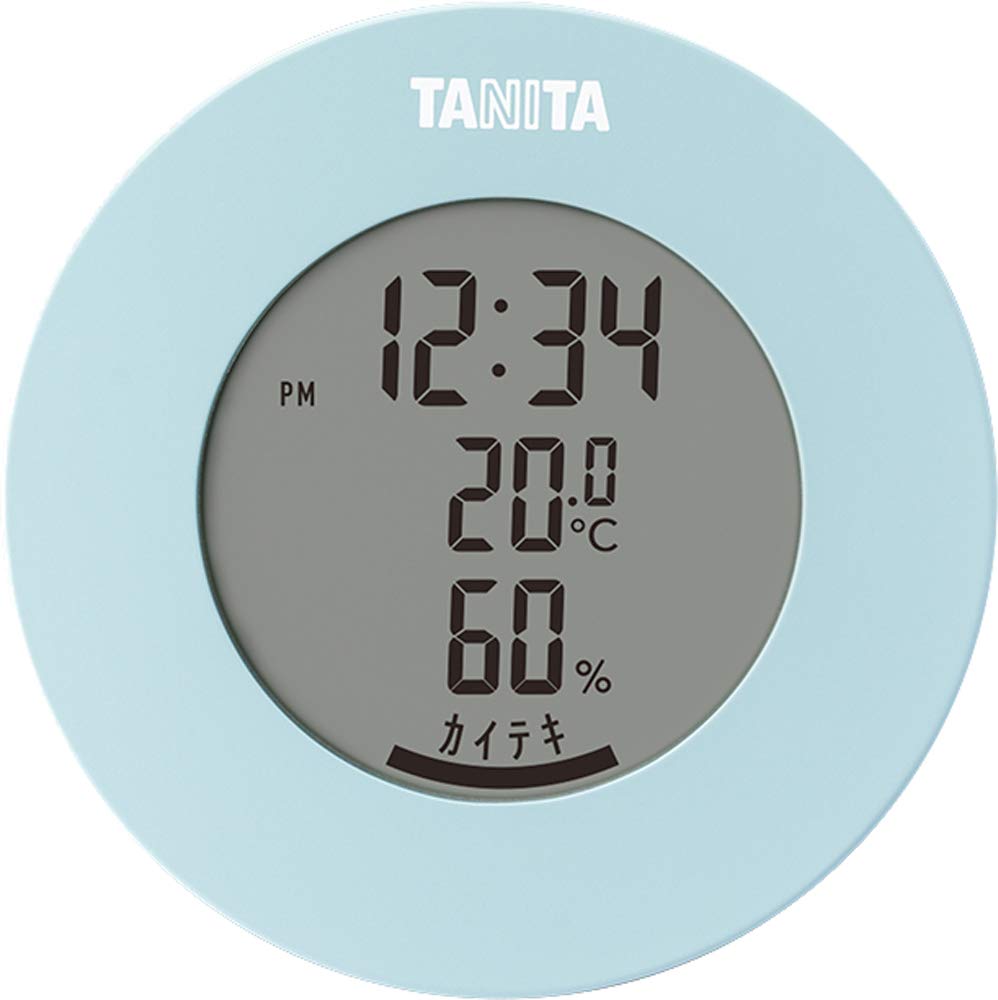
Figure 1: Front view of the TANITA TT-585 BL Digital Thermohygrometer, showing the digital display with time, temperature, and humidity.
2. Setup
2.1 Battery Installation
- Locate the battery compartment on the back of the unit.
- Open the battery compartment cover.
- Insert one AAA battery, ensuring the correct polarity (+/-). A test battery is included.
- Close the battery compartment cover securely.

Figure 2: Back view of the device, illustrating the battery compartment and control buttons.
2.2 Initial Placement
The TT-585 BL offers two primary placement options:
- Desktop Use: The unit is designed with a slight tilt when placed on a flat surface, optimizing viewing angle for readability.
- Magnetic Attachment: A magnet on the back allows for secure attachment to metal surfaces like refrigerators or whiteboards. When attached magnetically, the device sits flush against the surface.

Figure 3: The device on a desk, demonstrating its stable, tilted design for optimal viewing.

Figure 4: The device magnetically attached to a whiteboard, showcasing its versatility for office or kitchen use.
3. Operating Instructions
3.1 Display Information
The large digital display shows the following information:
- Time: Current time (12-hour format with AM/PM indicator).
- Temperature: Current ambient temperature in Celsius (°C).
- Humidity: Current ambient relative humidity in percentage (%).
- Comfort Level Indicator: An icon or text indicating the current comfort level based on temperature and humidity.
3.2 Setting the Time
- Press and hold the SET button on the back of the unit until the time display starts flashing.
- Use the ▲ (Up) or MAX/MIN (Down) buttons to adjust the hour.
- Press SET again to move to the minute setting, then adjust with the ▲ or MAX/MIN buttons.
- Press SET once more to confirm and exit the setting mode.
3.3 Viewing Max/Min Readings
The device automatically records the highest and lowest temperature and humidity readings since the last reset or battery installation.
- Press the MAX/MIN button once to display the maximum recorded temperature and humidity.
- Press the MAX/MIN button again to display the minimum recorded temperature and humidity.
- Press the MAX/MIN button a third time to return to the current readings.
- To reset the MAX/MIN records, press and hold the MAX/MIN button while viewing the MAX or MIN readings until the display resets.
No relevant official product videos were found based on the provided criteria (creator_type: Seller, and not a 7-second 'preview' video unless genuinely useful).
4. Maintenance
4.1 Cleaning
- Wipe the unit with a soft, dry cloth.
- Do not use abrasive cleaners, solvents, or immerse the unit in water.
4.2 Battery Replacement
When the display becomes dim or unresponsive, replace the battery. Follow the battery installation steps in Section 2.1.
5. Troubleshooting
- No display or dim display: Check battery installation. Replace with a new AAA battery if necessary.
- Incorrect readings: Ensure the device is placed in a stable environment away from direct sunlight, heat sources, or drafts that could affect readings. Allow time for the device to stabilize after placement or battery change.
- Buttons not responding: Remove and reinsert the battery to perform a soft reset. If the issue persists, replace the battery.
6. Specifications
| Feature | Specification |
|---|---|
| Model Number | TT-585 BL |
| Dimensions (W x D x H) | 7.5 cm x 4.6 cm x 7.3 cm |
| Weight | Not specified |
| Power Source | 1 x AAA battery (test battery included) |
| Temperature Measurement Range | -5.0°C to 50.0°C |
| Temperature Accuracy | ±0.5°C |
| Humidity Measurement Range | 20% to 95% |
| Humidity Accuracy | Not specified |
| Material | ABS resin, PMMA |
| Country of Origin | China |
7. Warranty and Support
TANITA products are manufactured to high-quality standards. For warranty information, technical support, or service inquiries, please refer to the official TANITA website or contact your local distributor. Keep your purchase receipt as proof of purchase.
For further assistance, please visit the TANITA Brand Store.