
ANENG VD-901
ANENG VD-901 AC 12V-1000V Non-Contact Voltage Detector Pen User Manual
Model: VD-901
1. Introduction
The ANENG VD-901 is a non-contact AC voltage detector pen designed for electrical testing. It provides a safe and convenient method to detect AC voltage within a range of 12V to 1000V. This device features an LCD display, flashlight, and adjustable sensitivity, making it suitable for various electrical applications.
Key features include:
- Non-contact voltage detection (NCV induction)
- Wide AC voltage range: 12V-1000V
- Voice, light, and analog display alarm modes
- LCD display screen for clear readings
- Integrated emergency flashlight
- Low battery indicator
- Live wire and zero line differentiation
- Adjustable sensitivity
- Automatic shut-down function

Image 1.1: The ANENG VD-901 voltage detector pen, illustrating its intelligent contactless detection, NCV induction, and automatic shut-down capabilities.
2. Safety Information
Please read and understand all safety instructions before using this product. Failure to follow these instructions may result in electric shock, fire, or serious injury.
- Always assume that any circuit is live until proven otherwise.
- Do not use the device if it appears damaged or is not operating correctly.
- Do not attempt to measure voltages exceeding the specified range (1000V AC).
- This device is designed for non-contact detection. Do not touch live conductors with the tip of the detector.
- Replace batteries promptly when the low battery indicator appears to ensure accurate readings.
- Keep the device away from water and moisture.
- Do not operate the device in explosive gas, vapor, or dust environments.
- This device is not a substitute for proper electrical safety procedures and personal protective equipment.
3. Product Components
Familiarize yourself with the different parts of your ANENG VD-901 voltage detector pen:
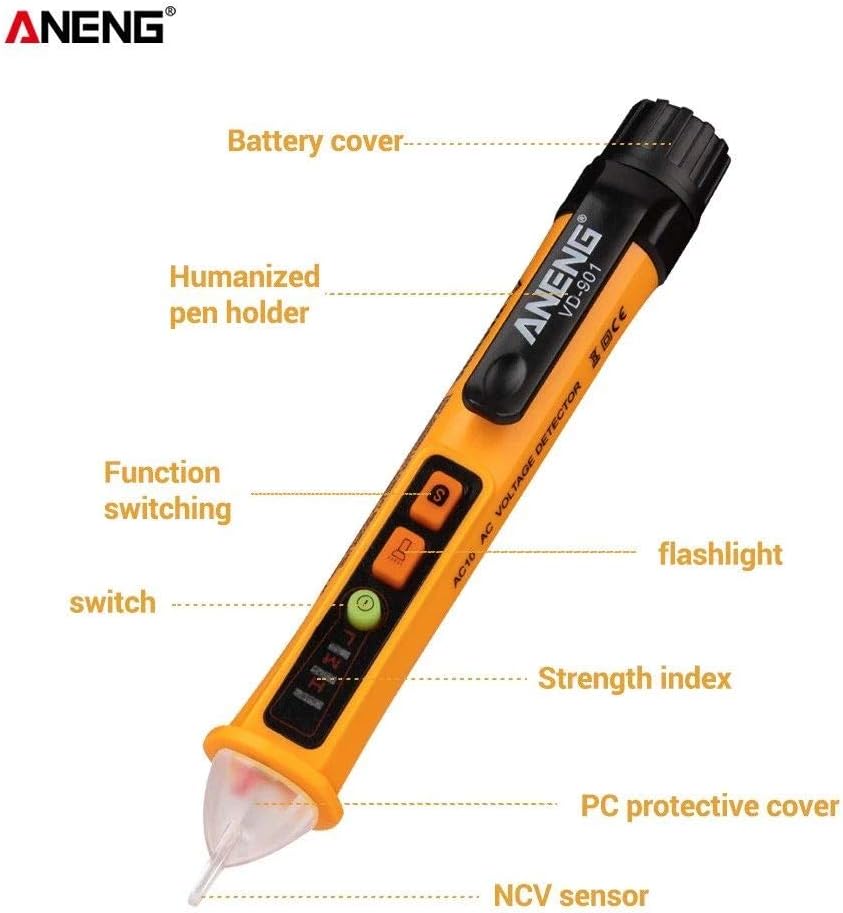
Image 3.1: Labeled components of the ANENG VD-901, including the NCV sensor, PC protective cover, strength index LEDs, flashlight, function switching buttons, humanized pen holder, and battery cover.
- NCV Sensor: Detects AC voltage without physical contact.
- PC Protective Cover: Protects the NCV sensor.
- Strength Index LEDs: Indicate the detected voltage strength (low, medium, high).
- Flashlight: Illuminates dark work areas.
- Function Switching Buttons: Control power, sensitivity, and flashlight.
- Humanized Pen Holder: For convenient carrying.
- Battery Cover: Provides access to the battery compartment.
4. Setup: Battery Installation
The ANENG VD-901 requires two AAA batteries (not included) for operation.
- Twist and remove the battery cover located at the top end of the pen.
- Insert two AAA batteries, ensuring correct polarity (+/-) as indicated inside the compartment.
- Replace the battery cover and twist it securely to close.
When the low battery indicator appears on the LCD, replace the batteries immediately to maintain accurate performance.
5. Operating Instructions
5.1. Power On/Off
- To power on, press the power button (usually marked with an 'I' or power symbol). The device will emit a beep and the LCD will light up.
- To power off, press and hold the power button. The device also features an automatic shut-down function after a period of inactivity to conserve battery life.
5.2. Non-Contact AC Voltage Detection
The VD-901 detects AC voltage without direct contact, enhancing safety.
- Turn on the device.
- Bring the NCV sensor tip close to the conductor, outlet, or circuit you wish to test.
- If AC voltage is detected, the device will emit an audible alarm, the strength index LEDs will illuminate (indicating voltage level), and the LCD display will show an analog bar graph. The frequency of the beeps and the number of illuminated LEDs increase with higher voltage or closer proximity to the voltage source.

Image 5.1: The voltage detector pen being used for non-contact detection on an electrical outlet. When power is detected, the LED flashes and an audible alarm sounds.
5.3. Sensitivity Adjustment
The VD-901 features adjustable sensitivity for different testing scenarios.
- Press the 'S' button (Sensitivity button) to cycle between high and low sensitivity modes.
- High Sensitivity: Suitable for detecting lower voltages or detecting voltage through insulation from a greater distance.
- Low Sensitivity: Ideal for pinpointing voltage in crowded electrical boxes or when a more precise detection area is needed.

Image 5.2: A close-up view of the ANENG VD-901 highlighting the function key switch, including the 'S' button for adjusting sensitivity.
5.4. Live Wire and Zero Line Detection
The device can help differentiate between live (fire) and neutral (zero) lines in an AC circuit.
- Live Line: When the NCV sensor is brought near a live wire, the red light will flash, and the device will emit a rapid alarm.
- Neutral Line: When brought near a neutral line, the green light will illuminate, and there will be no flash or alarm, or a very weak indication depending on the environment.
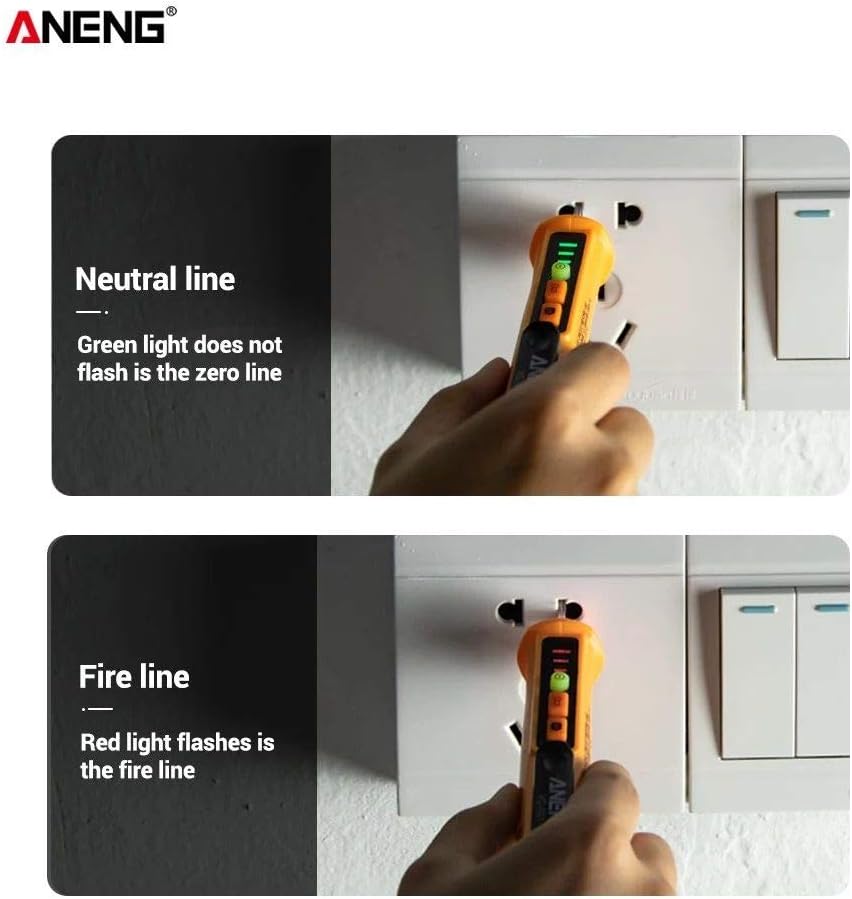
Image 5.3: The ANENG VD-901 demonstrating detection of a neutral line (green light, no flash) and a fire line (red light flashes) in an electrical outlet.
5.5. Wire Detection (Break Point Finder)
The VD-901 can assist in detecting breaks in wires.
- Ensure the wire is powered.
- Move the NCV sensor along the length of the wire.
- The device will indicate voltage presence until it reaches a break point, where the indication will cease. This helps in locating the approximate position of a wire disconnection.

Image 5.4: The ANENG VD-901, labeled as a 'Test pencil', demonstrating its capability for wire detection to identify disconnected or unpowered sections.
5.6. Flashlight Function
To activate the integrated flashlight, press the flashlight button (usually marked with a light bulb symbol). Press it again to turn off the flashlight. This feature is useful for working in dimly lit areas.
6. Maintenance
- Cleaning: Wipe the device with a dry, soft cloth. Do not use abrasive cleaners or solvents.
- Storage: Store the device in a cool, dry place, away from direct sunlight and extreme temperatures. If storing for an extended period, remove the batteries to prevent leakage.
- Battery Replacement: Replace batteries as soon as the low battery indicator appears to ensure optimal performance and accuracy.
7. Troubleshooting
| Problem | Possible Cause | Solution |
|---|---|---|
| Device does not power on. | Dead or incorrectly installed batteries. | Check battery polarity or replace with new AAA batteries. |
| No detection or weak indication. | Low battery, device too far from voltage source, or low sensitivity mode. | Replace batteries, move closer to the source, or switch to high sensitivity mode. |
| Constant alarm/false positives. | High sensitivity mode in a noisy electrical environment. | Switch to low sensitivity mode for more precise detection. |
| Flashlight not working. | Dead batteries or flashlight LED failure. | Replace batteries. If issue persists, contact customer support. |
8. Technical Specifications

Image 8.1: Detailed product information for the ANENG VD-901, including its model type, brand, battery requirements, material, color, weight, accessories, and dimensions.
| Parameter | Value |
|---|---|
| Model | VD-901 |
| AC Voltage Range | 12V - 1000V |
| Alarm Mode | Voice / Light / Analog Display |
| Display | LCD Display Screen |
| Flashlight | Yes |
| Low Battery Indicator | Yes |
| Live Wire / Zero Line Detection | Voice / Light / LCD Analog Display |
| Non-Contact Sensitivity | Adjustable |
| Power Source | 2 x AAA Batteries (Not Included) |
| Material | ABS |
| Color | Yellow / Black |
| Item Size | 159 x 26.4 x 26.4 mm (6.25 x 1.04 x 1.04 inches) |
| Item Weight | 42g (1.5oz) |
9. Warranty Information
Specific warranty details for the ANENG VD-901 are typically provided at the point of purchase or within the product packaging. Please refer to your purchase receipt or contact the retailer for information regarding warranty coverage and terms.
10. Customer Support
For technical assistance, troubleshooting beyond this manual, or inquiries regarding your ANENG VD-901, please contact the retailer or manufacturer's customer support channels. Keep your purchase information readily available when seeking support.
Related documentsVD-901


Ask a question about this manual
Ask about setup, troubleshooting, compatibility, parts, safety, or missing instructions. Manuals+ will review the question and use this page’s manual context to help answer it.