
WUBEN L50
WUBEN L50 Rechargeable LED Flashlight User Manual
Model: L50
1. Introduction
Thank you for choosing the WUBEN L50 Rechargeable LED Flashlight. This manual provides detailed instructions for the proper setup, operation, and maintenance of your device. Please read this manual thoroughly before use to ensure optimal performance and longevity of your flashlight.

Image 1.1: The WUBEN L50 Rechargeable LED Flashlight, showcasing its sleek black design and illuminated head.
2. Package Contents
Verify that all items listed below are included in your package:
- 1 x WUBEN L50 LED Flashlight
- 1 x Rechargeable Battery (built-in)
- 1 x Micro-USB Charging Cable
- 2 x Spare Waterproof O-rings
- 1 x Lanyard
- 1 x User Manual
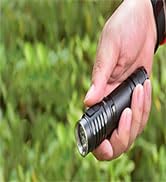
Image 2.1: Close-up of the spare O-rings, essential for maintaining the flashlight's waterproof rating.
3. Specifications
| Feature | Specification |
|---|---|
| Brand | WUBEN |
| Model | L50 |
| Dimensions | 13.87 x 2.59 x 2.59 cm |
| Weight | 128 grams |
| Material | Aluminum |
| Luminous Flux | Up to 1200 lumens |
| Beam Distance | Up to 200 meters |
| LED Type | P9 LED |
| Power Source | Rechargeable Battery (3.7 Volts) |
| Charging Port | Micro-USB |
| Waterproof Rating | IP68 |
| Modes | 5 (Eco, Low, Medium, High, SOS) with memory function |
| Special Features | ATR Temperature Control, Battery Indicator |
Image 3.1: Diagram illustrating the dimensions of the WUBEN L50 flashlight.
4. Setup
4.1 Initial Charging
The WUBEN L50 flashlight comes with a built-in rechargeable battery. For optimal performance, fully charge the flashlight before its first use.
- Locate the Micro-USB charging port on the flashlight. This port is designed to be waterproof.
- Connect the provided Micro-USB cable to the flashlight's charging port.
- Connect the other end of the Micro-USB cable to a standard 5V USB power source (e.g., wall adapter, computer USB port, power bank).
- The indicator light near the charging port will illuminate to show the charging status.
- Charging is complete when the indicator light changes color (typically from red to green).
A full charge typically takes approximately 4 hours.

Image 4.1: Illustration of the integrated waterproof Micro-USB charging port and the indicator lights showing charging status (red for charging, green for fully charged).
5. Operating Instructions
5.1 Power On/Off
To turn the flashlight on or off, press the tail switch located at the rear of the flashlight.
5.2 Mode Selection
The WUBEN L50 features 5 lighting modes: Eco, Low, Medium, High, and SOS. It also has a memory function that recalls the last used general lighting mode (Eco, Low, Medium, High).
- With the flashlight on, press the tail switch repeatedly to cycle through the general lighting modes: Eco → Low → Medium → High.
- To activate the SOS mode, quickly double-press the tail switch from any general lighting mode.
- To return to the previously used general lighting mode from SOS, press the tail switch once.

Image 5.1: Visual representation of the five lighting modes: High (1200 lumens, 1.5h), Medium (400 lumens, 2.5h), Low (75 lumens, 8.5h), Eco (5 lumens, 143h), and SOS (200 lumens for emergencies).
5.3 Battery Indicator
The flashlight is equipped with an integrated battery indicator to display the remaining charge and charging status. This indicator is typically part of the switch or near the charging port.
- During operation, the indicator will show the battery level (e.g., green for sufficient charge, red for low charge).
- When the remaining runtime is less than 30 minutes, the flashlight will flash 3 times every 5 minutes until it powers off, regardless of the current output mode.
5.4 Automatic Temperature Regulation (ATR)
The WUBEN L50 incorporates ATR technology. This system automatically adjusts the flashlight's output based on its working conditions and ambient temperature to prevent overheating and protect internal circuitry. This ensures stable and safe operation during extended use.
6. Maintenance
6.1 Cleaning
Regularly clean the flashlight body with a soft, damp cloth. Avoid using abrasive cleaners or solvents that could damage the finish or internal components.
6.2 O-Ring Replacement
The flashlight's IP68 waterproof rating relies on intact O-rings. If you notice any damage or wear to the O-rings, replace them with the provided spare O-rings to maintain water resistance. Apply a thin layer of silicone grease to the O-rings periodically to keep them supple and ensure a good seal.
6.3 Battery Care
To prolong battery life, avoid fully discharging the battery frequently. If the flashlight will not be used for an extended period, charge it to approximately 50% and store it in a cool, dry place. Recharge every 3-6 months to prevent deep discharge.
7. Troubleshooting
If you encounter issues with your WUBEN L50 flashlight, refer to the following common problems and solutions:
| Problem | Possible Cause | Solution |
|---|---|---|
| Flashlight does not turn on. | Low battery. | Charge the flashlight fully using the Micro-USB cable. |
| Loose connection. | Ensure the tail cap is securely tightened. | |
| Light output is dim or flickers. | Low battery. | Recharge the flashlight. |
| Overheating (ATR activated). | This is normal. The flashlight reduces output to prevent damage. Allow it to cool down. | |
| Flashlight not charging. | Faulty cable or power source. | Try a different Micro-USB cable and/or power adapter. Ensure connections are secure. |
| Charging port obstruction. | Check the charging port for debris and clean gently if necessary. | |
| Water ingress after exposure. | Damaged or improperly seated O-rings. | Inspect and replace O-rings if damaged. Ensure all parts are securely tightened before water exposure. |
8. Warranty and Support
WUBEN products are manufactured to high-quality standards. If you experience any issues with your WUBEN L50 flashlight, please contact customer support for assistance.
For support, please refer to your order details and click on the 'GET HELP WITH ORDER' option. The WUBEN customer service team will be available to assist you with any concerns or problems.
Related documentsL50


Ask a question about this manual
Ask about setup, troubleshooting, compatibility, parts, safety, or missing instructions. Manuals+ will review the question and use this page’s manual context to help answer it.