
Introduction
The Pure Resonance Audio C3 3" Micro Ceiling Speaker is a compact and lightweight audio solution designed for seamless integration into various environments. It delivers quality sound and excellent dispersion for both music and vocals, making it ideal for background music, paging, and ambient sound masking in commercial and public spaces. This speaker features an 8 Ohm and 70V/100V power tap transformer switch for versatile application.
Important Safety Instructions
- Read these instructions: Carefully read and retain all safety and operating instructions before using this product.
- Heed all warnings: Follow all warnings on the product and in the operating instructions.
- Clean only with dry cloth: Do not use liquid cleaners or aerosol cleaners.
- Water and Moisture: Do not use this apparatus near water. This product is not waterproof.
- Servicing: Do not attempt to service this product yourself. Refer all servicing to qualified service personnel.
- Installation: Ensure proper installation by qualified personnel to prevent electrical shock or damage.
- Power Source: Connect to the specified power source (70V/100V or 8 Ohm amplifier) as indicated in the specifications.
Package Contents
- Pure Resonance Audio C3 3" Micro Ceiling Speaker (1 unit)
- Easy-Mounting Ring (1 unit)
- Speaker Wire (not included, typically purchased separately)
Setup and Installation
The Pure Resonance Audio C3 speaker is designed for quick and easy installation in ceilings. It features a power tap transformer switch for selectable 8 Ohm or 70V/100V operation.
1. Selecting Power Tap Setting
Before installation, select the appropriate power tap setting (8 Ohm, 70V, or 100V) using the rotary switch located on the back of the speaker. The available wattage taps for 70V are 1.5W, 3W, 5W, and for 100V are 3W, 6W, 10W. For standard low impedance applications, select the 8 Ohm setting.

Image: Rear view of the C3 speaker, highlighting the power tap selector switch and the input/output terminals. The switch allows selection between 8 Ohm, 70V (1.5W, 3W, 5W), and 100V (3W, 6W, 10W) settings.
2. Mounting the Speaker
The speaker utilizes an easy-mounting ring for secure installation. Ensure the ceiling material is suitable for speaker installation and can support the speaker's weight.
- Cut a circular hole in the ceiling according to the speaker's cut-out diameter (refer to specifications).
- Connect the speaker wires to the appropriate terminals on the speaker (positive to positive, negative to negative).
- Insert the speaker into the cut-out hole.
- Secure the speaker using the threaded mounting ring. Turn the screws to engage the mounting clips and tighten until the speaker is firmly in place.

Image: The C3 speaker shown with its easy-mounting ring detached, illustrating the two main components for installation.
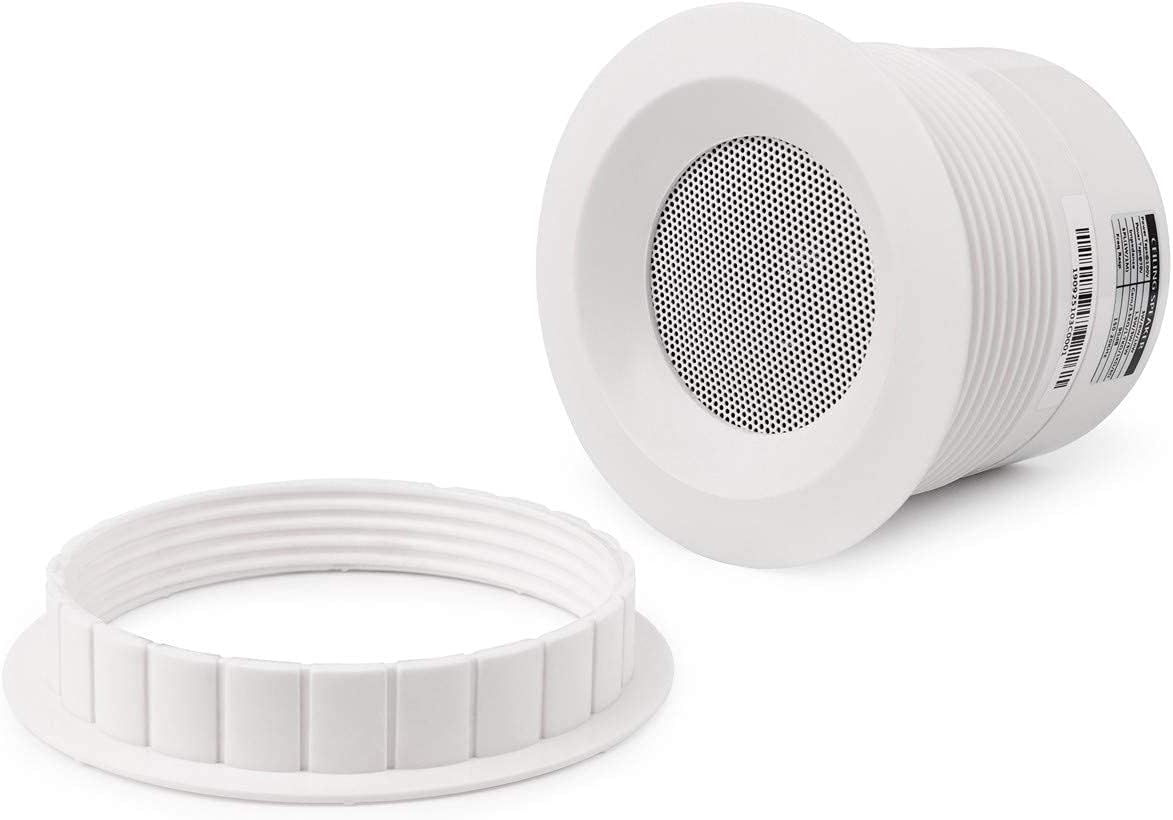
Image: Side view of the C3 speaker, detailing the blue mounting clips that secure the speaker to the ceiling when the screws are tightened.
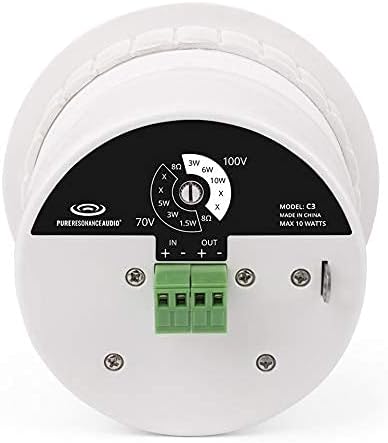
Image: The C3 speaker seamlessly installed flush with a white ceiling, showing only the discreet grille.
Operating Instructions
Once installed and connected to a compatible amplifier (70V/100V or low impedance 8 Ohm), the C3 speaker will reproduce audio from your source. Ensure your amplifier's output matches the speaker's selected power tap setting.
- Power On/Off: Control the speaker's operation via your connected amplifier.
- Volume Control: Adjust volume levels through your amplifier or audio source.
- Audio Source: Connect your audio source (e.g., MP3 player, smartphone, laptop, TV) to your amplifier, which then feeds the signal to the speaker.
Maintenance
The Pure Resonance Audio C3 speaker requires minimal maintenance.
- Cleaning: Use a soft, dry cloth to clean the speaker grille and surrounding areas. Do not use harsh chemicals or abrasive cleaners.
- Inspection: Periodically check the speaker for any loose connections or physical damage.
Troubleshooting
| Problem | Possible Cause | Solution |
|---|---|---|
| No sound from speaker |
|
|
| Distorted or poor sound quality |
|
|
Specifications
| Feature | Detail |
|---|---|
| Model Name | C3 |
| Speaker Size | 3 Inches |
| Speaker Type | Component |
| Mounting Type | Ceiling Mount |
| Impedance | 8 Ohms |
| Input Voltage | 70 Volts / 100 Volts (selectable) |
| Power Taps (70V) | 1.5W, 3W, 5W |
| Power Taps (100V) | 3W, 6W, 10W |
| Speaker Maximum Output Power | 10 Watts |
| Frequency Response | 150 Hz - 20 KHz |
| Connectivity Technology | Auxiliary (Wired) |
| Audio Output Mode | Stereo, Surround Sound |
| Product Dimensions | 5.13 x 5.13 x 4.69 inches |
| Item Weight | 1.9 pounds |
| Is Waterproof | FALSE |
| Manufacturer | Pure Resonance Audio |

Image: Side view of the C3 speaker, showing the product label with detailed specifications including power taps, impedance, SPL, and frequency response.
Product Overview Video
Video: An official overview of the Pure Resonance Audio C3 3-Inch Micro Ceiling Speaker, demonstrating its features and potential applications.
Warranty Information
This Pure Resonance Audio C3 speaker comes with a Limited Warranty. Please refer to the warranty card included with your purchase or visit the Pure Resonance Audio official website for detailed terms and conditions regarding coverage, duration, and claims process.
Support and Contact
For technical assistance, troubleshooting, or warranty inquiries, please contact Pure Resonance Audio customer support:
- Website: www.pureresonanceaudio.com
- Email: Refer to website for contact details.
- Phone: Refer to website for contact details.
Please have your model number (C3) and purchase information ready when contacting support.


