
1. Introduction
This user manual provides comprehensive instructions for the installation, operation, and maintenance of your Audison SR 4.500 4 Channel D-Class Amplifier. Please read this manual thoroughly before attempting to install or operate the amplifier to ensure proper function and safety.
The Audison SR 4.500 is a high-performance 4-channel D-Class amplifier designed for automotive audio systems, offering a compact size with robust power output and advanced features for optimal sound reproduction.
2. Safety Information
Always observe the following safety precautions to prevent injury or damage to the amplifier and vehicle:
- Disconnect the vehicle's battery negative terminal before beginning any installation work to prevent electrical shorts.
- Ensure all wiring is properly insulated and secured to prevent short circuits and damage.
- Do not install the amplifier in locations exposed to direct sunlight, excessive heat, moisture, or dust.
- Use appropriate gauge power and ground wires as specified in the installation section to handle the amplifier's current draw.
- Install an external fuse on the main power cable as close to the battery as possible.
- If you are unsure about any aspect of the installation, consult a qualified professional installer.
3. Product Overview
The Audison SR 4.500 amplifier features ADC (Audison D-Class) Technology with a 2Ω stable output stage, ensuring high audio performance in a compact size. It boasts an extruded aluminum compact design with a fanless convection cooling system for reliable operation.
Key features include balanced high-noise rejection input options (Speaker-In for OEM head units and RCA-In for Aftermarket head units), and ART (Automatic Remote Turn-On/Off) functionality that automatically powers the amplifier on/off with the OEM head unit. Pre-outs are also available when using Speaker-In level inputs. The amplifier supports a mono operation mode, allowing for flexible system configurations such as a sub + front three-channel system or a powerful two-channel system. An optional VCR-S2 Remote Volume Control is available separately.

Figure 3.1: Top view of the Audison SR 4.500 amplifier, showcasing its sleek design and Audison branding. This view highlights the compact form factor and the central illuminated Audison logo.

Figure 3.2: The Audison SR 4.500 amplifier with its top cover removed, revealing the internal components and heatsink design. This image illustrates the robust build quality and efficient cooling system.
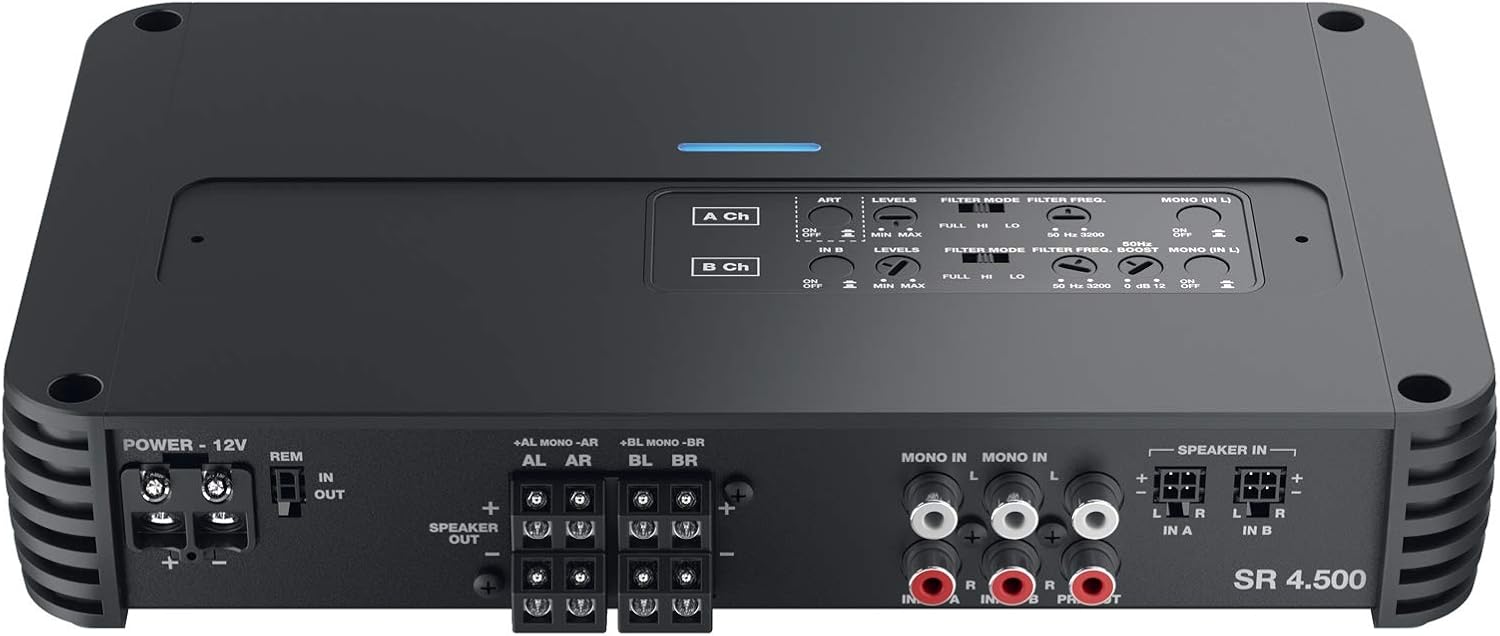
Figure 3.3: Rear panel of the Audison SR 4.500 amplifier, showing all input and output terminals, including power, remote, speaker outputs, RCA inputs, speaker-level inputs, and various filter and level controls. This detailed view is crucial for understanding wiring and setup.
4. Setup and Installation
Proper installation is crucial for the performance and longevity of your amplifier. Follow these guidelines:
4.1 Mounting Location
Choose a mounting location that is dry, well-ventilated, and protected from direct sunlight, excessive heat, and moisture. Ensure there is sufficient space around the amplifier for air circulation, especially for the fanless convection cooling system. The maximum dimensions of the amplifier are 264 x 155 x 47.5 mm (10.39 x 6.10 x 1.87 inches).
4.2 Wiring Connections
- Power Connection: Connect the +12V terminal to the positive terminal of the vehicle's battery using an appropriate gauge power cable. Install an inline fuse holder with the correct fuse rating (refer to specifications) within 18 inches (45 cm) of the battery.
- Ground Connection: Connect the GND terminal to a clean, unpainted metal surface of the vehicle's chassis. Ensure a solid, low-resistance connection.
- Remote Turn-On (REM): Connect the REM terminal to the remote output of your head unit. If using an OEM head unit with Speaker-In inputs, the ART (Automatic Remote Turn-On/Off) feature can be enabled, eliminating the need for a separate remote wire.
- Audio Inputs:
- RCA-In: For aftermarket head units, connect RCA cables from the head unit's pre-outs to the amplifier's RCA-In terminals.
- Speaker-In: For OEM head units without RCA outputs, connect the speaker-level outputs from the head unit directly to the amplifier's Speaker-In terminals. The amplifier features balanced high-noise rejection inputs for optimal signal integrity.
- Speaker Outputs: Connect your speakers to the amplifier's speaker output terminals (AL, AR, BL, BR) ensuring correct polarity. The amplifier is 2Ω stable.
- Pre-Outs: The amplifier provides PRE OUT Full range (Input A) terminals, which can be used to pass the audio signal to another amplifier, even when using Speaker-In level inputs.
4.3 Mono Operation Mode
The SR 4.500 supports a selectable mono operation mode, allowing for flexible system configurations. This can be used to create a sub + front three-channel system or a powerful two-channel system by bridging channels. Refer to the wiring diagram in the technical specifications for detailed bridging instructions.
4.4 Optional Remote Volume Control
An optional VCR-S2 Remote Volume Control (sold separately) can be connected for convenient adjustment of the amplifier's output level from the driver's seat.
5. Operating Instructions
Once installed, configure the amplifier settings for optimal sound performance:
5.1 Input Level Adjustment
Adjust the input level (GAIN) controls for channels A and B to match the output voltage of your head unit. Start with the gain at minimum and slowly increase it until the sound is clear and undistorted at high volume levels from your head unit.
5.2 Crossover Filters
The amplifier features independent crossover filters for Front (A Ch) and Rear (B Ch) channels:
- Full Range: Passes the full audio spectrum to the speakers.
- Hi-Pass Filter (HPF): Allows frequencies above the set point to pass through. Adjustable from 50 Hz to 3.2 kHz at 12 dB/Octave. Use for tweeters or full-range speakers to prevent low frequencies that can cause distortion.
- Lo-Pass Filter (LPF): Allows frequencies below the set point to pass through. Adjustable from 50 Hz to 3.2 kHz at 12 dB/Octave. Use for subwoofers or mid-bass drivers to prevent high frequencies.
5.3 Bass Boost
The B Channel features an adjustable Bass Boost at 50 Hz, ranging from 0 to +12 dB. Use this control to enhance low-frequency output, but use sparingly to avoid distortion and speaker damage.
6. Maintenance
The Audison SR 4.500 amplifier is designed for reliable operation with minimal maintenance. However, periodic checks can ensure optimal performance:
- Cleaning: Use a soft, dry cloth to wipe the amplifier's exterior. Do not use harsh chemicals or abrasive cleaners.
- Connections: Periodically check all power, ground, remote, and speaker connections to ensure they are secure and free from corrosion. Loose connections can lead to poor performance or damage.
- Ventilation: Ensure that the amplifier's cooling fins are not obstructed by debris or other objects. Proper airflow is essential for the fanless convection cooling system.
- Fuses: If the amplifier fails to power on, check the external fuse on the power cable and any internal fuses (if applicable, consult a professional). Always replace fuses with the same type and rating.
7. Troubleshooting
If you experience issues with your Audison SR 4.500 amplifier, refer to the following troubleshooting guide:
| Problem | Possible Cause | Solution |
|---|---|---|
| Amplifier does not turn on | No power, blown fuse, loose ground, no remote signal. | Check power and ground connections. Verify external fuse. Check remote wire connection or ART setting. |
| No sound output | No audio input, incorrect gain settings, speaker wires disconnected, amplifier in protection mode. | Check RCA/Speaker-In connections. Adjust gain. Verify speaker wiring. Check for overheating or short circuits. |
| Distorted sound | Gain set too high, incorrect crossover settings, poor input signal quality. | Reduce gain. Adjust HPF/LPF settings. Check head unit output. |
| Amplifier overheats | Insufficient ventilation, impedance too low, prolonged high output. | Ensure proper airflow around the amplifier. Check speaker impedance (must be 2Ω or higher). Reduce volume or allow cooling time. |
If the problem persists after attempting these solutions, contact Audison customer support or a qualified car audio technician.
8. Specifications
Below are the key technical specifications for the Audison SR 4.500 4 Channel D-Class Amplifier:
| Feature | Specification |
|---|---|
| Amplifier Type | D-Class, 4 Channel |
| Output Stage Stability | 2Ω stable |
| Cooling System | Fanless convection cooling |
| Inputs | Pre-In (RCA), Speaker-In (high-level) |
| Outputs | Speaker Outputs (4 channels), PRE OUT Full range (Input A) |
| Automatic Remote Turn-On/Off (ART) | Yes (with Speaker-In inputs, selectable) |
| Mono Operation Mode | Selectable |
| Front Ch Filters (A Ch) | Full / Hi-pass: 50 ÷ 3.2k Hz @ 12 dB/Oct. / Lo-pass: 50 ÷ 3.2k Hz @ 12 dB/Oct. |
| Rear Ch Filters (B Ch) | Full / Hi-pass: 50 ÷ 3.2k Hz @ 12 dB/Oct. / Lo-pass: 50 ÷ 3.2k Hz @ 12 dB/Oct. |
| Bass Boost (B Ch) | 50Hz (adjustable 0 ÷ 12 dB) |
| Max Size (W x H x D) | 264 x 155 x 47.5 mm / 10.39 x 6.10 x 1.87 inches |
| Item Weight | 2.2 pounds |
| Voltage | 17 Volts (Max) |
| Wattage | 900 watts (Max) |
| Item Model Number | SR 4.500 |
| Manufacturer Part Number | 66740320 |
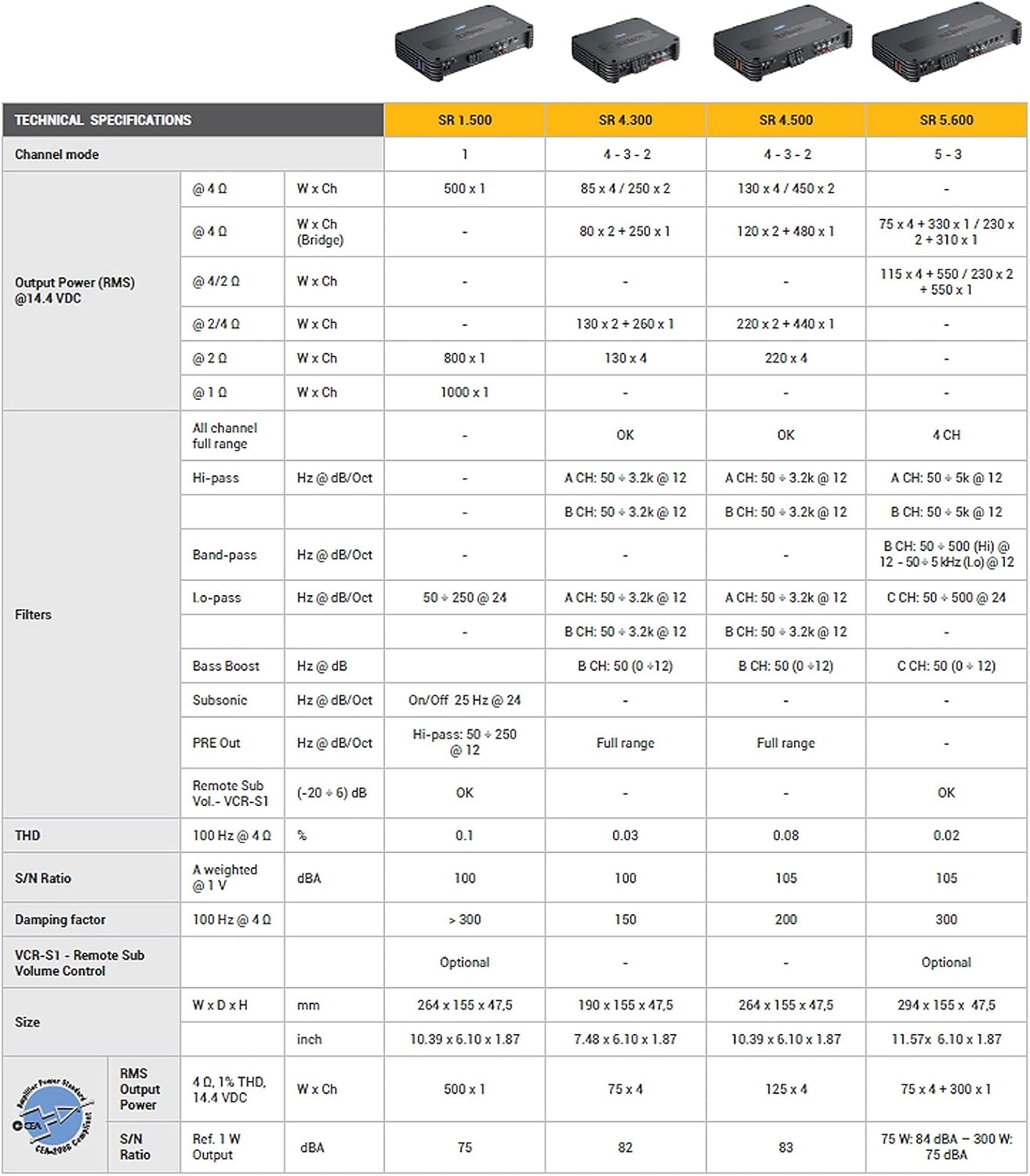
Figure 8.1: A detailed table of technical specifications for the Audison SR series amplifiers, including the SR 4.500. This table provides specific power output ratings (RMS), filter ranges, and dimensions for various models in the series.
9. Warranty and Support
For detailed warranty information, please refer to the warranty card included with your product or visit the official Audison website. Warranty terms and conditions may vary by region.
If you require technical assistance, have questions about installation, or need to report a defect, please contact Audison customer support through their official website or authorized dealer. Ensure you have your product model number (SR 4.500) and serial number ready when contacting support.


