
HOLDOG B8
HOLDOG Professional Heavy Duty Dog Grooming Clippers
Model: B8 | Brand: HOLDOG
Introduction
The HOLDOG Professional Heavy Duty Dog Grooming Clippers are designed for efficient and comfortable pet grooming. Featuring a detachable titanium-ceramic blade, low noise operation, and a powerful rechargeable battery, these clippers are suitable for various pet coat types, including thick and curly hair. The integrated LCD display provides real-time information on speed and battery level, ensuring a smooth grooming experience for both you and your pet.
Safety Information
Please read all instructions carefully before using the clippers. Keep this manual for future reference.
- Keep the product and all its parts away from children and pets when not in use.
- Do not immerse the clipper body in water or other liquids. The blade head is detachable for cleaning, but the main unit is not waterproof.
- Ensure the pet's hair is clean and dry before grooming to prevent blade clogging and ensure efficient cutting.
- Do not use the clippers on matted or severely tangled hair without pre-trimming with scissors, as this can pull the hair and cause discomfort to the pet.
- Always check the blade for damage before use. Do not use if the blade is chipped or broken.
- Use only the provided charging cable and adapter (if applicable) to charge the device.
- Avoid dropping the clippers, as this can damage internal components or the blade.
Package Contents

Image: Contents of the HOLDOG Pet Grooming Clippers package, including the clipper, charging cable, comb attachments, scissors, and cleaning brush.
Your HOLDOG Pet Grooming Clippers package should include the following items:
- 1 x Pet Clipper
- 1 x Rechargeable 3.7V Li-ion Battery (18650) (pre-installed)
- 6 x Comb Attachments (3mm, 6mm, 9mm, 12mm, 15mm, 18mm)
- 1 x USB Charging Cable
- 1 x Hair-Cutting Shears
- 1 x Stainless Steel Comb
- 1 x Cleansing Brush
- 1 x Clipper Oil
- 1 x User Manual (this document)
Product Features and Overview

Image: Key features of the HOLDOG Pet Grooming Clipper, including the titanium-ceramic blade, power switch, speed button, LCD screen, 2200mAh battery, and charging port.
- Detachable Titanium-Ceramic Blade: Features a 33-tooth titanium-ceramic blade for smooth cutting, reduced heat, and enhanced durability, suitable for various coat types.
- Low Noise & Low Vibration: Operates at approximately 50 dB, minimizing stress and anxiety for pets during grooming.
- Powerful Motor & Long Battery Life: Equipped with a heavy-duty, three-speed rotary motor. A 2200mAh Li-ion battery provides 3-4 hours of continuous use after a 3-hour charge.
- LCD Screen Display: Shows current speed (RPM), battery percentage, and an oil reminder icon.
- Adjustable Blade Settings: The blade can be precisely adjusted to 5 different lengths (0.8mm, 1.1mm, 1.4mm, 1.7mm, 2.0mm) by rotating the fine-tuning knob.
- Guide Combs: Includes 6 adjustable clipping combs (3mm, 6mm, 9mm, 12mm, 15mm, 18mm) for achieving desired hair lengths.
Setup
Charging the Clippers
Before first use, fully charge the clippers. Connect the USB charging cable to the charging port at the bottom of the clipper and plug the other end into a compatible USB power source (e.g., computer, USB wall adapter). The LCD screen will display the charging status and battery percentage. A full charge takes approximately 3 hours.
Blade Installation and Removal
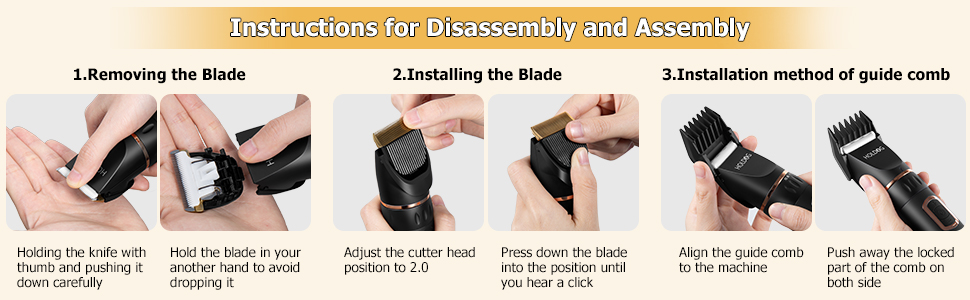
Image: Step-by-step guide for removing and installing the clipper blade, and attaching guide combs.
- Removing the Blade: Hold the clipper firmly. Place your thumb on the blade and push it down carefully until it detaches. Hold the blade with your other hand to prevent dropping it.
- Installing the Blade: Adjust the cutter head position to 2.0mm using the fine-tuning knob. Align the blade with the slot on the clipper body and press down until you hear a click, indicating it is securely in place.
Attaching Guide Combs
Select the desired comb attachment (3mm, 6mm, 9mm, 12mm, 15mm, or 18mm). Align the comb with the clipper blade and push it onto the machine until it clicks into place. To remove, push away the locked part of the comb on both sides and slide it off.
Operating Instructions
Preparing Your Pet for Grooming
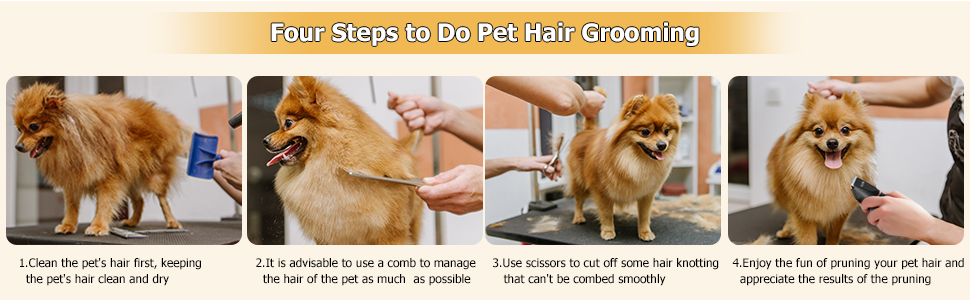
Image: Visual guide to the four preparatory steps for pet grooming: cleaning, combing, trimming knots, and beginning the clipping process.
- Clean the Pet's Hair: Ensure your pet's hair is clean and dry before grooming. This helps the clippers glide smoothly and prevents damage to the blades.
- Comb the Hair: It is advisable to use the provided stainless steel comb to manage the pet's hair as much as possible, removing loose fur and minor tangles.
- Trim Knots: Use the hair-cutting shears to cut off any hair knotting that cannot be combed smoothly. Attempting to clip through severe knots can be painful for your pet and damage the clippers.
- Familiarize Your Pet: Allow your pet to get used to the sound and vibration of the clippers before starting. Turn them on briefly near your pet without touching them.
Grooming Process
- Power On/Off and Speed Adjustment: Press the power button to turn the clippers on. Press it again to cycle through the three available speeds. The current speed (RPM) will be displayed on the LCD screen.
- Adjusting Blade Length: For precise trimming, rotate the fine-tuning knob on the clipper body to select a blade length between 0.8mm and 2.0mm. For longer cuts, attach one of the 6 guide combs.
- Clipping Technique: Hold the clipper firmly and move it in the direction of hair growth. Use smooth, even strokes. Take breaks as needed to prevent the blade from overheating and to keep your pet comfortable.
- Monitor Battery: Keep an eye on the battery percentage displayed on the LCD screen. Recharge when the battery level drops below 25% (charging icon will blink).
Maintenance
Cleaning the Blades
Regular cleaning is essential for optimal performance and longevity of your clippers.
- After each use, turn off the clippers and detach the blade.
- Use the provided cleaning brush to remove any trapped hair from the blade and the clipper head.
- You can rinse the detachable blade under running water, but ensure it is completely dry before reattaching it to the clipper body. Do NOT rinse the main clipper body.
Oiling the Blades
To maintain blade sharpness and reduce friction and heat, apply a few drops of the included clipper oil to the blades before and after each grooming session. The LCD screen will display an oil reminder icon when lubrication is recommended.
Storage
Store the clippers and all accessories in a cool, dry place, away from direct sunlight and moisture. Ensure the clippers are fully charged before long-term storage to preserve battery health.
Troubleshooting
| Problem | Possible Cause | Solution |
|---|---|---|
| Clippers not turning on. | Low battery; Power button not pressed correctly. | Charge the clippers fully. Press and hold the power button for a few seconds. |
| Clippers not cutting effectively or pulling hair. | Blades are dull or clogged with hair; Insufficient oil; Hair is matted or wet. | Clean and oil the blades. Ensure pet's hair is clean, dry, and free of severe tangles. Consider replacing blades if excessively dull. |
| Blade gets hot quickly. | Lack of lubrication; Excessive continuous use. | Apply clipper oil to the blades. Take short breaks during grooming to allow the blades to cool down. |
| Unusual noise or vibration. | Blade not properly installed; Internal damage. | Re-install the blade, ensuring it clicks into place. If the problem persists, contact customer support. |
Specifications
- Model: B8
- Brand: HOLDOG
- Power Source: Battery Powered
- Battery Type: 2200mAh 3.7V Li-ion Battery (18650)
- Charging Time: Approximately 3 hours
- Runtime: 3-4 hours
- Blade Material: Titanium-Ceramic
- Noise Level: Less than 50 dB
- Adjustable Blade Lengths: 0.8mm, 1.1mm, 1.4mm, 1.7mm, 2.0mm
- Comb Attachments: 3mm, 6mm, 9mm, 12mm, 15mm, 18mm
- Dimensions: 2.48 x 6.89 x 9.76 inches
- Item Weight: 8.1 ounces
- UPC: 732866750682
- Country of Origin: China
Warranty and Support
HOLDOG provides 365 days of technical support for this product. For any issues, questions, or technical assistance, please contact the manufacturer directly through their official support channels. Please refer to the packaging or product listing for specific contact details.
For more information, you may visit the official HOLDOG website or the product page where you purchased the item.
Ask a question about this manual
Ask about setup, troubleshooting, compatibility, parts, safety, or missing instructions. Manuals+ will review the question and use this page’s manual context to help answer it.