
1. Product Overview
This manual provides instructions for the installation, operation, and maintenance of the ForeverPRO WP3191049 Infinite Switch. This component is a replacement part designed for use with various Whirlpool range models, controlling the heat output of a 6-inch surface burner.
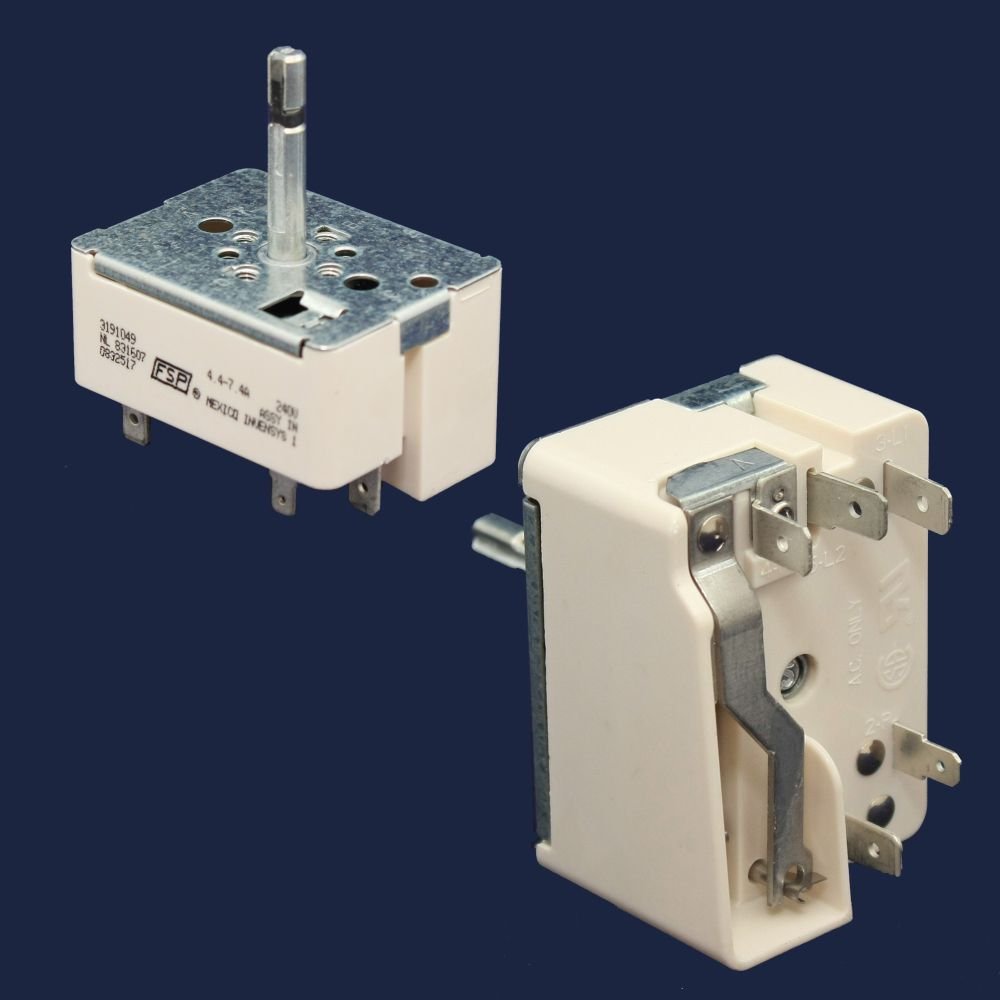
Image 1: The ForeverPRO WP3191049 Infinite Switch. This image displays the switch from two angles, highlighting its shaft, mounting plate, and electrical terminals. The switch is a compact, rectangular component with a metal shaft extending from one side and multiple spade terminals for electrical connections on the other.
2. Safety Information
- Always disconnect power to the appliance at the circuit breaker or fuse box before attempting any installation, repair, or maintenance. Failure to do so can result in serious injury or electrical shock.
- Wear appropriate personal protective equipment, such as gloves and safety glasses, during installation.
- If you are unsure about any step, consult a qualified appliance technician.
- Ensure all electrical connections are secure and correctly wired according to the original appliance configuration.
3. Setup and Installation
This section outlines the general steps for replacing an infinite switch. Specific procedures may vary depending on your range model. Refer to your appliance's service manual for detailed instructions.
- Disconnect Power: Turn off the power to your range at the main circuit breaker or fuse box. Verify that the power is off before proceeding.
- Access the Control Panel: Depending on your range model, you may need to remove knobs, screws, or clips to access the rear of the control panel where the infinite switches are located.
- Document Wiring: Before disconnecting any wires, take a clear photograph of the existing switch and its wiring connections. This will serve as a reference for correct reinstallation. Note the position of each wire on the terminals (e.g., L1, L2, H1, H2, P).
- Remove Old Switch: Carefully disconnect all wires from the old infinite switch. Then, unmount the switch from the control panel.
- Install New Switch: Mount the ForeverPRO WP3191049 switch into the control panel, ensuring it is securely fastened.
- Connect Wiring: Using your photograph as a guide, connect the wires to the corresponding terminals on the new switch. Ensure each connection is tight and secure.
- Reassemble: Reattach the control panel and any other components removed during disassembly. Replace knobs.
- Restore Power and Test: Turn the power back on at the circuit breaker. Test the burner controlled by the new switch to ensure it functions correctly through its full range of heat settings.
4. Operating Instructions
The infinite switch controls the heat output of a surface burner by regulating the amount of power supplied to the heating element. To operate:
- Turn the corresponding control knob to the desired heat setting (e.g., Low, Medium, High).
- The switch will cycle power to the burner element to maintain the selected temperature.
- Turn the knob to the 'OFF' position when cooking is complete.
5. Maintenance
The ForeverPRO WP3191049 infinite switch is designed for durability and typically requires minimal maintenance. However, regular inspection can help ensure optimal performance:
- Periodically inspect the wiring connections to ensure they remain secure.
- Keep the area around the control panel clean and free from grease or debris.
- If the control knob feels loose or sticky, inspect its connection to the switch shaft.
6. Troubleshooting
If you experience issues with your range's surface burner after installing the new switch, consider the following:
- Burner Not Heating:
- Check if the power to the range is on.
- Verify all wires are securely connected to the switch terminals.
- Ensure the burner element itself is not faulty.
- Burner Stuck on High or Low:
- This may indicate a faulty infinite switch. Re-check wiring or consider replacing the switch if other components are ruled out.
- No Power to Range:
- Check the circuit breaker or fuse box for tripped breakers or blown fuses.
- Ensure the range is properly plugged into a working outlet.
For further assistance, contact a qualified appliance repair technician.
7. Specifications
| Part Number | WP3191049 |
| Replaces Part Numbers | 3191049, 4454539, 504137, AH339377, EA339377, PS339377 |
| Included Components | 1 x Infinite Switch (6 Inch) |
| Manufacturer | ForeverPRO |
8. Compatibility
The ForeverPRO WP3191049 Infinite Switch is compatible with a wide range of Whirlpool brand ranges. This includes, but is not limited to, the following models:
- GJC3034GB0, GJC3034GQ0, GJC3034GS0, GJC3034GZ0
- GJC3034HB0, GJC3034HB1, GJC3034HB2, GJC3034HB3, GJC3034HB4, GJC3034HB5
- GJC3034HP3, GJC3034HP4, GJC3034HP5
- GJC3034HQ0, GJC3034HQ1, GJC3034HQ2, GJC3034HQ3, GJC3034HQ4, GJC3034HQ5
- GJC3034HT0, GJC3034HT1, GJC3034HT2, GJC3034HT3, GJC3034HT4, GJC3034HT5
- GJC3034LB0, GJC3034LB01, GJC3034LB02, GJC3034LC01, GJC3034LC02, GJC3034LCO
- GJC3034LP0, GJC3034LP01, GJC3034LP02
- GJC3034LQ0, GJC3034LQ01, GJC3034LQ02
- GJC3034LT0, GJC3034LT01, GJC3034LT02
- GJC3034RB00, GJC3034RB01, GJC3034RB02, GJC3034RB03, GJC3034RB04, GJC3034RB05, GJC3034RB06
- GJC3034RC00, GJC3034RC01, GJC3034RC02, GJC3034RC03, GJC3034RC04, GJC3034RC05
- GJC3034RP00, GJC3034RP01, GJC3034RP02, GJC3034RP03, GJC3034RP04, GJC3034RP05
- GJC3034RS00, GJC3034RS01, GJC3034RS02, GJC3034RS03, GJC3034RS04, GJC3034RS05
- GJC3054RB00, GJC3054RB01, GJC3054RB02, GJC3054RB03, GJC3054RB04, GJC3054RB05
- GJC3054RC00
- GJC3054RP00, GJC3054RP01, GJC3054RP02, GJC3054RP03, GJC3054RP04, GJC3054RP05
- GJC3054RS00, GJC3054RS01, GJC3054RS02, GJC3054RS03, GJC3054RS04, GJC3054RS05
- GJC3634GB0, GJC3634GQ0
Always verify compatibility with your specific appliance model before purchasing and installing any replacement part.
9. Warranty and Support
ForeverPRO stands by the quality of its products. This product comes with a 'No Questions Asked Money Back Guarantee'. For support or warranty inquiries, please contact ForeverPRO directly through their official channels.