
1. Introduction and Overview
This manual provides instructions for the Panasonic Cordless Phone, Model B081VP1QR2. This digital cordless phone features a 1.8-inch color screen, an automatic answering system, and call recording capabilities. It is designed for clear communication and ease of use in a home or office environment.
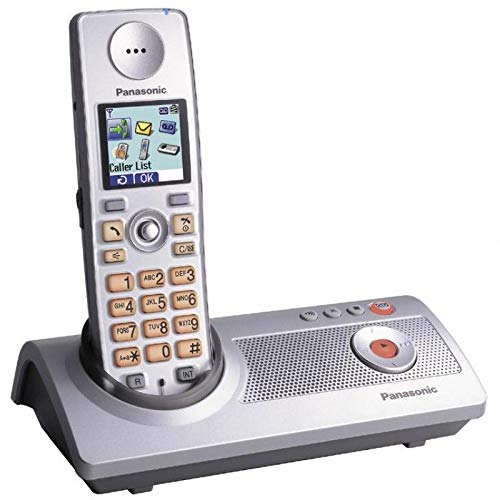
Image 1.1: The Panasonic Cordless Phone, showing the handset docked in its base unit. The handset features a color display and a numeric keypad. The base unit includes speakerphone controls and an answering machine interface.
Key features include a secure, untappable digital connection, a vibrant 65,000-color display, a 40-minute message recording capacity, customizable ringtones, a 200-entry phonebook, international caller ID, long-lasting battery, backlit keys, intercom functionality, and a powerful speakerphone. It also includes a clock with an alarm function and operates on 220 Volts.
2. Setup
2.1 Unpacking
Carefully remove all components from the packaging. Ensure you have the handset, base unit, AC adapter, telephone line cord, and rechargeable batteries.
2.2 Battery Installation
- Open the battery compartment cover on the back of the handset.
- Insert the provided rechargeable batteries, observing the correct polarity (+ and -).
- Close the battery compartment cover securely.
2.3 Base Unit Connection
- Connect the AC adapter to the base unit and plug it into a 220V electrical outlet.
- Connect one end of the telephone line cord to the base unit and the other end to your telephone wall jack.
2.4 Initial Charge
Place the handset on the base unit to charge. The handset should be charged for at least 7 hours before initial use to ensure optimal battery performance.
3. Operating Instructions
3.1 Making and Receiving Calls
- To Make a Call: Lift the handset, wait for a dial tone, and dial the number. Press the TALK button if necessary.
- To Receive a Call: When the phone rings, lift the handset or press the TALK button.
- To End a Call: Place the handset back on the base unit or press the END button.
3.2 Answering System
The integrated answering system can record messages for up to 40 minutes.
- Activating: Press the ANSWER ON/OFF button on the base unit.
- Recording an Outgoing Message: Follow the menu prompts on the handset or base unit to record your personalized outgoing message.
- Retrieving Messages: Press the PLAY button on the base unit or access the answering system menu on the handset. You can also listen to messages remotely by calling your phone number and entering your remote access code.
3.3 Phonebook
Store up to 200 names and numbers in the phonebook.
- Adding an Entry: Navigate to the Phonebook menu, select 'Add New Entry', enter the name and number, then save.
- Dialing from Phonebook: Access the Phonebook, scroll to the desired entry, and press the TALK button.
3.4 Caller ID
The phone displays the caller's number (and name if available and stored in your phonebook) before you answer, provided you subscribe to Caller ID service.
3.5 Intercom
If you have multiple handsets, you can use the intercom feature to communicate between them or between the handset and the base unit.
- To Initiate Intercom: Press the INTERCOM button (or equivalent) on the handset or base and select the desired destination.
3.6 Alarm Clock
Set an alarm using the handset's menu to function as a wake-up call or reminder.
4. Maintenance
4.1 Cleaning
Wipe the handset and base unit with a soft, damp cloth. Do not use abrasive cleaners or solvents. Ensure no liquid enters the device openings.
4.2 Battery Care
- Use only the specified rechargeable batteries.
- Avoid exposing batteries to extreme temperatures.
- If the phone will not be used for an extended period, remove the batteries.
5. Troubleshooting
If you experience issues with your phone, refer to the following common solutions:
| Problem | Solution |
|---|---|
| No dial tone | Ensure the telephone line cord is securely connected to both the base unit and the wall jack. Check if the AC adapter is properly plugged in. |
| Handset not charging | Verify the handset is correctly seated in the base unit. Clean the charging contacts on both the handset and base unit with a dry cloth. Ensure batteries are correctly installed. |
| Poor sound quality / Static | Move the handset closer to the base unit. Avoid placing the base unit near other electronic devices that may cause interference. |
| Answering system not recording | Check if the answering system is activated. Ensure there is sufficient recording time available (up to 40 minutes). |
6. Specifications
- Model: B081VP1QR2
- Brand: Panasonic
- Display: 1.8-inch Color Screen (65,000 colors)
- Answering System: Up to 40 minutes recording time
- Phonebook Capacity: 200 entries (names and numbers)
- Caller ID: Yes (requires subscription)
- Power Source: Corded Electric (for base unit)
- Voltage: 220 Volts
- Handset Type: Cordless
- Dialer Type: Single Keypad
7. Warranty and Support
For warranty information and technical support, please refer to the warranty card included with your product or visit the official Panasonic website for your region. Keep your purchase receipt as proof of purchase.