JIATONG 30CM DC 5V Hard Strip 4W LED Strip Bar User Manual
Model: 791342618458 | Brand: JIATONG
Introduction
This user manual provides comprehensive instructions for the installation, operation, and maintenance of your JIATONG 30CM DC 5V Hard Strip 4W LED Strip Bar. Please read this manual thoroughly before using the product to ensure safe and efficient operation. Retain this manual for future reference.
Safety Information
To prevent injury or damage to the product, please observe the following safety precautions:
Ensure the power source is DC 5V as specified. Using an incorrect voltage may damage the LED strip.
Do not expose the LED strip to water or excessive moisture. This product is not water-resistant.
Avoid bending or twisting the LED strip excessively, as this may damage the internal components.
Do not attempt to disassemble or modify the LED strip. This will void the warranty and may cause malfunction.
Keep the product away from flammable materials and direct heat sources.
Unplug the USB connector from the power source before cleaning or performing any maintenance.
This product is intended for indoor use only.
Product Overview
Features
Light color: Warm White (2700-3200 K)
Material: Aluminum alloy
Type: SMD 5630 LED chips
Interface: USB for convenient power supply
Input: DC 5V
Power: 4W
Size: 30cm (Approx.)
Mini-LED Night Light, suitable for camping and desktop lighting
Compatible with all standard USB devices, including mobile power supplies, mobile chargers, and computers
Thin, super bright LCD backlight beads that do not cause eye strain
Compact design, ideal for illuminating laptops or small spaces
Components
1 x LED Lamp Bar (30cm) with integrated USB cable and switch
Product Images
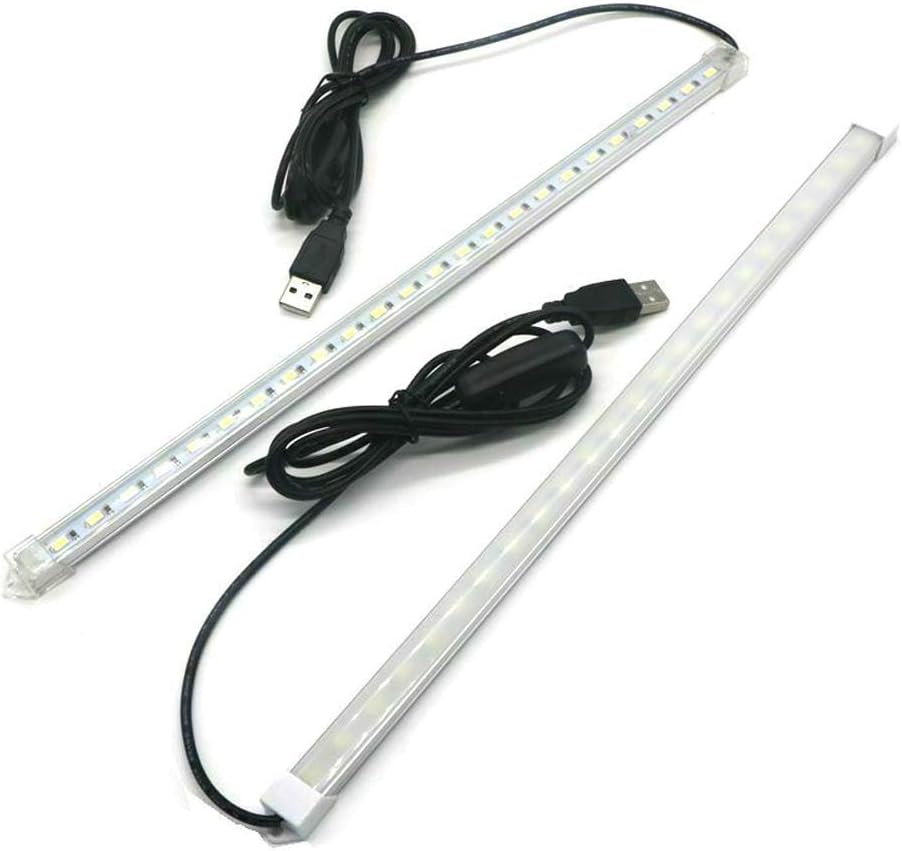
Figure 1: The JIATONG 30CM LED Strip Bar, showing the main light bar and its attached USB power cable.
Figure 2: The LED Strip Bar in operation, demonstrating its warm white light output in a dark environment.
Figure 3: A comparison view showing two LED Strip Bars, highlighting the presence of an inline switch on one of the models for easy control.
Figure 4: A detailed view of the USB cable, featuring the integrated inline switch for convenient power control.
Figure 5: A complete view of the LED Strip Bar, including the attached USB cable and the inline power switch, ready for connection.
Specifications
Attribute
Value
Brand
JIATONG
Model Number
791342618458
Light Color
Warm White (2700-3200 K)
Material
Aluminum alloy
LED Type
SMD 5630
Interface
USB
Input Voltage
DC 5V
Power
4W
Length
30cm (Approx.)
Power Source
Corded Electric (via USB)
Control Method
Button Control (inline switch)
Water Resistance Level
Not Water Resistant
Setup
Follow these steps to set up your LED Strip Bar:
Unpack the Product: Carefully remove the LED Strip Bar from its packaging. Inspect for any visible damage.
Choose a Location: Select a suitable location for the LED strip. Ensure the surface is clean and dry if you plan to use adhesive (adhesive not included, but common for strip lights).
Connect to Power: Insert the USB connector of the LED Strip Bar into a compatible DC 5V USB power source (e.g., computer USB port, USB wall adapter, power bank).
Secure the Strip (Optional): If desired, use appropriate mounting clips or double-sided adhesive tape (not supplied) to secure the LED strip in place.
Operating Instructions
The JIATONG LED Strip Bar is designed for simple operation:
Power On: Once connected to a DC 5V USB power source, locate the inline switch on the USB cable. Press the switch to turn the LED strip ON.
Power Off: To turn the LED strip OFF, press the inline switch again.
Placement: Position the LED strip to achieve the desired illumination. It is ideal for accent lighting in cabinets, cupboards, or as a desktop light.
Maintenance
Proper care will extend the life of your LED Strip Bar:
Cleaning: Ensure the LED strip is unplugged from the power source before cleaning. Gently wipe the surface of the LED strip with a soft, dry cloth. Do not use liquid cleaners or abrasive materials.
Storage: When not in use for extended periods, store the LED strip in a cool, dry place, away from direct sunlight and extreme temperatures.
Inspection: Periodically check the USB cable and the LED strip for any signs of damage, such as frayed wires or cracks. If damage is found, discontinue use.
Troubleshooting
If you encounter issues with your LED Strip Bar, refer to the following table:
Problem
Possible Cause
Solution
LED strip does not light up.
Not properly connected to power source. USB power source is not providing power. Inline switch is OFF. Faulty LED strip or cable.
Ensure the USB connector is fully inserted into a working USB port. Try a different USB port or power adapter. Press the inline switch to the ON position. If still not working, contact customer support.
Light is dim or flickers.
Insufficient power supply. Loose connection.
Ensure the USB power source can provide sufficient current (e.g., 1A or more). Check all connections to ensure they are secure.
LED strip gets unusually hot.
Incorrect voltage or power supply. Poor ventilation.
Verify the power source is DC 5V. Disconnect immediately if overheating occurs. Ensure the LED strip is not covered or in an enclosed space without airflow.
Warranty Information
Specific warranty details for this product are not provided in the available documentation. Please refer to the retailer's return policy or contact the manufacturer directly for information regarding warranty coverage.
Customer Support
If you require further assistance or have questions not covered in this manual, please contact your point of purchase or the manufacturer, JIATONG, through their official channels. When contacting support, please have your product model number (791342618458) and purchase details ready.
Related Documents - 791342618458
Multiphase Image Segmentation Using a Simple PDE This paper proposes a novel method for multiphase image segmentation utilizing a simple partial differential equation (PDE) based on the Modica-Mortola functional. It details the use of operator splitting and explicit Euler's method for efficient calculation, demonstrating its effectiveness with real MRI brain images and noisy data.