1. Introduction
This manual provides comprehensive instructions for the safe and efficient operation, installation, and maintenance of your KENWOOD Dishwasher, model KDWVB/9-12WEL60. Please read this manual thoroughly before using the appliance and retain it for future reference.
2. Safety Information
Always adhere to the following safety precautions to prevent personal injury or damage to the appliance:
- Ensure the dishwasher is properly grounded.
- Do not allow children to operate or play with the dishwasher. The appliance features a Child Lock for safety.
- Keep detergents and rinse aid out of reach of children.
- Only use detergents and rinse aid specifically designed for automatic dishwashers.
- Avoid opening the door during operation, especially during the hot wash or drying cycle, as hot water or steam may escape.
- Sharp items should be loaded with points down to prevent injury.
- Do not sit or stand on the dishwasher door or racks.
- In case of malfunction, disconnect the appliance from the power supply before attempting any inspection or repair.
3. Product Overview
The KENWOOD KDWVB/9-12WEL60 is a freestanding dishwasher designed for efficient dish cleaning. Key features include:
- Capacity: 12 place settings.
- Wash Programs: 9 distinct wash programs to suit various needs.
- Baskets: Features a Third Layer Cutlery Basket and a Height Adjustable Upper Basket for flexible loading.
- Control: Full Electronic Control with a digital display.
- Safety: Integrated Child Lock feature.
- Material: Stainless Steel interior.
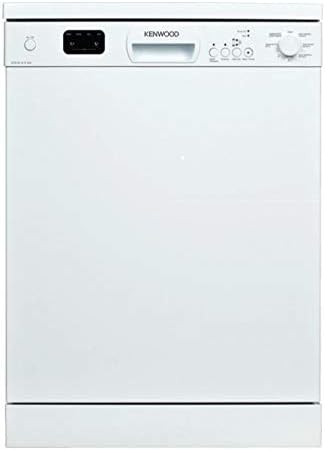
Figure 1: Front view of the KENWOOD KDWVB/9-12WEL60 Dishwasher. This image displays the front of the Kenwood KDWVB/9-12WEL60 Dishwasher. It is a freestanding, white appliance with a control panel located at the top. The control panel includes a digital display, program selection buttons, and a rotary dial for settings.
4. Setup and Installation
4.1 Unpacking
Carefully remove all packaging materials. Inspect the dishwasher for any signs of damage during transit. Report any damage to your retailer immediately.
4.2 Placement
Position the freestanding dishwasher on a level, stable surface near a water supply, drain, and electrical outlet. Ensure adequate space for opening the door and accessing connections.
4.3 Water Connection
Connect the water inlet hose to a cold water tap with a 3/4-inch thread. Ensure the connection is secure to prevent leaks. Connect the drain hose to a suitable drain pipe or sink trap, ensuring it is properly secured and allows for proper drainage.
4.4 Electrical Connection
Plug the dishwasher into a grounded electrical outlet. Ensure the voltage and frequency match the specifications on the appliance rating label. Do not use extension cords or adapters.
5. Operating Instructions
5.1 Loading the Dishwasher
For optimal cleaning, load dishes according to the following guidelines:
- Scrape off large food particles before loading.
- Place larger, heavily soiled items in the lower basket.
- Use the Height Adjustable Upper Basket for glasses, cups, and smaller plates. Adjust the height as needed to accommodate taller items in the lower basket.
- Utilize the Third Layer Cutlery Basket for forks, knives, and spoons, ensuring they are separated to allow water to reach all surfaces.
- Ensure spray arms can rotate freely and are not blocked by dishes.
5.2 Adding Detergent and Rinse Aid
Fill the detergent dispenser with the appropriate amount of dishwasher detergent. Add rinse aid to the rinse aid dispenser as needed to improve drying performance and prevent water spots.
5.3 Selecting a Wash Program
The dishwasher offers 9 wash programs. Refer to the control panel and the program chart (usually found inside the door or in a quick start guide) to select the most suitable program for your load. Common programs include:
- Intensive: For heavily soiled dishes and pots.
- Eco: Energy-saving program for normally soiled dishes.
- Quick: For lightly soiled dishes that need a fast wash.
- Sanitization Option: Select this option for enhanced hygiene, ideal for baby bottles or cutting boards.
5.4 Starting a Cycle
Close the dishwasher door firmly. Press the Power button, then select your desired program using the program selection buttons or rotary dial. Press the Start button to begin the wash cycle. The digital display will show the remaining time.
5.5 Child Lock Function
To activate the Child Lock, press and hold the designated Child Lock button (refer to your control panel for the specific button, often indicated by a lock icon) for a few seconds until the indicator light illuminates. This prevents accidental program changes or door opening during operation. Repeat the process to deactivate.
6. Maintenance and Cleaning
Regular maintenance ensures optimal performance and extends the lifespan of your dishwasher.
6.1 Cleaning the Filters
The filter system, located at the bottom of the wash tub, should be cleaned regularly (e.g., weekly). Remove the coarse filter, fine filter, and microfilter, rinse them under running water to remove food particles, and then reassemble them correctly.
6.2 Cleaning the Spray Arms
Periodically check the spray arm nozzles for blockages. If necessary, remove the spray arms and clear any debris from the holes using a thin wire or toothpick.
6.3 Cleaning the Exterior
Wipe the exterior surfaces of the dishwasher with a soft, damp cloth. Do not use abrasive cleaners or solvents.
6.4 Descaling
If you live in an area with hard water, periodic descaling may be necessary. Use a dishwasher-safe descaling product according to its instructions.
7. Troubleshooting
Before contacting service, consult the following table for common issues and their solutions:
| Problem | Possible Cause | Solution |
|---|---|---|
| Dishwasher does not start | Power cord not plugged in; door not closed properly; fuse blown; program not selected. | Check power connection; ensure door latches; check household fuse/breaker; select a program and press Start. |
| Dishes are not clean | Improper loading; clogged spray arms; insufficient detergent; incorrect program; clogged filters. | Reload dishes correctly; clean spray arm nozzles; add more detergent; select a more intensive program; clean filters. |
| Water remains in the tub | Clogged drain hose or filter; kink in drain hose. | Clean filters and drain hose; straighten drain hose. |
| White spots on dishes | Insufficient rinse aid; hard water. | Refill rinse aid dispenser; consider using a descaler or increasing rinse aid dosage. |
If the problem persists after attempting these solutions, please contact Kenwood customer service.
8. Specifications
| Feature | Detail |
|---|---|
| Brand | Kenwood |
| Model Number | KDWVB/9-12WEL60 |
| Type | Freestanding Dishwasher |
| Capacity | 12 Place Settings |
| Number of Wash Programs | 9 |
| Water Consumption | 9 Liters (per cycle) |
| Control Type | Full Electronic Control (Touch) |
| Material | Stainless Steel (interior) |
| Color | White |
| Special Features | Childproof Lock, Third Cutlery Basket, Height Adjustable Upper Basket, Sanitization Option |
| Item Weight | 29 kg |
| Package Dimensions | 90 x 75 x 48 cm |
9. Warranty and Support
For warranty information, please refer to the warranty card included with your purchase or contact your local Kenwood dealer or customer service center. Keep your proof of purchase for any warranty claims.
For technical support, spare parts, or service inquiries, please visit the official Kenwood website or contact their customer support hotline. Ensure you have your model number (KDWVB/9-12WEL60) and serial number ready when contacting support.


