Introduction
This manual provides essential information for the proper use and maintenance of your E-Car Connection 7-pin OBD1 to OBD2 16-pin Diagnostic Tool Adapter Cable. This adapter is specifically designed to connect older Ford EFI vehicles equipped with a 7-pin diagnostic port to modern OBD2 16-pin diagnostic scan tools. Please read this manual thoroughly before use to ensure safe and effective operation.
Safety Information
- Always ensure the vehicle's ignition is off before connecting or disconnecting the adapter cable to prevent electrical damage.
- Do not attempt to modify the adapter cable. Unauthorized modifications can lead to damage to the vehicle's electrical system or the diagnostic tool.
- Keep the adapter cable away from moisture, extreme temperatures, and corrosive substances.
- Handle the connectors carefully to avoid bending or breaking pins.
- This adapter is intended for diagnostic purposes only. Do not use it for permanent installations or other applications.
Product Overview
The E-Car Connection adapter cable facilitates communication between older Ford EFI vehicles and standard OBD2 diagnostic scanners. It features a 7-pin male connector for the vehicle side and a 16-pin female OBD2 connector for the diagnostic tool side, linked by a durable cable.
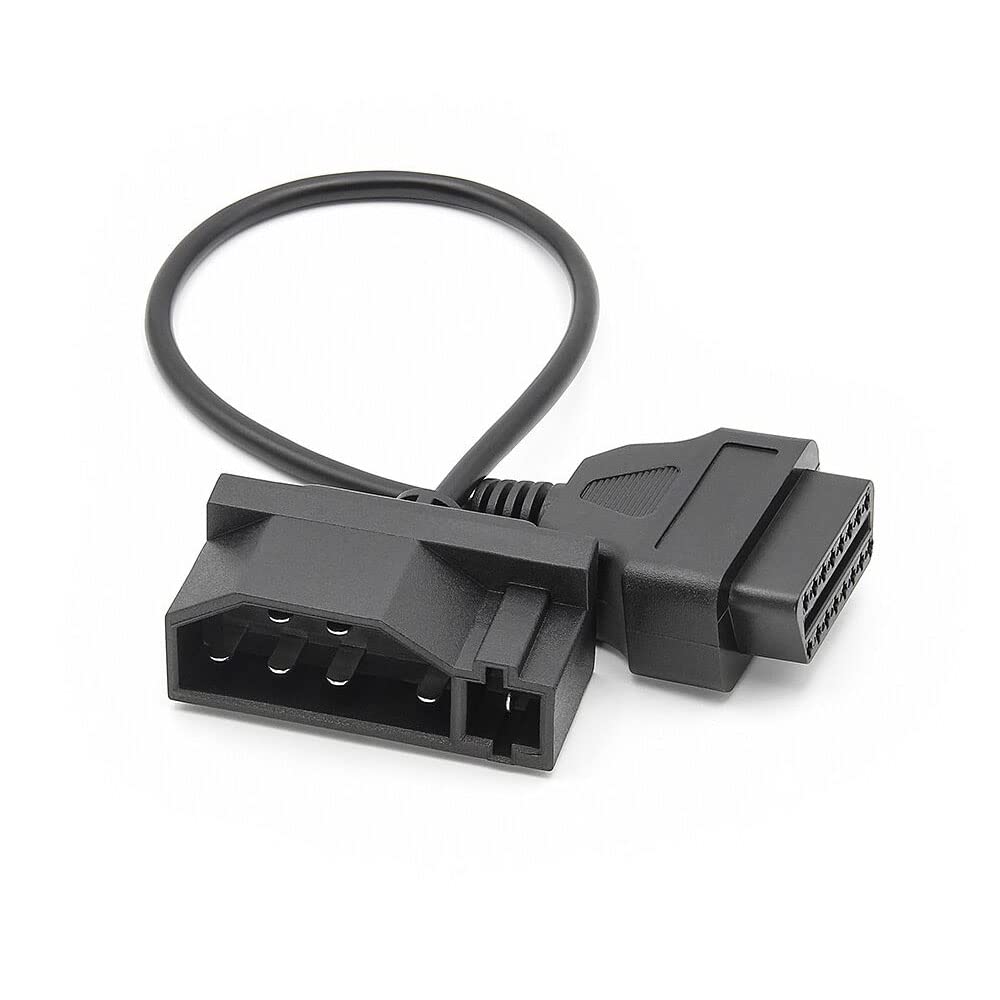
Image: The E-Car Connection 7-pin OBD1 to OBD2 adapter cable, showing both the 7-pin male connector and the 16-pin female OBD2 connector.
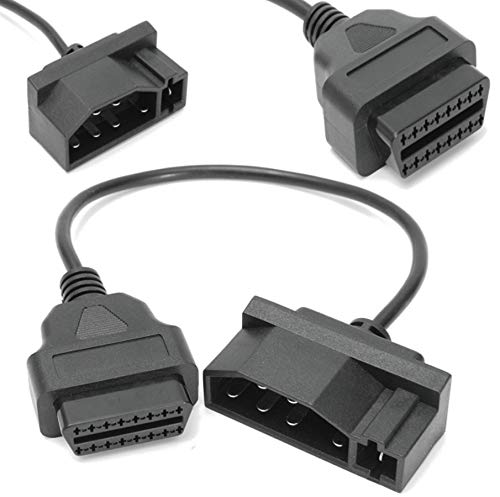
Image: A detailed view of both the 7-pin male connector (left) and the 16-pin female OBD2 connector (right) of the adapter cable.
Components:
- 7-pin Male Connector: Connects to the diagnostic port of compatible Ford EFI vehicles.
- 16-pin Female OBD2 Connector: Connects to a standard OBD2 diagnostic scan tool.
- Durable Cable: Provides a flexible and robust connection between the two connectors.
Specifications
| Feature | Detail |
|---|---|
| Product Dimensions | 8.3 x 5.2 x 1.5 inches |
| Item Weight | 2.22 ounces |
| Brand | E-Car Connection |
| Compatible Devices | Ford EFI vehicles |
Setup
Follow these steps to correctly connect the adapter cable:
- Locate Vehicle Diagnostic Port: Identify the 7-pin diagnostic port in your Ford EFI vehicle. Its location can vary by model and year, but it is typically found under the dashboard, near the steering column, or in the engine bay. Consult your vehicle's service manual if you cannot locate it.
- Ensure Vehicle is Off: Turn off the vehicle's ignition completely.
- Connect 7-pin Connector: Carefully plug the 7-pin male connector of the adapter cable into the vehicle's 7-pin diagnostic port. Ensure a firm and secure connection. Do not force the connector.
- Connect OBD2 Scan Tool: Plug the 16-pin female OBD2 connector of the adapter cable into your OBD2 diagnostic scan tool.
- Verify Connections: Double-check that both ends of the adapter cable are securely connected before proceeding.
Operating Instructions
Once the adapter cable is securely connected to both your Ford EFI vehicle and the OBD2 diagnostic scan tool, you can proceed with diagnostic operations:
- Power On Scan Tool: Turn on your OBD2 diagnostic scan tool. Some tools may power on automatically once connected to the vehicle.
- Turn On Vehicle Ignition: Turn the vehicle's ignition to the 'ON' position (do not start the engine unless instructed by the scan tool or specific diagnostic procedure).
- Initiate Scan: Follow the instructions on your diagnostic scan tool to initiate a vehicle scan. The tool should now be able to communicate with your Ford EFI vehicle's onboard computer system.
- Perform Diagnostics: Use your scan tool to read diagnostic trouble codes (DTCs), view live data streams, perform sensor tests, or conduct other diagnostic functions as supported by your tool and vehicle.
- Disconnect Safely: After completing diagnostics, turn off the vehicle's ignition, then disconnect the scan tool from the adapter, and finally disconnect the adapter from the vehicle.
Pin Assignment
Understanding the pin assignment is crucial for proper functionality and troubleshooting. The E-Car Connection adapter cable correctly maps the 7-pin Ford EFI diagnostic port to the standard 16-pin OBD2 configuration.

Image: Diagram illustrating the pin assignment from the 7-pin Ford connector to the 16-pin OBDII (Female) connector.
The diagram above illustrates the specific wiring configuration. For example, pin 1 on the 7-pin Ford connector maps to pins 4 and 5 on the OBDII connector, which are typically ground connections. Pin 7 on the 7-pin connector maps to pin 7 on the OBDII connector, which is often the K-Line for communication.
Maintenance
To ensure the longevity and reliable performance of your adapter cable, follow these simple maintenance guidelines:
- Cleaning: Wipe the cable and connectors with a soft, dry cloth. Do not use harsh chemicals or abrasive cleaners.
- Storage: Store the adapter cable in a clean, dry place, away from direct sunlight and extreme temperatures. Avoid kinking or tightly coiling the cable.
- Inspection: Periodically inspect the connectors for any signs of damage, corrosion, or bent pins. If damage is observed, discontinue use and replace the cable.
Troubleshooting
If you encounter issues while using the adapter cable, consider the following troubleshooting steps:
- No Communication:
- Ensure all connections are secure and fully seated.
- Verify the vehicle's ignition is in the 'ON' position.
- Check if your OBD2 scan tool is functioning correctly with other OBD2-compatible vehicles.
- Confirm that your Ford EFI vehicle uses the 7-pin diagnostic port and is compatible with this adapter.
- Inspect the adapter cable's pins for any damage or corrosion.
- Intermittent Connection:
- Ensure the cable is not under tension or being moved during diagnosis.
- Check for loose connections at both the vehicle and scan tool ends.
- Scan Tool Error Messages:
- Refer to your OBD2 scan tool's manual for specific error code interpretations.
- Ensure the scan tool's software is up to date.
Warranty and Support
For warranty information, technical support, or service inquiries regarding your E-Car Connection 7-pin OBD1 to OBD2 Adapter Cable, please refer to the documentation provided with your purchase or contact E-Car Connection directly through their official website or customer service channels. Keep your proof of purchase for warranty claims.


