
1. Introduction
Thank you for choosing the Lomvum LV 77U Digital Laser Distance Meter. This device is designed for precise and efficient distance, area, and volume measurements. It features advanced laser technology, a clear display, and user-friendly functions to assist with various measurement tasks. Please read this manual thoroughly before operating the device to ensure safe and correct usage.
2. Safety Information
The Lomvum LV 77U is a Class 2 laser product. Observe the following safety precautions:
- Do not stare directly into the laser beam. Direct exposure to the laser beam can cause eye injury.
- Do not aim the laser beam at people or animals.
- Avoid operating the device in explosive environments or near flammable materials.
- Keep the device out of reach of children.
- Do not attempt to modify or disassemble the device. Repairs should only be performed by authorized service personnel.
- Use only specified rechargeable batteries and charging methods.
3. Product Overview
3.1 Key Features
- High Accuracy: ±2mm precision for reliable measurements.
- Fast Measurement: Obtain results in approximately 0.5 seconds.
- Electronic Level: Integrated digital angle measurement with 0.3-degree accuracy.
- Multiple Measurement Modes: Single distance, continuous, area, volume, Pythagorean (single and double), angle.
- Voice Broadcast: English voice prompts for measurement results (can be muted).
- USB Rechargeable: Convenient charging via Micro USB port.
- Durable Design: Waterproof construction for enhanced longevity.
- Clear Display: 2.0-inch screen for easy readability.
- Measurement Range: Up to 40 meters (other ranges may be available for this model series).
3.2 Device Components
The device features a compact design with an intuitive button layout and a clear display. Key components include the laser emission aperture, receiving lens, measurement buttons, mode selection buttons, unit button, and a Micro USB charging port.
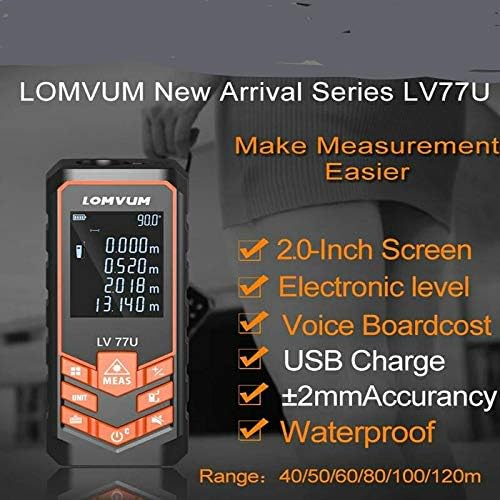
Figure 1: Overview of the Lomvum LV 77U Laser Distance Meter highlighting its main features.
4. Setup
4.1 Battery Installation and Charging
The Lomvum LV 77U requires rechargeable batteries for operation, which are not included in the package. Once suitable rechargeable batteries are installed, the device can be charged via its Micro USB port.
- Open the battery compartment cover (location may vary, typically on the back or bottom).
- Insert the appropriate rechargeable batteries, ensuring correct polarity (+/-).
- Close the battery compartment cover securely.
- To charge, connect the Micro USB cable (not always included) to the device's charging port and to a USB power source (e.g., computer, USB wall adapter). The battery indicator on the screen will show charging status.
4.2 Powering On/Off
- To Power On: Press the Power button (
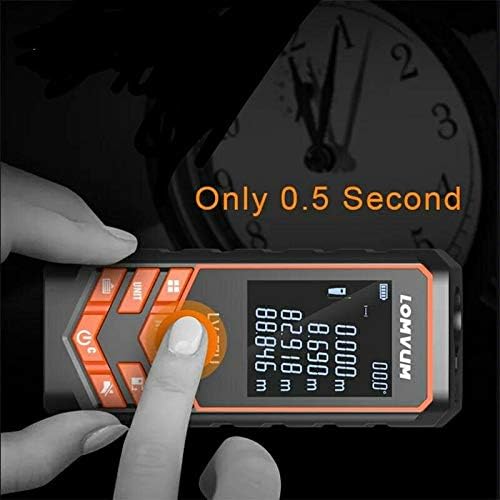 , typically orange) briefly.
 - To Power Off: Press and hold the Power button for a few seconds, or the device will automatically shut down after a period of inactivity to conserve battery.
5. Operating Instructions
5.1 Basic Measurement
- Power on the device.
- Point the laser at the target surface.
- Press the MEAS button (Measurement button) once. The measurement result will appear on the screen in approximately 0.5 seconds.
Figure 2: The device performing a quick measurement, displaying results in 0.5 seconds.
5.2 Unit Conversion
Press the UNIT button to cycle through different measurement units: meters (m), feet (ft), and inches (in).
5.3 Measurement Modes
Press the Function/Mode button (often depicted with multiple squares or a triangle icon) to select different measurement functions.
- Continuous Measurement: Displays real-time distance as you move the device.
- Area Measurement: Measure two sides (length and width), and the device calculates the area.
- Volume Measurement: Measure three sides (length, width, height), and the device calculates the volume.
- Pythagorean Measurement (Single): Measure two sides of a right-angled triangle to calculate the third side (e.g., height).
- Pythagorean Measurement (Double): Measure three sides to calculate an unknown height or distance using two right-angled triangles.
- Angle Measurement: Utilizes the built-in electronic level to display the current angle.

Figure 3: Icons representing various measurement functions including Length, Area, Volume, and Pythagorean calculations.
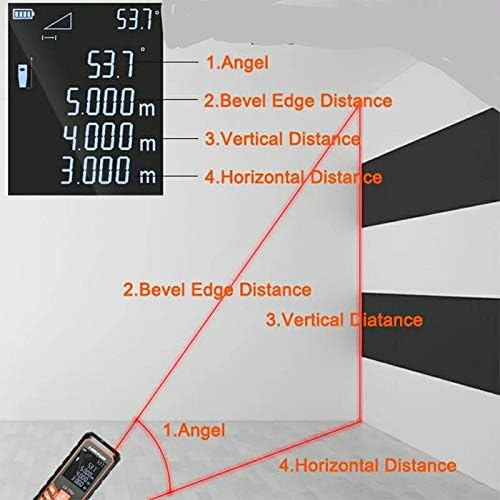
Figure 4: Visual representation of how the device measures angle, bevel edge, vertical, and horizontal distances.
5.4 Voice Broadcast and Mute Mode
The LV 77U features an English voice broadcast function that announces measurement results. To toggle the voice broadcast on or off (mute mode), refer to the device's specific button or menu option, usually indicated by a speaker icon.
6. Maintenance
- Cleaning: Use a soft, damp cloth to clean the device. Do not use abrasive cleaners or solvents. Clean the laser lens and receiving lens gently with a soft, lint-free cloth.
- Storage: Store the device in a dry, cool place, away from direct sunlight and extreme temperatures. If storing for extended periods, remove the rechargeable batteries.
- Avoid Impact: Protect the device from drops and strong impacts, which can affect its accuracy and functionality.
7. Troubleshooting
| Problem | Possible Cause | Solution |
|---|---|---|
| Device does not power on. | Low battery or incorrect battery installation. | Charge the batteries or ensure they are installed with correct polarity. |
| Inaccurate measurements. | Unstable surface, obstruction, or dirty lens. | Ensure a stable measurement surface, clear the path, and clean the laser lens. |
| Laser beam is not visible. | Bright ambient light or low battery. | Operate in lower light conditions or charge the battery. |
| Voice broadcast not working. | Mute mode is active. | Toggle the voice broadcast function to enable sound. |
8. Specifications
| Feature | Specification |
|---|---|
| Model | LV 77U |
| Measurement Accuracy | ±2mm |
| Measurement Speed | Approx. 0.5 seconds |
| Measurement Range | Up to 40 meters |
| Laser Class | Class 2 |
| Angle Accuracy (Electronic Level) | ±0.3 degrees |
| Display | 2.0-inch screen |
| Power Supply | Rechargeable batteries (not included), Micro USB charging |
| Waterproof Rating | Yes (specific IP rating not provided, but stated as waterproof) |
| Shipping Dimensions | 11.02 x 6.3 x 2.95 cm |
| Shipping Weight | 1.75 grams |
9. Warranty and Support
Lomvum products are manufactured to high-quality standards. For warranty information, technical support, or service inquiries, please refer to the documentation included with your purchase or contact the retailer/manufacturer directly. Keep your purchase receipt as proof of purchase for warranty claims.

