
Mixcder ZeroSport
Mixcder ZeroSport Wireless Sweatproof Headphones Instruction Manual
Model: ZeroSport (B013HZTTXI)
1. Introduction
Thank you for choosing the Mixcder ZeroSport Wireless Sweatproof Headphones. This manual provides detailed instructions on how to set up, operate, and maintain your headphones to ensure optimal performance and longevity. Please read this manual thoroughly before using the product.
2. Package Contents
Verify that all items listed below are present in your package:
- Mixcder ZeroSport Wireless Headphones
- Portable Carrying Case
- Micro USB Charging Cable
- User Manual
- Multiple sizes of ear tips (pre-installed or in a separate bag)

Image 2.1: Contents of the Mixcder ZeroSport package, including the headphones, a green zippered carrying case, a black Micro USB charging cable, and the user manual.
3. Product Overview
The Mixcder ZeroSport headphones feature an ergonomic design with ear-hooks for a secure fit during physical activity. The inline control unit allows for easy management of music and calls.
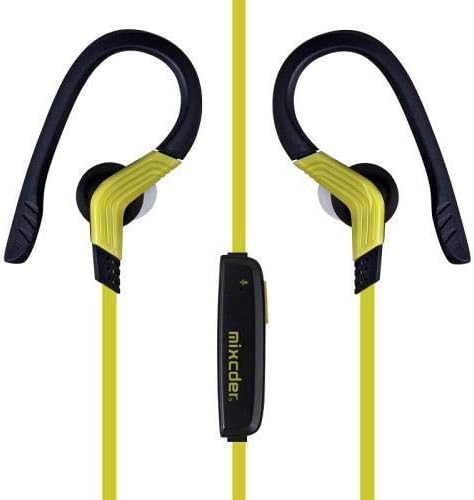
Image 3.1: Front view of the Mixcder ZeroSport headphones, highlighting the yellow cable, black ear hooks, and in-ear design.

Image 3.2: Detailed view of the inline control unit on the Mixcder ZeroSport headphones, showing the volume up, volume down, and multi-function buttons, along with the Mixcder branding.
Component Identification:
- Ear Hooks: Provide a secure fit over the ear.
- Earbuds: In-ear design for sound delivery.
- Inline Control Unit: Contains buttons for power, volume, and call management.
- Microphone: Built-in for hands-free calls.
- Micro USB Charging Port: Located on the inline control unit.
- LED Indicator: Displays status (pairing, charging, power).
4. Setup
4.1. Charging the Headphones
Before first use, fully charge the headphones. A full charge typically takes approximately 1.5 to 2 hours.
- Connect the Micro USB charging cable to the charging port on the inline control unit.
- Connect the other end of the USB cable to a USB power adapter (not included) or a computer's USB port.
- The LED indicator will glow red during charging.
- The LED indicator will turn blue or off once charging is complete.
Note: Use a 5V/1A charger for optimal charging. Avoid using fast chargers which may damage the battery.
4.2. Bluetooth Pairing
To connect your Mixcder ZeroSport headphones to a Bluetooth-enabled device:
- Ensure the headphones are fully charged and turned off.
- Press and hold the Multi-function Button (usually the center button on the inline control) for approximately 5-7 seconds until the LED indicator flashes red and blue alternately. This indicates pairing mode.
- On your device (smartphone, tablet, computer), enable Bluetooth and search for new devices.
- Select "Mixcder ZeroSport" from the list of available devices.
- Once successfully paired, the LED indicator will flash blue slowly, and you may hear a confirmation tone.
- If prompted for a password, enter "0000".
Note: The headphones will automatically attempt to reconnect to the last paired device when powered on, if the device's Bluetooth is active and within range.
5. Operating Instructions
5.1. Power On/Off
- Power On: Press and hold the Multi-function Button for 3 seconds until the LED flashes blue and you hear a "Power On" prompt.
- Power Off: Press and hold the Multi-function Button for 3 seconds until the LED flashes red and you hear a "Power Off" prompt.
5.2. Music Playback
- Play/Pause: Press the Multi-function Button once.
- Next Track: Press and hold the Volume Up (+) button for 2 seconds.
- Previous Track: Press and hold the Volume Down (-) button for 2 seconds.
5.3. Call Management
- Answer/End Call: Press the Multi-function Button once during an incoming call or an active call.
- Reject Call: Press and hold the Multi-function Button for 2 seconds during an incoming call.
- Redial Last Number: Double-press the Multi-function Button when not on a call.
5.4. Volume Control
- Volume Up: Press the Volume Up (+) button.
- Volume Down: Press the Volume Down (-) button.
6. Maintenance
Proper care ensures the longevity and performance of your headphones.
- Cleaning: Wipe the headphones with a soft, damp cloth. For the earbuds, remove them and clean with mild soap and water, then dry completely before reattaching. Ensure the charging port is dry before charging.
- Storage: When not in use, store the headphones in the provided carrying case to protect them from dust, moisture, and physical damage.
- Avoid Extreme Conditions: Do not expose the headphones to extreme temperatures, direct sunlight for prolonged periods, or corrosive liquids.
- Battery Care: To preserve battery life, charge the headphones at least once every three months if not used regularly.
7. Troubleshooting
If you encounter issues with your headphones, refer to the following common problems and solutions:
| Problem | Solution |
|---|---|
| Headphones will not power on. | Ensure the headphones are fully charged. Connect to a power source and check the LED indicator. |
| Cannot pair with device. |
|
| No sound or low volume. |
|
| Poor sound quality. |
|
8. Specifications
Technical details for the Mixcder ZeroSport Wireless Sweatproof Headphones:
- Model Number: B013HZTTXI
- Connectivity: Wireless (Bluetooth)
- Bluetooth Version: 4.1
- Form Factor: In-Ear with Ear Hooks
- Microphone: Built-in
- Noise Control: Active Noise Cancellation (ANC) (as per product specifications, though typically for passive noise isolation in this form factor)
- Material: Silicone (earmuffs)
- Weight: Approximately 16.1g
- Play/Talk Time: Over 4 hours (continuous)
- Standby Time: 100 hours
- Charging Port: Micro USB
- Included Components: Headphones, Portable Case, Micro USB Cable
9. Safety Information
Please observe the following safety guidelines for safe and proper use:
- Do not use the headphones at excessively high volumes for prolonged periods to prevent hearing damage.
- Do not use the headphones in situations where inability to hear ambient sounds could be dangerous (e.g., driving, cycling, walking in traffic).
- Keep the headphones away from water and moisture, despite being sweatproof, to prevent damage to internal components.
- Do not attempt to disassemble, repair, or modify the headphones. This will void the warranty and may cause damage or injury.
- Keep out of reach of children and pets.
- Dispose of the product responsibly according to local regulations. Do not dispose of with household waste.
10. Warranty and Support
Mixcder products are designed and manufactured to the highest quality standards. For warranty information or technical support, please refer to the warranty card included in your package or visit the official Mixcder website. Please have your model number (B013HZTTXI) and purchase details ready when contacting support.
Related documentsZeroSport


Ask a question about this manual
Ask about setup, troubleshooting, compatibility, parts, safety, or missing instructions. Manuals+ will review the question and use this page’s manual context to help answer it.