
1. Introduction
Thank you for choosing the Newrixing NR-2017 Bluetooth Hi-Fi Wireless Speaker. This manual provides essential information for the safe and efficient use of your new soundbar. Please read these instructions carefully before operating the device and retain them for future reference.
2. Product Overview and Key Features
The Newrixing NR-2017 is a versatile soundbar designed to enhance your audio experience. It features high-quality DSP sound for an immersive listening experience and live sound restoration. Its compact and stylish design allows it to fit seamlessly into various environments.
Key Features:
- Wireless Connectivity: Bluetooth V4.2 for fast and convenient pairing.
- Audio Quality: High-quality DSP sound, 360-degree dual-channel stereo for fuller sound.
- Multi-functional: Supports Bluetooth connection, USB playback, Radio function, and Call function.
- Durability: Waterproof and dustproof design.
- Portability: Built-in 1800 mAh lithium battery for up to 6 hours of operating time.
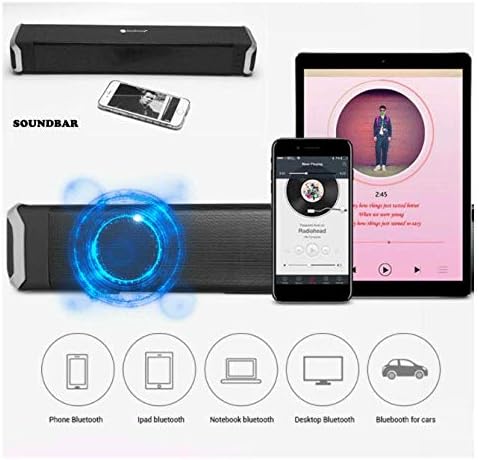
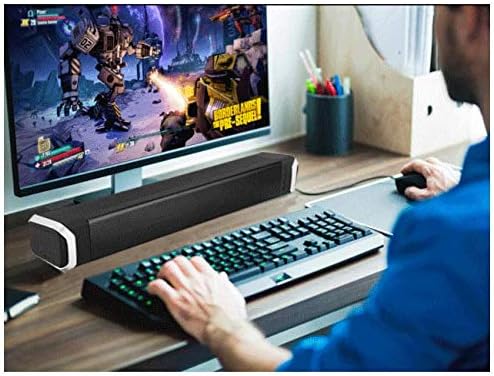
- Compatibility: Compatible with smartphones, tablets, laptops, personal computers, and televisions.
- Playback Formats: Supports MP3, WMA, WAV audio files.

3. Package Contents
Please check the box for the following items:
- Newrixing NR-2017 Bluetooth Hi-Fi Wireless Speaker
- Audio Cable
- Data Cable (USB charging cable)
- User Manual (this document)
4. Setup
4.1 Charging the Speaker
Before first use, fully charge the speaker. Connect the provided data cable to the speaker's USB port and the other end to a USB power adapter (not included) or a computer's USB port. The charging indicator light will illuminate during charging and turn off when fully charged.
4.2 Powering On/Off
Press and hold the power button for a few seconds to turn the speaker on or off. A voice prompt will indicate the power status.
4.3 Bluetooth Pairing
- Turn on the speaker. It will automatically enter Bluetooth pairing mode, indicated by a flashing LED light and a voice prompt.
- On your device (smartphone, tablet, laptop), enable Bluetooth and search for available devices.
- Select "NR-2017" from the list of devices.
- Once paired, the LED light will stop flashing, and a voice prompt will confirm the connection.
4.4 Wired Connection (AUX)
To connect via the audio cable:
- Connect one end of the provided audio cable to the AUX port on the speaker.
- Connect the other end to the audio output (headphone jack) of your device.
- The speaker will automatically switch to AUX mode, or you may need to press the 'M' (Mode) button to select AUX input.
5. Operating Instructions
5.1 Button Functions
The speaker is operated using physical buttons. Refer to the diagram below for button layout (if available on product) or the following descriptions:
- Power Button: Press and hold to turn on/off.
- Mode (M) Button: Short press to switch between Bluetooth, AUX, USB, TF Card (if available), and FM Radio modes.
- Play/Pause Button: Short press to play or pause music.
- Volume Up (+): Short press to increase volume. Long press for next track.
- Volume Down (-): Short press to decrease volume. Long press for previous track.
5.2 Call Function
When connected to a smartphone via Bluetooth:
- Answer Call: Short press the Play/Pause button.
- End Call: Short press the Play/Pause button during a call.
- Reject Call: Long press the Play/Pause button.
5.3 FM Radio Operation
In FM Radio mode (selected via the Mode button):
- Auto Scan: Long press the Play/Pause button to automatically scan and save available FM stations.
- Change Station: Short press the Volume Up (+) or Volume Down (-) buttons to switch between saved stations.
5.4 USB/TF Card Playback
Insert a USB drive or TF (Micro SD) card into the respective port. The speaker will automatically switch to USB/TF card mode and begin playing supported audio files (MP3, WMA, WAV).
6. Maintenance
- Cleaning: Use a soft, dry cloth to clean the speaker. Do not use abrasive cleaners or solvents.
- Water Exposure: While the speaker is waterproof, avoid submerging it in water for extended periods. Ensure all port covers are securely closed before exposure to water.
- Storage: Store the speaker in a cool, dry place away from direct sunlight and extreme temperatures.
- Battery Care: To prolong battery life, charge the speaker regularly, even if not in use for long periods. Avoid fully discharging the battery frequently.
7. Troubleshooting
| Problem | Possible Cause | Solution |
|---|---|---|
| Speaker does not turn on. | Low battery. | Charge the speaker fully. |
| Cannot pair via Bluetooth. | Speaker not in pairing mode; Bluetooth disabled on device; device too far. | Ensure speaker is in pairing mode. Enable Bluetooth on your device. Move device closer to speaker (within 10 meters). |
| No sound in AUX mode. | Incorrect mode selected; cable not fully inserted; device volume too low. | Press 'M' button to select AUX mode. Ensure audio cable is securely connected. Increase volume on both speaker and connected device. |
| Poor FM radio reception. | Weak signal. | Move the speaker to a location with better signal reception. |
8. Specifications
| Feature | Specification |
|---|---|
| Model Number | NR-2017 |
| Brand | Newrixing |
| Connectivity Technology | Wireless (Bluetooth V4.2) |
| Speaker Type | Soundbar |
| Audio Output Mode | Stereo (2-channel) |
| Nominal Output Power | 2 x 5 Watts (Total 10 Watts) |
| Frequency Response | 100 Hz - 20 kHz |
| Signal-to-Noise Ratio | ≥75 dB |
| Effective Bluetooth Distance | 10 meters |
| Power Source | Built-in 1800 mAh Lithium Battery |
| Operating Time | Up to 6 hours |
| Charging Port | USB |
| Supported Playback Formats | MP3, WMA, WAV |
| Special Features | Bluetooth, Wireless, Waterproof, Dustproof, Radio, Call Function, Audio Guide (Voice Prompts) |
| Control Method | Button, Voice (for prompts) |
| Dimensions (L x W x H) | 44.2 x 8.5 x 7.5 cm |
| Item Weight | 1.2 kg |
| Color | Black |
9. Warranty and Support
For warranty information and customer support, please refer to the documentation provided at the time of purchase or contact your retailer. Keep your proof of purchase for any warranty claims.


