
1. Introduction
Thank you for choosing the LOMVUM LV 77U Digital Laser Distance Meter. This device is designed for precise and efficient distance measurements, offering a range of up to 40 meters. Please read this manual carefully before using the device to ensure safe and correct operation.
Safety Warnings
- This product is a Class 2 laser device. Do not stare directly into the laser beam.
- Avoid direct eye exposure to the laser.
- Do not disassemble or modify the device. Repairs should only be performed by authorized personnel.
- Keep the device out of reach of children.
2. Product Overview
The LOMVUM LV 77U is a compact and versatile laser distance meter featuring high accuracy and quick measurement capabilities. It includes an electronic level and voice broadcast function for enhanced usability.
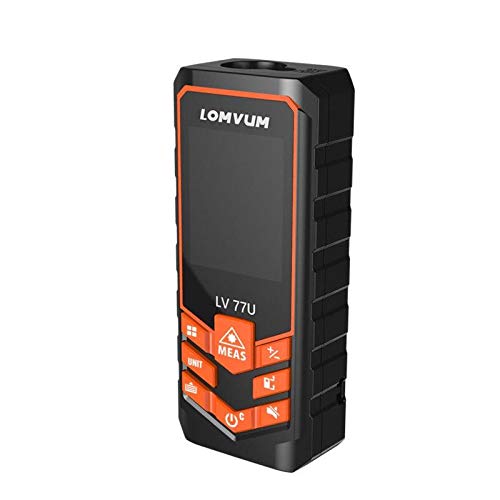
Figure 1: LOMVUM LV 77U Digital Laser Distance Meter. This image shows the top view of the device, highlighting its display, control buttons, and compact design.
Key Features:
- Accuracy: ±2mm
- Fast Measurement: 0.5 seconds
- Electronic Level: 0.3-degree accuracy
- Button Measurement
- Voice Broadcast (77U model only)
- USB Rechargeable
3. Setup
Battery Installation and Charging
The LV 77U operates on rechargeable batteries (not included in the package) and supports Micro USB charging.
- Install Batteries: Open the battery compartment cover and insert the appropriate rechargeable batteries, ensuring correct polarity.
- Charging: Connect the device to a standard USB power source using the provided Micro USB cable. The charging indicator on the device will show the charging status. A full charge ensures optimal performance.
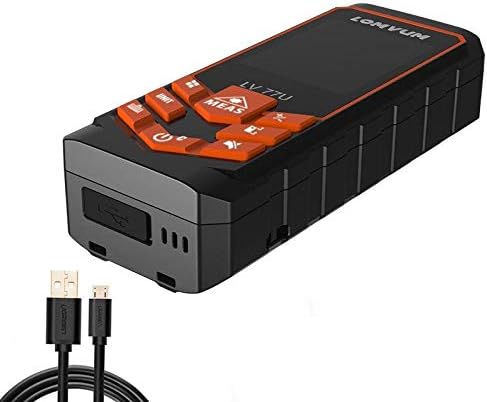
Figure 2: LOMVUM LV 77U connected to a USB charging cable. This image illustrates the Micro USB port on the device and the cable used for charging.
4. Operating Instructions
Familiarize yourself with the device buttons and display before operation.
Basic Operations
- Power On/Off: Press the POWER button to turn the device on. Press and hold the POWER button to turn it off.
- Single Distance Measurement: Press the MEAS button once. The laser will activate. Press MEAS again to take a measurement. The result will be displayed on the screen.
- Continuous Measurement: From standby, press and hold the MEAS button. The device will continuously measure and display the maximum and minimum distances. Press MEAS again to stop.
- Unit Selection: Press the UNIT button to cycle through measurement units (e.g., meters, feet, inches).
Advanced Functions
- Area Measurement: Press the FUNCTION button until the area icon appears. Measure the length and width sequentially. The device will calculate and display the area.
- Volume Measurement: Press the FUNCTION button until the volume icon appears. Measure length, width, and height sequentially. The device will calculate and display the volume.
- Pythagorean Measurement: For indirect measurements, press the FUNCTION button until the Pythagorean icon appears. Follow the on-screen prompts to measure the required sides (e.g., hypotenuse and one leg) to calculate the unknown side.
- Electronic Level: The device features an integrated electronic level. The display will show the angle, allowing for precise horizontal or vertical alignment with 0.3-degree accuracy.
- Voice Broadcast: The LV 77U model includes a voice broadcast feature that announces measurement results. This can be toggled on or off via the settings menu (refer to the on-screen interface for specific instructions).

Figure 3: LOMVUM LV 77U in operation, displaying measurement results. This image shows the device's screen with various measurement values and icons, including an angle reading.
5. Maintenance
Proper maintenance ensures the longevity and accuracy of your device.
- Cleaning: Use a soft, damp cloth to clean the device body. For the laser lens, use a clean, lint-free cloth specifically designed for optical lenses. Do not use abrasive cleaners or solvents.
- Storage: Store the device in a cool, dry place, away from direct sunlight and extreme temperatures. If storing for an extended period, remove the batteries.
- Battery Care: Recharge the batteries regularly, even if the device is not in frequent use, to maintain battery health. Avoid fully discharging the batteries.
6. Troubleshooting
If you encounter issues with your LOMVUM LV 77U, refer to the following common problems and solutions:
| Problem | Possible Cause | Solution |
|---|---|---|
| Device does not power on | Low or depleted battery; incorrect battery installation | Charge the device using the Micro USB cable; ensure batteries are installed correctly. |
| Inaccurate measurements | Dirty laser lens; unstable measurement surface; incorrect measurement mode | Clean the laser lens with a soft, lint-free cloth; ensure the device is stable; verify the correct measurement mode is selected. |
| Laser beam not visible | Bright ambient light; low battery | Use the device in lower light conditions if possible; charge the device. |
| Voice broadcast not working | Voice broadcast feature is turned off | Check the device settings to ensure voice broadcast is enabled. |
7. Specifications
| Feature | Specification |
|---|---|
| Model | LV 77U |
| Measurement Range | 40 meters |
| Measurement Accuracy | ±2mm |
| Measurement Speed | 0.5 seconds |
| Electronic Level Accuracy | 0.3 degrees |
| Power Source | Rechargeable batteries (not included), Micro USB charging |
| Battery Type (Recommended) | Lithium-Ion |
| ASIN | B081TQP48L |
| Manufacturer | LOMVUM |
8. Warranty and Support
LOMVUM products are manufactured to high-quality standards. For warranty information or technical support, please refer to the documentation included with your purchase or contact LOMVUM customer service. Keep your purchase receipt as proof of purchase.