Introduction
Welcome to your new Dansat Refrigerator DFD200HR. This manual provides essential information for the safe and efficient operation, installation, and maintenance of your appliance. Please read this manual thoroughly before using the refrigerator and keep it for future reference.

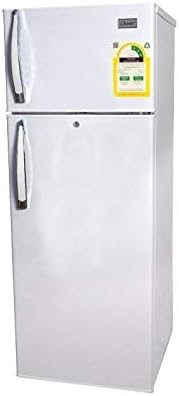
This image displays the overall design of the Dansat DFD200HR refrigerator, featuring its white exterior and the distinct top-mounted freezer door, along with the larger fresh food compartment door below.
Important Safety Information
To reduce the risk of fire, electric shock, or injury when using your refrigerator, follow these basic precautions:
- Read all instructions before using the appliance.
- Connect to a properly grounded outlet only.
- Do not remove the grounding prong.
- Do not use an adapter.
- Do not use an extension cord.
- Unplug the refrigerator before cleaning or making repairs.
- Keep flammable materials and vapors away from the refrigerator.
- Use two or more people to move and install the refrigerator.
- Ensure proper ventilation around the appliance.
Product Overview
The Dansat DFD200HR is a top-freezer refrigerator designed for efficient food preservation. Familiarize yourself with its main components:
This image provides a side perspective of the refrigerator, highlighting its compact depth and the separation between the freezer and fresh food compartments.
Key Components:
- Freezer Compartment: Located at the top, for frozen foods.
- Fresh Food Compartment: The larger bottom section, for refrigerated items.
- Adjustable Shelves: For flexible storage within the fresh food section.
- Door Bins: For bottles, jars, and smaller items.
- Thermostat Control: To adjust the internal temperature.
Setup and Installation
Unpacking
Carefully remove all packaging materials, including the base packaging and any adhesive tape. Dispose of packaging materials responsibly. Ensure no parts are missing or damaged.
Location
Choose a location that is:
- On a firm, level surface.
- Away from direct sunlight or heat sources (e.g., stove, radiator).
- With adequate air circulation around the back and sides for efficient cooling. Allow at least 10 cm (4 inches) of space at the back and 5 cm (2 inches) on the sides.
Electrical Connection
Before plugging in the refrigerator, ensure the voltage and frequency match the ratings on the appliance's label (220-224 V, 50/60 Hz). Plug the appliance into a dedicated, properly grounded wall outlet. Do not use extension cords or multi-outlet adapters.
Initial Cleaning
Before first use, clean the interior and exterior of the refrigerator with a soft cloth and a mild detergent solution. Wipe dry thoroughly.
Operating Instructions
Temperature Control
The thermostat control is typically located inside the fresh food compartment. Turn the dial to adjust the cooling intensity. A higher number usually indicates colder temperatures. Start with a medium setting and adjust as needed based on ambient temperature and food load.
Food Storage Guidelines
- Fresh Food Compartment: Store fruits, vegetables, dairy products, and cooked foods. Do not overcrowd shelves to allow for proper air circulation.
- Freezer Compartment: Ideal for long-term storage of frozen meats, vegetables, and pre-packaged frozen foods. Ensure packages are sealed to prevent freezer burn.
- Allow hot foods to cool to room temperature before placing them in the refrigerator to avoid increasing internal temperature and energy consumption.
Defrosting
The Dansat DFD200HR features an automatic defrost system for the fresh food compartment, which minimizes ice buildup. The freezer compartment may require manual defrosting if excessive ice accumulates, typically when the ice layer is about 0.5 cm (0.2 inches) thick. Refer to the maintenance section for manual defrosting steps if necessary.
Care and Maintenance
Cleaning
- Interior: Clean regularly with a solution of mild detergent and warm water. Rinse with clean water and dry thoroughly. Remove shelves and drawers for easier cleaning.
- Exterior: Wipe with a soft, damp cloth. For stubborn stains, use a mild, non-abrasive cleaner.
- Door Seals: Clean door gaskets regularly to ensure a tight seal. Use a soft cloth and warm soapy water.
- Always unplug the refrigerator before cleaning.
Power Outage
In case of a power outage, keep the refrigerator and freezer doors closed as much as possible to maintain internal temperature. Food can remain frozen for several hours if the doors are kept shut. Discard perishable food if the power outage is prolonged.
Moving the Appliance
When moving the refrigerator, ensure it is empty and unplugged. Secure all loose parts like shelves and drawers with tape. Lift the appliance using proper lifting techniques or with assistance to prevent injury and damage.
Troubleshooting Guide
Before contacting customer service, try the following solutions for common issues:
| Problem | Possible Cause | Solution |
|---|---|---|
| Refrigerator does not operate | Not plugged in; Power outage; Circuit breaker tripped. | Ensure plug is secure; Check household fuse/circuit breaker; Test outlet with another appliance. |
| Refrigerator not cooling sufficiently | Temperature setting too warm; Door left open; Excessive door openings; Poor ventilation; Overloaded with food. | Adjust thermostat to a colder setting; Ensure door is fully closed; Reduce frequency of door openings; Ensure adequate space around appliance; Do not overload. |
| Unusual noises | Appliance not level; Items rattling inside; Compressor noise (normal). | Adjust leveling feet; Rearrange items; Compressor noise is normal during operation. |
| Water on floor or inside | Drain tube clogged; Excessive humidity. | Clear drain tube; Ensure door is closed properly to prevent humidity entry. |
Product Specifications
| Feature | Detail |
|---|---|
| Brand | Dansat |
| Model Number | DFD200HR |
| Capacity | 4.56 Cu.ft |
| Style | Freezer on Top |
| Color | White |
| Material | Metal |
| Height | 145 cm |
| Width | 55 cm |
| Depth | 60 cm |
| Weight | 40 kg |
| Voltage | 220-224 V |
| Frequency | 50/60 Hz |
| Defrost System | Automatic (Fresh Food) |
| Number of Doors | 2 |
| Installation Type | Freestanding |
Warranty and Customer Support
Your Dansat Refrigerator DFD200HR comes with a manufacturer's warranty. Please refer to the warranty card included with your purchase for specific terms and conditions, including coverage period and what is covered. Keep your proof of purchase for warranty claims.
For technical assistance, troubleshooting beyond this guide, or to inquire about warranty service, please contact Dansat customer support. Contact details are typically provided in the product packaging or on the manufacturer's official website.
