
Nikon D850 FX-Format Digital SLR Camera User Manual
Comprehensive guide for setup, operation, and maintenance of your Nikon D850 camera system.
1. Product Overview
The Nikon D850 is a high-resolution FX-format digital SLR camera designed for professional and advanced amateur photographers. It features a 45.7MP back-side illuminated CMOS sensor, EXPEED 5 image processing, and 4K UHD video recording capabilities. This bundle includes the camera body, a battery grip, and essential accessories to enhance your photography experience.

2. Setup Guide
2.1. Battery Installation
The Nikon D850 uses an EN-EL15a rechargeable Li-ion battery. Ensure the battery is fully charged using the supplied MH-25A Battery Charger before first use.
- Open the battery chamber cover located at the bottom of the camera.
- Insert the EN-EL15a battery with the orange battery lock slid to the side, ensuring the contacts align.
- Close the battery chamber cover securely.

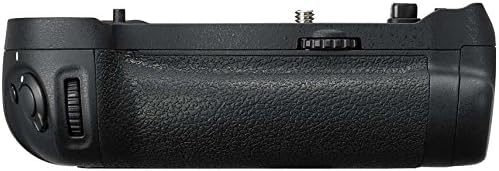
2.2. Attaching the Battery Grip
The included battery grip enhances handling and extends battery life. To attach:
- Remove the battery chamber cover from the camera body.
- Align the battery grip with the camera's tripod socket and battery compartment.
- Secure the grip using the attachment screw on the grip, turning it clockwise until tight.
- Insert additional batteries into the battery grip as desired.

2.3. Memory Card Insertion
The D850 supports both XQD and UHS-II SD memory cards for fast data read/write speeds. It has dual card slots.
- Open the memory card slot cover on the side of the camera.
- Insert the XQD card into Slot 1 and/or the SD card into Slot 2 until they click into place.
- Close the memory card slot cover securely.
3. Operating the Camera
3.1. Power On/Off and Basic Controls
To power on the camera, rotate the power switch around the shutter release button. The D850 features a tilting touchscreen for intuitive control and menu navigation.


3.2. Image Quality and ISO Settings
The D850 boasts a 45.7MP sensor and EXPEED 5 image processing, delivering exceptional detail and low-noise images across a wide ISO range of 64 to 25,600.
You can adjust image quality (JPEG, Raw, TIFF) and ISO sensitivity through the camera's menu system. The camera also supports various RAW sizes (S/M/L) for workflow flexibility.

3.3. Autofocus System and Continuous Shooting
The D850 features a 153-point AF system for reliable focusing, whether capturing fast action or detailed portraits. It supports continuous shooting at up to 7 fps, and up to 9 fps with the MB-D18 Multi-Power Battery Pack (with EN-EL18b/EN-EL18a Rechargeable Li-ion Battery inserted).
The camera's advanced autofocus system ensures sharp images even in challenging conditions.
3.4. Video Recording
Record cinematic 4K Ultra HD (3840x2160) video in full-frame glory. The D850 also supports 4K and 8K Time-Lapse creation and x4/x5 slow-motion movies in Full HD.
Video 1: Official Nikon D850 promotional video showcasing its key features including resolution, speed, and video capabilities. This video highlights the camera's performance in various shooting scenarios.
For optimal video quality, utilize the camera's full-frame sensor which takes full advantage of wide-angle lenses, even in low light conditions.
3.5. Creative Lighting System
The D850 is compatible with Nikon's Creative Lighting System, including the SB-5000 Speedlight which offers radio-controlled flash for versatile lighting setups.

4. Maintenance
4.1. Cleaning the Camera
Regular cleaning helps maintain your camera's performance and longevity. Use a soft, lint-free cloth to wipe the camera body. For the lens and sensor, use specialized cleaning tools such as a lens brush, dust blower, and lens tissue paper (included in the accessory kit).
4.2. Battery Care
To prolong battery life, store batteries in a cool, dry place when not in use. Avoid fully discharging the battery frequently. Recharge as needed.
4.3. Storage
When storing the camera for extended periods, remove the battery and memory cards. Store the camera in a dry environment, ideally in a camera bag (like the included Deco Gear Photography Bag) to protect it from dust and impact.
5. Troubleshooting
5.1. Common Issues and Solutions
- Camera not turning on: Ensure the battery is fully charged and correctly inserted. Check if the battery grip is securely attached if in use.
- Images appear blurry: Verify that the lens is properly attached and clean. Check autofocus settings and ensure sufficient light for focusing.
- Memory card error: Reinsert the memory card. If the issue persists, try a different compatible memory card. Ensure the card is not write-protected.
- Video recording stops unexpectedly: This can be due to slow memory card write speeds. Use high-speed XQD or UHS-II SD cards for 4K video recording.
6. Specifications
| Feature | Specification |
|---|---|
| Model Number | E24NKD850K |
| Sensor Type | 45.7MP FX-Format BSI CMOS |
| Image Processor | EXPEED 5 |
| ISO Range | 64-25600 (Expandable to 32-102400) |
| Continuous Shooting | Up to 7 fps (9 fps with MB-D18 and EN-EL18b/a battery) |
| Video Recording | 4K UHD (3840x2160) |
| Autofocus System | 153-point AF system |
| LCD Monitor | 3.2-inch Tilting Touchscreen |
| Memory Card Slots | 1x XQD, 1x SD (UHS-II compatible) |
| Connectivity | Built-in WiFi and Bluetooth |
| Dimensions (Body) | 3.1 x 5.7 x 4.9 inches |
| Weight (Body) | 2.01 pounds |
7. Warranty and Support
This Nikon D850 camera comes with a Limited Nikon USA Warranty. For detailed warranty terms and conditions, please refer to the warranty card included in your product packaging or visit the official Nikon USA website.
For technical support, service, or additional resources, please contact Nikon customer service or visit their support portal. You can also find helpful information and FAQs on the Nikon Store on Amazon.


